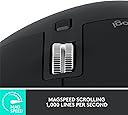
🖱️ Elevate your workflow with the MX Master 3S — precision, silence, and speed in one sleek package.
The Logitech MX Master 3S is a premium wireless mouse featuring an 8000 DPI Darkfield sensor for flawless tracking on any surface, including glass. It boasts MagSpeed electromagnetic scrolling capable of 1000 lines per second with 90% less noise thanks to Quiet Click technology. Ergonomically sculpted for comfort, it supports multi-device connectivity via Bluetooth and USB-C, offers up to 70 days of battery life, and integrates advanced customization through Logi Options+ with cross-computer FLOW control.
| ASIN | B0BS9VVQPD |
| Additional Features | 8000 dpi Darkfield Optical Sensor; MagSpeed Electromagnetic Scrolling, Quiet Click Buttons; Up to 70 Days Battery Life |
| Antenna Location | Laptop |
| Best Sellers Rank | #309 in Computer Mice |
| Brand | Logitech |
| Button Quantity | 5 |
| Color | Black |
| Compatible Devices | Laptop |
| Connectivity Technology | Bluetooth, Radio Frequency , USB |
| Customer Reviews | 4.5 out of 5 stars 959 Reviews |
| Hand Orientation | Ambidextrous |
| Hardware Platform | Mac, PC |
| Included Components | Item |
| Item Dimensions L x W | 7"L x 5.4"W |
| Item Type Name | Mouse |
| Item Weight | 4.96 ounces |
| Manufacturer | Logitech |
| Mfr Part Number | 910-006556 |
| Model Name | MX MASTER 3S |
| Model Number | 910-006556 |
| Mouse Maximum Sensitivity | 8000 dots_per_inch |
| Movement Detection | Optical |
| Movement Detection Technology | Optical |
| Number of Batteries | 1 Lithium Polymer batteries required. (included) |
| Number of Buttons | 5 |
| Operating System | Chrome OS, Linux, Windows 10 |
| Power Source | Battery Powered |
| Special Feature | 8000 dpi Darkfield Optical Sensor; MagSpeed Electromagnetic Scrolling, Quiet Click Buttons; Up to 70 Days Battery Life Special Feature 8000 dpi Darkfield Optical Sensor; MagSpeed Electromagnetic Scrolling, Quiet Click Buttons; Up to 70 Days Battery Life See more |
| Style Name | Modern |
| UPC | 097855174819 |
| Unit Count | 1 Count |
| Warranty Description | 1 year Manufacturer |
L**E
Great for excel modeling, and long hours of use in a day
I use excel a lot, for multiple hours per day, and this is just the best. The ability to scroll across, and personalize the buttons is very helpful. Also, the way it charges, pretty much no downtime as you can still use. My wrist feels well after using it, not like other mouses.
C**Z
⭐️⭐️⭐️⭐️⭐️ The Mouse That Makes Every Other Mouse Feel Like a Toy
The MX Master 3S isn’t just a mouse—it’s basically a productivity cheat code. Setup? Easy. Comfort? Like it was sculpted by the gods of ergonomics. That side scroll wheel alone is worth the price—it’s like having a gear shift for editing. For video editing, this thing is a dream. Zipping through timelines, precision dragging, quick shortcuts—it makes me feel faster, smoother, and way more in control. Then when it’s time to switch gears and game? It still holds its own with buttery movement and responsive clicks. Sure, it’s not a dedicated gaming mouse, but it’s like bringing a luxury car to a go-kart track—it still outclasses most of the competition. The price? Honestly, for what this mouse does, it’s a steal. Between the insane battery life, multi-device switching, and flawless performance, it’s easily the best investment I’ve made for both work and play. If you edit, create, or just want a mouse that feels like an extension of your hand, the MX Master 3S is the one. Trust me—you’ll never look at your old mouse the same way again.
L**E
Perfect mouse - couldn’t ask for better
I’ve been using the MX Master 3S for about 8 months now and this thing is a game-changer. When you’re constantly switching between applications and juggling multiple windows throughout the day, having a mouse that just works flawlessly is crucial. The scroll wheel alone is worth the price - being able to fly through long documents or quickly navigate through pages of content is so much faster than my old mouse. The side scroll wheel is clutch when working with wide spreadsheets or browsing through detailed reports. Battery life is insane - I’m talking months between charges, even with heavy daily use. The last thing you want when you’re in the middle of something important is your mouse dying on you. The precision is spot-on whether I’m working on my main monitor or switching to a secondary display. No lag, no missed clicks, just reliable performance. The customizable buttons save me tons of time - I’ve got shortcuts set up for common functions I use all day. Build quality feels solid, comfortable for those long work sessions. The ergonomics are great and it doesn’t cause any hand fatigue even after hours of use. If you’re looking for a reliable, high-performance mouse that’ll last you years, this is it. Worth every penny.
S**K
Very happy with this mouse!
This mouse has singlehandedly saved my relationship with my Macbook Air. The Macbook was my first laptop. I’ve always had a desktop PC. I’ve heavily used iPhones and iPads, so instead of getting another PC when my old one failed, I decided to get a Mac laptop. I read some reviews that mentioned the track pad on the Macbook was a pain, but I thought “How bad could it be?” Answer: pretty bad! I struggled with scrolling, I struggled with clicking where I wanted to click. It was frustrating enough that I was avoiding using the new laptop as much as possible. This mouse solved all those problems, and it is the nicest mouse I’ve ever used as far as ergonomics and just how it feels under my hand. It paired flawlessly with the Mac. Holds a charge for a long, long time. Makes scrolling and clicking no big deal—which might seem minor until you try a system that makes doing those things a constant irritation! It’s expensive for a mouse, true, but it has saved a much more expensive laptop from serving as no more than a paperweight, so to me it was money well spent.
T**C
World's best mouse. Seriously.
This is the world's best mouse for professionals, such as SW developers, content creators, and any power user of a computer. I've owned one for four years. I've bought seven more to give to friends and family as gifts, even though they're pretty expensive. I am now those people's best friend. :) After four years the mouse is still in perfect working order and totally reliable. The battery life time on a full charge has diminished maybe 20% in that time. But it's still over a month per charge for me. I love the fact that the same mouse can talk to three different computers with the switch on the bottom, including iPhones and iPads. And I like the Logitech Flow software that lets me just move the mouse pointer to the edge of the screen and it changes the mouse to talk to the next computer over. That's pretty slick. I especially like two things about that. I can copy files from one computer to the other using ctrl-C on one, and ctrl-V on the other. This is by far the easiest way for me to copy files. The other thing is that I have a Logitech MX Keys keyboard, and when I move the mouse focus to another computer with Flow it also moves the keyboard focus. Perfect! I love it! The one caveat is that Logi Flow is not very reliable. I feel like I need to re-set it up every two weeks or so. The computers will just stop seeing each other in Options and I have to delete them and re-add them. Logitech, if you're listening, please fix this. If you can't find the actual problem and fix it, then just simulate what I do as a user to delete a computer and re-add it.
P**L
recommended mouse
have had this model mouse for years and recommend it for ppl that like larger mice
A**K
The "smart" scroll wheel destroys productivity
At the price point, couldn't be more disappointed in this mouse. The scroll wheel tries to be smart and it "unlocks" when you scroll quickly and "locks" when the scroll slows down. Unlocking and locking cause a temporary lag during which the scroll wheel doesn't actually scroll anymore. How about just let me decide how I want to use my mouse instead of trying to smart and deciding for me, never successfully. The scroll wheel also very frequently simply does not register that I scrolled the wheel. I scroll the wheel and absolutely nothing happens. Additionally, the mouse does not and cannot operate through the cable while wired. It always operates wirelessly regardless of whether it is plugged in. WHY? This mouse costs way too much to be this bad.
R**S
Very good, but not perfect
One of the better mice out there. I think I finally found a mouse that has zero problems with the mouse wheel after 9 months. That alone justifies buying it for the amount of time I use it for so many uses. They should have used this mouse wheel design many years ago! The pads underneath the mouse could be better. Might have to put some single sided teflon tape there to decrease the friction. Just a minor improvement, especially for gaming. The one thing that kind of annoys me is the length of this mouse. If they chopped off 1/2" from the front, it would be so much better. I am constantly hitting my keyboard with the front end of the mouse. Only if you have super long fingers is the length necessary. Battery is very good. I only charge it a couple times a month. If you get any kind of sporadic cursor movement on your screen, it's an indication you need to charge it. Or so I have found out.
T**O
Super Maus, stolzer Preis
Eine wirklich klasse Maus. Lässt sich am Mac uneingeschränkt nutzen (auch alle zusätzlichen Tasten lassen sich für alles mögliche konfigurieren). Sie liegt gut in der Hand. Der Preis meiner Meinung nach aber schon sehr hoch.
R**I
No lo puedo usar
Bueno pero no para mi muñeca
Y**A
Above imagination
Above imagination
J**N
Parfait et transport rapide!
Article neuf et beaucoup moins cher que le prix régulier ou même à rabais par Amazon! Le colis est arrivé 4 jours plus tôt que l'estimé.
W**.
Great shipping
Excellent product. I used the earlier version for several years until it finally crashed.
Trustpilot
5 days ago
1 month ago