🎯 Master your media space with the Logitech K400 Plus—wireless control, redefined.
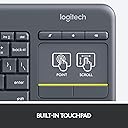
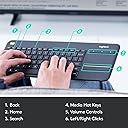
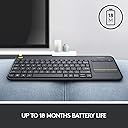
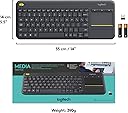
The Logitech K400 Plus is a sleek, black RF wireless keyboard featuring a built-in touchpad and a 10-meter range, designed for seamless control of PCs and internet-connected TVs. Powered by a long-lasting lithium polymer battery with up to 18 months of use, it combines convenience and versatility in a slim form factor ideal for home theater and media center setups.


| ASIN | B014EUQOGK |
| Antenna Location | Gaming |
| Box Contents | 2 AA-Batterien (vorinstalliert), Benutzerdokumentation, Kabellose Touch-Tastatur, USB Range Extender, Unifying-Empfänger |
| Brand | Logitech |
| Brand Name | Logitech |
| Button Quantity | 84 |
| Colour | Black |
| Compatible Devices | Laptop |
| Compatible Operating System Family | Android |
| Compatible devices | Laptop |
| Connectivity Technology | RF |
| Connectivity technology | RF |
| Customer Reviews | 4.4 out of 5 stars 39,225 Reviews |
| EU Spare Part Availability Duration | 18 Months |
| Enclosure Material | Acrylonitrile Butadiene Styrene |
| Generation | 2nd Generation |
| Global Trade Identification Number | 00097855115300 |
| Hand Orientation | Ambidextrous |
| Is Electric | No |
| Item Dimensions L x W x H | 35.4L x 14W x 2.4H centimetres |
| Item Weight | 0.86 Pounds |
| Keyboard Backlighting Color Support | Single Color |
| Keyboard Description | Wireless, Integrated |
| Keyboard Layout | QWERTY |
| Keyboard description | Wireless, Integrated |
| Language | English |
| Manufacturer | Logitech |
| Manufacturer Part Number | 920-007119 |
| Mechanical Keyboard Switch Model | チェリーMX |
| Minimum Required Operating System Version | ChromeOs 134, Windows 7 |
| Model Name | K400 Plus |
| Model Number | 920-007119 |
| Number of Batteries | 2 |
| Number of Items | 1 |
| Number of Keys | 84 |
| Number of Packs | 1 |
| Number of Sections | 3 |
| Power Source | Battery Powered |
| Processor Count | 1 |
| Product Features | Wireless |
| Recommended uses for product | Gaming |
| Series Number | 7119 |
| Special feature | Wireless |
| Style Name | Modern |
| Switch Type | membrane |
| Theme | Home Entertainment |
| UPC | 097855115300 |
| Unit Count | 1.0 count |
| Water Resistance Level | Water Resistant |
A**0
Logitech K400 Plus Wireless Touch TV Keyboard Review
Logitech K400 Plus Wireless Touch TV Keyboard Review The Logitech K400 Plus Wireless Touch TV Keyboard works flawlessly with the Nvidia Shield Pro. Setup is incredibly simple—just plug the USB receiver into the Shield Pro, and you’re ready to go. No complicated installations or software are required, making it a plug-and-play solution for any home theater or media center setup. One of the most impressive aspects of this keyboard is its responsiveness. There is no delay in either typing or mouse movement, even when navigating menus, typing in search fields, or browsing the web. The touchpad is smooth and precise, ensuring that you can control the cursor just as easily as you would on a desktop or laptop. This level of performance is crucial for a seamless user experience, and the K400 Plus delivers it without a hitch. Another standout feature is the battery life. Logitech claims up to 18 months of battery life, and based on my experience, it’s spot on. I’ve been using it regularly for several months without needing to replace the batteries, which is impressive for a wireless device. Overall, the Logitech K400 Plus Wireless Touch TV Keyboard is a highly reliable and efficient accessory for the Nvidia Shield Pro. It offers a simple setup, fast and precise performance, and excellent battery life. If you're looking for a no-fuss, responsive keyboard and touchpad combo for your home theater or streaming setup, this one comes highly recommended.
R**E
Excellent product. Lightweight and small, without compromising too much on key size.
Just had it delivered a few hours ago. Tried it with my mobile (had to get a small OTG adaptor to get started). I also own the K480, and got this one because it has a touchpad. Comparing the two, both have unique features that I would not call positive or negative, because how one views a feature, or the lack thereof, depends on one's requirements. The plus-point of the K480 is that it connects through bluetooth, leaving the port free to charge the mobile (if you want to use it with your mobile/tab) or connect a pendrive to it. The keys are larger and better spaced out (important if typing comfort is a major priority). The K400 plus, on the other hand, requires the OTG adaptor, plus, the unifying receiver used to connect the keyboard to devices like the mobile, tab, or the LCD TV. The plus point of this feature is that connection is immediate. The minus point is that one must be careful not to lose the 'unifying receiver'. Also, if you forget the OTG connector, there is no way you can connect the keyboard to anything. The 'K400 Plus' is also lighter and slightly tinier: But comfortable enough for normal to large sized fingers to type without any obstacles. Unlike the K480, this piece has the touch pad. One main advantage of going for these keyboards ( be it the K480 and K400) is the amount of money saved...in my case, I saved 28K approx., the amount I would have to invest for getting a new laptop. And just didn't have the money to invest in one. Now, with this, I can complete most college assigments. And a couple of years later when my phone conks off, I can simply get a new smartphone for about 8-10K. If one calculates the interest accumulated, one has way more in one's hand than one thinks.
R**B
Good keyboard but a bit overpriced.
Very useful keyboard for a media centre PC. Very handy having both the keyboard and trackpad in one unit rather than trying to find a surface to use a mouse on. Keyboard is good to type on. The unit as a whole feels solid but the plastic it is made out of seem quite cheap - which the product definitely was not! So the prices Logitech charge are a bit high but its the only media centre keyboard on the market so you just have to deal with it.
T**M
The dongle is on the flap of the box.
Very important detail. You would expect the dongle to be in the battery compartment, but it is actually on a flap on the box. Seller was very polite and helpful when I enquired about it. On an unrelated note, this keyboard works with the Logitech Options software, but Logitech Options, the program to configure the keyboard does not seem to work with Window 11. Just something to be aware of. The keyboard and trackpad will still work, only there won't be a way to reverse two finger scrolling direction. That is a Logitech issue.
A**A
Very good keyboard
بشتريها للمرة التانية كيبورد روعة الاولى عندى من خمس سنين
Trustpilot
1 month ago
2 weeks ago