Buy anything from 5,000+ international stores. One checkout price. No surprise fees. Join 2M+ shoppers on Desertcart.
Desertcart purchases this item on your behalf and handles shipping, customs, and support to Austria.
🚀 Elevate your workspace: Power, speed, and clarity in one sleek dock.
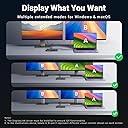
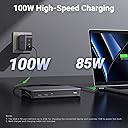
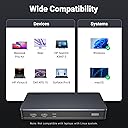
The UGREEN 9-Port Laptop Docking Station is a professional-grade hub designed for MacOS and Windows users, featuring dual 4K@60Hz display outputs via HDMI and DisplayPort, 100W USB-C Power Delivery for fast charging, and three 10Gbps USB-A/C ports for rapid data transfer. This compact, high-performance dock streamlines connectivity with Ethernet and multiple USB ports, transforming any laptop into a powerhouse workstation. DisplayLink software installation is required for full functionality.


| ASIN | B0BLNCNCMZ |
| Best Sellers Rank | 3,841 in Computers & Accessories ( See Top 100 in Computers & Accessories ) 31 in Docking Stations |
| Brand | UGREEN |
| Brand Name | UGREEN |
| Colour | Black |
| Compatible Devices | Card Readers, Keyboards, Laptops, Monitors, USB Flash Drives |
| Compatible devices | Card Readers, Keyboards, Laptops, Monitors, USB Flash Drives |
| Country of Origin | China |
| Customer Reviews | 4.3 out of 5 stars 900 Reviews |
| Global Trade Identification Number | 06957303899128 |
| Hardware Interface | USB 3.2 Gen 2 |
| Hardware interface | USB 3.2 Gen 2 |
| Item Dimensions L x W x H | 16.6L x 8W x 2.3H centimetres |
| Item Weight | 510 Grams |
| Manufacturer | Ugreen Group Limited |
| Manufacturer Part Number | 90912 |
| Model Number | 90912 |
| Number of Ports | 9 |
| Product dimensions | 16.6L x 8W x 2.3H centimetres |
| Total HDMI Port | 2 |
| Total USB Ports | 4 |
| Total USB ports | 4 |
| Wattage | 100 watts |
A**L
A really great dock for Mac users
This dock is great, it does exactly what it says it does and it works with both my work provided MacBook Air (M1) and my personal MacBook Pro (M3 Pro) and allows me to use two external monitors with the MacBook closed. I do have some issues with it though, but these aren’t big enough to stop me using the dock. The dock shows up in finder and desktop all the time as it’s for two files stored on the dock that links you to the required software for display link for Mac and windows. It’s easy to ignore, but I wish this was listed in the product page as it took me a while to recognise what this new random drive was. It also shows up as an available microphone on Microsoft teams, but it has no mic built in so not sure why this happens. Apple then being apple will keep displaying the purple screen sharing icon in the taskbar, which I’ll be honest is super annoying when I remember it’s there, but this isn’t ugreens fault, it’s apples. The dock itself doesn’t get that hot and the size of it is perfect, it’s not too big so doesn’t take up lots of room and fits perfectly at the back of my desk. Overall, compared to other docks on the market this one is great value for money, it’s a great build quality and an all round great dock.
D**8
MacOS is supported
Works as advertised! My MBP M1 13” now can run 2 large monitors on only a single USB-c port. Works great!
B**6
No support for Samsung Dex - Disappointing for price
I purchased this dock, and it’s excellent in terms of sleek, compact design and functionality—it does exactly what it promises. However, I have two concerns. First, it doesn’t support Samsung DeX, which is disappointing considering the price. For a similar cost, I could choose a Dell dock or another brand that offers DeX compatibility. Second, it has an automatic feature that mounts a USB local disk with drivers. While this might be convenient for personal use, it’s a hassle on my work laptop, which has strict security policies that block external USB drives. The constant mounting and unmounting creates issues, and there should be an option to disable this feature.
J**S
DiplayLink is great, if you remain within its boundaries
Having used DisplayLink docks for years, I find them highly reliable for business, though they do have notable limitations. This unit functions similarly to standard ThinkPad docks, but you must supply your own power supply (a USB-C PD adapter is highly recommended for stability). It also features a great selection of front and rear ports for easy peripheral access. While the required DisplayLink software makes extending to two extra screens seamless, the "screen recording" compression method means picture quality takes a hit. Text isn't perfectly crisp, colours are slightly off, and fast motion can be choppy. Additionally, HDCP restrictions mean you can't watch copy-protected content like Netflix. I’ve since upgraded to a Thunderbolt 4 dock, which is far superior for my needs—delivering power, data, and Ethernet over a single cable without any visual compromises. That said, it feels wrong to dock a star for this product; it does exactly what it's supposed to do. It’s just that DisplayLink technology itself is starting to feel a bit ancient.
A**R
Perfect for extending to 3 screens on my MacBook
Highly recommend. Excellent quality, UGreen is a go to brand for me when buying IT hardware. It does exactly what I needed with no fuss. Extends my MacBook to 3 screens. I did my research and bought this one because it automatically has the driver you need to install. Or the link at least.
L**P
Brilliant without a DisplayLink it works perfectly
I bought the UGREEN 9-Port Laptop Docking Station for my wife’s setup because her laptop lacked a USB-C port for video output (had one but for data only). It’s been working perfectly—smooth dual 4K@60Hz, fast 100W PD charging, and all the extra ports we need. Highly reliable and hassle-free!
E**F
Best docking station I have used
I have been using this Dock for a while now. It has all the ports you need for connectivity and the monitor output at 2x4K/60Hz is fast enough for work use. I use it with my work PC and Home laptop connected to a dual monitor setup. USB2 ports for Mouse & Keyboard plus Dual HDMI or DisplayPort monitors with a USB3 (usb-c) input port for memory sticks and the like. This unit itself is a nice design and the build feels solid. It is good value for money
A**R
Automatic mounting of USB volume for "driver install" is pointless and causes problems
The approach of automatically mounting a USB storage volume to facilitate Display Link driver installation is good in theory, except when it interacts with endpoint security policies which attempt to encrypt any USB volume attached to a corporate laptop - causing an endless loop of mounting and unmounting. It becomes utterly pointless when you connect the hub to another machine and find out that the "drivers" are nothing more than browser shortcuts to the Display Link website. An utterly useless over complication which could otherwise be served with a short URL or QR Code being included in the quickstart guide.
I**O
Macbookair 2022 M2 トリプルモニターにて(自身の設定ミスでしばらく作動せず)
システム設定の画面収録の許可を聞かれた時にOFFにしてしまったことで 作動しておりませんでした 手順などの説明の補足注意事項、正確な名称、そしてこのサイトにドライバーリンクなど貼ってほしいと思います 以下遠回りしましたが現在順調に作動中です ドライバーDisplayLink Manager(このサイトや説明書では名称が違うので分かりずらいし探せない) を検索で時間がかかりながらインストールとりあえず再起動 その後 機器を繋ぐとデスクトップにドライバーのリンクが現れた そちらからドライバーを入れ直そうとしても(これより新しいものがインストールされているからと)入らず 気持ち悪さが残るが 気を取り直し何も起こらない状況で設定画面など探してみる システム設定のディスプレイのタブには何も変化がなくそれでおしまい 開始から2時間経過の時点で 地面に叩き付ける快感を味わうことを選択しようと思たが システム設定の画面収録の許可の部分に気が付き 作動開始
T**H
Başarılı ürün
UGREEN markasının neredeyse tüm ürünlerini kullanmaktayım bu üründe beni yanıltmadı gayet başarılı bir ürün yazılım kullanarak monitörü extend etmesi bir sorun teşkil etmez kafanızda soru işareti kalmasın gayet stabil çalışıyor tavsiye ederim.
R**H
PERFECTO
Me ha solucionado perfectamente poner dos pantallas a mi Apple M1 y con salida de 10 g para disco duro. Botones de encendido y carga a la vez el ordenador. Material de aluminio y perfecto. Espero que dure tiempo
R**L
Very good for two high screens and lots of harddrives
It was simple to install. Works instantly. Absolutely hazzle free.
A**A
Excellent displaylink dock. Works great with M1 Macbook Pro
I have an M1 Macbook pro ( the one with the ill fated touch bar) and while I love it for most use cases, it has the annoying limitiation of only supporting one external monitor. Fortunately DisplayLink software comes to the rescue and allows me to plug in up to three monitors with a DisplayLink dock. I had bought another brand dock before and this Ugreen dock was to replace it after it burned out. I couldn't be happier and this feels like a huge upgrade. My other dock didn't support full 4K resolution on output and the ports were also not as good. This one has all multiple USB C ports and a dedicated USB C for powering my mac so I really don't lose any conectity by using this on one of my ports.
Trustpilot
4 days ago
2 weeks ago