Desertcart purchases this item on your behalf and handles shipping, customs, and support to Austria.
🔗 Power your productivity, anywhere, anytime.
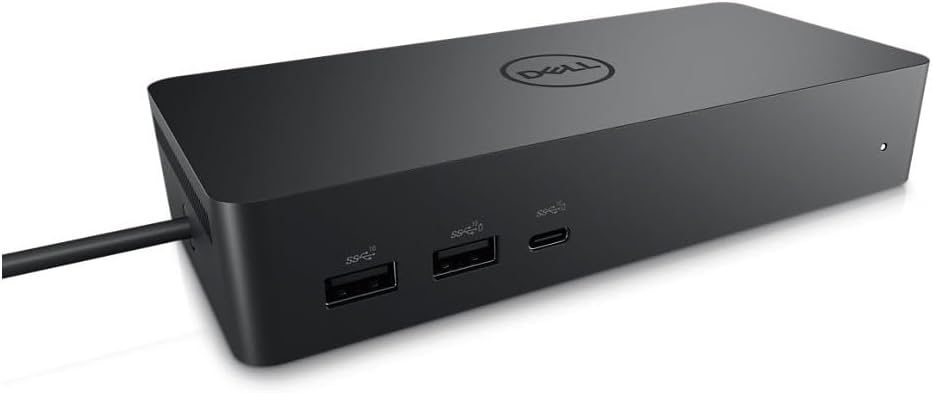
The Dell UD22 Universal Dock is a compact, black docking station delivering 130W power and supporting dual displays via HDMI and DisplayPort. Featuring 10 ports including USB 3.0, it offers seamless compatibility with Mac M1 Pro and Windows laptops. Designed for fast deployment with DP Alt mode and DisplayLink layout provisioning, it enhances shared workspaces and mobile productivity without needing external power adapters.
| ASIN | B0B5YC6TS4 |
| Best Sellers Rank | #54,798 in Computers & Accessories ( See Top 100 in Computers & Accessories ) #89 in Docking Stations |
| Box Contents | Item |
| Brand | Dell |
| Brand Name | Dell |
| Colour | Black |
| Compatible Devices | Monitors |
| Country of Origin | China |
| Customer Reviews | 4.4 out of 5 stars 571 Reviews |
| Hardware Interface | HDMI , USB 3.0 Type A |
| Item Dimensions L x W x H | 16.6L x 3.2W x 7.6H Centimeters |
| Item Weight Unit of Measure | 14.7 Ounces |
| Manufacturer | Dell Computers |
| Manufacturer Part Number | 210-BEXR |
| Model Number | Dell-UD22 |
| Number of Items | 1 |
| Number of Packs | 1 |
| Number of Ports | 10 |
| Product Dimensions | 16.6L x 3.2W x 7.6H Centimeters |
| Total HDMI Port | 1 |
| Total USB Ports | 6 |
| UPC | 884116431442 |
| Unit Count | 1.0 Count |
| Wattage | 130 |
K**L
Finally- Mac + Windows compatible
Based upon last 3 months user experience Pros: 1. Compatible with both Mac M1 Pro and Windows laptop 2. Compact and light weight 3. USB -C type input - sufficient wire length 4. Max 3 output: 1 HDMI and 2 Display Port 5. Multiple USB ports for easy connectivity 6. No need of external power source for laptops, this single USB C input will charge it 7. Latest software updates are available on dell website Cons: 1. At least 2 HDMI port should be provided, I had to purchased a new cable to connect second screen. 2. All USB ports should be 3.0 3. To shift from Mac to windows, manually unplug the USB C 4. Avoid using any Display Port to HDMI converter. I faced resolution challenges when system goes to sleep mode.
D**N
Appears to be refurbished or minor reject sets given the price, but functions well as intended
Had multiple scuffs on the exterior, but functions well as intended so far. It seems likely a refurbished set or rejected set due to minor defects (exterior scuffs) rather than brand new in perfect condition, though not unexpected given the price.
T**A
Works Seamlessly Across Multiple Laptops – A Desk Essential!
This Dell Universal Dock has been a game changer for our household! I use a MacBook for personal use, my work laptop is an HP EliteBook, and my husband uses a Dell laptop — and this dock works perfectly with all of them. It has simplified our workspace by eliminating the need for multiple chargers and messy wires. Everything connects smoothly, and we’ve had zero compatibility issues. The compact size is another big plus — it doesn’t take up much space on the desk, making it ideal for a tidy setup. Overall, it’s made our lives so much easier, and I highly recommend it for anyone managing multiple devices at home or at work!
U**K
Fantastic - Supports connection using BOTH DisplayPortAltMode *and* DisplayLink.
This is fantastic - high resolution, supports up to four monitors simultaneously, but take care to note that the way you connect to the dock dictates how many, and which of, the four monitor ports will work. In driverless mode (Display Port Alt Mode - found on most laptops that have a display icon next to the USB-C port or that advertise "USB-C with data and display" for the connecting USB-C port) only the HDMI port - and - EITHER DisplayPort #1 OR the USB-C Port will work. If you want to use more ports than this (up to and including all four ports simultaneously) you'll need to install the DisplayLink driver. I got this dock because my employer won't let me install software on the work laptop, so I can't install the DisplayLink driver, therefore I'm stuck with two screens maximum. If I change jobs and the new job lets me install the DisplayLink driver, then I'll be able to move to a three or four monitor setup. This has been a major step up from my previous Dock (which only supported 1080p resolution) and, as advertised, works driver-free with my work Dell laptop and my personal Asus laptop, as well as working with DisplayLink drivers with my Mac laptop. This is the only dock I've found that lets you connect BOTH DisplayPortAltMode and DisplayLink computers to the same dock. The cable length is good (80cm) which was enough to mount the dock in a cable tray hidden under the desk while still allowing enough length to comfortably reach up to the top of the desk to plug into the laptop. So after getting over the confusion of which ports work in which mode - it's a great bit of kit.
P**D
Bon fonctionnement
Content du produit
J**E
Base de acoplamiento.
Funciona perfectamente. Hay que tener presente que llega sin el cable de alimentación. Por lo demás, todo bien.
Trustpilot
2 weeks ago
1 week ago