Buy anything from 5,000+ international stores. One checkout price. No surprise fees. Join 2M+ shoppers on Desertcart.
Desertcart purchases this item on your behalf and handles shipping, customs, and support to Austria.
๐ Power your AI vision with NVIDIAโs smartest edge developer kit yet!
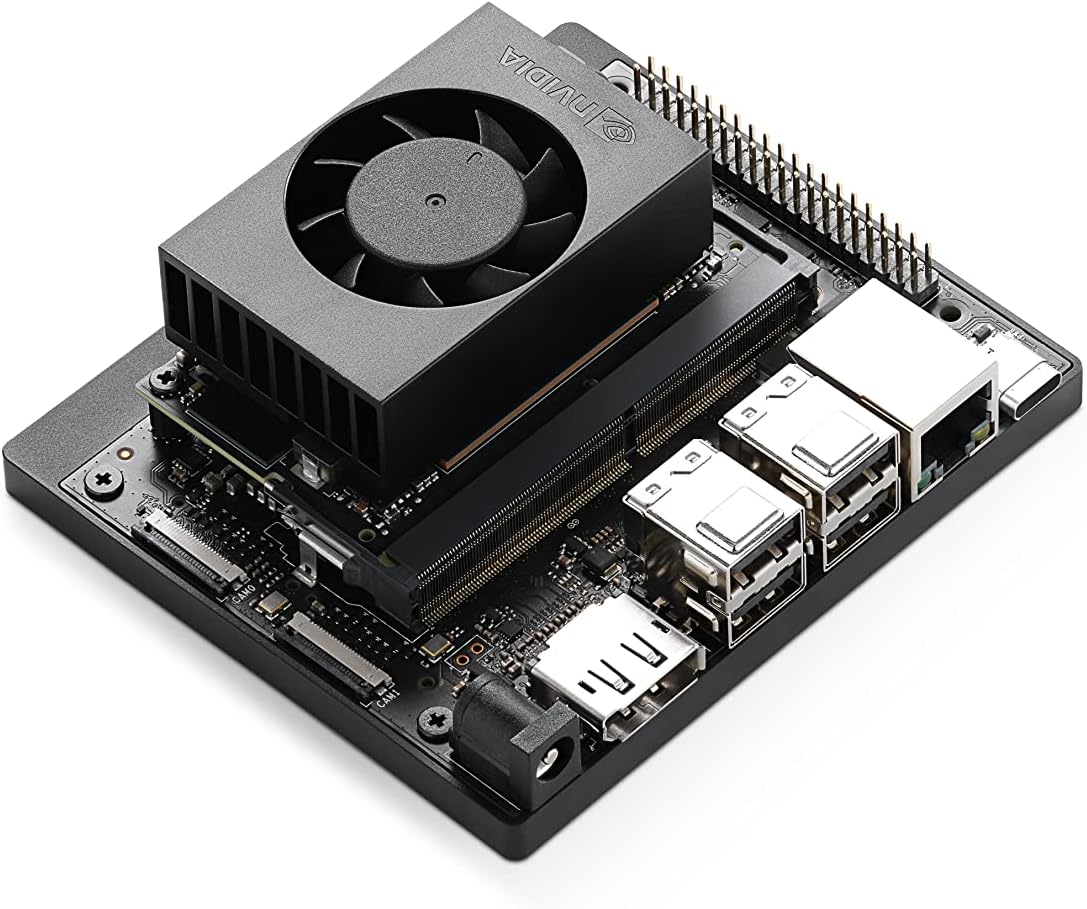
The NVIDIA Jetson Orin Nano Super Developer Kit is a compact, high-performance AI platform delivering up to 67 TOPS, powered by a 6-core ARM Cortex-A78AE CPU and Ampere GPU. Designed for developers and innovators, it supports advanced AI models including vision transformers and large language models, with extensive connectivity options and a robust NVIDIA AI software ecosystem. Ideal for prototyping next-gen robotics, smart cameras, and autonomous machines, it offers unmatched efficiency and scalability at an accessible price point.
| ASIN | B0BZJTQ5YP |
| Best Sellers Rank | #2 in Single Board Computers (Computers & Accessories) |
| Brand | NVIDIA |
| Built-In Media | Quick Start and Support Guide, Type B (US, JP) Power Cable, Type I (CN) Power Cable |
| CPU Model | 6-core ARM Cortex-A78AE v8.2 |
| Compatible Devices | Various |
| Connectivity Technology | USB, DisplayPort, Ethernet, GPIO |
| Customer Reviews | 4.2 out of 5 stars 379 Reviews |
| Global Trade Identification Number | 00812674025261 |
| Item Dimensions L x W x H | 6"L x 3"W x 8"H |
| Item Weight | 1.7 Pounds |
| Manufacturer | NVIDIA |
| Memory Storage Capacity | 8 GB |
| Mfr Part Number | 945-137766-0000-000 |
| Model Name | Jetson Orin Nano 8GB |
| Model Number | 945-137766-0000-000 |
| Operating System | Linux |
| Processor Brand | ARM |
| Processor Count | 1 |
| RAM Memory Installed | 8 GB |
| RAM Memory Technology | LPDDR4X |
| Ram Memory Installed Size | 8 GB |
| Smart Home Compatibility | Not Smart Home Compatible |
| Total Usb Ports | 5 |
| UPC | 812674025261 |
| Unit Count | 1.0 Count |
| Warranty Description | 1 year manufacturer |
| Wireless Compability | Bluetooth |
P**D
Runs popular models, easy to set up
1. Impressive Capability: Easily runs heavy models like Meta's SAM and Google's Gemma. 2. Unified Memory Advantage: The shared 8GB CPU/GPU memory is a massive perk for efficiency. 3. Excellent Connectivity: Hassle-free Wi-Fi and a highly convenient USB-Ethernet option for direct laptop tethering. 4. Great Ecosystem Support: OpenAI Codex easily handles setup/HuggingFace scripts, and Nvidia provides excellent Docker documentation. 5. Other thoughts: a) This Jetson is an incredibly fun, compact Linux device. I was easily able to run advanced models like Metaโs Segment Anything Model (SAM) and Googleโs Gemma right on the device. b) Getting started is fast. Nvidia provides extensive documentation for running models via downloadable Docker images, and OpenAI Codex knows exactly how to configure the environment to run HuggingFace models within Python scripts. c) I found the USB-Ethernet option particularly handyโit allowed me to connect my MacBook directly to the Jetson and log in via the terminal. If you want to squeeze even more performance out of it, I highly recommend disabling the local GUI entirely and operating solely through the terminal to free up maximum memory for your models.
R**V
Nice piece of hardware
Itโs a 8GB shared GPU/CPU memory that can run quantized LLMs. The fan is not noisy and it run on Ubuntu 22.04 (you cannot update to 24.04+). Installation is a pain, but this was not my first rodeo. I have the latest lt4 drivers and CUDA 13.1 installed after doing some complex upgrades. Nothing is easy there, but the prepared docker containers are life savers. You can find containers set by functionality like Voice, LLM, Ollama, etc.
R**D
Fixed Browser Issue
This is five star blazing fast awesomeness for just $250. Itโs like a raspberry pi on steroids. BUT thereโs an issue straight out of the box for me where the browser, chromium wouldnโt work. This issue can be easily resolved by downloading a previous version of Snap, then holding it at that version. Thereโs an article on jetsonhacks titled โ Why Chromium Suddenly Broke on Jetson Orin (and How to Bring It Back)โ that will give you the terminal commands. Happy hacking
P**T
Build your own AI toaster, after historical depency resolution
Computers aren't toasters. NVIDIA thinks they are selling build-your-own toasters with these Jetson devices. Except there are no slots for the bread, and if you try to put them in, you might have to recompile the Linux Kernel. Against better judgment. So I'm not sure what the appliance is or will be. Good luck to the brave who have to enforce a standard for a particular build of this thing. I'm sure that the "stability" of a control build of you're device/application will be crushed by the never-ending parade of CVEs that plague networked devices. At the moment, applications on this nano will likely break on the newest version of Docker that patches a pre-auth RCE. Wait.. don't want to use Docker? Good luck if you try to do something bare metal; you're relegating yourself to the point in history this device came from. Also, if you plan to effectively air-gap, good luck matching your dependencies with system interfaces from 5 years ago. Their tune might be changing on this with more recent Jesons, but I'm sure there will still be lags by arrogantly trying to freeze a moment in time. Just because we have version control doesn't mean you can stop time or truly turn it back; in fact, with Git, you can rewrite history if you're so adventurous. I'm not sure anybody appreciates a denial of reality. Please, NVIDIA, just switch to fix forward. The people who need control builds will figure it out. I'm 0 for 2 for networking cards on getting wireless working with the kernel/bootload combo that does super mode (the one that came with it probably works, on the kernal that ships with the device, I didn't test that). Also, hosed my application by neively sudo apt update && sudo apt upgrade. This is where the docker issue above presents itself, you'll have to pin everything to stay stable. Also note that this doesn't ship with "super mode" firmware-wise, which is an Odyssey adventure to enable. Just get the NVIDIA driver manager (sign the TOS), install the newest old one (5.w.e), then install the newest new one (6.w.e) for this device... no prob, your favorite AI tool will help you. People in this review column are saying to be cautious: this is a "dev device," which I guess means something somewhat accurate, but to be more specific, this is the type of thing you buy and feels like false-capability advertising because the juice isn't worth the squeeze unless you absolutely need CUDA at this price point. I think that's what people mean when they say it didn't "perform" as expected. If it does perform as expected, it'll probably take me more than a hot minute to figure that out if I didn't have something better to do. On a positive note, the form factor is much more compact than expected. Very cute.
J**E
works for training models using transformers just fine (just the normal nvidia python issues suck)
so far, its been pretty good, BUT NVIDIA drivers and Linux..... DUDE... its a PITA. When you do get the system up and running with linux drivers with all of the CUDA and the python support is finally working right (NVIDIA keeps changing python libraries without keeping a steady version numbering on their wheels or just deleting them without letting people know) its good. Currently using mine to build Ai models using transformers on market history for daytrading crypto. Works pretty good, i have my script on github... thing is i keep finding little changes i can add to the scrypt so i've only posted the main scrypt on github, and haven't settled on a new updated version yet till i work the bugs out of the jetson and the scrypt.
H**.
It's a great board but the setup is not for the faint of heart
Iโve been extremely impressed with the NVIDIA Jetson Nano Super Developer Kit 8GB. For anyone seriously interested in exploring local AI, edge inference, robotics, or embedded AI systems, this little board is an absolute hammer for the price and power envelope. Performance-wise, I was able to achieve over 20 tokens/sec running an 8B model locally, which honestly exceeded my expectations for hardware in this class. NVIDIAโs CUDA ecosystem, TensorRT support, and overall AI tooling make this platform feel much more capable than its size would suggest. It punches well above its weight. That said, I do want to give one honest caveat: setup can be challenging. Iโve configured two of these boards now, and both took nearly a full day of troubleshooting, flashing, configuring, and tuning before everything was stable and running correctly. This is definitely more of an engineer/developer platform than a consumer plug-and-play device. However, if youโre comfortable working through Linux setup, drivers, SDKs, containers, or AI frameworks, the payoff is absolutely worth it. Once configured properly, this thing becomes an incredibly capable local AI platform. Highly recommended for developers, makers, robotics enthusiasts, and anyone wanting to learn real edge AI without spending workstation-level money.
R**O
An absolute monster of a board!
First things first, this board is absolutely beautifully designed. The location of the SD Card and where you can add your NVMe drives make logical sense. It ships with factory firmware that requires an update before use. It is a bit of work to find the firmware update and is a rather large file that you will then need to flash onto an SD Card using BalenaEtcher, which is about 30 minutes of waiting depending on your download and cpu speeds. The UEFI bios is very well organized and structured and does have TPM 2.0. It does not have an OS installed by default, so you will need to install one via SD Card or NVMe slots. Which means you can use official Nvidia images or you can use custom ones. The official image is also a bit of a pain to find, but again, once you download it, you need to flash it onto an SD Card using BalenaEtcher. Your mileage may vary for how long this process will take. For me, it was around 10 minutes. The construction of this thing is super solid. Has a very solid base that the SBC connects to, the CPU is more of a Compute module setup so you could possibly change it for a newer MU unit later without needing a new base. The standard use case for a board like this is local LLM inference, my use case is currently getting my custom OS to boot on it and then move to local LLM inference later.
M**F
Powerful Hardware, but a Frustrating and Fragmented User Experience
The NVIDIA Jetson Orin Nano Super is undeniably a powerhouse on paper, offering impressive AI throughput for edge computing. However, after integrating this into my workflow for mobile ALPR and custom security development, Iโve found that the actual user experience is marred by several design choices and technical hurdles that make it far from a "plug-and-play" professional tool. Installation and Hardware Ergonomics The physical layout of the board leaves much to be desired. The SD card slot location is remarkably inconvenient, especially if you have the board mounted in a custom enclosure or near other hardware. Furthermore, the complexity of getting the system to boot and run reliably from an NVMe drive is far higher than it should be in 2026. For a developer kit that essentially requires NVMe for any serious work, this process should be streamlined and native, rather than a multi-step technical hurdle that feels like a workaround. Stability Issues The most frustrating aspect has been the repeated system lockups. Iโve experienced multiple freezes during standard operation with no immediate or obvious cause. When you are trying to benchmark AI models or test long-term stability for a vehicle-mounted deployment, having the hardware randomly hang is a dealbreaker. It undermines the confidence you need in a board intended for "industrial" or "super" applications. Documentation and Support Fragmentation Finding clear, concise information is an uphill battle. NVIDIAโs documentation is scattered across too many different models and JetPack versions, making it incredibly difficult to find specific answers for the Orin Nano Super. You often find yourself digging through forum posts and outdated wiki pages to solve basic configuration issues. For a "Super" edition product, the support ecosystem feels fragmented and disorganized. What I Like: Raw Compute: When it is actually running, the CUDA performance is excellent for localized inference. Form Factor: It packs a lot of power into a small footprint, which is ideal for mobile security builds. What Needs Improvement: UI/UX for Setup: The NVMe boot process needs to be modernized and simplified. Reliability: Firmware or kernel stability needs to be addressed to stop the random lockups. Consolidated Documentation: A single, authoritative source of truth for this specific hardware would save developers hours of wasted time. Final Thoughts I like the potential of this product, and the hardware specs are exactly what I need for my security startup's infrastructure. However, the execution "leaves some to be had." If you aren't prepared to spend significant time troubleshooting and navigating a labyrinth of documentation, you might find the "Super" experience more frustrating than itโs worth. Itโs a powerful tool, but it currently feels like itโs still in beta.
A**ใผ
ๅๅใซๅ้กใชใๆฉใใซๅฑใใพใใ
ใขใกใชใซใใใฎ็บ้ใงใใใใๅฝๅใฎไบๅฎใใๆฉใๅฑใใพใใใ ็ฉใๆญฃ่ฆๅใงใไปใฎๆนใใณใกใณใใใใฆใใใจใใๆฅๆฌๅใใณใณใปใณใใๅๆขฑใใใฆใพใใwifiใซใผใใจใขใณใใใฑใผใใซใฏๆฅ็ถๆธใฟใงใใใ ๅฝๅ ใงใฎ่ณผๅ ฅใใใๆฅใซใกใฏใใใใพใใใ้ข็จๆ็ถใใฎ่ฒป็จ่พผใฟใงใๅฎใๆใซๅ ฅใใพใใใ ๆณจๆ็นใฏใใขใใฟใผๅบๅใHDMIใงใฏใชใใใใฃในใใฌใคใใผใใงใใไธๅใฏHDMIใจๆใใใใงใใใๅคๆใขใใใฟใๆ ใฆใฆ่ณผๅ ฅใใพใใใ
U**E
Honest Review
Excellent
Z**L
Revived on time and the package included everything as described
Yes
S**O
Computer dalle grandi prestazioni
Semplicemente perfetto sia il prodotto che il servizio di consegna.
C**S
My NVIDI
This product would not fire up. I tried many ways to "fire up" the NVIDIA Jetson Orin Nano including making sure the power supply and source were correct but it made no difference. The Jetson Nano would power up for a few minutes then cut out.
Trustpilot
2 months ago
5 days ago