Buy anything from 5,000+ international stores. One checkout price. No surprise fees. Join 2M+ shoppers on Desertcart.
Desertcart purchases this item on your behalf and handles shipping, customs, and support to Austria.
🚀 Power your AI vision with NVIDIA’s smartest edge developer kit yet!
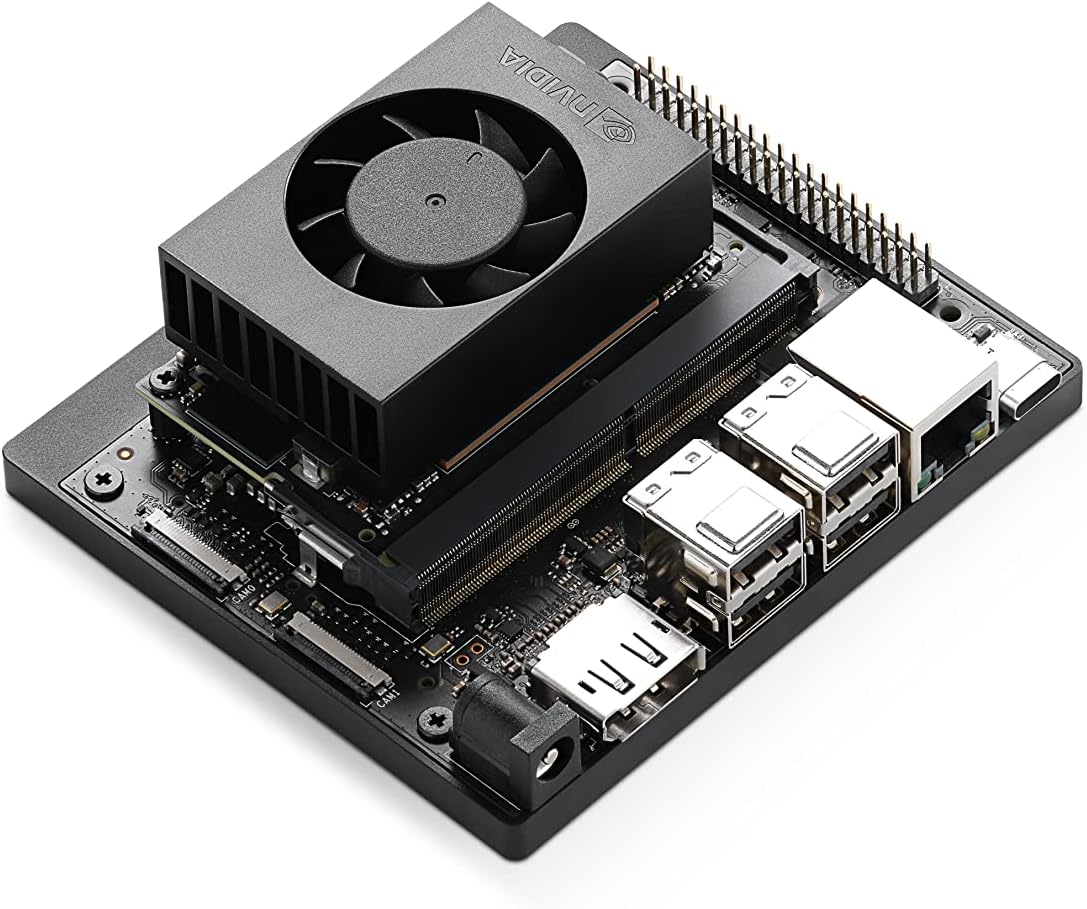
The NVIDIA Jetson Orin Nano Super Developer Kit is a compact, high-performance AI platform delivering up to 67 TOPS, powered by a 6-core ARM Cortex-A78AE CPU and Ampere GPU. Designed for developers and innovators, it supports advanced AI models including vision transformers and large language models, with extensive connectivity options and a robust NVIDIA AI software ecosystem. Ideal for prototyping next-gen robotics, smart cameras, and autonomous machines, it offers unmatched efficiency and scalability at an accessible price point.
| ASIN | B0BZJTQ5YP |
| Best Sellers Rank | #4 in Single Board Computers (Computers & Accessories) |
| Brand | NVIDIA |
| Built-In Media | Quick Start and Support Guide, Type B (US, JP) Power Cable, Type I (CN) Power Cable |
| CPU Model | 6-core ARM Cortex-A78AE v8.2 |
| Compatible Devices | Various |
| Connectivity Technology | USB, DisplayPort, Ethernet, GPIO |
| Customer Reviews | 4.2 out of 5 stars 357 Reviews |
| Global Trade Identification Number | 00812674025261 |
| Item Dimensions L x W x H | 6"L x 3"W x 8"H |
| Item Weight | 1.7 Pounds |
| Manufacturer | NVIDIA |
| Memory Storage Capacity | 8 GB |
| Mfr Part Number | 945-137766-0000-000 |
| Model Name | Jetson Orin Nano 8GB |
| Model Number | 945-137766-0000-000 |
| Operating System | Linux |
| Processor Brand | ARM |
| Processor Count | 1 |
| RAM Memory Installed | 8 GB |
| RAM Memory Technology | LPDDR4X |
| Ram Memory Installed Size | 8 GB |
| Smart Home Compatibility | Not Smart Home Compatible |
| Total Usb Ports | 5 |
| UPC | 812674025261 |
| Unit Count | 1.0 Count |
| Warranty Description | 1 year manufacturer |
| Wireless Compability | Bluetooth |
P**O
Excellent – Powerful, Fast, and Perfect for Advanced AI Projects
The NVIDIA Jetson Orin Nano Super Developer Kit exceeded every expectation. For its size, this thing delivers incredible performance — fast boot times, smooth CUDA acceleration, and outstanding handling of AI workloads. Running local LLMs, vision models, robotics stacks, and edge-compute pipelines feels effortless. The build quality is solid, setup is straightforward, and the system stays stable even under heavy loads. I’ve tested everything from PyTorch models to engineering diagnostics and it never struggles. For anyone working on edge AI, embedded systems, or real-time machine learning, this is an absolute powerhouse. Highly recommended if you want serious AI performance in a compact, efficient developer kit. This is hands-down one of the best edge-AI boards available right now.
P**.
Excellent microservices AI server. Servers my purposes.
This is my microservices AI Server. Running faster-whisper ASR, piper TTS, Ollama with gemma3:4b, qdrant RAG in docker with several collections, several python scripts - one being before the ollama pipeline, uses keyword detection on my query, allows me to access weather, web search, qdrant RAG zim RAG. Voice in, processing, voice out. Really happy with this board
R**N
Irritating to set up but runs like a dream once it is.
This thing is a colossal pain in the ass to set up. My advice, skip the messing around with SD cards etc. Take a old laptop, install Nvidia Ubuntu with console, and install it directly to the nvme (get one too, you'll thank me). No cards no bs. You will probably need to build llama.cpp from source to integrate the cuda cores etc so it can take care of the hardware for inference. But once that's all done and set up, it runs great. I keep it at max power, running qwen 3.5 3B with vision. And I get around 16+ tokens a second. Pain to set up but worth it.
C**.
after this experience I won't be able to look at any nvidia product without gagging
what a waste of time, not worth my sanity. another day and I'd likely take a sledge hammer to it. nvidia software, their os, the sdk, the code examples (jetson lab), all of it is just absolute garbage. first, you must have real computer (vm won't do) with intel and ubuntu 22.04 just to flash the nvme. then you find out nothing works. first clue was their "readme" link they placed on the desktop "for my convience", which doesn't work, points to nothing. snap needs downgrading before you can run any program. then there are the ai software examples from their own lab. I wasted a week so far trying. only ollama native or container work. I can't make anything else work, and these are their own "tutorials" for this board. all I learned from those is to stay far away from nvidia. I don't believe any of that software, the os and the tutorials are tested or that they are maintaned. their support forums have nothing useful. none of the speech or image or vision tutorials work, all I get is errors, or no response. docker containers start, but nothing listens on the ports I'm supposed to browse to. a swap file is necessary to run anything because the os and nvidia crapware already use about 2-3 GB, leaving very little for models. performance is disapointing, the advertised 67 tops is a lie, marketing bs. in the "super" mode it throttles down immediatelly, actually it trottles down in all power modes. the fan does nothing because it defaults to quiet mode, and you must find a way to set it to allow it to do its job of actually cooling the chip. every step is a struggle, hours of trying, hundreds of gigabytes of wasted downloads. I bought this nvidia dev kit because of the hardware specs:, 1024 cudas, 32 tensors, 2 pcie slots, gpio, 2 csi cameras. but it's all useless without working software and drivers and documentation, and nvidia people have no clue how to code. I know nvidia since mid 90s, their video card drivers were always horrible.
R**O
An absolute monster of a board!
First things first, this board is absolutely beautifully designed. The location of the SD Card and where you can add your NVMe drives make logical sense. It ships with factory firmware that requires an update before use. It is a bit of work to find the firmware update and is a rather large file that you will then need to flash onto an SD Card using BalenaEtcher, which is about 30 minutes of waiting depending on your download and cpu speeds. The UEFI bios is very well organized and structured and does have TPM 2.0. It does not have an OS installed by default, so you will need to install one via SD Card or NVMe slots. Which means you can use official Nvidia images or you can use custom ones. The official image is also a bit of a pain to find, but again, once you download it, you need to flash it onto an SD Card using BalenaEtcher. Your mileage may vary for how long this process will take. For me, it was around 10 minutes. The construction of this thing is super solid. Has a very solid base that the SBC connects to, the CPU is more of a Compute module setup so you could possibly change it for a newer MU unit later without needing a new base. The standard use case for a board like this is local LLM inference, my use case is currently getting my custom OS to boot on it and then move to local LLM inference later.
G**H
Powerful AI capabilities and inexpensive
Setup was a little tricky, but I was able to get everything running in under 3 hours. Ai performance is fast with a 8b model. This is a Raspberry pi on steroids and can't wait to start building on this powerful little platform.
J**E
works for training models using transformers just fine (just the normal nvidia python issues suck)
so far, its been pretty good, BUT NVIDIA drivers and Linux..... DUDE... its a PITA. When you do get the system up and running with linux drivers with all of the CUDA and the python support is finally working right (NVIDIA keeps changing python libraries without keeping a steady version numbering on their wheels or just deleting them without letting people know) its good. Currently using mine to build Ai models using transformers on market history for daytrading crypto. Works pretty good, i have my script on github... thing is i keep finding little changes i can add to the scrypt so i've only posted the main scrypt on github, and haven't settled on a new updated version yet till i work the bugs out of the jetson and the scrypt.
M**F
Powerful Hardware, but a Frustrating and Fragmented User Experience
The NVIDIA Jetson Orin Nano Super is undeniably a powerhouse on paper, offering impressive AI throughput for edge computing. However, after integrating this into my workflow for mobile ALPR and custom security development, I’ve found that the actual user experience is marred by several design choices and technical hurdles that make it far from a "plug-and-play" professional tool. Installation and Hardware Ergonomics The physical layout of the board leaves much to be desired. The SD card slot location is remarkably inconvenient, especially if you have the board mounted in a custom enclosure or near other hardware. Furthermore, the complexity of getting the system to boot and run reliably from an NVMe drive is far higher than it should be in 2026. For a developer kit that essentially requires NVMe for any serious work, this process should be streamlined and native, rather than a multi-step technical hurdle that feels like a workaround. Stability Issues The most frustrating aspect has been the repeated system lockups. I’ve experienced multiple freezes during standard operation with no immediate or obvious cause. When you are trying to benchmark AI models or test long-term stability for a vehicle-mounted deployment, having the hardware randomly hang is a dealbreaker. It undermines the confidence you need in a board intended for "industrial" or "super" applications. Documentation and Support Fragmentation Finding clear, concise information is an uphill battle. NVIDIA’s documentation is scattered across too many different models and JetPack versions, making it incredibly difficult to find specific answers for the Orin Nano Super. You often find yourself digging through forum posts and outdated wiki pages to solve basic configuration issues. For a "Super" edition product, the support ecosystem feels fragmented and disorganized. What I Like: Raw Compute: When it is actually running, the CUDA performance is excellent for localized inference. Form Factor: It packs a lot of power into a small footprint, which is ideal for mobile security builds. What Needs Improvement: UI/UX for Setup: The NVMe boot process needs to be modernized and simplified. Reliability: Firmware or kernel stability needs to be addressed to stop the random lockups. Consolidated Documentation: A single, authoritative source of truth for this specific hardware would save developers hours of wasted time. Final Thoughts I like the potential of this product, and the hardware specs are exactly what I need for my security startup's infrastructure. However, the execution "leaves some to be had." If you aren't prepared to spend significant time troubleshooting and navigating a labyrinth of documentation, you might find the "Super" experience more frustrating than it’s worth. It’s a powerful tool, but it currently feels like it’s still in beta.
A**ー
商品に問題なく早めに届きました
アメリカからの発送でしたが、当初の予定より早く届きました。 物も正規品で、他の方もコメントされていたとおり日本向けコンセントが同梱されてます。wifiカードとアンテナケーブルは接続済みでした。 国内での購入より、日にちはかかりますが、関税手続きの費用込みでも安く手に入りました。 注意点は、モニター出力がHDMIではなく、ディスプレイポートです。下名はHDMIと思いこんでおり、変換アダプタを慌てて購入しました。
A**S
Se ve muy bien para proyectos IA
Biene completo la tarjeta más el módulo nano y cable de corriente más 2 conectores para america y europa aun no lo enciendo pero es el producto y esta completo
Z**L
Revived on time and the package included everything as described
Yes
S**O
Computer dalle grandi prestazioni
Semplicemente perfetto sia il prodotto che il servizio di consegna.
C**S
My NVIDI
This product would not fire up. I tried many ways to "fire up" the NVIDIA Jetson Orin Nano including making sure the power supply and source were correct but it made no difference. The Jetson Nano would power up for a few minutes then cut out.
Trustpilot
1 week ago
2 weeks ago