Buy anything from 5,000+ international stores. One checkout price. No surprise fees. Join 2M+ shoppers on Desertcart.
Desertcart purchases this item on your behalf and handles shipping, customs, and support to Austria.
๐ Tiny device, massive network control โ stay connected, stay ahead!
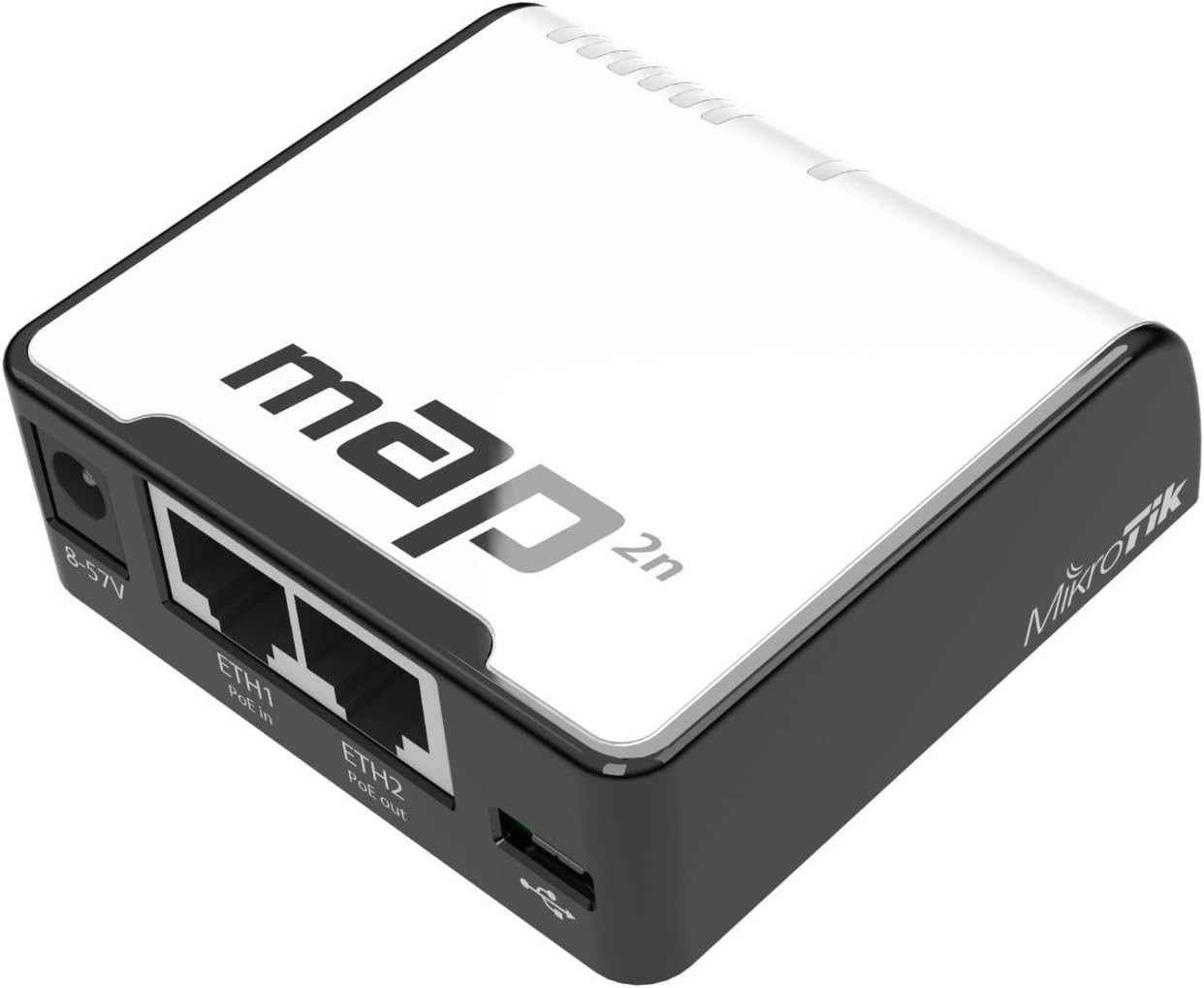
The Mikrotik RouterBoard mAP RBmAP2nD is a micro dual-chain 2.4GHz wireless access point featuring a 650MHz CPU, 64MB RAM, and full RouterOS capabilities. Its ultra-portable design supports multiple power inputs including USB, Passive PoE, and DC jack, plus it functions as a PoE injector powering other devices via its second Ethernet port. With dual 10/100 Mbps Ethernet ports and a built-in 1.2dBi antenna, it delivers reliable Wi-Fi 4 connectivity at up to 300 Mbps, making it an ideal compact networking solution for professionals on the move or in tight spaces.
| ASIN | B01N7DO1VB |
| Antenna Location | Home |
| Antenna Type | Internal |
| Best Sellers Rank | #202 in Computer Networking Wireless Access Points |
| Brand | MikroTik |
| Built-In Media | Mounting kit (K-33), 24V 0.8A power adapter, USB OTG cable |
| Color | Multicolor |
| Compatible Devices | Personal Computer |
| Connectivity Protocol | Wi-Fi, Ethernet |
| Connectivity Technology | USB, Passive POE, 2xEthernet |
| Control Method | Touch |
| Controller Type | Touch |
| Coverage | Indoor: 100-150 meters, Outdoor: up to 300 meters |
| Customer Reviews | 4.2 out of 5 stars 63 Reviews |
| Data Transfer Rate | 100 Megabits Per Second |
| Frequency | 2.4 GHz |
| Frequency Band Class | Single-Band |
| Has Internet Connectivity | No |
| Has Security Updates | Yes |
| Is Modem Compatible | No |
| Item Dimensions L x W x H | 2.68"L x 2.68"W x 0.75"H |
| Item Weight | 230 Grams |
| LAN Port Bandwidth | 10/100 megabits per second |
| Manufacturer | Mikrotik |
| Maximum Upstream Data Transfer Rate | 300 Megabits Per Second |
| Mfr Part Number | RBMAP2ND |
| Model Name | RBMAP2ND 9406957 |
| Model Number | RBMAP2ND |
| Number of Antennas | 1 |
| Number of Ports | 2 |
| Operating System | RouterOS |
| Other Special Features of the Product | WPS |
| RAM Memory Installed | 64 MB |
| Router Firewall Security Level | basic |
| Router Network Type | wireless_router |
| Security Protocol | WPA2 |
| Special Feature | WPS |
| UPC | 709257388199 |
| Unit Count | 1.0 Count |
| Voltage | 12 Volts |
| Warranty Description | No Warranty |
| Wireless Communication Standard | 802.11bgn |
| Wireless Compability | 802.11bgn |
R**N
My favorite Mikrotik by far
The mAP is an incredible power player that offers the full functionality of RouterOS in a tiny, portable footprint. It provides a stable, dual-chain wireless connection and the PoE flexibility makes it perfect for travel or discreet setups in tight spaces. Iโm extremely happy with how such a small device delivers professional-grade control and reliable performance, it's easily the best compact networking solution I've used.
V**E
Mikrotik mAP RBmAP2nD โ The Little White Box That Ended My WiFi Tantrums
I keep one in the motorhome, one in the toolbox, and one in the kitchen drawer. Any time the campsite signal is weaker than tea, I plug this in and everyoneโs happy again. Real life: Cigarette-lighter cable in โ instant hotspot. Phone connects, laptops connect, smart TV connects, no dropouts. Set a 10-second guest password for the neighbours, then kick them off at bedtime. PoE port runs the outside camera without a separate plug. Kids think the caravan has โproper internetโ now.
R**D
Great mobile 4G USB hotspot
These are great for hooking up to 4G USB modem cards to create a WiFi hotspot. MikroTik routerboards are extremely configurable, my favorite. Setup might be too much for the average consumer. Advanced settings do need to be tweaked to make it work as: dualwan, failback or 4G USB modem. Only complaint: The mini USB connector is too weak, wish MikroTik had used a beefy USB A connector instead.(cost them one star, sorry) I had one of these that the mini USB connector came unsoldered after being bumped a few times in a mobile environment. I purchased a second mAP to replace the broken device. I will be more careful with my mobile hotspot. Confirmed working on several Verizon modems. 1st hooked to a ** Verizon USB551L setup as ppp, worked great after much T&E. Next configured a MiFi U620L after reading their latest firmware added support. (download packages all_packages-mipsbe-6.38rc43 or higher. RC43 change log shows: lte - added support for novatel USB620L Verizon's MiFi 4G USB) both devices work great once setup. I love winbox, great setup tool. Now running a mobile VPN hotspot! It took a while to setup so I will share setup to make it function on verizon, Warning Boring stuff below. Settings for U620L and USB551L In winbox: Click: IP, DHCP Client. Double click on โDefconf ether1โ, click: Copy. We will now clone this rule that is pre setup for eth1 In the new box change interface to โlte1โ Click apply, ok. Click Cancel on ether1 box. (this will allow either ether1 or LTE internet source=Dual WAN MAN). Close DHCP Client box. (HaHa "either ether" HeeHee) (**old USB551L cards skip DHCP Client- Don't plug in card until APN is blanked out on PPP setup) Click: IP, Firewall, filter Rules tab. Double click on rule three (WAN input rule, we will now clone this rule that is pre setup for eth1) Click: Copy, in new box click: General, change โin. Interfaceโ to lte1, click: apply, OK, and then close/cancel the Ether1 box. (**USB551L cards select โall pppโ instead of lte1) Do the same thing with Filter Rules #8 on the bottom of filter rules. Tab over to Click: NAT, double click and copy masquerade, General, add a new rule for lte1 in โOut. Interfaceโ, apply, OK, close all open boxes It should now be able to access the interwebs click link www.speedtest.net !!! Or Click: System, Ping, ping the googles. Click Log, look for nasty red ink. USB551L below: ** careful setting up USB551l cards- remove default APN from ppp setings before plugging into router. If you do you will loose 4g - no more blue LED If you loose 4G search "USB551L incorrect APN settings at+cgdcont?" to find the 4G fix Click on advanced tab to show settings Modem init ATZ leave everything else blank Verizon Dial 899***3#
T**T
Great device
Not easy to set up. Eth1 is the Poe port, but itโs also the wan port. When you try to set it up as a AP, lots of steps to change the port bridge, pull the port out of dhcp client and clear the fire wall rules. If you know MikroTik, pretty straightforward. If not, itโs a pain in the butt.
A**Y
Nice Router with POE
The seller was prompt and price reasonable. Setup for my needs (extend WiFi coverage with Cat6/POE but no mains power) was extremely easy. The router is very small, which was nice in my situation.
M**T
Cheap, portable, needs daily reboots...
Mikrotik Map 2nD: Portable, convenient, lightweight, seems to have a memory leak or something, internet performance will steadily degrade across ~1-2 days until you are around 0.2mbps up/down. Power cycle it and its decent again. UPDATE - actually it endlessly gets worse over time. I've had this one about 1.5 years and it is incapable of keeping up with light web browsing, letting a print job get from a computer to a printer, etc. 3000+ms rtt pings are not uncommon.
A**R
Works great. Easy to setup
This router works great.. super easy to use as long as u set it up right. I use Home Ap mode and run it as a dhcp server to poe devices.. the poe in and out work great. Love this thing
S**V
Good modem
Good little modem if you are into exploring that sector
N**U
Thank you
Fast Shipping , The Product was Original not a fake and brand new, and the shipping package and the product was in perfect condition.
Trustpilot
1 week ago
2 days ago