Buy anything from 5,000+ international stores. One checkout price. No surprise fees. Join 2M+ shoppers on Desertcart.
Desertcart purchases this item on your behalf and handles shipping, customs, and support to Austria.
๐ฎ Elevate Your Game with Style and Speed!
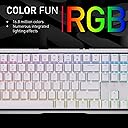
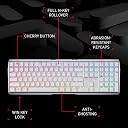
The CherryMX 3.0S Wireless Mechanical Gaming Keyboard combines high-performance features with a sleek aluminum design. It offers ultra-fast connectivity options, customizable RGB lighting, and a rechargeable battery, making it the perfect choice for gamers seeking both functionality and aesthetics.


| ASIN | B0C2W2Q9HL |
| Additional Features | Backlit Gaming Keyboard, Mechanical MX Switches, Wireless Aluminum Casing |
| Antenna Location | Gaming, Personal |
| Brand | Cherry |
| Built-In Media | USB Cable |
| Button Quantity | 104 |
| Color | White w/MX Brown Switches |
| Compatible Devices | Gaming Console |
| Connectivity Technology | Bluetooth |
| Customer Reviews | 3.9 out of 5 stars 31 Reviews |
| Enclosure Material | Aluminum |
| Hand Orientation | Ambidextrous |
| Keyboard Backlighting Color Support | RGB |
| Keyboard Description | Gaming Mechanical Keyboard |
| Keyboard Layout | QWERTY |
| Manufacturer | CHERRY |
| Mfr Part Number | G80-3872LXAUS-0 |
| Model Name | Cherry MX 3.0 S Wireless |
| Model Number | G80-3872LXAUS-0 |
| Number of Batteries Required | 1 |
| Number of Keys | 109 |
| Number of Sections | 3 |
| Power Source | Battery Powered |
| Recommended Uses For Product | Gaming, Personal |
| Special Feature | Backlit Gaming Keyboard, Mechanical MX Switches, Wireless Aluminum Casing |
| Style Name | Contemporary |
| Switch Type | Tactile |
| UPC | 840183607203 |
| Unit Count | 1.0 Count |
| Warranty Description | 1 Year Warranty |
B**N
Love it!
I love this keyboard! The build quality really impressed me due to its aluminum frame which adds a premium feel to it. After a year the battery life is still top notch, itโs the perfect size for my desk and the RGB colors are really cool. It fits my needs and functions exactly how I want with its mechanical feeling keys.
R**R
Awesome
Great quality. Sturdy. Nice feel. Quick typing speed.
F**K
DOA - Expensive compared to other options
I received a non-functional keyboard right out of the box. Given that it's manufactured by CHERRY, I had anticipated a top-notch product. Although I can only speak about its aesthetics due to the faulty nature of my keyboard, I must admit that the keys have a pleasant feel. Unfortunately, the font on the keyboard is challenging to read. In brief, there are numerous other keyboards available that offer superior value at a fraction of the cost.
A**A
Itโs pretty ๐ฅน๐ฅน๐ฅน
Keyboard quality is VERY nice. Brightness is perfect.
V**N
Good as a mechanical keyboard, but not reliable.
I love how clicky the keys are, but after a few months, the keyboard stop working, I thought the battery died so I plugged the cable in, usually you can use the keyboard when it's in charging, but this time it just won't work, after charging it overnight, still not working, after unplug it and plug it back in for a few times, it started to work again, but then after a few days, it died again, right during a conference meeting when I was presenting, it last less than a year, I have sent an email to the manufacture, have not received any response yet......
K**Y
Great keyboard, but the keys have gotteen sticky
I love this keyboard! I have had it since March 2024, and wanted to wait awhilee to post a review beecause it was my first time spending this kind of mooney on something like a keyboard. It's a nice weight and you can tell it's good quality. The brown switch it still a little more "clickity clackity" than I thought it would be, but that also just tells me how much I would've hated the red! (it's definitely nowhere near as offensive as blue/green!) I have to use the dongle because my work laptop doesn't allow Bluetooth devices to connect to it. However, the reason for the 4-stars instead of 5 is that my keys keep sticking randomly and sporadically so that when I press a letter, it inputs that letter anywheereee from 2-5 times. It's driving me CRAZY, and I don't know how to fix it or (maybe clean it?) because the keys are very close together. They will also start to "fix" themselves, but then pick back up again. I wish there were some clearer resources available to help me resolve this or a service option to send it back to Cherry for a deep clean. If someonne at Cheerry reads this and knows how I can fix this, pleease reach out to me! LOL (i left some typos because i'm trying to illustrate a point, but i did manually fix some of them so this was still llegible.)
C**G
Excellent build quality and key feel
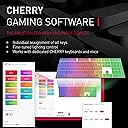
This keyboard is awesome! I'd been looking at compact gaming keyboards for awhile when this Cherry keyboard became available on Vine, and it's got exactly what I was looking for. Pros: 1} Smooth Cherry brown key switches with a nice tactile bump when pressed. I prefer this type of key feel versus linear or clicky style switches. Perfect feel in my opinion. The keys are not silent, but quiet enough as to not disturb the whole house when I'm gaming. 2} Compact design while still retaining a full keyboard layout including numpad. Special keyboard functions are access through the use of a Function key and the F row keys, with a function lock available as well. 3) Excellent build quality and modern design aesthetic. This thing is heavy and solid. No rattles or creaks when in use. While I usually choose black keyboards, the white version looks great, especially with RGB enabled 4) Low latency wireless connectivity. This one was a must. I'm not a pro gamer or anything, but I want my keystrokes to be registered as quickly as I can press them. The response on this keyboard is blazing fast and I have not had any issues with missed or dropped keystrokes, delayed response, etc. Neutral: 1) RGB - While the RGB looks great and is very bright when enabled, it does drain the battery faster, and can be a bit distracting in darker environments. I generally leave it off to preserver battery. 2) No wrist rest. Not a deal breaker, but my previous keyboard had an integrated wrist rest which I really like. I use the keyboard on my lap during gaming sessions, so not having the extra wrist support is a bit of a let down. So far, though, the Cherry is comfortable enough to use without the rest. 3) Slight delay when waking the keyboard from sleep mode. It takes a few seconds after pressing a key to wake the keyboard if it goes into full sleep mode. Not a big deal, but can be annoying. I realize this is done to save battery, so it makes sense and is why I'm not listing it in the Cons section. Cons: 1) Cherry Utility software - While it does work okay, the software is very barebones. Fortunately, the keyboard features are fairly intuitive to use, and the software is not required for keyboard operation. Conclusion: I really love this keyboard so far. I use it every day and it is a pleasure! I'll update this review if anything changes. Update on 10-28-23: I still really like this keyboard. Battery life is good even with RGB enabled, I use the keyboard about 10 to 15 hours per week with RGB on, and only have to recharge it ever 4 to 6 weeks or so. The only thing I have come to dislike about the keyboard is the somewhat slow wake up time when the keyboard comes out of sleep mode. It sometimes takes a few seconds before any keypresses are registered after the keyboard wakes, and there is no way to adjust the sleep timeout in the Cherry software. I'm hoping for a future update that addresses this issue. Other than that, I still really like and recommend this keyboard.
B**R
A top quality and pleasant keyboard to have
I have been using mechanical keyboards for quite a few years. The tactile response one can get from the mechanical keyboard makes typing a lot fun and pleasant, compared to typing the membrane keyboard. I have bought a handful of mechanical keyboards of small brand names, along with a Keychrone F5 SE low-profile wireless keyboard lately. For a non-gamer and regular office keyboard user, MX brown switch, or other brown switch clones, has been my favorite type. Today, I finally got my hand on this MX 3.0S keyboard. In terms of the keyboard mechanical switch, this is the keyboard that gives you the ultimate built quality and typing satisfaction. The keyboard body may be made and assembled in China, but the switches are made in Germany (as it is claimed on the package box). When you type on the keys, you get the clear, precise, and very distinct tactile, followed by the crisp response of the key touching the floor of the switch, no more, no less. I got the version of the standard full-size layout, with very classic white keycaps. Aside from the nice and satisfactory feelings from typing on this keyboard, this keyboard comes with quite a few nice and useful features, such as the rigid and solid keyboard base, the updated wireless connection options, the UBS-C cable port for connection and for charging, and the fantastic backlit RGB color options. Another rather critical feature is that the legends on the keycaps are nice and not distracting under regular room light, and are clear and quite readable with the help of the backlight in the dark. This feature is a must for me. All these features make this keyboard a highly desirable piece of โfun to haveโ item in the office. Like most of the products today, this keyboard is not perfect. I placed the order not without small regrets or a feeling of sacrificing. I think adding the following options will make this keyboard a sizable step further towards the perfect keyboard, at least for users like me: 1) a set of designated media controls, at least an audio volume nob; 2) some kind of USB hob feature, even USB 2.0 if not USB 3.2, as nowadays we constantly need a few USB ports, for mouse or mouse dongle, SD card reader or thumb drive, around our desk. These wishful options did not become the deal breaker for me. And I did not want to wait for another few years rather than start enjoying this pleasant keyboard right away. I am very happy that I have let this keyboard become the next permanent residence for the next few years on my desk. Update: Among the 2 missing options I mentioned above, I can now resolve one of them (dedicated media playing control) by re-mapping the 3 keys above the arrow keys into media play volume up/down/mute keys, which are mostly useful when playing music. I hardly use their default functions (print screen, scroll lock, and pause). Now with the existing dedicated media play/pause/next/previous keys on the right-top corner, we have a complete set of dedicated media play control keys.
Trustpilot
2 weeks ago
2 weeks ago