


✒️ Upgrade your Surface Pen game—because your ideas deserve the sharpest edge.
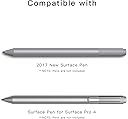
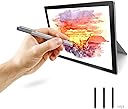
This 3-pack of black 2H replacement pen tips is compatible with Microsoft Surface Pro 4, 5, 6, 7, and Book Series pens (Model 1776). Featuring a harder, more durable composition than original tips, these nibs offer a smoother, low-friction writing and drawing experience with enhanced precision and longevity. Ideal for professionals and creatives seeking finer detail and reliable performance.



| ASIN | B078NQVGKL |
| Battery Description | Alkaline |
| Best Sellers Rank | #157,175 in Cell Phones & Accessories ( See Top 100 in Cell Phones & Accessories ) #23,455 in Tablet Accessories #135,244 in Cell Phone Accessories |
| Brand | B BIKRUL |
| Charging Time | 2 hours |
| Color | Black |
| Compatible Devices | Microsoft Surface Pro 4, 5, 6, 7, and Book Series |
| Compatible Tablet Computer Models | Microsoft Surface Pro 2, Microsoft Surface Pro 4, Microsoft Surface Pro 5, Microsoft Surface Pro 6, Microsoft Surface Pro 7 |
| Customer Reviews | 4.3 out of 5 stars 1,244 Reviews |
| Enclosure Material | Plastic |
| Item Diameter | 0.08 inches |
| Item Dimensions | 3.5 x 2.6 x 0.6 inches |
| Item Type Name | surface pen tips |
| Item Weight | 18.14 g |
| Manufacturer | Blue Jiejia |
| Material | Plastic |
| Mfr Part Number | BIPRO4180529002 |
| Model Number | BIPRO4180529001 |
| Number of Batteries | 1 AAAA batteries required. |
| UPC | 707409746392 |
| Unit Count | 3 Count |
L**X
Fits Weird, but still works great!
I was a little worried at first because the nib wouldn't entirely click into place. You can see in the photo there's a small gap in between the nib and pen that wasn't there in the other nibs I've used. However, it still works entirely the same, along with being much cheaper than other replacement packs I've bought in the past. I would like to mention, because some of the product reviews seem to not have realized, this is a pack of H replacements, not the standard nib that comes with the surface pen. H nibs are harder and pointier than the standard, and I've found they are a little more difficult to use and get used to. They're much better for small lines and details, and I've found they work best if you're used to using a line smoother or if you like the more sketch styles. If you're looking for the standard nib, search for HB or B. However, if you're looking for a hard nib, I most definitely recommend this product.
A**S
Excellent nibs, better than the originals
Better than the originals! I use my surface pro 3 for illustration work and I go through nibs quickly. These are firm, but responsive in both the stylus that came with my pro 3 and the Pro 4 stylus I bought last year. The nibs fit securely with no slippage. I've got a good ten hours of heavy use into the first nib out of this pack with little noticeable wear and no reduction in response. I intend to buy several packages to keep in my carry case so I never run out. I am very happy with these!
J**Z
As good as the original
I'm not an artist and I don't do any graphic design. I use the pen on my Surface Pro 7 as a pointing device/mouse and it works OK for that purpose. But, now and then the tip gets worn and it bends. I think it's partially because the pen I'm currently using (not MS) and the original pen will stop working unless I tap it on the screen to wake it up. Anyway, these tips go in just fine and so far are performing well. I had MS pen tips but I don't have any idea where I put them. These are just as good.
T**G
Works—but sadly surface pen is still a wobble fest
Tips worked in stylus. Too bad the surface pro pen doesn’t agree with my drawing style—when I draw straight diagonal or upwardly curving lines they come in all jangled and wobbly. Unless you use a line smoothing software options—but these will eradicate any fine and purposeful detail from my line work ... please don’t hate; I’m a professional designer and the surface pro pen just fails at imitating the versatility of a real pencil. Nothing against these nibs, they work great—it’s just the surface, and it’s pen, only really work for painterly strokes, fast strokes or digitally swoopy smoothed out curves... Oh well, back to the Wacom tablet for me. Great for taking notes or drawing within the limited style and look possible with the surface pro.
S**Y
Great but different
As claimed in the product description, these tips are different that the originals that come from microsoft. They are plastic and not rubber. As such, there is much less friction between the pen and the screen. The pen glides much easier. In other words, get these if you want less friction. If you prefer the microsoft rubber tip, then these aren't for you. Like anything, as they are different, they take a minute to get used to but then they are great! Having 3 in the package is great for backups. While mine haven't broken yet, I know that I do have several back ups in case of a break. For $10, its a solid deal.
S**A
Broke right away
The tip worked fine, but the first time the pen was dropped the tip broke off making it very difficult to remove. The easiest way I found to get the rest of the tip out was to heat up a needle and push it down into the tip. This forced enough material up and out of the hole that I was able to pull it out with a pair of pliers.
B**N
Cheap but worth it
I was really scared when I was purchasing this replacement pack of tips because I was scared it might not be as great as the original tips and that they might not respond well to the touchscreen of the laptop. But surprisingly, the tips felt smoother than the original. They are easy to use and surprisingly quite durable. I have dropped my pen multiple times but thankfully the tip is untouched. Only issue is that the package doesn't come with a kit to remove the old tip and install the new one but you can find a youtube DIY link for this. Would buy again!
B**R
Works with the 2017 surface pen, KINDA
Just a warning to buyers with the newer pen that inserting it may be difficult. When tried to insert these tips into my surface pen Model 1776 (EYU-00009), initially they did not go in. I was worried about breaking my pen because i was using so much force trying to insert it into the pen's body. Eventually i gave up and decided that maybe i had bought tips that were incompatible.However, i tried inserting one of these tips again a week later and it went in effortlessly. This is when i discovered that inserting these in is extremely tedious, but possible. Even once it's inserted, if i take the tip out and try to put it back it i'll still have a hard time doing it. You have to hope you're holding the tip perfectly centered when you push for it to go in, and it will still require a lot more force than expected. This is not a problem that happens with the official tips I have. I'm still a little paranoid that these may end up damaging my pen but only time will tell. I'll update this review in the future if anything changes. After finally getting the pen tip in however, the pen works wonderfully. These tips have less friction when writing/drawing than the official tips do, this can be a con for those with sloppy hand writing (like me) because it makes it look a little worse, but for others it may be a pro. The pressure sensitivity seems fine to me, however I can not confirm if these tips affect that in any way.
S**S
Good quality and far more affordable
Tougher than the original tip, and far cheaper than the official replacements. Used with the 2017 Surface Pen.
Trustpilot
1 month ago
1 week ago