Desertcart purchases this item on your behalf and handles shipping, customs, and support to Austria.
💡 Light up your life, smartly and effortlessly.
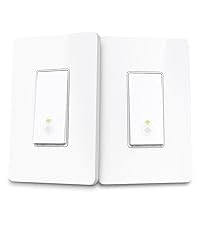
The Kasa Smart 3 Way Switch HS210 KIT is a UL-certified, Wi-Fi-enabled smart switch system designed for easy replacement of traditional 3-way or single pole switches. It supports 2.4 GHz Wi-Fi, requires a neutral wire, and offers app-guided installation with remote and voice control via Alexa and Google Assistant. Ideal for multi-location lighting control, it features scheduling, away mode for security, and is trusted by millions for reliable smart home integration.


| ASIN | B07724HNTX |
| Actuator Type | Push Button |
| Best Sellers Rank | #3,261 in Tools & Home Improvement ( See Top 100 in Tools & Home Improvement ) #10 in Electrical Light Switches |
| Brand | Kasa Smart |
| Brand Name | Kasa Smart |
| Circuit Type | 1-way, 3-way |
| Color | Original Version |
| Compatible Devices | Amazon Echo, Google Assistant, Smartphone (Kasa Smart app) |
| Connectivity Protocol | Wi-Fi |
| Connector Type | Plug In |
| Contact Material | Copper, Brass |
| Contact Type | Normally Open |
| Control Method | App |
| Control Type | remote, voice |
| Controller Type | Amazon Alexa, Android, Google Assistant, IFTTT, iOS |
| Current Rating | 15 A |
| Customer Reviews | 4.6 out of 5 stars 19,892 Reviews |
| Global Trade Identification Number | 00845973083113 |
| Included Components | HS210 (2) |
| International Protection Rating | IP54 |
| Item Dimensions | 5.1 x 2.76 x 6.3 inches |
| Item Type Name | TPL-HS210 KIT |
| Item Weight | 0.22 kg |
| Lower Temperature Rating | 32 °F |
| Manufacturer | TP-Link |
| Material Type | Polycarbonate |
| Model | HS210 KIT |
| Mounting Type | Wall Mount |
| Number of Items | 1 |
| Number of Positions | 2 |
| Operating Voltage | 120 volts |
| Operation Mode | ON-OFF-ON |
| Part Number | HS210 KIT |
| Specification Met | UL |
| Switch Type | Toggle |
| Terminal | Spst |
| UPC | 845973083113 |
| Unit Count | 2 Count |
| Upper Temperature Rating | 104 °F |
| Warranty Description | 2 years |
| Wattage | 1800 watts |
G**G
Works great for both three way dimmer and four way configurations
[[Packaging]] This smart switch comes with two sets of switches. Each set includes two wire nuts, two mounting screws, snap-on face plate, wire labeling stickers, and the switch itself. [[Install]] Install is relatively straightforward. I was able to install these in a 3 way dimmer switch configuration and a 3 way configuration. For both, I made sure to install the smart switch at the switch with the hot wire from the main home circuit, rather than any hot wires coming from other switches in the setup. If you install in any of the switches after this first switch then I believe it won't work. Only one switch is needed - the other switches can stay dumb. This also works for a single pole switch (just wire one of the travellers). For the 3 way dimmer, the other switch is the dumb dimmer switch. It works fine after the install. For the 4 way switch, the intermediate switch is the four way and the last switch is another 3 way switch. I also didn't touch these and they worked fine. To find which switch is the first switch, I voltage tested the common wire on the switch (usually has a black screw, bottom right side of the switch when facing it) while operating the switches. The common wire for the first switch will never go to zero (when measuring between it and ground or using a line tester). In my house, this first switch was also usually in the largest gang outlets or near areas with lots of wiring. If your old switch has the wires inserted into a hole in the switch rather than screwed on the side, you have to find a small paperclip and stick it in the even smaller hole next to it. Then you can pull the wire out. The neutral and ground wires in the smart switch are permanently fixed to the smart switch. They can be wired into any existing bundles of neutral (white) and ground (exposed copper) wires in the outlet box. My outlet box had these already bundled together and secured using a wire nut. I just unscrewed the wire nut and added the cables from the switch. The remaining line/hot wire (black) and traveller wire connections are screwed onto the smart switch. There are no wires coming off the smart switch itself for these. I do not believe it matters which traveller wire goes to which terminal. Typically the traveller wires will be bundled into one sheathed wire in the outlet box, while the line/hot wire will be separate. My traveller wires were colored red and black. The traveller wires are screwed onto the top of the switch, and the line wire to the right side. I found the smart switches to be a lot larger than the dumb switches, but they do just barely fit into the outlet box. I had to chip away some drywall compound from my outlet boxes to get them to fit. If your outlet box is metal, you might want to insulate the traveller wire terminals, as I think they could contact the metal box. [[Operation]] Setup is very easy with the app. No QR codes to scan. Just go near the switch and follow the instructions in the app. It does not use Bluetooth either. It seems to search for a Wifi broadcast from the switch. For some of my switches I had trouble connecting the first time, but a retry, or reset of the switch (using a small button on the front of the switch) would allow it to work. Alexa integration is automatic once you link the Kasa phone app. The switch itself is not a toggle like a normal switch, but simply a clicky button. When off, a dim white ring lights up the switch. Below the switch are very small reset and restart buttons. Although I only have one switch per three way or four way setup, the app can still tell if my light is on or off. Finally, these have no delay. I have some Kasa smart plugs plugged into switched outlets. With these smart plugs, there is a slight delay when turning on the switch and waiting for the lights to come on. However, with the smart switches, there is no delay. I assume this is because the smart plugs actually lose power while the switch doesn't. [[Conclusion]] I am very happy with these switches. The setup and use is very easy. Install was very straightforward, even though I had not done any switch installs before. These are one of the cheapest smart switches on the market, but they perform excellently.
J**7
Installs and Works as Advertised
The Kasa HS-210 works as advertised. It took about 15 mins to install in a 4-way switching setup (3 switches/2 lights). I only needed the one switch HS210 as TP-Link indicates. So long as you have a neutral wire it should work in just about any configuration needing a 2-way or 3-way switch. This is the first Kasa device I have used, as my house is wired with mostly Insteon smart switches and outlets which are excellent devices, but they are expensive and cannot be purchased since the pandemic. Their fate is unknown to me, so I was looking for alternatives. I held off replacing my 4-way wiring due to complexity and cost if using most standard smart switches as I would need to either run additional wiring, add multiple switches or both. Instead I had been looking for a smart switch that was a drop-in replacement for a standard 3-way. I found the HS210 wifi and Zooz S2 Z-wave. I think either would work, but I have been reluctant to implement Z-wave even though I have a hub due to stories of dropped connections when only a few devices are installed (you need to build out a mesh network for Z-wave to be robust). Anyway I run OpenHAB as my home automation platform and both Z-wave and TP-link Kasa are supported but the Kasa seemed the more direct route for me as I have a solid wifi mesh in my home and I have owned TP-link products in the past with good success. What I like about this product is: 1) Price makes it a great value and only needing 1-switch further increases its value. 2) Simplicity of installation (only 1 switch needed) 3) Ease of setup and incorporation into OpenHAB What I don’t like about this product is: 1) It only comes in white and the rest of my switches are light Almond. 2) It requires access to the internet as it calls home to for setup. There might be a way around this but it would likely require a second router not connected to the internet. I think the Zooz S2 might have an advantage here. 3) It only comes in white. 4) It’s a touch key not a rocker switch (not really a negative but I was surprised) Bottom-line, I will likely buy another HS210 for another 4-way setup in my home, if I can just get past the white color. It may grow on me after a while. Based on my experience with HS210 and for those not caring about color I believe the Kasa line-up represents a superior value and architecture to build out a smart home. I would highly recommend them.
J**T
These Just Work
These 3 Way work. Now, I learned you don't "have" to put each one on the same circuit, so if you are okay going against the TP Link recommendation, since they come in pairs, you can put 1 on a plug and have it work, and put the other one on a different plug and name it separately, and BAM you have two 3 way circuits that are on your Alexa control (and Kasa App control etc). I do have some "4 way" switches.....and they area PAIN. I thought they were 3 way, and one of them I got to work (don't ask me how, ha) but the other I cannot. They have an extra wire, and it's a huge pain in the rump. In general, it's awesome though. I copied the review from the "smart plugs" as well, because all of the information is essentially the same, except for the install which for the switch you have to put in the wall switch (TURN OFF BREAKER< HA) and the plugs are just plug in and then the lamp or whatever goes in the plug. The switches you have to know how to wire in a replacement switch in the wall. I will say, these switches are much bigger than just a switch (inside the wall box). I've done other timer switch replacement, and that's the norm. The problem is a lot of these boxes have TONS of wiring stuffed into them. On a few, especially ones that have 3 or more switches in one long box, I've had to pull all of them and trim wires to make them fit. I didn't trim where they weren't workable, but I did get a ton of the excess removed. These plugs work....that’s it, they work. All of the TP Link smart home plugs and Switches work, and work flawlessly that I can see. The Kasa app is great, works flawlessly as well. I have 8 of these so far, and they are mixed in my home with wall switches (TP Link switch and 3 way switches) to all run with Kasa app that is TP link that then works with the Alexa Amazon Echo's throughout the home. These things are truly plug and play. You plug them in, open the Kasa App, and "add device" and bam, it's super easy to follow the directions and add to WiFi in the home. Then open Alexa App on the phone and all of these TP Link items are there in the Smart Home section. It just works, and works flawlessly. The entire system, I add "Routines and Scenes" and you can do all kinds of cool things. In the Alexa App the Routines, I can turn on lights and play the weather on the Echo and then have it start music. I can say "Alexa, turn on the Accent Lighting" and it turns OFF the ones that I want off and don't think are accent, and turns on the ones I say to turn on, and it is super easy. The Kasa app also has timers as much as you want. You can set "turn on" and the time, and create as many as you want, and turn off the same. My Christmas lights indoor and outdoor were all on these indoors and the plugs for outdoors are on switches, so bam those all worked on timers there. Same with my patio outdoor lights. The "only" glitch I've had in the months of using these......I switched Broadband Providers from Uverse to Spectrum. The new WiFi router, I set up the SSID to the exact same, same password, and it "should" have all just connected and never had a glitch. After 2 hours of weirdness, and trying to reset one of them, and get the TP Link to work.....I spent more time online and realized these are 2.4Ghz ONLY. I had set up the 5Ghz Wifi to be the original. I went in and made the 2.4G the old one, and BAM, everything worked FLAWLESSLY again. So, the 5Ghz wave I made the SSID-5G and all was right with the world once again, ha. My wife said this was silliness......she also said that when I got our first DVR 20 years ago......now the DVR is full of HGTV.....and she admits these things are great.
P**6
Switches work as advertized - Some improvements needed to get to perfect -
Summary: The three ways HS201 kit replaced my existing HUBBELL switches. The HS201s are bulkier than conventional switches. You need to factor it into account if you are installing in a gang box crowded with wires and connectors. I expect that any smart switch will take more space, it is not specific to TP-Link. The TP-Link switches only function when a neutral is available. New and recent constructions may have a neutral laid out, missing with older buildings. Do not order the TP-Link smart switches if you don't have a neutral available. The TP-Link switches have a thicker mounting bracket than that of my HUBBELL. I installed the HS201 in existing 4-Gang and 3-Gang boxes. As shown in the photos, my existing wallplates no longer provided a perfect fit between the switches and the wall. I called TP-Link CS, and they took note of the problem, and never provided any answer. PROS: works as expected; Central hub not required. "Kasa" app. takes you through the installation step by step, with DIY instruction; you need to create an account, one more email and password. Easy to pair with your Wifi network; Easy to configure to work with your existing Smart Home devices (Alexa, Google home, etc...) CONS: Switches are bulkier than conventional ones, it may be an issue in crowded gang boxes. Neutral is required for the system to work. Delivered with two single switch wallplates; the wallplates should not be included, but sold separately. TP-Link offers no 2-Gang, 3-Gang, 4-Gang wallplates to fit their switches. Customer Service was reachable, but did not follow up on my request: what wallplate should I use to have a perfect fit between the wall and a TP-Link HS201 switch. The original wallplate left a gap with the wall where the switch was installed. Be aware that if your installation deviates from standard, the Kasa app. will tell you to call support for assistance. Keep in mind that if you lose power, you will have to pair each and every TP-Link switch again! why couldn't they use non volatile memory? The same goes if you change ISP. Not cheap! REVIEW: I have a staircase in my home, and three way switches at the top and bottom. This was the perfect testing ground for a set of Smart Switches. After a bit of research, I identified TP-Link as a good candidate, because they had a selection of products that would work in case I decided to add more components in my home. I renounced to my initial brand choice, because it required to have an extra hub to interface all the devices together. The installation did not go as smoothly as I expected, due to the larger size HS201s compared to conventional three way switches. My installation was done inside 4-gang and 3-gang boxes, with existing connectors and plenty of wires. The wires are not the flexible type, and it took me some time to bend them in a way that would allow the switch to fit. This also makes me question the possibility to add more switches. There is very limited room behind the HS201 and the back of the gang box. I suppose gang boxes manufacturer should start proposing deeper boxes to accommodate smart switches. Before you order any Smart switch, check the inside of your gang box, even if it is for a single switch. Before you order any Smart switch check your Wifi level close to where you will install. No Wifi, means you need to spend more money for repeaters. Not necessarily from TP-Link. There are other solutions. There are a few tools TP-Link advices to have before you begin, and I strongly recommend one of them; the contact less voltage detector, to ascertain you have effectively cut the power off. Identifying the wires require a little understanding of how a 3 way switch works, meaning load, 2 travelers, a ground. A conventional three way switch does not require a neutral. So you may have a little digging to do to find it. In my case, they did the paint job without covering the gang boxes, so all the wires inside were white! I had to remove the paint to be able to see the colors. You may also be in that situation. Do not hesitate to remove ALL the switches, and clean everything as required. In case of multiple switches in a gang, make sure ALL the switches are powerless. Do not assume because the one switch you are working on is powered off, that the others will necessarily be. Especially if you work with 3 way switches installed in multiple locations. This is where the contact-less voltage detector comes handy!!! I used Leviton wall plates to replace my originally installed one, which did not fit a mix of HUBBELL and TP-Link switches. If you want to install smart switches in a "shadow" area of your home, I recommend that you use a "mesh" system, rather than "repeaters or extenders"; Google, Linksys, Netgear, Samsung, eero propose equipment that eliminate any network shadow in your house. However, those are not cheap. I have tried the Linksys Velop and returned it. Each time you lose power, you need to reconfigure it. I live in an area where power outages are frequent. I am talking about losing power once every two months in average. This is why I am reluctant to equip my house with more TP-Link switches.
G**G
Works perfectly.
Was pretty easy to install and set up on the wi-fi. BTW, it appears that you only need one of these on any given 3-way circuit to get the remote functionality.
B**8
Easy enough to figure out after some tinkering.
End result: works exactly like it should. We use it to control our 3-way patio lights via a schedule and Alexa. They try to emulate an Ecobee installation through their app. AKA - which wires do you have and where do they point, etc. This is an "ok" experience compared to Ecobee, but I think it has to do with the nature of a 3-way switch. During the instructions, they ask for the wire layout of BOTH switches. For anyone else wondering, this is in regards to both sides of the 3-way controlling the same light. My, probably dumb, assumption was that it was asking for the wiring for both switches in the same gang (aka the same wall plate). After I figured that out, I was able to get it all wired up. It worked sporadically at first - then I realized the copper uninsulated ground wire was occasionally bumping against the screw for the switch next to it. Again - not a competent electrician. This is somewhat a result of my naivety, but also due to the fact that this sucker is THICK when trying to shove it back inside a normal wall plate. After I got that squared away, I added it to KASA app which controlled on and off just fine. Then paired the skill up with Alexa. For some reason, it would only activate the switch if I said "Alexa, turn on the outside lights." If I said "Turn off the outside lights," Alexa would think it was off, but it wouldn't do anything to the KASA side of things. The Alexa app showed them off, the KASA app showed them on. But, if I said "Alexa, turn on the outside lights" again, the lights would shut OFF - and the Alexa app would show lights on, KASA app show lights off. Strange, right? Only the "on" command would trigger the switch. So I couldn't see the actual status of the lights via the Alexa app. Not ideal for remote control away from the home or ensuring they were off from the bedroom. A quick google search revealed that I'm not the only one with this bug. So, I deleted the switch from the Alexa app completely. Re-named the switch in the KASA app from Outdoor Lights to Outside Lights. Then, when I went back into the Alexa app where it prompted me that there was a new switch on the network. I added it via the prompt and all of the sudden the switch worked as expected. On turned it on and off turned it off. SWEET. Only thing I wish is that you could program the lights to come on more than 60 minutes before or after sunrise/sunset.
V**U
Works great with Alexa or touch.
Works great, and obeys Alexa commands.
D**L
Easy to install
Only one of the two switches is required for operation in a 3 way circuit. So the two switches in the kit can be used to control 2 three way circuits. The only hitch is that you need to be able to connect the neutral (white) wire for that circuit, which will not be attached to the manual three way switch you are replacing. The wire is usually in the switch box. The smart switch needs connections to both the power and neutral wires to power the electronics. If you connect to the white wire from another circuit the switch will work, but will back feed power into the other circuits. When I did this lights in another circuit were dimly lit and hummed when the smart switch was turned on. It is easy to connect with the Kasa app on a smart phone. If you download the Kasa app before installation, it will give you step by step instructions for installation of the new device. Just tell it which TP-Link product you are installing. Wish I had known that up front. The instructions will tell you take a picture of the wiring before disconnecting the old switch. I am sorry that I didn't do that when installing a single pole smart switch. I thought it was pretty simple, so I skipped doing that. Problem was that I had to switch the location of 2 switches in a gang of three so that the new Deco style smart switch would not be in the middle. Triple switch plates for 2 toggles and 1 Deco style switch always have the hole for the Deco switch on one end. In the process of pulling the wires for the 2 switches out and moving them around a couple of wires came loose (shouldn't have happened if they were installed properly, but it did). In the process I mixed up a couple of wires, with the result that neither of those 2 circuits worked properly until I was able to sort everything out. So take plenty of pictures of the wiring after pulling the switches out but before disconnecting any wires. I had put the tags on the wires that would be connected to the smart switch, but in the process of pulling the wires out and untangling them and rerouting them to the new location within the switch box, the tags fell off. And I hadn't put tags on the 3 way toggle switch that I was not replacing (but from which wires also came loose).
J**.
Excellent Unit
Easy wiring, easy wi-fi connection, and the product looks great after install. App is really easy to use too. I have 20+ units installed around my house, and they all work great. Motion sensor units work great, and the dimmer switches have memory, so the brightness level is always perfect. Only downside is the height of the switch. They don't fit inside older (80's) boxes very well. *** Just don't buy used switches *** Often they come damaged, or the incorrect switch is in the wrong box. Not worth the hassle of a few dollars.
M**N
Interruptor recomendable
Las funciones del interruptor me han dejado sorprendida. Conecta con Amazon Alexa sin complicación, únicamente asegúrate que la red wifi sea estable. Adicional, TPlink tiene una aplicación que conecta con sus productos donde se encontrarán más funciones y usos del interruptor. Fácil de instalar.
A**P
Facil de instalar y configurar!
Super facil de instalar y de configurar. Me gustan más este tipo de apagadores que los que los solo tactiles. Se siente de muy buena calidad. La aplicación es muy amigable y facil de configurar con Alexa y google. Cuando se nos va el internet y regresa no se desconfiguran y se vuelven a conectar rápido. El va y ven funciona perfecto con solo uno de estos interruptores y el otro el original.
J**M
Smart, reliable 3-way upgrade that actually improves daily use
We replaced a pair of old 3-way switches in our hallway with the Kasa HS210 kit and have been very happy with the result. Installation was straightforward for anyone comfortable with basic electrical work; the app walkthrough and wiring diagrams get you through it, though be careful;some homes use nonstandard wire colors so double-check which conductor is which before connecting anything. You do need a neutral in the box and the ground must be connected for the unit to power on. Once installed the switches work smoothly from both locations. Dimming is responsive and the fade on/off feels nicer than an abrupt flip for late-night hallway trips with the kids. The Kasa app is easy to use for schedules and remote control, and voice control via Alexa and Google Assistant integrated without fuss. We also tied the switches into SmartThings with no issues, which let us include the hallway lights in family routines like bedtime and morning wake-ups. One small note for owners of 4-way circuits: you typically only replace one intermediate switch; the app and documentation assume common wiring conventions so a bit of patience helps if your wiring differs. Overall the kit is reliable, well priced, and genuinely makes our daily lighting simpler for the whole family. Highly recommend if you want a practical, dependable smart lighting upgrade.
C**H
Excellent Product Works in India (220 Volt AC) and Using as Single Switch
Excellent product, I had an existing KASA HS200 using since last 4 Years, little doubt when ordering but worked well in India. I am using this switch as one way switch for garden lighting. Most reliable product in this category.
Trustpilot
1 month ago
2 months ago