Buy anything from 5,000+ international stores. One checkout price. No surprise fees. Join 2M+ shoppers on Desertcart.
Desertcart purchases this item on your behalf and handles shipping, customs, and support to Austria.
🔄 Master your multitasking with one click—switch smarter, not harder!
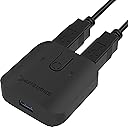
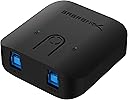
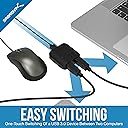
The SABRENT USB 3.0 Sharing Switch (USB-SW30) is a compact, plug-and-play device that enables seamless sharing of USB peripherals between two computers. Featuring ultra-fast 5Gbps data transfer, a single push-button switch, and LED indicators for easy status monitoring, it’s designed for professionals who demand efficiency and simplicity in their multi-device setups.


| ASIN | B074TYDJK2 |
| Actuator Type | Push Button |
| Best Sellers Rank | #77 in KVM Switches #3,601 in Home Audio Accessories |
| Brand | SABRENT |
| Brand Name | SABRENT |
| Circuit Type | 1-way |
| Color | Black |
| Compatible Devices | Keyboard, Mouse |
| Connectivity Protocol | Usb |
| Connector Type | Usb |
| Contact Material | Plastic |
| Contact Type | Normally Open |
| Control Method | Touch |
| Control Type | Physical |
| Controller Type | Push Button |
| Current Rating | 50 Milliamps |
| Customer Reviews | 4.4 out of 5 stars 2,531 Reviews |
| Included Components | Sabrent USB 3.0 Sharing Switch for Multiple Computers and Peripherals LED Device Indicators |
| International Protection Rating | IP647 |
| Item Dimensions | 2.4 x 2.32 x 0.83 inches |
| Item Weight | 40 Grams |
| Lower Temperature Rating | 67 Degrees Fahrenheit |
| Manufacturer | SABRENT |
| Material Type | Plastic |
| Model | USB-SW30 |
| Mounting Type | Surface Mount |
| Number of Items | 1 |
| Number of Positions | 2 |
| Operating Voltage | 120 Volts |
| Operation Mode | ON-ON |
| Part Number | USB-SW30 |
| Specification Met | CE |
| Switch Type | Push Button |
| Terminal | Solder |
| UPC | 819921013569 |
| Unit Count | 1.0 Count |
| Warranty Description | 1 Year limited. 2 years with manufacturer registration. |
J**.
Works great for gaming keyboards
With the pandemic, working from home has been more and more common. Being a gamer, I looked for a KVM switch that would allow me to switch back and forth between my work laptop and my gaming desktop. I initially went with an IOGear KVM and was extremely disappointed because it couldn't keep up with my WPM and there would be some lag with typing. In worse cases, a key would get frozen and would stay stuck entering a key and the only way to stop it was to physically disconnect the keyboard from the KVM switch then reconnect it. I'm using a Razer Blackwidow After looking around and doing some research, I took the chance on the Sabrent USB 3.0 USB switch. It acts as a direct passthrough as opposed to running off of software firmware so by hitting the switch to go back and forth, it's like actually disconnecting the keyboard (or whatever device you have) and then reconnecting to the PC/laptop you want to use it on. My keyboard latency issue has been resolved by using this USB switch and no more stuck keys/characters. I highly recommend this to anyone who was having similar issues or wants a good USB Switch. This supports USB 3.0 but also works with USB 2.0 devices (my keyboard is USB 2.0). Also worth mentioning that it has a micro USB power port but not sure what that would be needed for as I'm not using it. The power is pulled from the USB ports connected the PC/Laptop. I'm assuming it might be for something that draws more power? Hope the review was helpful and this device works for your needs.
R**D
Very Good Quality and easy access
To be honest, I came to know about this product from my colleague. After purchasing it, I found it to be of very good quality and it works perfectly. Also does not need power supply. So its easy to handle.
D**E
Simple, cheap, small, works, but the light is a not very bright
Have been using this for a couple years now, and other than an occasionally having a connection issues, its worked just fine. I don't switch it often, so I can't attest to durability under more frequent usage, but I have just two gripes about it. 1. The LED is not bright enough for me to just glance at it and see which port its outputting to. Also the light points up, not out the front, making it harder to see. Someone else complained the light was too bright, but I can barely see mine unless I'm directly above it. 2. The box is smooth plastic, with curved sides four some pointless aesthetics, but it didn't come with rubber feet so if you have it on hard surface, which most desks are, it can end up sliding around. Some cheap rubber bumpers from the hardware store solved that, but seems like this would be something it should come with.
J**D
Works with an adapter for USB-C computers.
I tried it out today with a Logitech wireless USB and mouse set. It worked perfectly today and was easy to connect and set up. The first computer has a USB 3.0-A port. The second computer has a USB-C port. Therefore, I am using a USB-A to C adapter, and everything is working fine
J**E
Works as advertised, very useful. 3.0 is worth the extra money
I have ordered a few of these, and they work great. I use them to copy OS install files to a thumbdrive, switch it to another machine, an then can boot from that image, saving me having to plug/unplug (I plan on using a relay to automate it next). But the products well built, comes with two nice long usb cables, and has an LED which clearly shows which 'side' is active. The button feels good when you hit it...I took one apart and saw that they used a nice large solid button vs. the cheap tiny ones that you can't feel click...this one is obvious when pressed. One note..they have a USB 2 and a USB3 version...even if only one machin you're using is USB3, I recommend it...the speed increase is drastic. I plan on trying this with an arcade game controller next, and will update the review if I hit any issues, but I don't expect to base don my experience so far.
K**J
Good simple switch for USB things
This has still been working well for at least 6 months. Would buy again. Useful for keyboard, mouse, etc. not for video transfers like HDMI or Displayport, it doesn't advertise that it does, just want to make it clear what the purpose of this is. It allows a user to switch between two computers to use the connected to the main side, I put a simple USB hub on that side for mouse & keyboard & webcam and it works well to switch between laptop & desktop. They each still have their own display cable connected to my monitor. The downfall is that it's USB A connections.
M**.
Sharing a USB mouse
Works great for sharing a Logitech wireless USB mouse between a laptop and a desktop. Although the laptop has a built in finger pad, a typical mouse always works best. No longer unplugging and moving the USB receiver between the two.
J**S
Very meh. Even for a sale price ~$15, questionable if worth it
I've been using this since April. I usually use KVM switches, but my preferred brand's new Displayport 1.4 models aren't compatible with my Dell WD19TB dock, so I decided to just use my monitor's DP and HDMI ports to switch between computers and something like this plugged into a hub. I had a number of problems with it, but i worked past most of them until recently. I plugged a USB hub into the input for this, and port A into my laptop dock and B into my desktop. My mouse, keyboard, gamepad, and one or two other things were plugged into the USB hub. Note, this is a powered hub so power draw should be a non-issue. 1. Regularly, something would just stop working until I unplugged it and plugged it back in to the hub. I tried a couple different hubs, same model different units and another from a completely different manufacturer, same problem no matter what. 2. It'll auto select kind of randomly. Not as in "it randomly decides to switch inputs," that would be much worse, but I leave my desktop off most of the time. If I do happen to shutdown/unplug this from my laptop dock, it'll sometimes default to switching to the desktop and sometimes won't. Not a big deal, just unpredictable when I'm doing some as simple as rewiring (Shelter at Home/starting to work from home has meant a lot of "what if I moved this..." situations). 3. I decided to alleviate some of these issues by getting a separate, dedicated USB hub switch for my keyboard/mouse/gamepad and plug this into my USB audio DAC. I figured it'd be nice to be able to leave the audio on my laptop dock if I need to switch over to my desktop just for a moment. I got a new Sabrent USB hub that's hire wattage, and plugged that directly into my laptop dock and plugged this USB switcher into that. USB audio would just die before a song finished playing while I was testing it. Plugged it into a USB-C adapter on my laptop dock (it has very limited USB ports), worked for a while, but after ~30-45 minutes stopped again. Right now it's sitting unplugged. I might keep playing with it, I honestly think most of the issues is that it draws power from the host devices it's plugged into. Seems logical, but I think the way it's implemented is bad. If you just need something simple, or you're going to use for a device you don't use frequently, it's probably fine. You may need to futz with it regularly, but it'll probably work for the most part. A few people report that it's blown up their computers... which is why I'm fairly confident it's a power draw problem.
R**D
Simple and functional
It's intuitive to hook up and use, and it works for switching a USB hub with a connected mouse, keyboard, and Yubikey. I haven't tested the USB throughput, so I can't speak to that. Only downside is that the LED indicators are a little dim and hard to see in a brightly lit room unless you know what you are looking for. This could be a good thing if you are using it in a darker room (e.g., watching a movie). It's not a big deal and you'll quickly get used to it. I'm happy with my purchase.
B**I
Excencial. Leia a descrição.
Funciona 100% bem , excencoal para quem tem 2 computadores, 1 monitor e um jogo de teclado e mouse.
G**.
Fais bien son travail mais c’est usb 3.0 pas 3.2
Fais bien son travail mais c’est usb 3.0 pas 3.2 C’est top pour basculer mon clavier et souris entre mon mac et ma xbox en un click
E**O
Funciona muy bien
Lo uso para compartir un teclado entre dos computadoras y funciona perfecto.
L**K
Działa ze Stream Deckiem
Działa zgodnie z opisem. Współpracuje też z przejściówką USB-C do USB-A w jednym z podłączonych komputerów. Używam go do Stream Decka.
Trustpilot
1 month ago
4 days ago