


Desertcart purchases this item on your behalf and handles shipping, customs, and support to Austria.
🚀 Elevate your CAN bus game with plug-and-play power and pro-grade protection!
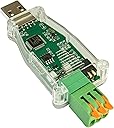
The DSD TECH SH-C31A USB to CAN Adapter is a robust, open-source hardware device based on Canable 2.0, delivering native CAN FD support at 5 Mbps without firmware updates. Featuring a rugged enclosure with built-in electrical protections and a professional termination switch, it ensures reliable, field-ready CAN bus connectivity. Backed by a 1-year warranty and responsive technical support, it’s trusted by over 100,000 users worldwide.


| ASIN | B0CDGD1FSH |
| Best Sellers Rank | #183 in USB Computer Network Adapters |
| Brand | DSD TECH |
| Color | Green |
| Compatible Devices | Desktop, Laptop |
| Customer Reviews | 4.3 out of 5 stars 76 Reviews |
| Data Link Protocol | USB |
| Data Transfer Rate | 5 megabits_per_second |
| Global Trade Identification Number | 00794251080989 |
| Hardware Interface | USB |
| Item Weight | 0.02 kg |
| Manufacturer | DSD TECH |
| Mfr Part Number | SH-C31A |
| Model Number | SH-C31A |
| Number of Items | 1 |
| UPC | 794251080989 |
| Unit Count | 1 Count |
| Warranty Description | Manufacturer warranty for 12 months from the date of purchase |
C**S
DSD makes good stuff
Works great for digging into can protocol. Claude can use it as well. Would recommend. Love all DSD stuff
C**T
Works with Savvycan on Linux
The first thing that I did when I got this was install the candlelight firmware from the canable website. This went smoothly with no issues. I have successfully used this with SavvyCan running on Linux mint with minimal configuration. Mine came with the screw down connectors for the wires which is not as convenient as the lever type it is shown with but it still works fine. Overall, this is a good option for an all in one can bus reader that is mostly ready to go out of the box. I was able to connect to my car first try after installing the candlelight firmware as mentioned. This does what an esp32 plus a can transceiver like the mcp2562 with the added benefit of can-fd support, which the esp32 cannot do, in one compact package and a very reasonable price for everything this can do.
B**Z
Good
Good
B**R
Works beautifully
I am using it on an Ubuntu Linux system, and it worked just as well as a Canable with the alternate firmaware.
B**L
It works
Dip switch for termination resistor broke on first use. Other than that, works as advertised.
A**.
Plug and Play with Modern Linux Kernel
Able to easily use the can-utils package and verify operation using a scope with built in CAN decoding.
K**S
Looks great, nice packaging., can't get it to work.
Maybe i'm missing something, but I couldn't get it to talk to my computer out of the box, was able to reflash it to newer firmware, but it still won't talk. Sending it back. If you can get it to work mechanically it's beautiful, with great connectors.
R**D
Does not work. No drivers
I purchased this to work with Windows and a Jetson Nano to work with CAN Bus data. for both windows and Nano/Linux the device did not install or there where no drivers. Tried to flash the Candlelight firmware, still was not able to use device.
S**N
Does the job
Works flawlessly on a raspberry pi with Home Assistant.
O**C
Works with CANgaroo, but required a WinUSB/GUID fix
I had an issue using this SH-C31A with CANgaroo under Windows 11. This may be specific to my adapter/firmware, but I reproduced the same issue on two different PCs. On both computers, Windows did not automatically install a usable driver for the CAN interface. I installed WinUSB using Zadig (select canable2 gs_usb (Interface 0), USB VID:PID 1D50:606F). However, CANgaroo still could not see the adapter. I found that the DeviceInterfaceGUIDs registry value created during the Zadig installation did not match the GUID expected by CANgaroo/CandleAPI. Interestingly, Zadig generated a different GUID on each of my two PCs. If you have the same problem, this is what worked for me: Install WinUSB for canable2 gs_usb (Interface 0) using Zadig. Open PowerShell as Administrator and run: $dev = Get-PnpDevice -PresentOnly | Where-Object {$_.InstanceId -like 'VID_1D50&PID_606F&MI_00'} $path = "HKLM:\SYSTEM\CurrentControlSet\Enum$($dev.InstanceId)\Device Parameters" Set-ItemProperty -Path $path -Name DeviceInterfaceGUIDs ` -Value '{c15b4308-04d3-11e6-b3ea-6057189e6443}' Unplug and reconnect the SH-C31A, then restart CANgaroo. After doing this, CANgaroo immediately detected the adapter as candle0_ch0, and CAN reception works correctly. Again, I don't know whether this affects all SH-C31A adapters or only the firmware/version of mine, but hopefully this helps anyone experiencing the same issue.
L**V
Facile installazione e avviamento.
ottimo prodotto. Funziona bene con sw python di sviluppo.
V**R
CAN通信状態の確認に利用
LINKG4XのCAN通信状態確認用に利用 通信内容についての取得については問題なく出来ました。
B**N
Perfect for can analysis or sending commands
Worked great straight from the box. Could.not have been better.
Trustpilot
1 month ago
1 week ago