Desertcart purchases this item on your behalf and handles shipping, customs, and support to Austria.
🖱️ Elevate your desk game — precision, comfort, and control in one sleek trackball!
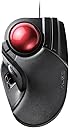
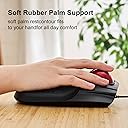
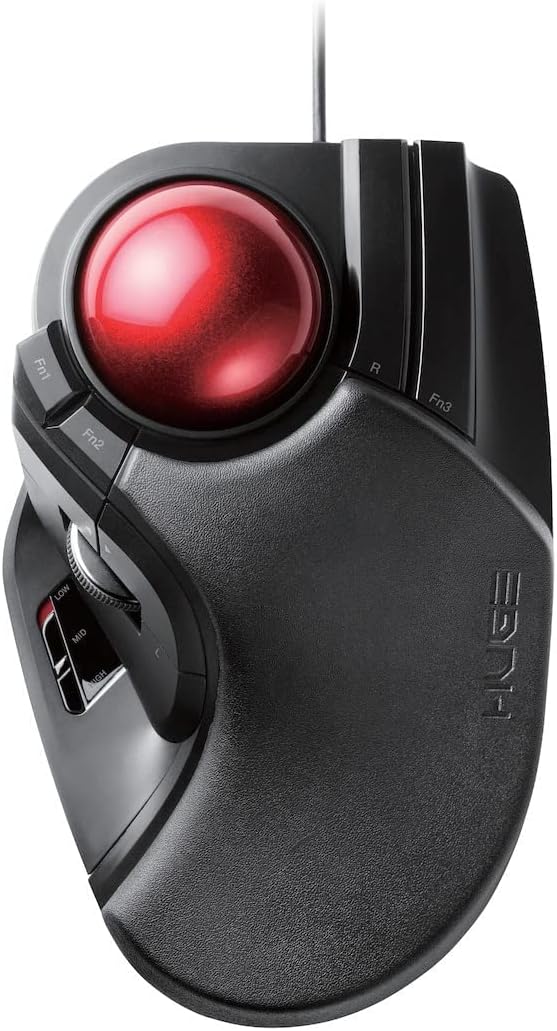
The ELECOM HUGE Trackball Mouse is a wired, finger-operated input device featuring an ultra-smooth 52mm red ball with precision optical tracking technology. It offers 8 programmable buttons including horizontal scroll tilt, adjustable DPI settings (500/1000/1500), and ergonomic design to reduce wrist strain. Compatible with Windows and macOS, it includes durable ruby ball bearings for easy maintenance and long-lasting smoothness, making it ideal for professionals seeking enhanced productivity and comfort.


| ASIN | B07353DBP9 |
| Antenna Location | Gaming |
| Are Batteries Included? | No |
| Are Batteries Required | No |
| Best Sellers Rank | 12,434 in Computers & Accessories ( See Top 100 in Computers & Accessories ) 8 in Trackballs |
| Brand | エレコム(ELECOM) |
| Brand Name | エレコム(ELECOM) |
| Button Quantity | 8 |
| Colour | Black & Red |
| Compatible Devices | Personal Computer, Laptop |
| Connectivity technology | USB |
| Country of Origin | China |
| Customer Reviews | 4.4 out of 5 stars 2,035 Reviews |
| Enclosure Material | Plastic |
| Global Trade Identification Number | 04953103308169 |
| Hand Orientation | Right |
| Hardware Platform | PC; Mac |
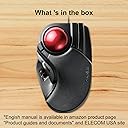
| Included Components | User manual *1 |
| Item Dimensions L x W | 18.2L x 11.5W centimetres |
| Item Type Name | ELECOM Wired Finger-operated Large size Trackball Mouse 8-Button Function with Smooth Tracking, Precision Optical Gaming Sensor (M-HT1URBK) |
| Item Weight | 0.59 Pounds |
| Manufacturer | ELECOM |
| Manufacturer Part Number | M-HT1URBK |
| Minimum Required Operating System Version | Mac OS 12 Monterey, Windows 7 |
| Model Name | M-HT1URBK |
| Model Number | M-HT1URBK |
| Mouse Maximum Sensitivity | 1500 Dots per Inch |
| Movement Detection | Optical |
| Movement detection technology | Optical |
| Network Connectivity Technology | USB |
| Number of Batteries | 2 AA batteries required. |
| Number of buttons | 8 |
| Operating System | macOS 10.12 ou posterior |
| Power Source | Corded Electric |
| Product Features | 4 Way Scrolling, Ergonomic Design, Programmable Buttons |
| Product Warranty | 1 year manufacturer |
| Range | 5.0 meters |
| Special feature | 4 Way Scrolling , Ergonomic Design, Programmable Buttons |
| Style Name | Wired Trackball Mouse |
| Theme | Gaming |
| Unit Count | 1.0 count |
G**S
Brilliant trackball for Mac, great software and button customisation (tiny learning curve)
I used to have a trackball years ago and loved it, so I ordered this one mainly for the programmable buttons and the fact it’s finger-controlled rather than thumb-controlled. That works much better for me because it lets me keep my fingers on the ball while using my thumb and little finger for the buttons, without having to take my hand off the trackball. It worked straight out of the box on my Mac, even plugged into an unpowered USB hub. After installing the ELECOM software, I was able to set up the buttons exactly how I wanted for my workflow, and it has genuinely made my day-to-day use much easier, exactly as I hoped it would. One thing worth noting: when I first started using it, the cursor movement seemed a bit sporadic and I spent ages trying to work out what was wrong. In the end, it turned out my touch was too light on the ball so it wasn’t always registering movement. This was only temporary, because with a bit of use it “bedded in” and now even the lightest touch registers properly. It’s now very accurate and feels great. Overall, I absolutely love this trackball and highly recommend it. If you’re brand new to trackballs there is a short adjustment period, but it’s well worth it. I honestly wouldn’t go back to a normal mouse. Tip: every so often, pop the ball out and give it a quick wipe (and wipe inside the cradle too). Dust does build up and it will affect sensitivity if you leave it too long.
T**D
Very comfortable
This is a very different style of rollerball to what I have used previously, and it took a little while for me to adjust to the different button positions, but from the start, I found it far more comfortable than any mouse I've used before, and my left and right click now come very naturally. Placed in the right position, I find that I keep leaving my hand on it, as it's a very comfortable position for my hand and nicely padded. Rollerball control is enhanced by the slightly larger ball, and the easy quick change settings for speed on the mouse. The construction feels far stronger and sturdier than previous mice I've had. the buttons are easy to depress, but feel very sturdy and deliberate with no wiggle and the scroll wheel has an effective but comfortable grip strip. Trackball mice aren't cheap, and previous mice I've purchased have felt very cheap and tacky for the money spent. This is without doubt the nicest mouse I've ever used and I couldn't be happier with the quality and comfort it brings.
H**R
With replacement bearings fitted, it's a brilliant trackball. As stock though? not so much
It's called the Huge. It probably is huge to an 8 year old, but not for an adult. It would be better named the biggish. I've used trackballs for years as a personal preference over mice. My last two were logitech and were obviously designed with my hand size in mind. My first logitech eventually wore out. My second, the marble was near perfect for me, apart from nor having a scroll wheel and logitechs way of dealing with page scrolling because if that omission simply doesn't work in a lot of things, like cad software for example, I don't know why they see fit to change the way a standard thing works and break it in the process. So a new trackball was needed. I chose the huge because it had the red ball. Not for aesthetics, but because the black ball versions get a lot of reports of issues sue to the device missing ball movements. Its a nice sized finger ball. I prefer finger control to thumb and this is definitely a finger control ball with the left mouse button being under your thumb. That mouse button is one of the failings on the huge. Its fine for clicks and double clicks, but bad when holding it to drag things around in CAD. More often than not, while dragging, the button moves slightly in the enclosure and 'feels' like it just clicked making you pause to check you didn't accidentally let go of the button. Even though you can see it on screen is still moving the thing you grabbed, it still causes you to inwardly pause as sometimes it does un click. In a quiet room you are also aware that there are large voids inside as sometimes you get a 'boing' effect as you release a button. Basically the sound of release is almost spring like in sound. It's unpleasant when you hear it though inconsistent in its appearances. It's a different shape than my last trackball so caused hand and wrist ache for me, but that's a given when changing to a different design, it goes against muscle memory. After a week of use it's becoming more natural. The plethora of buttons is a welcome improvement over the logitechs minimal offerings. The software for the huge is, let's say functional. It works but somehow feels clunky. But it does give a lot of options. The right mouse button has another near identical button alongside. I can't tell you how many times I pressed the wrong one by accident. Again that's user error, but I can't help wishing they had done something different with that buttons shape or force required, something to make it feel different, but it's identical when used by feel alone. The thumbwheel for me is a little too far back and I find I keep moving my hand back to use it. 2 or 3 centimeters forward would be perfect for me, as it is I feel I have to change my hand position to use it better. The thumb wheel has a side to side option that so far I have never found worked in its default settings on any app. The ball feel is OK. By that I mean it's general control aspect, it's a shiny ball so actual tactile feel is like any other. But it does occasionally stick. There are numerous complaints about this issue that is apparently caused by the faux Ruby bearings. I only notice it when trying to do pin-point accuracy things. In general use its fine, but those moments where you need the pointer to move a tiny amount are fraught with potential overshoots as it sticks then suddenly frees. It's not a major stick, just enough to be a problem when it happens. Replacing the bearings is possible and is something I will be looking to do sooner than later. Does all this make it a bad trackball though? No. It doesn't. For a general user it's actually pretty good. I am overly critical of it primarily because it's failings affect me in a couple of my daily interactions with certain software. Without those particular things the sticking ball and mouse click issues would likely never have been spotted. At the price it's a good option and better than many including the logitech it replaced as the gamut of buttons brings functionality the logitech marble didn't have. In the built down to a price aspect though, those bearings suck, the cable is also as cheap as cheap can be, being as thin as it is I wonder how long it will last. All in though, 'for the price' it's an acceptable device. I forgot to mention that it also has an adjustable dpi switch that is useful for switching on the fly depending on current use and easily accessible by your thumb. I wouldn't use this for gaming, maybe command and Conquer zero hour, but definitely not for first person shooters. It is so close to being a great device, but just enough niggles to stop it getting there. I'm not looking for a replacement though so it must be good enough. UPDATE:- After a week I had adapted to the buttons just fine, but that sticking issue was getting tiresome. I bought some Zirconia/ceramic G5 2.5mm bearings and did the bearing swap (lenty of videos on youtube about how to do it and it really is easy). It is 100 percent worth doing this bearing swap with the huge. It is a difference you can feel instantly and not a small difference, it really is game changing. Before doing the swap, try moving the ball left to right then up and down slowly with just one finger for a full rotation. Do that same movement after doing the bearing swap. The difference is there straight away and is smooth as silk. If Elecom had shipped it with these new bearings I would happily recommend it all day long. Those ruby bearings it comes with though? they must be egg shaped to be as bad as they are. If you are planning on getting one of these trackballs, factor in another 5 pounds sterling to get the better bearings to make this a really good trackball.
P**R
Great trackball if you have big hands
I've been using this trackball a lot for the last 12 months and it's been great. Accurate, easy to use, scroll wheel works fine. Basically, it's faded into the background as a bit of equipment that works every time I put my hand on it. I have big hands and this trackball is well built for me, if you've got small hands it might be annoyingly large, maybe have a look at the Logitech trackballs as I find them a little small. For those really researching this, my hand is 20cm (just under 8") from the tip of my finger to the bottom of my palm. Maintenance-wise, about once a month or so I pop the ball out (very easy to do) and clean the little ball bearings that hold it in place. We live in quite a dusty house as we have cats so if you have less dust, you might not need to do it as much. I've had to do the same with the Logitech and Kensington trackballs I've owned previously. This is enough to keep the ball moving smoothly. All in all, a big thumbs up.
H**Y
Feels somewhat rough compared to better devices
Having recently wanted to get another trackball, having used one for 3D work in the stone age, I asked some fellow nerds for opinions. The Kensington Expert Mouse and Elecom Huge both kept coming up. The wired versions were strongly recommended due to problems with flaky polling rates on both over wireless. I accordingly picked up both to try. The Elecom Huge, despite the name, is anything but. It is a smaller ball than the Kensington, and comparing the two when the Kensington's included wrist rest is fitted, the Huge is much smaller. If you have large hands, the heel will come off the end of the trackball's hand rest, if you're a fingertip user. This can be mitigated by using a beanbag (which trackballs types should accumulate anyway, they help with ergonomics). The other notable thing about the Huge is that it just feels quite cheaply-made. Mine arrived warped, it rocks on the desk. The scroll wheel feels cheap, like a £10 mouse. The buttons have a piercing microswitch click, but also don't feel great or instill confidence. The movement of the ball, arguably the most important factor, was unpleasant out-of-the-box on my unit. It suffered from tons of stiction. This makes small movements all but impossible, even with a careful fingertip grip. The Kensington Expert is night and day in smoothness and precision. This is probably partly because Elecom use cheaply-finished bearings, i.e. not terribly round/smooth. They're made of synthetic ruby, so they're hard and durable, but that doesn't matter if they're wonky. I replaced the bearings with g5-specced 2.5mm ceramic bearings. It's a cheaper material but better finishing has improved things somewhat. It has reduced the sticktion to an extent. However, I think the bearings aren't the whole story, the cup in which the ball sits has a nasty seam in it too- which might not be helping matters. It could well improve mechanically with some use, and the new bearings are a worthwhile and easy upgrade. Yes, this trackball has loads of buttons, which is handy if you need them. As a sidenote, the official software for mapping them is not very good. It has an ugly UI and actually uses a surprising amount of CPU in the background on Windows. I am using hid-remapper (you can google for that, find a github site) running on a microcontroller to replace the software, which is a marked improvement. I added an RMB mapping to Fn3 as it felt more natural for my hands, as well as a ball scroll toggle to one of the forwards/back buttons, which I never use as they tend to cause disasters in web interfaces by mistake. I suspect that I wouldn't have been as negative about this device if I didn't have a much better-made Kensington Expert Mouse on the same desk to compare it to. It might be easier to remain content without an easy basis for comparison! It's also worth noting that ergonomics of trackballs are surprisingly personal, you might find that you have to try a few different models until one suits you. I don't regret trying the Huge (even though ironically, it's not huge at all). It's worth trying for the experience, but the Kensington Expert Mouse trackball feels far smoother and better-made to me. Also, it actually sits flat on the desk and doesn't rock when you use it. However, if you're prepared to do a little DIY to replace the bearings and potentially put some tape on a foot/use a sheet of padded drawer liner to prevent noisy rocking on a hard surface, there's a perfectly usable trackball waiting to be discovered. Bring beanbags!
A**R
Very good Mac mouse
I read the reviews, with an eye on the Mac users' comments. Like many folks I've been using a Microsoft Trackball Explorer for the past ... twenty years. <gulp> My latest one was developing a frustrating fault and so I thought I'd take the plunge on the Elecom Huge. I should add that I've been using and upgrading as the years passed, the excellent Mac SteerMouse app, so I had no need to go anywhere near the Elecom drivers. To be clear, it's plug and play, but you will want to customise those buttons. I've set the Elecom Huge up to match, as far as possible, what I found familiar on the Microsoft Trackball: i.e. the left and right-hand buttons for primary click, secondary click and forward and back is the two right-hand buttons. I've set the two function buttons as page zoom + and -. Lots of commentary on the poor quality of the ball bearings used. I'm not sure that it's hugely different to the Microsoft device, it's certainly no improvement, but it rolls just fine for me. I did find a fabulous video on YouTube "Elecom HUGE trackball bearing replacement" explaining how to remove the existing balls and insert silicon ones. It seems easy enough, but my fingers aren't as nimble as they could be and my eyesight not great, so I don't think I'll risk it. That said, Amazon sell the G5 precision, zirconium oxide ball 2.5mm ceramic ball bearing if you are feeling up to it.
R**H
I love it
This is my first trackball (if you don't count the god-awful trackball on the Compaq laptop I had back in the 90s). It takes a little getting used to compared to a mouse, but after my first day of using it it's already staring to feel fairly natural. I downloaded the config app from Elecom and remapped the right and left clicks to the thumb buttons above the scroll wheel, and the scroll wheel click, left and right tilt I set to mute, volume down and volume up. Not sure I'll stick with that long-term, but I do like the flexibility to set a vast array of functions or arbitrary keyboard keys to the buttons. The rubber pad is really comfortable and the wrist orientation is quite natural. I am resting my forearm on my closed Thinkpad, which raises it level with the flat part of the pad. I did find, like other reviewers, that the bearings on the ball felt a little bit stiff and scratchy. Certainly not to the point that the trackball was a pain to use or inaccurate, but it just felt that there was the tiniest fraction more effort in the start of a movement than once it was going, and there was a barely perceptible vibration in the movement. I probably wouldn't have noticed it if I hadn't been primed to by reading other reviews. Rather than bother with swapping them out, I tried a tiny dab of some fluorinated PFTE grease that I'd bought for lubricating mechanical keyboard switches on each of the sapphire bearings and it's loosened them up noticeably. Way less hassle than disassembling the device to swap the bearings with some steel or ceramic ones.
P**L
Good solid mouse, will take some getting used too.
I bought this as a stand in for my usual Elecom Thumb trackball mouse as I broke my left wrist and needed a trackball mouse with as many buttons as possible. The Elecom Huge fitted the bill. I have been using it for around 4 weeks now so I am more or less used to the trackball being controlled by fingers rather than thumb. The trackball is smooth (I use it for Dota 2) but I find there are issues with the button size and placements. I rebound the 2 buttons to the right of the ball as left and right mouse buttons as this seemed logical, but they are both very skinny and slippery which isnt ideal. This left me with the option to rebind the forward and back buttons to the left of the ball as other active buttons but that does mean that you have to operate the ball with your middle finger. However, due to the design angles, the Huge seems to encourage you to control the ball with your index finger. Unfortunately this then leaves you with no spare finger to operate the forward and back buttons. the 3 buttons clustered around the wheel are ok, although for some reason the largest one at the bottom seems awkward to hit, probably due to placement of the wheel. All in all its well built and all the buttons are programmable which is very good. I have dropped it a couple of times and it suffered no ill effects.
R**B
Very nice to use and feels great under hand. Even better with ZrO2 bearing mod.
Very happy with this purchase the Elecom Huge is definitely huge, but I have bigger hands so it feels quite nice. All the buttons fall nicely under my fingers and are easily in reach, with the exception of the scroll wheel which I think is a little far back for my thumb, but I have found a way to use the ball for scroll anyway. I did change out the bearings from the stock artificial ruby ones to G5 rated Zirconium Dioxide ones and it makes all the difference, the stock ones are a little scratchy, but also the trackball itself likes to be worn in too. I think its a finish or substance on that ball that takes some use, after a few days of frequent use the smoothness just got even better. I am not using the Elecom configuration software at all, I'm using HID-remapper by jfedor2 on github. Basically it's a Raspberry Pi Pico board that sits inline between any HID device and a computer and remaps any input. It's much much more powerful than what most configuration utilities can do, it supports macros and layers and is configurable with WebHID. All the buttons on this revision of the Huge are now standard inputs, so can be interpreted and intercepted much easier, unlike previous revisions. I've remapped left click to Fn1 and I have another button that toggles the ball to be the scroll wheel, super useful. All the internal switches are common and easily sourced and replaceable, it does come with Chinese Omrons for primary buttons, and the others are commonly found square micro switches. So should the stock ones fail, I know I can replace them all.
A**T
Bonne remplaçante
Commandée en remplacement de ma trackball Microsoft Explorer, cette trackball s’avère excellente. Très bonne expérience générale à l’utilisation. Seul défaut la molette qui ne tourne pas impeccablement mais bloque légèrement à la fin d’un tour complet! À voire dans le temps si cela va s’aggraver… En résumé très bon choix mais je ne crois pas qu’elle m’apportera la même satisfaction que la reine des trackball qu’elle remplace. 15 ans de bon et loyaux services qui seront difficile à égaler.
K**R
Tasarımı için almıştım.
Tasarımını beğenip almıştım. Beklediğim kadar rahat, hassas, konforlu ve kullanışlı bir ürün değil. Kötü de değil tabii. İdare eder.
G**G
大きく安定していて使いやすい
結構、大きいです。 その分、安定していて使いやすいです。 これまで、MicrosoftのTrackball Explorerを18年使用してきました。 その間、Logicoolも使用しました。 Logicoolの方がボールの動きも軽く、使いやすかったのですが、長く使用していると表面がベトベトしてきたので捨てました。 しかたなくMicrosoft Trackball Explorerを使用していました。 こちらはボールの動きが少し重いのが気になりましたが、耐久性は抜群でした。 さすがに支点のすり減りが限界に近いため、今回この商品を購入しました。 ちなみに有線タイプにしています。 購入前にはちょっと大きすぎるかな?と思ったのですが、机の上はそれ程狭い訳でもないですし、マウスの様に動かすものではないので、大きさは気になりません。 それどころか、この大きさのお陰で手を乗せる安定性も抜群ですし、手を置く部分が柔らかいので快適です。 この柔らかい部分の耐久性がやや心配ですが、1ヶ月使用した感じでは全くヘタリもないです。まだ、これからですけどね。 それでも操作中に少し動くこともあるので、もうちょっと重量があるか滑り止めを工夫すると尚良いです。 肝心のボールはこれまで使用したどのトラックボールよりも大きいのですが、動きはどのトラックボールよりも軽いです。非常に快適です。 軽すぎてマウスポインタが行き過ぎてしまう感もなきにしもあらず・・・。まぁ、慣れでしょう。 難点を挙げるとすれば、親指操作の左クリックの上にあるブラウザ「進む」「戻る」ボタンが親指操作ではちょっと押し難いです。特に手前のボタンは親指では押し難いですね。これは薬指ボタンに割り当てると良いかもしれませんが、私は会社のセキュリティ上、アプリは入れられないので変更不可で、これはあきらめてます。 とは言え、非常に満足しています。やはりトラックボールは大きい方が使いやすいです。 買って正解でした。これは良いものですね。
C**O
Funktioniert sehr gut!
Bei mir rollte die Kugel auf Anhieb perfekt und wesentlich flüssiger und geschmeidiger als bei meinem vorherigen Logitech TrackMan Marble! Allerdings nicht lange, denn nach ungefähr einem Tag Benutzung wurde die Kugel zunehmend schwergängiger und wies zuletzt ein unangenehmes Losbrechmoment bei kurzen Korrekturen auf - Hautfett? Nach einer Reinigung mit Wasser und Seife war sie dann sogar noch schwergängiger! Auch eine Reinigung mit Alkohol brachte nichts - ebenso ein leichter Überzug von Silikonöl, was den Effekt der ruckeligen "Anfahrt" zurückbrachte. Die Lösung war dann tatsächlich, den Trackball erneut mit Alkohol zu reinigen, mit Graphit einzureiben und vorsichtig abzuwischen. Ich wollte allerdings erst Talkum probieren, hab den aber im Saustall der Werkstatt nicht gefunden - dafür fiel mir das Graphit in die Hand! Damit läuft er jetzt wieder wie anfangs, aber die dunklen Finger sind dauerhaft auch keine Lösung... Ich würde mir so sehr wieder einen Trackball mit drei Kugellagern zurückwünschen, wie meinen ersten Marconi von 1987! Der lief auch noch butterweich, wenn die Kugel bereits dreckverklumpt war! Und man konnte ihn in eine Richtung anstoßen - dann lief er dahin und konnte mit einem kurzen Tip genau an der gewünschten Stelle gestoppt werden. War ja ursprünglich ein kanadisches Militärteil für Radarstationen von 1952 (also NOCH älter als ich)... Das Teil wirklich für sehr große Hände gedacht. Die Verwendung eines Mauspads dahinter zur Handgelenksauflage ist wegen der Größe leider nicht mehr möglich und das zwar gelgefüllte Pad des Trackballs ist doch erheblich härter als so ein glattes Gelpad. Immerhin ist es mit einem fein genarbten Kunstleder bezogen, denn die Stoffpads, welche oft auch angeboten werden, scheuern über kurz oder lang, wenn man den Trackball so intensiv nutzt, wie ich. Probleme habe ich mit der schmalen rechten Maustaste, welche direkt rechts neben der Kugel liegt und der andererseits weit links unter dem Drehrad liegenden linken Maustaste, welche vorne ganz leichtgängig auslöst, aber nach hinten hin immer schwergängiger wird. Eigentlich haben beide aber einen erheblich höheren Druckwiderstand als beim TrackMan. Dies alles dürften jedoch Gewöhnungsprobleme sein - im großen und ganzen fühle ich mich mit dem Trackball auf Anhieb wohler, als mit allen anderen Alternativen, welche ich bisher probiert habe. Update: Nach ein paar Tagen habe ich mich nun an so ziemlich alle Funtionen gewöhnt, bis auf die doch recht schmale rechte Maustaste, bei der ich mich oft nicht entscheiden kann, ob ich sie mit Ringfinger oder Mittelfinger bedienen soll - die Kugel ist so groß, daß ich sie oft mit Zeigefinger und Mittelfinger gleichzeitig "bespiele" und um die rechte Taste zu treffen, nehme ich dann den Mittelfinger zu ihr runter. Es wäre besser, den Ringfinger zu verwenden, aber mit dem lande ich immer wieder auf der direkt daneben liegenden Fn3-Taste. Hier wäre eine einzelne, breitere Taste eindeutig besser! Mit der linken Taste komme ich mittlerweile gut klar und gewöhne mich sogar zunehmend an das Scrollrad Die Kugel läuft nun wieder dauerhaft seidenweich, nachdem ich sie mehrmals mit Graphit nachpoliert habe. Auch den Talkum hatte ich mittlerweile gefunden, aber bei dem ist der "Sanftanlauf" nicht ganz so gut, wie beim Graphit. Die anfänglichen Beschwerden am Handgelenk bei der Auflage sind verschwunden, nachdem ich das gesamte Gerät etwas zum Körper hin ausgerichtet schräg gestellt habe und den Stuhl ein klein wenig höhergestellt - schon passte es perfekt. Mittlerweile habe ich auch Grafikaufgaben damit bewältigt, welche mindestens genauso gut gelangen, wie vorher mit dem TrackMan und kann sagen, daß ich nun völlig zufrieden mit dem Gerät bin! Deshalb erhöhe ich die Sternezahl nun auf fünf! Update 2: Ein weiteres Problem mit Hautfett tritt von Zeit zu Zeit auf, denn der gezahnte Gummiring am Scrollrad dehnt sich bei Kontakt mit gewissen (leider bisher nicht nachgewiesenen) Bestandteilen auf der Haut extrem aus, sodaß er einen um fast 5 Millimeter größeren Umfang erreichen kann. Entsprechend "staut" sich das nun lose und nicht mehr in der Nut liegende Band beim Drehen des Scrollrades vor der Antriebsachse und bremst den Vorschub böse aus! Dies vergeht aber nach einigen Tagen wieder. Trotzdem ist es ärgerlich und behindert das flüssige Arbeiten mit dem Gerät enorm, wenn es denn auftritt! Hier wäre ein unempfindlicherer Kunststoffring anstelle des Gummibandes hilfreich. Diese starke Quellung von Latex habe ich auch schon andererwärts feststellen können - Lösemittel, Hautcremes und vor allem Bienenwachs lösen es in diesem Fall aus.
Trustpilot
5 days ago
2 days ago