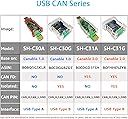
Desertcart purchases this item on your behalf and handles shipping, customs, and support to Austria.
๐ Elevate your CAN bus game with plug-and-play precision and pro-grade protection!
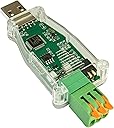
The DSD TECH SH-C31A USB to CAN Adapter is a robust, open-source hardware device designed for professional CAN and CAN FD communication. Featuring a hardened enclosure, built-in electrical protections, and a 5 Mbps data rate, it delivers reliable, out-of-the-box performance with full transparency and dedicated support, making it an essential tool for engineers and automation experts.
| Asin | B0CDGD1FSH |
| Best Sellers Rank | 12,480 in Computers & Accessories (See Top 100 in Computers & Accessories) 211 in USB to USB Adapters |
| Brand Name | DSD TECH |
| Color | Green |
| Compatible Devices | Personal computer, laptop, desktop |
| Compatible Operating System Family | Linux |
| Country Of Origin | China |
| Customer Reviews | 4.4 4.4 out of 5 stars (79) 4.4 out of 5 stars |
| Data Link Protocol | USB |
| Data Transfer Rate | 5 Megabits Per Second |
| Eu Spare Part Availability Duration | 1 Years |
| Global Trade Identification Number | 00794251080989 |
| Hardware Interface | USB |
| Item Highlight | CE and RoHS certified, CAN FD data rates up to 5 Mbit/s, open-source hardware (CERN-OHL-S-2.0) and example code on GitHub |
| Item Weight | 0.02 Kilograms |
| Manufacturer | DSD TECH |
| Manufacturer Part Number | SH-C31A |
| Minimum Required Operating System Version | Windows 10 |
| Model Number | SH-C31A |
| Number Of Items | 1 |
| Number Of Packs | 1 |
| Unit Count | 1.0 count |
| Upc | 794251080989 |
User
Perfect for can analysis or sending commands
Worked great straight from the box. Could.not have been better.
User
Great value USB to Canbus controller and sniffer
Used in an automation environment to help debug and diagnose logic controllers. Used once so far, great to keep in tool kit for future use. Price good against what the device achieves. Very happy.
User
Worked perfectly, easy to setup
Simply plug and play installation. Works well with free windows software.Easy to connect with screw terminals. Looks nice with the clear case.No buffer overflows or "filters" to configure to use, a simple stream of CAN data from the bus instead.
User
Handy USB to CAN adapter that works well on Linux
Bought this for connecting a computer to a CAN bus and it has been straightforward to use. The adapter feels reasonably well made and the terminal connection makes it easy to hook up CAN-H, CAN-L and ground without needing to make a special cable.Iโm using it with Linux and it has been reliable once configured, with no random disconnects or obvious communication problems. Itโs particularly useful for development and diagnostics where I wanted something simpler than setting up a separate microcontroller just to access a CAN network.The enclosure is compact and the status LEDs are useful for confirming that the adapter is powered and active.Overall, a useful little USB-to-CAN interface and good value for hobby electronics, development and troubleshooting.
User
Does the job
Works flawlessly on a raspberry pi with Home Assistant.
User
Works with CANgaroo, but required a WinUSB/GUID fix
I had an issue using this SH-C31A with CANgaroo under Windows 11. This may be specific to my adapter/firmware, but I reproduced the same issue on two different PCs.On both computers, Windows did not automatically install a usable driver for the CAN interface. I installed WinUSB using Zadig (select canable2 gs_usb (Interface 0), USB VID:PID 1D50:606F). However, CANgaroo still could not see the adapter.I found that the DeviceInterfaceGUIDs registry value created during the Zadig installation did not match the GUID expected by CANgaroo/CandleAPI. Interestingly, Zadig generated a different GUID on each of my two PCs.If you have the same problem, this is what worked for me:Install WinUSB for canable2 gs_usb (Interface 0) using Zadig.Open PowerShell as Administrator and run:$dev = Get-PnpDevice -PresentOnly |Where-Object {$_.InstanceId -like 'VID_1D50&PID_606F&MI_00'}$path = "HKLM:\SYSTEM\CurrentControlSet\Enum$($dev.InstanceId)\Device Parameters"Set-ItemProperty -Path $path-Name DeviceInterfaceGUIDs `-Value '{c15b4308-04d3-11e6-b3ea-6057189e6443}'Unplug and reconnect the SH-C31A, then restart CANgaroo.After doing this, CANgaroo immediately detected the adapter as candle0_ch0, and CAN reception works correctly.Again, I don't know whether this affects all SH-C31A adapters or only the firmware/version of mine, but hopefully this helps anyone experiencing the same issue.
User
Facile installazione e avviamento.
ottimo prodotto. Funziona bene con sw python di sviluppo.
User
Good Tool
Worked on the first try reading and recording canbus communication. Perfect for me and fast delivery
User
Great adapter, high quality
A great USB to CAN adapter for anyone needing one. It's high quality and will definitely last if taken relatively good care of.
Trustpilot
1 month ago
1 day ago