


Desertcart purchases this item on your behalf and handles shipping, customs, and support to Austria.
๐ฎ Elevate your game with the controller that adapts as fast as you do.
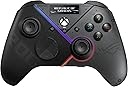
The ASUS ROG Raikiri Pro is a premium gaming controller designed for PC and Xbox Series S, featuring a vibrant 1.3-inch OLED display for customization, tri-mode connectivity (USB-C, 2.4 GHz RF wireless, Bluetooth 5.0), and advanced control options including four remappable rear buttons, adjustable joystick sensitivity, and selectable step or linear triggers. Equipped with a high-fidelity ESS DAC and 3.5mm audio jack, it delivers immersive sound and precise input customization via Armoury Crate software, making it a versatile choice for competitive and casual gamers alike.

| ASIN | B0CJN1LXT8 |
| Additional Features | Wireless |
| Best Sellers Rank | #15,452 in Video Games ( See Top 100 in Video Games ) #230 in PC Gamepads & Standard Controllers |
| Brand Name | ASUS |
| Button Quantity | 6 |
| Color | BLACK |
| Compatible Devices | Windows |
| Compatible Video Game Console Models | Microsoft Xbox SERIES S |
| Connectivity Technology | Bluetooth |
| Controller Type | Joystick |
| Customer Reviews | 3.9 3.9 out of 5 stars (675) |
| Global Trade Identification Number | 00195553919845 |
| Hardware Platform | Gaming Console |
| Item Dimensions | 6.1 x 4.06 x 2.52 inches |
| Item Dimensions D x W x H | 6.1"D x 4.06"W x 2.52"H |
| Item Weight | 330 g |
| Manufacturer | ASUS |
| Manufacturer Part Number | GD300X ROG RAIKIRI PRO/BK/WW//6 IN 1 |
| Model Name | GD300X ROG RAIKIRI PRO/BK/WW//6 IN 1 |
| Model Number | GD300X ROG RAIKIRI PRO/BK/WW//6 IN 1 |
| Package Quantity | 1 |
| Power Source | Battery Powered |
| UPC | 195553919845 |
| Warranty Description | 1 Year Warranty |
V**C
Good purchase
good product
J**C
Wireless only for pc
Paired with an Asus ROG g15. Easy setup, whether wireless or Bluetooth. Battery holds a pretty good charge. Feels good in my hands. Not quite an elite or elite 2. And that's fine, I feel like this is a bargain, quality, option for PC players. Customization features are nice, but weren't a selling point for me. I usually have the led bar off or set to battery level. I came from a steel series stratus wireless to this. I'm pretty happy with it.
B**D
Looks awesome... terrible internals...
I love ASUS and the ROG line, so I had really high expectations for this controller and love the overall feel and aura sync aspect of this controller. Plus it has bluetooth, wired and 2.4ghz dongal but... this was my third attempt with it. The first one I bought in store in Japan and the OLED went out a day after getting it, even after the firmware update to the most recent, returned it in Japan in store. The second one I ordered here on Amazon, it was fine at first but after playing for less than a week on the new Black OPS 6, the right trigger when set to hair trigger started bugging out and was super erratic and registered trigger pull when there was none. It only stopped when I turned hair trigger off. After I turned it back on again, the issue returned. I exchanged it for another one and not even three days playing with it, the right trigger issue appears with the replacement controller. This time after taking it out of hair trigger it stopped registering any trigger input at all. Im not rough with my controllers by any means and as an adult I'm the only one who uses it. It sits on a desk to charge and only in hands for gaming, never dropped or anything out of the ordinary for a controller. ASUS ROG design team did a great job, it's just too bad that it appears the internal components did not match or live up to the ROG name.... Cant really call it a gamming controller if you can't even use it to play Call of Duty for less than a week before not being able to use the hair trigger aspect or have it not register any trigger input at all. Maybe if ASUS decides to revamp this line with stronger more premium electronic components, I'd consider buying that but doing a full return and just going to use my Xbox Elite series 2 controller. Never had any issues with that after years of use, only got the ROG controller to match the rest of my PC build with the Aura sync and so I could keep my xbox items in the living room with the xbox... love you ASUS, but kinda disappointed here.... Oh! And yes if you really read the details on this controller, it will work on xbox but only if plugged into it as a wired generic controller IE if you buy it to use on your xbox, expect to be plugged in when using it.... There was also some software issues noted with the ASUS Armory Create app (tried on two separate computers...). Half the time it won't pick up the controller so you cant remap buttons or configure the controller.... Overall, a great... looking controller with a nice long USB C to USB A cord, looks premium, feels good in the hands... but thats really where it stops unfortunately.... I could not in good faith recommend this controller to any serious gammer or even intermediate level gamers out there.
M**D
Display panel is pretty much for watching OLED animations
Model purchased: Raikiri Pro OLED Display TL;DR: This would be a 4.5 star review but the display panel is mostly worthless in its current state, making it a very overpriced product. Outside of the bottom back buttons having really sharp points, the controller itself feels great. The controller software is actually really nice, except for the fact that you can only remap the back buttons to other buttons on the controller, and not custom things like macros/keyboard combos. The biggest issue that I have is with the display panel, and how that make me feel about the overall price. I bought this controller for the display panel, because based on advertising and reviews I was under the impression that we would be able to use it to quickly check the battery life. Checking controller battery life in Windows is hit-n-miss, often involving software overlays. This controller seemed like a perfect solution to that, because you could quickly look at the OLED panel instead of hoping that the gaming overlay you used would show the battery status of your particular device. As it turns, you can only kind of do that with this controller. When you first wake this controller from sleep, it shows a 3-4 second animation, then transitions to the useful info: battery life and connection type, which is only shown for a few seconds before going dark. However, after that there is no way to see the battery life on the display again unless you force the device to sleep and wake it. This could be a bug with this unit where the display is concerned, but there's way to tell, because the rest of the controller experience is good, if not great. As it stands, the only thing that I can do with the display panel once the device is play the selected animation or scroll a text message on it. That is fun to do once. After that, it's no longer fun, because what I want to see is actual, useful info on the display panel, like battery life status. The user manual says that the special R/L device buttons next to the USB port can be double-pressed or long-pressed to invoke things on the screen, but this unit only responds to a single press and double-press. Long press only does what single press does. This could all be avoided by ASUS adding more display options in the Armoury Crate software for the Raikiri Pro, but as it stands (and it has been this way for months), all you can do in the display section of that software is add/edit animations and text. It's also worth noting that as of this review, there is no option to fully disable animations/text scrolls, so most of the time, bringing up the display means that you're going to have to watch a 3-4 second animation. All of this adds up to a very disappointing experience where the display is concerned. I wanted it for the ability to quicky see useful information. What I got was a tiny display that shows various ASUS logo animations. If you're a big fan ASCII level animations and have always wanted to watch them on a super tiny screen, then this is the device for you. Otherwise, you're paying $110 for a screen that doesn't show useful info. With it lacking the ability to you know, let us see said useful information, this is a $50 controller at best.
K**L
Very good controller with minimal drawbacks
The controller's build quality is great. It's plastic, but doesn't feel cheap. It also looks great. The Asus branding is all other the place, but it isn't prominent The buttons are responsive, but they're not mechanical, so there's no sound when you click them. I do prefer clicky controller-buttons. The thing that sets this apart from the non-pro version, the OLED screen, does add functionality as you can change profiles and connection settings without having to connect to a computer. This controller does have 3 connection methods: USB(wired), Bluetooth, and 2.4Ghz wireless via the USB dongle. In my experience, the Bluetooth connection does have noticeable latency which would make it unacceptable for fast-paced games, but the 2.4Ghz dongle connection has almost no latency. The battery life is pretty good. With RGB on, I get almost 6 hours of playtime
T**N
Stylish and Feature-Packed โ The ROG Raikiri Pro Delivers on Performance!
The ASUS ROG Raikiri Pro is a stunning controller that instantly impresses with its sleek design and built-in OLED display. The RGB lighting adds flair, while the aluminum accents give it a premium, solid feel. Itโs incredibly comfortable to hold, and the addition of rear paddles provides a competitive edge during intense gaming sessions. The control response is precise and responsive, whether you're navigating fast-paced shooters or exploring adventure titles. Connectivity is excellent with tri-mode supportโ2.4 GHz wireless, Bluetooth, and USB-Cโmaking it easy to switch between PC, console, and handheld devices. The battery life is robust, lasting up to two days of regular use, and charging via USB-C is fast and convenient. Plus, the programmable buttons and intuitive customization through the ROG software let you tailor the controller perfectly to your play style. If you want performance, style, and versatility in one package, the ROG Raikiri Pro is truly a standout choice.
K**I
Outstanding Controller with Impressive Features!
I recently got the ASUS ROG Raikiri Pro, and it has completely elevated my gaming experience. The OLED display is a standout feature, providing clear and useful information right on the controller. The tri-mode connectivity ensures seamless switching between my PC and Xbox, making it incredibly versatile. The remappable buttons and triggers, along with the four rear buttons, offer a high level of customization, allowing me to tailor the controller to my gaming style. The step and linear triggers provide precise control, which is especially useful in racing and shooting games. The adjustable joystick sensitivity is another great feature, giving me the exact responsiveness I need for different types of games. The 3.5mm jack with ESS DAC delivers excellent audio quality, enhancing my overall gaming experience. The build quality is top-notch, and the controller feels comfortable during long gaming sessions. Overall, the ASUS ROG Raikiri Pro is an exceptional controller packed with features that cater to both casual and competitive gamers. Highly recommended!
V**T
Not Wireless for Xbox, rear buttons are not good.
This product is 3 things first: 1. WIRED controller for Xbox (NO WIRELESS OPTION) 2. 2.4 Wireless controller (with dongle) for PC 3. Bluetooth controller While the overall feel of the controller is very nice, there are still a few major issues to overcome. The 4 'programmable' buttons on the rear of the controller are layed out poorly and not nearly as easy to use as the paddles on the Xbox Elite controllers. The analog sticks feel "loose" if you're used to playing with a controller that has higher tension analog sticks. The OLED display and LED's are just a gimmick and are not worth the price tag. (I'll take function over gimmicks any day) The illuminated mute button on the bottom of the controller is probably my favorite thing, since I occasionally use a wired headset. (It only illuminates when a headset is connected to the 3.5mm port; which is nice.) Sadly, the price tag, along with NOT being wireless for Xbox are a dealbreaker. I really.. REALLY wanted to love this controller.... but I don't. Return process started. :(
R**N
Good quality
Good for pc nice and smooth
ู **ุฏ
The Best Xbox Controller
itโs Expensive but worth i tried Call of Duty MW3 The Response very good because the 2.4Ghz its Excellent after the regular xbox controller and it has good grip Notice : if you want it for xbox i donโt recommend it because you can only use it wired ) take it if you have Pc you can use it Wireless and you can put any gif in the screen and change the led color and dead zone and other things and last thing The quality its very good
ใญ**็
ๆฌๅฟ
ไฝฟใใใใใๆบ่ถณใงใใ
I**N
Gaming
Perfecto, ademas llego antes de tiempo
A**A
Looks amazing
This is not a complaint .. this is a review for Asus joypad which is for show only .. a decoration piece of ART. It works as intended .. but what you pay for is only for design and the LCD .. Never compare it with xbox elite. If you have the money to buy this joypad .. i would suggest to spend it on the elite. Or if you just a crazy xbox controller collector like me.. It looks amazing ๐. Good job Asus .. you made a good product.. included with bad gaming experience. Update: stick drift after one year...
Trustpilot
3 weeks ago
1 week ago