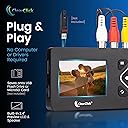
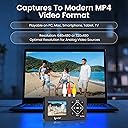
I bought this for the same reason everyone else would be. To capture old memories. I was in a band for a long time in the late 80s and 90s and I video taped almost every show we did here in Rochester, NY and other cities. To date, I have captured over 50 +/- videos. Some long lengths, some short. It really IS as easy as it is described as. Simply plug in the cables to the VCR or HIGH- camera, or what ever device you have that has video and needs to S-Video and/or AV-Cables (Red White and8 Yellow), press play on the unit, and when you want to start recording, just hit the REC red button on the device. Its a little tricky, though. Sometimes pressing it quickly will just take a snapshot picture and save it to your USB Drive. So, you may have to hold it down for like a second or two to see the counter start on the top left. When you are done, just hit the red button again and stop. Then just repeat the process.The quirk: I noticed when you start a recording a video and then stop the recording, then remove the USB stick from the unit, for some reason or other it doesn't save. No idea why. So, with that said, I tried something. I recorded a 20 minute long video, then stopped the recording process. Then, I started recording more. I did a total of three clips. Then I unplugged the POWER from the unit and then pulled the USB out and inserted it in to my laptop. All the files were there. So, that is a trick I noticed I could do to get around that one quirk.The screen IS small on the unit, but I knew that going in. All you need is an HDMI cable to attach to the unit and in to your TV or whatever. Once you do that, the video on the unit turns off and you can see the video on your big screen. Note: Everything you see on the little screen (the time-code, timer, settings at the top) are displayed on the TV as well. You just have to choose one or the other while you're capturing.The file is an .MP4 video file. What you see on the tape is what you get un-compressed. So, garbage in, garbage out. Good video in, good video captured! The file sizes it creates for a 2hr VHS tape recorded in SP mode on the VHS camera originally came to be 4GB (Gigabytes).I don't recommend using a storage drive like a NAS device or an external drive. Stick to fast USB 3.0 sticks.If you want to see the quality of what I have uploaded, you can look my YouTube page up by searching for @AmerkFlack in YouTube search bar,Have Fun!