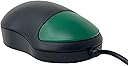
🟢 Simplify your click, amplify your focus.
The Chester Creek Ctmo is a compact, wired optical mouse featuring an 800 DPI sensor and a single large green button designed for intuitive use. Its USB connection includes a PS/2 adapter, ensuring broad compatibility with Windows and Mac operating systems. Perfectly sized for small hands, this rugged mouse is ideal for beginners or anyone seeking distraction-free navigation.


| ASIN | B001P4Q45U |
| Antenna Location | Educational Activities, General Computer Use, Gaming |
| Are Batteries Included? | No |
| Are Batteries Required | No |
| Brand | Ablenet |
| Brand Name | Ablenet |
| Button Quantity | 1 |
| Colour | Black And Green |
| Compatible Devices | Personal Computers and Laptops |
| Connectivity technology | USB |
| Customer Reviews | 4.5 out of 5 stars 491 Reviews |
| Enclosure Material | Plastic |
| Global Trade Identification Number | 00686455450210 |
| Hand Orientation | Ambidextrous |
| Hardware Platform | Personal Computer |
| Included Components | USB with PS/2 adapter |
| Item Weight | 3.2 Ounces |
| Manufacturer | Chester Greek |
| Manufacturer Part Number | CTMO |
| Model Name | AbleNet Chester One Mouse |
| Model Number | 20030800 |
| Movement Detection | Optical |
| Movement detection technology | Optical |
| Network Connectivity Technology | USB |
| Number of buttons | 1 |
| Operating System | Microsoft Windows 7, Microsoft Windows Vista, Apple MacOS X 10.1.5 or later, Microsoft Windows 98SE/2000/ME/XP/Vista/7 |
| Power Source | Corded Electric |
| Product Features | 800 dpi optical tracking, size- 3-38- long x 2-25- wide x 1-25- high |
| Range | 10.0 meters |
| Special feature | 800 dpi optical tracking, size- 3-38- long x 2-25- wide x 1-25- high |
| Style Name | Modern |
| Theme | Single Button Mouse |
| UPC | 999993900933 999994631522 033584464661 686455450210 667479068636 001910307241 151903028018 |
N**Y
How much!?
Purchased for a child with reduced motor skills. Very disappointing. 1. It's not a one button mouse. There are clearly two buttons covered by a single lump of plastic, as others have noted. 2. You can buy 5 proper mice or 3 wireless mice for the same price, yet this one failed after less than a year of light use. I've bought some pretty nasty nice in my time, but this is the first one that I've had that's failed before it was lost or the computer was replaced. Poor. Avoid.
S**R
Gute, einfache Maus
Hab die Maus für meinen Großvater gekauft. Klappt super, weil sie keine Tasten besitzt, auf die er klicken kann und ein Menü oder ähnliches öffnen kann, was ihn nur verwirrt. Bin mit der Maus sehr zufrieden, ich finde sie ist vor allem für ältere Leute gut geeignet, die nur einfache Dinge auf ihrem Rechner machen wollen.
A**Y
The best investment for my 2 yr old!
Chester mouse is an awesome little mouse! I bought this with my 2.5 yr old in mind, but I also have a 5 yr old & she likes it too. It's smaller than I pictured it, but that is better for my 2 yr old. I had been looking around for a one-button mouse that was wireless & small for her, as I have a large wireless Microsoft mouse that came with my wireless keyboard. We have two computers that the girls use, my new laptop with Vista & an older laptop with XP on it. (Both hooked up semi-permanently with a keyboard, mouse & external monitor.) Both girls would right click by accident all the time & the scrolling wheel would do strange things on the Vista machine for them. I had purchased a couple "laptop" versions of wireless mice for them and had no luck (especially with the Microsoft laptop mouse... the older one dropped it on the basement floor by accident & broke it... Microsoft did replace it for me though). After the Microsoft mouse broke, I was searching for a STURDY small mouse. I purchased a blue Logitech wireless laptop mouse & the 5 yr old seems to be doing well with it (that one's been dropped too but it seems to be more sturdy!), but the 2 yr old still had the right-click problems with it. So we put that in the basement since that's where the older one tends to play her games. I then looked into a "kids" mouse that was wireless, but it didn't work with Vista; it also had two buttons which I was trying to avoid for the 2 yr old. So I purchased Chester Mouse for Xmas for both girls, but more with the little one in mind. She absolutely loves it! She loves "Chester's" face on it at the bottom & she loves the small size! Now when she wants to use my computer, she goes right to the drawer we keep it in, saying "Own mouse, own mouse!" The wired part is not a problem at all, even with how I have my laptop set up on my desk. I also don't need to unplug my large wireless mouse at all... I simply put it out of her reach while she's playing. (Both work at the same time; what ever mouse you move moves the arrow.) I thought the 5 yr old might think it was too small & babyish, but she seems to enjoy using it as well... probably b/c she knows she gets so frustrated with the large Microsoft wireless one at my desk. Definitely worth it if you have a 2 or 3 yr old... If you are looking for a 5 or 6 yr old, you might be fine with the Logitech wireless laptop mouse or similar one, but you may need to be willing to try out a few & have some bad luck with them... I found that you need one with a non-sensitive scroll wheel (or no scroll wheel), a non-sensitive mouse-click, and a mouse that is small... it was hard to find all of these things! And keep in mind, there is a time frame to return computer mice at most stores... If you are not willing to put up with trying out (& being unsuccessful with some), then just get Chester for them, too. Purchasing Chester Mouse was also far better than trying to download & install a program that changes the mouse from one-click to two! (Yes, we tried that, too!)
S**Y
Long, high quality cord; great for preschool age kids
Bought this optical mouse because it was advertised as a children's mouse. I was looking for something with one button and a smaller overall size to accommodate a 5 year old and 2 year old's hands. Love: - The one button for clicking so the kids don't get confused by accidentally clicking the right click button. - The length of the cord. It is several feet long. - The quality of the cord itself. At the USB end as well as the mouse end there are extra bits of plastic on it to increase its durability (a nice, unexpected feature since our old cord was showing its wires at the spot where it connects to the mouse). The only thing I was a little surprised by is that I was expecting the overall size to be slightly smaller. It did not seem much smaller than regular size mous to me. My 5 year old used it with ease right from the start. My 2 year old needs help the entire time, but for the age, that is to be expected. My kids also both LOVED the little green mouse logo on the mouse.
M**E
Perfect mouse for toddlers
I love this mouse so much that I bought another one when I tore up the cord. I bought this mouse for my then 2-year-old grandson. You know when a toddler is using a mouse how they don't have the control over their fingers enough to keep from right clicking? This mouse has only one button. Plus, you can use another mouse with it, so that the little one doesn't know you are helping. And this mouse is easier to use than my mouse, because it glides across any surface easier. I play Mahjong against other online players, so I need speed. I use this mouse every time. The only reason I gave it a 4 rating is it would be nicer if it was cordless and smaller for little hands. This is a full size mouse.
C**Y
Ideal for a 2 year-old
I bought this mouse for my two year-old. She'd used one like this at our local library, and it seemed more ideally suited to her small hands. I like the size and long cord. She uses it on our laptop, and it plugs right into the USB port, but it also comes with a different type of connection to a desktop (like older mouses). The one button feature is great, so she doesn't get confused. Since she's so young, she doesn't have preference for right or left, and she can use this with either hand. Also, there is a small mouse logo at the bottom. If she turns the mouse around, I can say, "put the mouse at the bottom.." and she can do it. My hubby had a smaller, wireless mouse that he thought was fine for her, but it has 2 buttons at the top (as it's made for adults). This single button mouse is much more ideal for her, and it helps her engage in better computer use. We have her on games at that are age-appropriate, but they still require a mouse click every now and then. This mouse helps her be fully self-sufficient on her games.
Trustpilot
2 months ago
1 day ago