Buy anything from 5,000+ international stores. One checkout price. No surprise fees. Join 2M+ shoppers on Desertcart.
Desertcart purchases this item on your behalf and handles shipping, customs, and support to Austria.
🎬 Switch to brilliance — never miss a moment in 4K clarity!
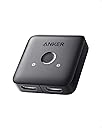
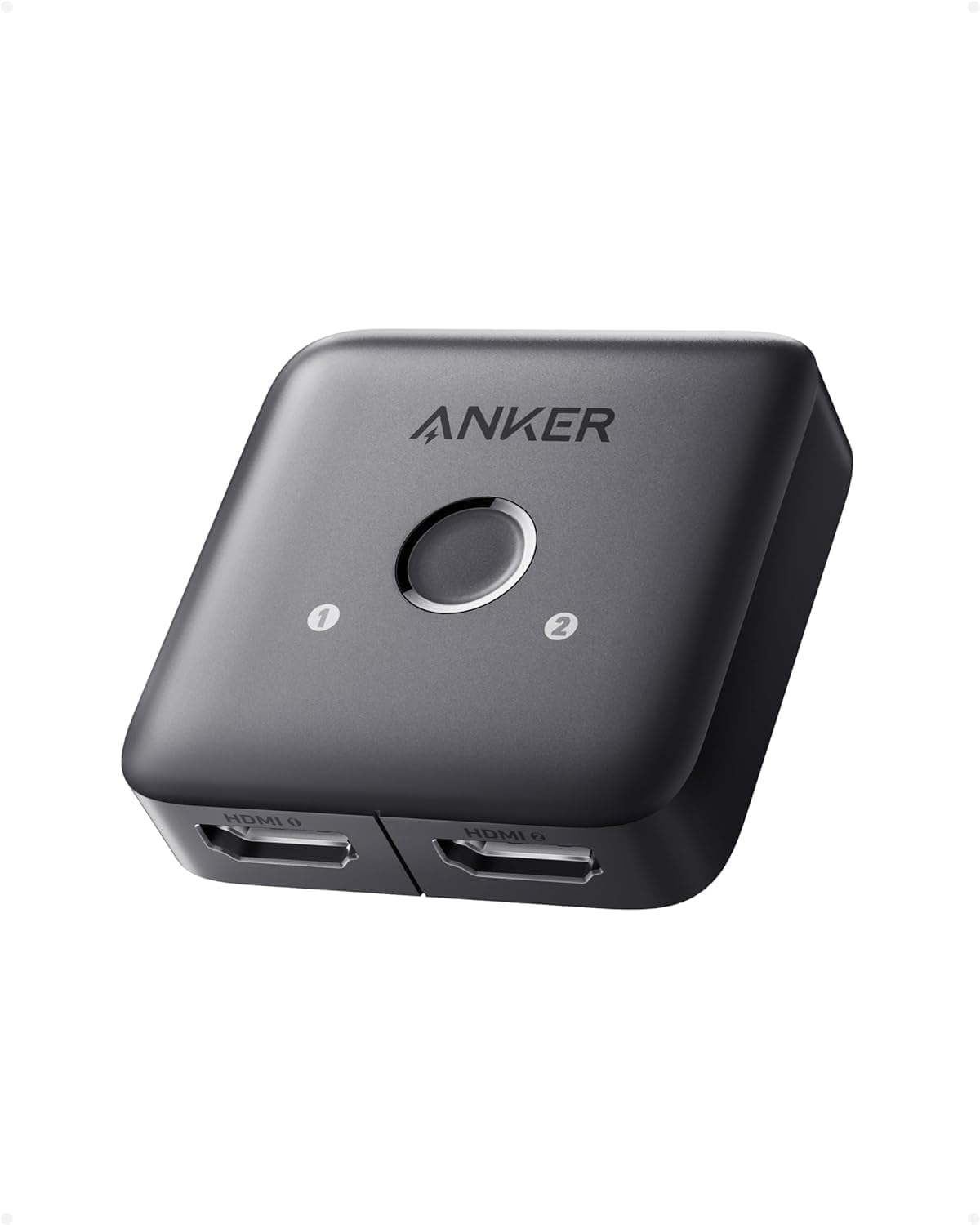
The Anker HDMI Switch is a compact, high-performance 2-in-1 HDMI switcher supporting 4K@60Hz resolution with HDR, 3D, and Dolby compatibility. Designed for seamless manual switching between devices like laptops, gaming consoles, and projectors, it offers universal compatibility and a sleek, lightweight design backed by an 18-month warranty and trusted Anker reliability.


| ASIN | B0CJT6JBM8 |
| Best Sellers Rank | #1 in Audio & Video Selector Boxes |
| Brand | Anker |
| Cable Type | HDMI |
| Color | Black |
| Compatible Devices | Laptop, Desktop |
| Connector Type | HDMI |
| Connector Type Used on Cable | HDMI |
| Customer Reviews | 4.5 out of 5 stars 4,568 Reviews |
| Item Weight | 30 Grams |
| Manufacturer | Anker |
| Mfr Part Number | A83H10A1 |
| Model Number | A83H1 |
| Number of Ports | 2 |
| UPC | 194644173678 |
| Unit Count | 1.0 Count |
T**T
Anker Does It Again!
A Quality HDMI Splitter from one of the best brands on the market, all for less than $13.00 bucks! My Denon AV receiver was down to only (1) open HDMI input and I needed to plug in both my original Nintendo Switch and Nintendo WiiU into my AV system. Needless to say, the first thing I did was do a search on Amazon to see if Anker provided a device to make this possible. I was pleased to see this compact little gem pop up at the top of my search results as "Amazon's Choice" and selling for only $12.99! The device had a ton of 5 Star reviews and that price was surprisingly low considering that this was an Anker product that often commands a well earned premium compared to the competition. After hooking everything up in less than 5 minutes, I am pleased to report that the picture and sound quality from both gaming consoles looks beautiful with no sign of any degradation. To switch between the two devices, all you need to do is push the button on the top of this splitter. Anker even provides a handy Blue LED backlit (1) and (2) above the switching button to show you which input you currently have selected which is a nice touch and adds to the premium look and feel typical of Anker products. (These little lights are not overly bright by the way and should not be a problem in most installations) The device is powered through the HDMI cables so there is no need for a power supply to this splitter which is a big plus in my book! Set up was super easy and straight forward with my full installation taking me less than 5 minutes to complete. The only thing you will need besides this device are the three HDMI cables for the two components you want to run out to your single HDMI input. In my case I picked up a couple of 1.5 foot HDMI 2.1 jumpers for less than 8 bucks to hook the two Nintendo systems into the splitter and plugged my single HDMI receiver input into the other side of this splitter and I was off to the races. I saw there were dozens of similar devices like this on Amazon, but I have become such a huge Anker products fan over the last 10 years, simply because everything I have ever bought from them has been high quality and reliable and the small premium you may pay for that Anker product is always well worth the additional investment. Not to mention that the Anker product is often the most attractive as well in terms of industrial design. And all of this for less than 13 bucks? WOW! An Easy 5 Stars!
S**S
Affordable, Practical, and Well-Built! Great job Anker!
If you're looking for an easy way to toggle the HDMI connection to your monitor from two devices, without breaking the bank, but still getting something from a reputable brand, then look no further! The Anker HDMI switch is well-built, simple to use, and gets the job done! CONTEXT: I have my Macbook Pro 16-inch connected to my external monitor, and sometimes, I want to switch to my custom PC to play video games. However, this originally required me to unplug the cables and fiddle with the back of my monitor. It was quite the hassle, but not anymore! Now, with this device, all I need to do is connect the HDMI cables and with the click of a button, it toggles between both devices. It's that easy. It's also very well-priced for what you're getting.
T**E
Another Great Device Made By Anker!
We own many different devices made by Anker, including this little HDMI switch box, and they all work very well. When our 12 year old Pioneer AV receiver located in the master bedroom died, I (ok the wife actually...lol) decided that we didn't want to spend the nearly $700 (for now anyway) to replace it with the latest equivalent Pioneer or Denon AV receiver, as we already have a great home theater setup in the living room. Instead, we purchased this 2 into 1 Anker HDMI switch box, and a Fosi 2.1 channel mini amplifier, to replace the Pioneer AV receiver. This combination works very well together for our audio and video needs in the master bedroom now. Albeit, we no longer have ARC/eARC capability in order to control everything, but such is life. This Anker HDMI switch box has a Roku Ultra and a Sony Blu-Ray player connected to the two HDMI inputs, and the single HDMI output is connected to a 40 inch Sony LED TV. Everything is connected with three, 3 foot long Silkland HDMI 2.1/w Ethernet cables. This combination of devices work flawlessly together, and the Anker HDMI switch box switches back and forth between the Roku and Blu-Ray player with no issues at all. The audio is sent from the Sony TV to the Fosi 2.1 channel amplifier via the 3.5 mm audio-out port on the TV. The video and sound both work perfectly, transmitted first through this Anker HDMI switch box, from the Roku and Blu-Ray player to the TV. This Anker HDMI switch box is very small in size, and made of plastic. It is 2-3/16 inches by 2-3/16 inches square, and 1/2 an inch tall. This Anker HDMI switch box takes up no space at all. It also changes input devices with a push of the single button centered on top of the box. There are also 2 faint (not blindingly bright) blue LED lights on top that indicate which HDMI channel the device is currently operating on. The Anker HDMI switch box requires no external power supply, and it runs very cool while operating. Also, while Anker states that this HDMI switch box will transmit 4k @ 60hz video resolution, I cannot verify this as our Sony TV is only capable of 1080p at 120hz (the Roku Ultra is 4k @ 60hz capable, however). In any case, the Anker HDMI switch box does transmit the 1080p resolution flawlessly. I can however verify that this Anker HDMI switch box will transmit both basic 5.1 Dolby and DTS surround sound audio, but most likely won't transmit the higher bandwidth Dolby Atmos or DTS-X 7.2.2 surround sound audio specifications. Overall, I am very impressed with this Anker HDMI switch box. It is small, works very well, and does not require external power to function. However, if the power is turned off to all connected devices, this Anker HDMI switch box will default back to the #1 HDMI input channel, so just make sure that the most often used input device is on that channel. I highly recommend this inexpensive Anker HDMI switch box for anyone that has two HDMI devices, and limited HDMI ports on their TV/monitor (or doesn't want multiple HDMI cables running to the TV), and doesn't want to shell out hundreds of dollars for a home theater AV receiver. Pick up one of these great Anker HDMI switch boxes today!
L**S
Cautiously Optimistic
This HDMI switcher is at least the fifth one I've purchased. Many years ago I bought one for an old tv so I could plug my Blu-ray and my laptop into the tv at the same time: this tv did not predate HDMI it was from the cusp of HDMI prevalence. And that one worked amazingly well. I then fully upgraded my system. I got a new computer that I bought a monitor for and I had bought a Nintendo Switch before that and still had a Blu-ray player in the mix. My old switcher didn't work with the new monitor so I started the process of trying different ones and none of them worked so I quit looking and accepted my fate of having to swap HDMI cables out every time I wanted to use a different device. Fast forward to last year, I bought a PS5 and really need a switcher to switch between my Switch and my PS5. First world problems. This switcher is the first to ever work with this setup. To say there weren't initial issues would be a lie. Something to really pay attention to is that it says in the setup guide to not exceed 6 feet (2 meters for our non freedom unit using friends) between the output and the input devices. To clarify, as they do in the setup guide, the HDMI cable from say my PS5 to the switcher and the HDMI cable between the switcher and my monitor should not exceed 6 feet in total length. So definitely know your cable lengths and that should solve any reception or detection issues. On the subject of detection and reception issues. My Nintendo switch had not issues. Then again the game I tested with was pretty low on the graphics front, I didn't bust out Mario Kart or Lego Star Wars to test it. The issues started with the PS5. I figured that would be my actual quality test. I fired up the PS5 and started playing Horizon Forbidden West (great game btw). Now it's a super graphics heavy game and I knew it would put the switcher through it's paces. At first, everything was good. Then out of nowhere the image starts cutting in and out. Ok, that told me something was getting overpowered or the connection was unstable. So I test a couple of HDMI cables and that's when I read that warning of not to exceed six feet. Well the PS5's HDMI cable is 5.5 feet long. So I ordered a cheep 6 inch cable that didn't work the way it was supposed to, so I swapped out the PS5's HDMI that came with it for another HDMI cable I have and everything has been great since. The graphics are true, it does as good of a job as being directly plugged into the monitor does. For me two HDMI plugs is enough and seems to handle high output graphics very well. So, it does autodetect but if you have two things running you do have to push the little button. Pushing a little button is much better than having to fish cables around behind a monitor if I want to switch consoles. It's a dream to setup it's all plug and play, no power adapters, just plug your desired HDMIs into it and plug it into your monitor or TV and your good to go: as long as all your cables work together. Hopefully it doesn't die on me in a few weeks. Had that happen before. Only four stars because I still live in trepidation of an eventual issue.
C**H
Exactly what I needed!
Works perfectly! I bought this to extend my PC display to my TV and drawing tablet. Installation was pretty straightforward, you will need three HDMI cords: one HDMI cord connected to your PC/Laptop then two outgoing to any other displays of your choosing. You cannot use both secondary displays at once it's only limited to your main display and another, although you can easily switch second displays with a click of a button on the switch itself. Transitions work smoothly and so far doesn't seem to have any latency even with using a display tablet. Overall a great product, reasonable price (under $20), small size to install anywhere needed.
M**D
Great little HDMI splitter!
I use these (3 so far) to easily switch between devices going to my TV or to my monitor. It reduces wear on my monitor's HDMI port by not having to switch cords manually, because the monitor's port is really on its last legs lol - it acts up if you look at it wrong, so this splitter is giving my monitor a new lease on life! It's perfect to be able to switch to the TV instead of the monitor with a push of a single button. Probably someday I'll consolidate the 3 into one bigger splitter since it's only 2 displays. But these little splitters do a perfect job and also have the benefit of being usable anywhere and reusable in the future (rather than committing to one big splitter that isn't as mobile if needs change.) Really happy with this product!
T**T
Good quality passive switch
A solidly built product that allows two laptops/devices to share a single large monitor. Does not require external power but indicator lights for the active input are powered by the HDMI. Works well with my two MacBooks - no issues switching but it does take a minute when switching between inputs before it displays. This is a plain switch with no bells and whistles- no remote control, or other gadgets.
P**R
Simple and Reliable HDMI Switch
Works great with my PS5 and laptop. Easy setup, seamless switching, and crystal-clear 4K 60Hz picture quality
A**R
Dobry produkt
Dobrej jakości obraz, przełączanie działa bardzo szybko.
W**L
Excelente
Entregue no prazo. Comprei a pouco tempo. Até o momento está funcionando corretamente. Um ponto negativo é que se dois dispositivos estão conectados "A" e "B" e o dispositivo "A" for desligado, ele não troca para o dispositivo "B" automaticamente. É necessário sempre apertar o botão. Como eu já sabia desse problema (lendo o comentário de outras pessoas) avaliei com 5 estrelas mas fica como sugestão de melhoria do produto.
R**O
Sin problemas!
Por el momento el producto funciona de maravilla. Es muy compacto y no requiere de una fuente de energía externa como otros dispositivos del mismo estilo. Unicamente conectas los cables hdmi y listo. No dispone de cambio automático por lo que cada vez que quieras cambiar de hdmi no basta con encender el dispositivo correspondiente, hay que pulsar el botón, el cambio es instantáneo. Respecto a la calidad de imagen no he apreciado ninguna pérdida de calidad, unicamente lo probé con mi pc, una nintendo swich y ps4, y se ven exactamente iguales. Por poner algun "pero" diría que estaría bien que tanto las entradas como la salida de hdmi estuviesen unicamente en un lado del dispositivo, al estar en varios lados puede ser algo engorroso para tenerlo a la vista. Igualmente su funcionamiento es perfecto, sin pérdida de calidad y sin problemas de imagen ni nada. Recomendado!
A**L
A good one
A good one
C**N
Successful Simplicity
Very handy, simple, and seemingly robust device. Essentially, it's a switch so should cost pence but it's well made and looks nice and appears to be one of the most reliable HDMI switches available. The simplicity of the design gives me some reassurance that it has longevity and will not fail soon or often. Think of a standard light switch - how often do you need to change those?!! The simplicity of the design is also effective because you can add any lengths of HDMI cables to suit your needs whereas the pre-wired varieties are often next-to-useless because you get few inches of cable or pre-wired fail-a-minute cable(s). Supposedly this is cheap - honestly its very costly for what it is; however, I'd say it's worth the expense because it's pounds for pennies but a rare example these days of a product that's actually suitable for purpose.
Trustpilot
3 weeks ago
2 months ago