Desertcart purchases this item on your behalf and handles shipping, customs, and support to Austria.
๐ Upgrade your Legion Go โ because storage speed and capacity wait for no one!
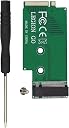
This Suckoo expansion board transforms your Lenovo Legion Go handheld by enabling the upgrade from a 2242 to a 2280 NVMe M-Key PCIe 4.0 SSD. Crafted with premium anti-blocking materials and a sunken gold-green finish, it ensures stable, high-speed data transfer and a perfect fit. The package includes all necessary tools for installation and supports seamless system cloning, making it the ultimate internal storage upgrade for power users seeking more capacity and blazing performance.
| ASIN | B0CQTNL8N9 |
| Best Sellers Rank | #112,987 in Computers ( See Top 100 in Computers ) #775 in Internal Solid State Drives |
| Brand | suckoo |
| Color | Green |
| Colour | Green |
| Compatible Devices | Handhelds |
| Compatible devices | Handhelds |
| Connector Type | NVME M.2 PCIE4.0 |
| Connector type | NVME M.2 PCIE4.0 |
| Customer Reviews | 3.7 out of 5 stars 16 Reviews |
| Finish | Glossy |
| Item Dimensions | 5.9 x 2.8 x 0.4 centimeters |
| Item Weight | 10 Grams |
| Item dimensions L x W x H | 5.9 x 2.8 x 0.4 centimeters |
| Manufacturer | suckoo |
| Mfr Part Number | suckoo 289 |
| Model Number | suckoo 289 |
| Number of Items | 1 |
| Number of Ports | 2 |
| Package Quantity | 1 |
| Power Plug Type | No Plug |
| Smart Home Compatibility | Not Smart Home Compatible |
| Specific Uses For Product | Suckoo For Legion Go Handheld 2280 Replace 2242 SSD Hard Disk Expansion High Capacity Card |
| Specific uses for product | Suckoo For Legion Go Handheld 2280 Replace 2242 SSD Hard Disk Expansion High Capacity Card |
| Warranty Type | Limited |
K**A
Works well
Install was easy- followed instructions and trimmed back cover as indicated in pictures. Using with crucial p3 4tb ssd and achieving advertised drive speeds and storage capacity. Great upgrade.
S**.
Perfect fit
Fits perfectly
C**N
Works fine.
Take your time while installing this. Watch related youtube videos. My advice is to use some sort of cooling for the new ssd that will be installed. I used silicone cooling pads. Also you need to cut out right side bottom plastic nubs from back cover of legion go to make space. Use metal cutting pliers.
A**R
Works
Works great for my legion go. Only reason I swapped it out for side one with ribbon cable was that i wanted to add copper heatsinks to my 2280 ssd. Other than that this fit great with 2 thermal pads an possibly copper plate heatsinks. Mine was a bigger type of heat sink that i had to modify to work with the 2 vented backplates that i purchased from here
J**L
Technically works, but has massive overheating issues
I did get this installed pretty easily and paired it with a Samsung 2TB 980 Pro. There was some trimming needed to the internals, all of which were on the back lid, pics attached. I can't absolutely blame the adapter, as the Legion Go is not designed to house a 2280 drive, but I eventually had to uninstall the drive and go back to the oem stock drive, the transfer speeds and absolutely intense overheating was just way too much to handle. The Legion Go constantly overheated and crashed, even when just booting up and idling with no activity. Again, not positive if it is the adapter for sure, but the drive works perfectly fine with no issues in my PS5 and my Lenovo 9i Laptop. I'm also not a huge fan of having the drive basically loose in the console, with no real way to permanently and securely mount it. While this adapter technically works, I can't recommend it as a viable solution unfortunately.
Trustpilot
1 month ago
1 month ago