Buy anything from 5,000+ international stores. One checkout price. No surprise fees. Join 2M+ shoppers on Desertcart.
Desertcart purchases this item on your behalf and handles shipping, customs, and support to Austria.
🌟 Bridge the gap, boost your network—wireless freedom redefined!
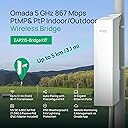
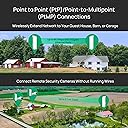
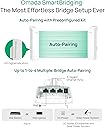
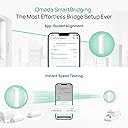
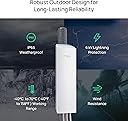
The TP-Link Omada Point to Point Wireless Bridge delivers up to 867 Mbps on the 5 GHz band with a robust 5 km range. Featuring 3 Gigabit Ethernet ports, IP65 weatherproofing, and flexible PoE or DC power options, it’s preconfigured for quick plug-and-play setup and managed seamlessly via the Omada cloud platform. Ideal for professionals seeking reliable, long-distance wireless bridging with enterprise-grade durability and remote management.


| ASIN | B0CX7X1WT2 |
| Antenna Location | Business |
| Best Sellers Rank | #2 in Computer Networking Wireless Access Points |
| Brand | TP-Link |
| Built-In Media | EAP215-Bridge KIT, Passive PoE Adapter, Power Cord, Installation Guide, Mounting Kit |
| Color | black |
| Compatible Devices | Personal Computer |
| Connectivity Protocol | Wi-Fi |
| Connectivity Technology | Wi-Fi |
| Controller Type | Software-defined Network (SDN) Controller |
| Coverage | Up to 5 km |
| Customer Reviews | 4.5 out of 5 stars 432 Reviews |
| Data Transfer Rate | 867 Megabits Per Second |
| Frequency | 5 GHz |
| Frequency Band Class | Single-Band |
| Global Trade Identification Number | 00840030709159 |
| Is Modem Compatible | No |
| Item Dimensions L x W x H | 4.8"L x 2.5"W x 8.9"H |
| Item Weight | 1.7 Pounds |
| LAN Port Bandwidth | 1000 Mbps |
| Manufacturer | TP-Link |
| Maximum Upstream Data Transfer Rate | 867 Megabits Per Second |
| Mfr Part Number | EAP215-Bridge KIT |
| Model Name | EAP215-Bridge KIT |
| Model Number | Parent EAP115-Bridge KIT |
| Number of Ports | 6 |
| Operating System | Linux |
| Other Special Features of the Product | Beamforming |
| Security Protocol | WPA2 |
| Smart Home Compatibility | Not Smart Home Compatible |
| Special Feature | Beamforming |
| UPC | 840460601542 840030709159 |
| Unit Count | 1.0 Count |
| Warranty Description | 5 Year |
| Wi-Fi Generation | Wi-Fi 5 |
| Wireless Communication Standard | 802.11ac |
| Wireless Compability | 802.11ac |
C**Y
Easy Setup and Reliable Performance
This TP-Link Omada point-to-point bridge is a very solid device. The setup process is quick and straightforward, and it can be configured in just a few minutes using a smartphone or through the IP interface on a computer. The interface is simple, and the overall installation is not difficult. One important step is to reset the unit to factory settings and create your own password, since some units may come with a default login. After proper setup, the connection is stable and reliable. A great option for a point-to-point link at a good price.
C**Y
Great value. Simple set up. Good functionality
Works great. Easy to install. Good range. Solid signal strength. Compatible with everything i needed. I set it up with the host side mounted right below another host antenna (from a different manufacturer) and was worried about interference, but haven't had any issues. It comes with POE injectors to supply power and everything is pretty straightforward. Pretty much plug and play.
B**C
Easy setup. No issues.
Deployed a pair of these to bridge my internet to a building about 700' away from our main house. Not a long distance use for this product by any means but it worked like a charm, getting comparable WiFi speeds from the attached access point as I was getting at the main house. Essentially functions as a really long ethernet cable. I have a few trees and bushes between the two stations, not line-of-sight, but that didn't seem to be any issue - at this distance anyway. No configuration issues. Pretty much just reset the username and password and I was up and running. I use the Omada app for any management of this and a couple of other Omada outdoor access points I have running. The one feature which would have been really handy is a PoE pass through (other brands do have this - not sure about other models from TP Link). This would have made power provisioning for the Omada outdoor access point I have mounted on a utility pole at the receiving end a bit easier.
M**R
Reliable and easy to set up
Fast reliable steady signal. I am transmitting/receiving about 100' connecting a router and two 8k cameras to my house. So far it has been reliable and the range has been more than adequate. These antennae are smaller and seem to be well made. This was the easiest bridge I have ever set up. NOTHING to it. Plug it up and point it. DONE. You can set up other features and use it as an access point as well. Very happy with this bridge.
C**N
Wildly impressed! Bridges shorter distances through walls!
Important to know when buying this, you still need to get the Access Point and a quality of 5 cat 5 or 6 cables (I used cat 5) This has a 3 mile range but I only needed to go about 300/400 ft to the horse barn. The reason I bought one with such a powerful range was because I wanted to see if it would bridge through walls and IT DOES! So happy with this device, though its a little wild that it doesn't come with any of the cat 5 cable required just to plug it in. So, we set one end up in our laundry room where our Verizon 5G Home Internet device is. I didnt want to have to run any cat5 through our house to mount it outside. This would have been a last resort. We mounted the other end outside the horse barn, under an attached lean-to and drilled through the tin to plug it in and mounted the Access Point that it also plugs into, inside the barn. Between the two ends of the bridge are, my closest, which is constructed out of cinder blocks(its our storm shelter), a bathroom/bedroom wall, the exterior wall and steal siding, plus the trees between, which arent much but there's a few. We've had this running two wifi cameras for a month and half now and they're running seamlessly. I love that I can just pick up my phone, day or night, regardless of where I am, and can check on the horses.
L**A
Half the price of some other point to point systems yet it was just as good if not better
So I was going to give this a four star but I changed my mind and I'm moving it to a five-star now. The reason is the price point is fantastic and the unit actually worked great. I was a little disappointed at first because the four cables for the land ethernet lines did not come with this but they're so inexpensive on Amazon I was able to get a five pack for $12. The units itself works great as you can see watch my video and it's super simple to set up. The instructions were a little harder to understand but after I got it figured out I figured I would actually post a video to help others out. It's great
T**T
Did not connect at 200 ft
The first set had one bad one that would not light up. Returned and got a second set that worked on the bench, but as soon as I separated them about 200 ft, one of them would not light up, and they would not connect. I suspect the POE injectors were too weak for the 60 ft Ethernet solid copper 24G Cat 6 wire that was going to the roof. Anyway, after several days of troubleshooting and frustration, I gave up. And I am not one to give up easy. I suppose they might have worked if I had bought a couple of high powered POE injectors to replace the ones that came with it.
B**N
They should be standard PoE
I mean... they really should be operable directly connected to a PoE switch without needing a 24v passive adapter, but it is what it is. I found a dongle thing to convert from my PoE switch to passive for the transmitting side. On the receiving end it didn't really matter, so I used their brick. Easy to set up and offers way more control over the no-name CPE bridge I replaced, which was 48v standard PoE (the only thing I really liked about it.) I have way more control with the TP-Link devices, so I can easily tweak the channel and more importantly, channel width. I don't have any neighbors near by so I like to hog all of the 5ghz (and 2.4ghz) channels with various access points and now I can do that without the no name CPE bridge getting in the way. Zero overlap. One thing to note is that these TP-Link bridges don't appear to support DFS channels... I didn't see any of those channels as an option at least. Maybe you have to modify some other setting... but from a reliability standpoint it's likely better to keep them off DFS. These EAP211's are providing connectivity to several cameras I have around my backyard and woods - two Reolink Duo 4k's, 2 x Reolink 5mp, 1 x Amcrest 5mp. Working perfectly and with my throughput needs, I was able to occupy just a sliver of wireless operating at 20mhz. The distance is maybe 75ft but I didn't want to dig for fiber or add greater lightning strike potential by burying ethernet. I already have enough lightning strike risk with the PoE cameras all over the place up in trees. @ 75ft, Ch36, 20mhz channel width: -43dbm - 0 interference per the app, 125mbps down / 140mbps up. @75ft, Ch36, 40mhz channel width: -43dbm - 0 interference per the app, 244mbps down / 270mbps up. These are eyeball aimed and we haven't yet entered autumn, so sagging branches and leaves are blocking a perfect line of sight. Performance may increase during winter, but this is plenty fast. I've elected to keep it at 20mhz given my camera bandwidth requirements and the speeds I've observed. Btw the link speed using the Omada app is accurate, I tested it against an OpenSpeedTest installation on my security camera NVR computer and it always matched. So happy to be free of the no name CPE bridge.
M**E
TP Link 215 Bridge Kit
Product fails to produce more than 80 MBps. Seems to limit speed and there’s no way to increase output.
J**S
Beware if refurbs
Refurb version. Beware! Unable to get them to work.
S**N
Top
Ótimo produto
J**.
Excellent PharOs AP replacement.
Having used the previous generation of these devices, based on the PharOs platform, these work better than I expected. Those Pharos based ones stopped working after about 8 years in the field (literally a field!) and it could have been a cable fault, but as they’re are mounted about 8m above the ground, in a location not easily accessible, we opted to replace them (and the cabling) with these, to bring them into the Omada platform that we’ve been using for the rest of the site for sometime. The build quality is good, although expect the plastic to yellow in the sun, but it won’t go brittle. They use exactly the same mounts and housing as the previous generation, so you could literally just swap the AP out, if the cabling and mount are good. They’re not certified to transmit as far, I forget the exact numbers, but I think it was about 15Km on the old platform, verses about 5Km on the new. That wasn’t a concern for us, but could be for others. The setup of the devices was a piece of cake, we installed the Main AP on the main building where the Controller is situated, and the client one at the other building. Once the client AP was powered up, using the in box PoE adaptor, they automatically paired and began working. The speed is nothing to write home about at only 800Mbps, but this is 10x the internet uplink, and only needs Kbps to function as intended. All in all they provide great value too, as you get two APs in the box, preconfigured, whereas with the previous generation, they were about 3/4 of the price, but you only got 1, and had to install software to configure them. These are also part of the Omada platform, so you get all the benefits you would expect from using that platform. In addition, the bridge APs also functioned as client APs, allowing devices to connect if there wasn’t a better positioned AP to handle the traffic.
M**Z
Requiero garantía dejo de funcionar
Se compró esta antena en diciembre y se instaló en el mes de febrero, de inicio funcionó muy bien después se desconectaba con frecuencia y ayer después de 5 meses de uso una de las antenas ya no prendió, mi pregunta es aún tiene garantía con el fabricante ?
Trustpilot
1 month ago
1 day ago