Desertcart purchases this item on your behalf and handles shipping, customs, and support to Austria.
🏷️ Organize like a pro, print like a boss!
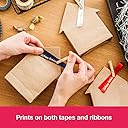
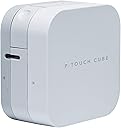
The Brother PT-P300BT P-Touch Cube is a compact, Bluetooth-enabled thermal label printer designed for professional-quality, customizable labels up to 12mm wide. Powered by batteries and controlled via a free smartphone app, it offers versatile label designs with durable, laminated tapes that withstand harsh conditions. Perfect for home and office organization, it combines portability, style, and functionality to elevate your labeling game.
| ASIN | B01N7WAC19 |
| Additional Printer Functions | Print Only |
| Best Sellers Rank | 5,179 in Business, Industry & Science ( See Top 100 in Business, Industry & Science ) 55 in Label Makers 97 in Labels & Labelling Equipment |
| Box Contents | s |
| Brand | Brother |
| Brand Name | Brother |
| Color Depth | 1 bpp |
| Colour | White |
| Compatible Cartridge | TZe |
| Compatible Devices | PC |
| Connectivity technology | Bluetooth |
| Control Method | App |
| Customer Reviews | 4.4 out of 5 stars 3,126 Reviews |
| Display Type | LCD Screen or OLED Screen or LED Display |
| Dual-sided printing | No |
| Duplex | Simplex |
| EU Spare Part Availability Duration | 3 Years |
| Global Trade Identification Number | 04977766801102 |
| Hardware Interface | Bluetooth |
| Ink Colour | black |
| Item Dimensions D x W x H | 18D x 9.5W x 19.5H centimetres |
| Item Type Name | Label printer |
| Item Weight | 0.38 Kilograms |
| Manufacturer | Brother |
| Maximum Copies Per Run | 9999 |
| Maximum Copy Resolution Black and White | Mindestens 300 dpi |
| Maximum Copy Resolution Color | 300 dpi |
| Maximum Print Resolution Black and White | 300 dots_per_inch |
| Maximum Sheet Capacity | 1 |
| Maximum Supported Paper Size | 12 mm |
| Maximum print Resolution Color | 300 dpi |
| Model Name | PT-P300BT |
| Model Number | PT-P300BT Cube |
| Model Series | PT-P300BT |
| Model name | PT-P300BT |
| Network Connectivity Technology | Bluetooth |
| Number of Drivers | 1 |
| Other Special Features of the Product | Portable,Compact |
| Output sheet capacity | 1 |
| Paper Size | 12 millimeters |
| Print media | Labels |
| Printer Output Type | Monochrome |
| Printer Resolution Horizontal in Black and White | 0.09 Centimeters |
| Printer Type | Thermal |
| Printing technology | Thermal |
| Processor Count | 1 |
| Product Warranty | 3 year manufacturer |
| Resolution | 300 x 300 |
| Special feature | Portable,Compact |
| Specific Uses For Product | Identification labels, storage labels, file and folder labels, school uniform name labels, food labels, freezer labels, plant labels, gift wrapping and wedding stationery |
| Total USB Ports | 1 |
| Warranty Type | limited warranty |
D**D
Sleek, highly portable, and incredibly easy to use
The Brother P-Touch Cube has completely transformed how I organise things around the house and office. It is a brilliant little machine that looks incredibly modern and compact, taking up virtually no space on a desk or shelf. The setup is entirely effortless thanks to the seamless Bluetooth connectivity. Instead of typing on a tiny, clunky built-in keyboard like older label makers, you do everything directly from your smartphone using Brother's intuitive app. The app gives you massive creative freedom with an excellent selection of fonts, symbols, borders, and templates, allowing you to design clean, professional-looking labels in seconds. The print quality is crisp, sharp, and smudge-proof. The fact that it includes a twelve millimetre black on white tape cassette right out of the box means you can start organising immediately. The labels themselves are highly durable, stick firmly to a variety of surfaces, and peel off cleanly without leaving a sticky residue behind. It accepts tapes up to twelve millimetres wide, which is the perfect size for file folders, spice jars, storage boxes, and cable management. Overall, its portability, fast printing, and wireless convenience make it an absolute joy to use. It is a fantastic, high-quality gadget that makes custom labelling quick and fun. Highly recommended for anyone looking to get organised!
C**H
This label printing system is brilliant - buy one now!
(No, I'm not getting paid by anyone to say this - it just seems to be the perfect answer to labelling!) This is a brilliant little label printer, rather undersold on Amazon and on the manufacturer's website. Had it been more clearly explained I would have bought it without a thought. I decided to take a chance and I'm glad I did.. It can print on label tapes of several widths, the widest being 24mm. Different label tapes are available for printing black on white and several colours, white on black, black or white on transparent labels. The cartridges are simple to slot in and out so you can easily make just one off of a number of different sizes, formats and colours. I found it easy to install and get working with my iMac, and the downloadable App is cleverly designed so you can use different fonts, styles and sizes, plus barcodes, images and borders. You can produce multi-line type (within the depth confines of the label tape you are using). The only thing I haven't yet found is how to adjust the line spacing, but it's not a big problem. The labels seem to be encapsulated in clear plastic so should be durable and waterproof. Some reviewers criticise because it wastes half an inch of label tape each time, but I suspect this is essential for the way it works, and it does give scored tab which makes it really easy to peel off the backing. Apart from that it only uses the required amount for the longest line on your label. Multi lines can be centred or justified left or right. Uses so far - for sticking onto plastic plant labels, bottle and jar labels, cables and pipe identification. Perfect around the office, kitchen, garage, workshop etc. Just brilliant!
S**Y
LABEL HEAVEN! Labels of different colours and sizes and so versatile.
I love this. I bought the Dymo one first but it really seemed like a step backwards as the print quality was poor. This is amazing, it comes with 12mm tape, but I like buying 9mm and 6mm more. Even with these sizes you can print multiple lines with a small font size. I was stunned at the number of fonts to pick from too, and on top of that you can make them bold, italic or underlined. The app is great so far. I love the fact that you can save your labels too, so you can make the same or similar ones again later. The only downside is that the cutter is obviously situated too far away from the edge of the machine as some extra tape is wasted with each label. The best way to avoid this is to print all the labels you want at the same time and not cut each one on the machine. It is an option on the app to add cut lines rather than cut the tape on the machine.
R**N
excellent label printer - not compatible with old tapes
I have many brother label printers and this is the best one for narrow labels (up to 24mm). The cartridges make laminated labels which means the printed part is below a clear layer and the layers are joined in the cartridge at time of printing. This is much better than the TZ type of label which are just one layer. The drawback is that print head and lamination roller are about 2cm apart which means you cannot print less than 2cm from the end of the label. My old ptouch printer had a manual cut button which meant the label always had 2cm white space at one end. This printer has an electric cutter which means it can cut off the 2cm part, so the label itself looks nice with no wasted space but there will be a 2cm offcut for each label printed. This P700 will not "half cut" which means the 2cm part is still attached to the label via the backing, instead the P700 totally cuts off a small blank 2cm label each time you print. Otherwise the software is great and there is a good choice of original and "compatible" labels available. I've made professional looking labels for my fuse box, cables, binders, kitchen appliances. It's so handy. *updated Nov 2019* I removed one star because some old brother TZ cartridges would not fit even though at first they look identical. This modern TZe label printer can only use TZe cartridges. Older TZ label printers can use TZ and TZe cartridges. The explanations on the internet normally say the label is the same, just different packaging using less plastic. I took this to mean the packaging the cartridge comes in but it also means the plastic box the cartridge is made of. There is an extra hole on the new cartridge and the label size sense holes are in a different place. In the photo you can see the difference between new TZe printer and old TZ printer. If you have lots of old label cartridges then they might not fit in this printer.
S**K
Great little compact labeller, easy to use and cheap
Great little labeller that is compact and easy to carry around. The app on your phone means the labeller needs no built in keyboard so makes it compact. Dead easy to set-up and use, app is a little bit clunky but does the job fine. Can be wasteful of ribbon/tape but you can easily work around this by printing multiple labels one after another and cutting manually rather than ejecting and cutting each label with the built-in cutter. To further reduce costs, buy the 3rd party label cassettes to use with it rather than the Brother originals.
D**K
Love it!
Brother PT-P700 Label Maker Excellent little printer, way better than my old Dymo one. Creates laminated labels that are durable. Lots of options for colours and sizes. Print quality is very good. Shrink tubing for cables is also available, not tried it yet. Software utility is easy to use and stable (on Mac OS), supports merging with a CSV file, which is really useful if you have lots to prepare. Overall, highly recommend. P.S. Some very minor issues with text justification when wrapping, but easy to work around.
Y**D
A Wireless Nightmare!
I purchased this printer mainly to be used wirelessley and it turned out to be a nightmare to try connecting it to my smart devices using the Wifi function! First I discovered the hard way that the Wifi function can not be turned on unless the printer is used with the power adapter! It does not work when operating the printer with battery power which is plain stupid and doesn't make any sense! Secondly and after finding out that I must use the power adapter, it still didn't help with connecting my smartphone either by Wifi Direct or with the wifi network. I followed all instructions available to use the Wifi function and even used the NFC function BUT it always fail to connect! The printer is never found on the list from the iPrint&Label app no matter how many times I tried! Initially I thought the wifi function is defective, but after searching the net, I found out this is a known issue with most Brother wireless printers! So if you need a wireless label printer, just forget this one. Not recommended at all.
S**N
Absolutely brilliant bit of kit
Absolutely brilliant bit of kit. Works perfectly and looks pretty cool on my black themed desk. Even if using it right next to the PC as I am, the fact that it's wifi saves yet another cable from the desk. I found setup for wifi very easy despite other comments. I didn't use WPS, just followed the instructions for installing it without. You just connect it via the supplied USB cable initially, then the software uses this connection to set it up for connecting via wifi. It's all automatic, all you need to know is the name of the network and the password - it sorts out everything else automatically. Then disconnect the USB cable, leaving it connected to the wifi network ready for use by as many other computers as you like. Once it's setup, you can just skip all the USB steps on further computers and the installer will find it straight away. I'm not usually the type to suffer from brand loyalty, but I now have two Brother laser printers plus this and a Brother paper thermal label printer too for running my small business. They've all been faultlessly reliable over the years I've had them, so they are now my brand of choice, in fact I wouldn't bother looking at the alternatives. Having said that, I'm far from the ideal loyal customer as I find that the equivalent unbranded labels are every bit as good as the branded ones but cost a fraction of the price.
N**Z
Nur gut!
Seit ich den Brother P700 bei mir im Büro habe, ist Beschriften das allergrößte Vergnügen. Einfach, sauber, schnell... leicht zu installieren. Ich hatte früher mit den handelsüblichen Beschriftungsgeräten gearbeitet. Das war kein echte Spaß und schön war anders. Für alle die viel und vor allem einheitlich beschriften müssen, ein Muss.
A**T
Super pratique
Fais le job et franchement bien. Rien a voir avec une machine avec clavier incorporé. Là on fait tout d'un smartphone et franchement c'est top . On change de monde. Je recommande vivement
J**A
Muy buen producto
Una buena impresora. Robusta, funciona muy bien con cintas marca labelwell y tiene un aplicación muy intuitiva y fácil de usar.
M**R
Best small label printer.
This is a brilliant little label printer..
S**R
Super Gerät
War erst vom Preis etwas geschockt, aber würde es wieder kaufen. Die Software könnte etwas besser sein. Die Aufkleber blassen nicht aus wie bei anderen Etikettierer. Hatte nämlich einen Dymo und da war das Etikett keine 2 Wochen am Briefkasten erkenntlich. Diese TZe Bänder sind UV-beständig und haften richtig gut, was ich benötige, da ich die Etikette geschäftlich auch im freien anbringen muss. Weiterer Pluspunkt ist, dass das Gerät per Akku funktioniert. Auch gut ist das es alle möglichen Größen und Farben gibt. Nachteil jedoch man hat für jede Größe und Farbe eine weitere Kassette herum liegen. Würde aver jeder Zeit wieder auf solch einen Drucker zurückgreifen.
Trustpilot
2 months ago
4 days ago