Desertcart purchases this item on your behalf and handles shipping, customs, and support to Austria.
💼 Store More, Work Faster, Anywhere You Go!
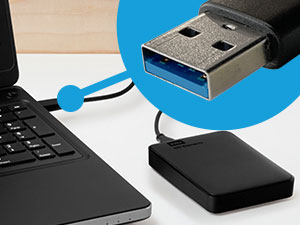
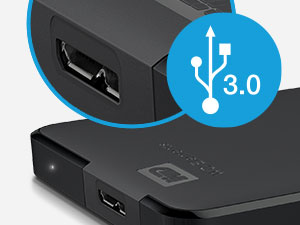
The WD 6TB Elements Portable External Hard Drive delivers massive, reliable storage in a sleek 2.5-inch portable design. Featuring USB 3.2 Gen 1 connectivity for rapid 5Gbps data transfers, it offers effortless plug-and-play compatibility with both Windows and Mac systems. Perfect for professionals needing expansive, on-the-go storage, this drive combines Western Digital’s trusted durability with a 2-year warranty and a stellar 4.7-star user rating, making it the ultimate choice for seamless backup and media management.


| ASIN | B0D3GW9R4G |
| Additional Features | Portable |
| Best Sellers Rank | #4 in External Hard Drives |
| Brand | Western Digital |
| Built-In Media | SuperSpeed USB-A cable (5Gbps), Quick install guide, WD Elements Portable hard drive |
| Cache Memory Installed Size | 6 |
| Color | Black |
| Compatible Devices | Desktop, Laptop, Tablet |
| Connectivity Technology | USB |
| Customer Package Type | Standard Packaging |
| Customer Reviews | 4.7 out of 5 stars 164,889 Reviews |
| Data Transfer Rate | 1 megabytes_per_second |
| Digital Storage Capacity | 6 TB |
| Enclosure Material | Plastic |
| Form Factor | 2.5-inch |
| Hard Disk Average Latency | 1 milliseconds |
| Hard Disk Description | Mechanical Hard Disk |
| Hard Disk Form Factor | 2.5 inches |
| Hard Disk Interface | USB 3.2 |
| Hard Disk Rotational Speed | 1 |
| Hard-Drive Size | 6 TB |
| Hardware Connectivity | USB 3.0 |
| Hardware Platform | WD |
| Installation Type | External Hard Drive |
| Item Dimensions L x W x Thickness | 8"L x 3"W x 6"Th |
| Item Weight | 44.8 g |
| Manufacturer | Western Digital Technologies, Inc. |
| Media Speed | [50-150 MB/s] |
| Mfr Part Number | WDBHJS0060BBK-WESN |
| Model Name | Elements Desktop |
| Model Number | WDBHJS0060BBK-WESN |
| Number of Items | 1 |
| Read Speed | 1050 megabytes_per_second |
| Special Feature | Portable |
| Specific Uses For Product | Multimedia, Personal |
| UPC | 718037904313 |
| Unit Count | 1 Count |
| Warranty Description | 2 year Limited Warranty |
R**Y
Seamless Storage Solution at an Unbeatable Price
The WD Elements Portable External Hard Drive is a fantastic choice for Mac Air users seeking reliable storage without breaking the bank! It's incredibly user-friendly with true plug-and-play functionality, solid build quality that inspires confidence in (data's safety) encryption and comes at an accessible price point and outstanding value. Whether you're backing up important files, storing your media library, or need extra space for creative projects, this drive handles it all with ease. A smart investment that simply works.
A**S
Reliable External Storage - Perfect Capacity and Performance!
The WD 2TB Elements Portable External Hard Drive has been exactly what I needed for reliable, high-capacity storage! This drive delivers outstanding performance and convenience for backing up files, expanding storage, and transferring data. The 2TB capacity is perfect for storing massive amounts of photos, videos, documents, and backup files. Having this much portable storage has eliminated my constant worry about running out of space on my laptop. The USB 3.2 Gen 1/USB 3.0 connectivity provides excellent transfer speeds that make backing up large files quick and efficient. No more waiting hours for file transfers - this drive moves data fast enough for practical daily use. The portable design is ideal - compact enough to slip into a laptop bag but substantial enough to feel durable and reliable. The sleek black finish looks professional and the size is perfect for travel or desktop use. What sets WD apart is their proven reliability. This drive has performed flawlessly for months of regular use without any errors, corruption, or performance degradation. Western Digital's reputation for quality storage is well-deserved. The plug-and-play functionality works perfectly with Windows systems - no software installation or complicated setup required. Simply connect and start using immediately for seamless storage expansion. This external drive has provided peace of mind for data backup and practical storage expansion. Outstanding reliability, capacity, and performance at an excellent value. Highly recommend for anyone needing dependable external storage!
2**S
Worked Great on a Brand New 2022 MacBook Pro with the M1 Pro Chip
Worked Great on a brand new 2022 MacBook Pro with the M1 Pro Chip. It's amazing how cheap HDDs are now. I will continue buying them until the price of external SDDs goes down. You can literally get twice as much storage capacity with HDDs for half the price of a SSD. As always, with external drives used to do backups on Mac computers, you must reformat the disk before doing the backup and this WD is no different. Reformatting is a very easy task as always, and it takes no more than a few minutes to get the external drive ready for your Mac. However, I ran into some issues with Time Machine on the newest version of Monterey (the one that came installed in the laptop). It seems like it no matter what format you choose when reformatting the external drive, Time Machine automatically reformats the drive on its own to the new Apple File System (APFS) when you do your first backup. Not only that, but once Time Machine reformats the drive to APFS and completes the backup, then it blocks the HDD and you cannot use it to save anything else in it, drop files, etc. It basically locks the drive for backups only. Oh, and with the APFS format you cannot use the drive to backup older Apple computers. I NEVER had this happened in any of my Apple computers before. I tried a few other HDDs from other brands to ensure this was not an issue of the WD brand. They all did the same, so I knew it was an Apple software glitch issue. It took several calls to Apple to figure out that yes, Time Machine does this. The only way around this issue is to create a "new volume" in the external HDD. Then you can use the separate volume to save other things, drop files, etc. You could create as many volumes as you can, and the APFS makes it very easy. When you plug the HDD, the volume for the backup pops on your desktop (Time Machine color), along with any other volumes you created (yellow color). Hope this saves somebody out there a lot of frustration and aggravation trying to figure out what the issue with Time Machine and external drives using the newest Monterey version. I also hope Apple fixes this problem. It makes no sense that you select a specific reformat option but then Time Machine ignores it and reformats to APFS against your wish and block the drive in the process. The WD external drive works great. It is a really great value for 2TBs of storage, and it is a very small and lightweight drive. All the issues mentioned are specific to the Apple operating system that would happen with any HDD of any brand.
B**S
Fast, Reliable, and Perfect for Storage on the Go
The WD 2TB Elements Portable External Hard Drive completely exceeded my expectations. Setup was effortless — just plug in and it’s ready for both PC and Mac. Transfer speeds via USB 3.2/3.0 are impressively fast, and the compact design makes it easy to take anywhere. The 2TB capacity is perfect for backups, media libraries, or large project files. Durable, dependable, and thoughtfully designed — exactly the kind of storage solution I love testing and recommending.
K**N
Product works fantastically, but a warning to other users.
I want to clarify, this HD does exactly what it's meant to, exceptionally. It is plug n play, it requires no formatting or complicated software, its transfer rates are great & it has a rugged protective design that means it'll last a long time. BUT I want to let folks know, specifically, if they're utilizing USB wireless devices such as a keyboard, mouse, etc; You must plug this in as far away from the recievers for those devices as possible. In fact, if you have a laptop, I recommend using a far longer cord & putting the HD as far away as the Hard Drive allows. To be clear, I'm not sure this is a real manufacturing or producer error, this just seems like signal interference inherent to the power output of the hard drive. It WILL cause your mouse, keyboard, etc to lag. It can cause wireless connections to drop. If you have a little plug in USB reciever for any device you use on your computer, move it to the opposite side from the HD. In fact, try to keep the HD out of the line of signal entirely AND as far away from it as possible. If you plug a WD Elements Portable External Hard Drive & experience: - Lag of keyboard input - Lag of wireless mouse input - Intermittent or disruptive wireless disconnections - Signal or Detection dropout of a microphone or webcam using a wireless reciever It is because of the WD Elements Portable Hard Drive. It is not an error, it's not malfunctioning, it is just disrupting the signal. Get a long USB transfer cord, or turn your laptop, or MOVE your wireless recievers so the HD is not between them & the device. I swear, it's working fine, it's super easy to work around, you do not need to refund/return, etc. The product is great, I'm just writing this to thank the seller & also to make sure anyone googling this has a clear, reliable, understandable result in search as to what to do. Your computer isn't dying, nothing's wrong, it's just way too much in the airways.
Z**L
Good product
Easy setup, durable, reliable
C**R
Works as expected
Great backup drive to backup a desktop computer.
A**R
Seems to be Excellent!
I'm writing this review as my ELEMENTS 2T is still in the process of backing up my Dell Windows 7 laptop. I had an HP 1T external hard drive, but it's chock full. So anyway, I have a few things to say about the set up that may help someone else who's replacing a smaller external hard drive, and/or whose PC or laptop isn't the lastest OS. (1) when I plugged the new Elements 2T hard drive into the very same USB that the old HP external hard drive was plugged into, my new Elements hard drive began beeping. WTH? The complete lack of instructions had me in a frazzle. The box says Plug And Play, right? (2) the new Elements hard drive wasn't being recognized either in Computer. (2) I unplugged it from that extension port and plugged it directly into a USB port of the laptop. No beeping. (3) Still, when I went to the Backup and Restore feature, the old HP was still the recognized external hard drive, although is said disconnected. (4) Tinker tinker. Couldn't find anything that said "start backup now". ??? (4) Went back to Computer. Still not recognizing the new Elements hard drive. (5) Went back to Backup and Restore....VOILA! Finally the new external hard drive was recognized and the back up was in progress. The only thing I can say is, IT TAKES A FEW MINUTES for an old laptop, an old OS, to get with the program. (5) Old laptops have USB ports that are kaput. That's why I'm using a USB adapter, one end plugs into an operable USB port, the other end allows 4 USB's to be plugged in. I don't think this new ELEMENTS hard drive liked my adapter. It wants it's own port. The old HP hard drive didn't care. (6) So now been 4 hours, and my laptop is halfway backed up. Afterall, there's at least 1T of stuff to Back up.
D**A
Great hard drive. Everything is great about it. Go for it.
This is a great hard drive. I previously had a 1 TB hard drive of WD and that worked really fine. That is why I decided to go for a 2TB hard drive of WD. Though, Seagate hard drives are much better than WD because they are thinner and they sustain for a long time like WD. I purchased it @Rs. 5599. Pros- 1. WD is a very reliable name in the field of hard drives. So it is reliable. 2. 2-year warranty. 3. small in size. 4. Reading speed is amazing. I got around 150 MBps/ 1.2 Mbps while reading. (Data was a movie and USB port was USB 3.0) 5. Writing speed is also great. I got around 55 MBps/ 440 Mbps while writing on the hard drive. (Data was a movie and USB port was USB 3.0) 6. The speed of reading and writing on USB 2.0 ports is also great. 7. USB 3.0 cable is already included in the package. So you don't need to purchase a USB 3.0 cable separately. 8. The length of the cable is enough for normal usage. 9. The product is original. So you can get is registered on WD website. You will also get your warranty from there. 10. Cheaper than Seagate models. (in general) Cons- 1. If you are in need of a long USB 3.0 cable then you will be disappointed. The length of the cable is just enough for normal usage. 2. The hard drive is somewhat thick. You will get a Seagate hard drive of the same capacity to be slimmer. Final comment- If the price is not a big issue for you and you want a slimmer hard drive then go for Seagate hard drive. Else this is certainly one of the best choices.
A**R
هارد ممتاز
شغال كويس وطبيعي ومعنديش مشاكل فيه
A**R
Good packaging ,fast service
Wd after a day delivery. I use just several days. I can say till now its good performance ...
E**8
Perfetto come memoria esterna per PS4 — affidabile anche dopo anni!
Ho acquistato questo qualche anno fa per usarlo come memoria esterna sulla mia PS4, e devo dire che è stato un acquisto davvero azzeccato. Da allora lo uso regolarmente per installare giochi, salvare dati e aggiornamenti, e non ha mai dato il minimo problema. La compatibilità con la console è perfetta: basta collegarlo e formattarlo in pochi secondi, e la PS4 lo riconosce subito senza complicazioni. Le prestazioni sono ottime, i giochi si caricano velocemente e non ho mai riscontrato blocchi o rallentamenti. Anche a distanza di anni continua a funzionare come il primo giorno, segno che la qualità WD si fa sentire. Inoltre è piccolo e leggero , quindi non dà fastidio nemmeno quando resta collegato in modo permanente. All’epoca l’avevo pagato a un ottimo prezzo, e col tempo si è dimostrato un acquisto più che valido. In sintesi: affidabile, capiente e perfetto per PS4, consigliato a chi vuole espandere la memoria senza complicazioni.
L**L
Muito bom
Muito bom!
Trustpilot
1 day ago
2 weeks ago