Buy anything from 5,000+ international stores. One checkout price. No surprise fees. Join 2M+ shoppers on Desertcart.
Desertcart purchases this item on your behalf and handles shipping, customs, and support to Austria.
🖨️ Print smart, live vibrant — your home office MVP!
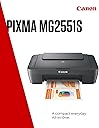
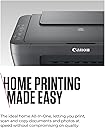
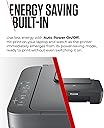
The Canon PIXMA MG2551S is a compact, energy-efficient all-in-one inkjet printer designed for home use. It delivers high-resolution prints up to 4800 x 600 dpi, supports automatic duplex printing, and connects via USB 2.0 for reliable wired performance. Featuring Canon’s FINE cartridges and ChromaLife100 ink technology, it produces vivid, long-lasting photos and documents. With near-silent operation and auto power on/off, it’s optimized for convenience and cost-conscious users seeking quality and efficiency in one device.


| ASIN | B0D47NK73H |
| Additional Printer Functions | All In One |
| B&W Pages per Minute | 8 ppm |
| Best Sellers Rank | 4,145 in Computers & Accessories ( See Top 100 in Computers & Accessories ) 22 in All-In-One Printers |
| Box Contents | Canon PIXMA MG2551S, FINE Cartridges, Power Cord, Setup CD-ROM (CD only for Windows – Mac drivers available online), Manuals and other documents |
| Brand | Canon |
| Brand Name | Canon |
| Color Depth | 24 bits_per_pixel |
| Color Pages per Minute | 4 ppm |
| Colour | Black |
| Compatible Cartridge | PG-545 (Black), CL-546 (Colour), PG-545XL (Black), CL-546XL (Colour) |
| Compatible Devices | Laptops, PC, Smartphones |
| Connectivity technology | USB |
| Control Method | App |
| Customer Reviews | 4.0 out of 5 stars 1,149 Reviews |
| Dual-sided printing | Yes |
| Duplex | Automatic |
| Hardware Interface | USB 2.0 |
| Ink Colour | Black |
| Item Dimensions D x W x H | 30.6D x 42.6W x 14.5H centimetres |
| Item Type Name | Multifunction Printer |
| Item Weight | 3.5 Kilograms |
| Manufacturer | Canon |
| Maximum Copies Per Run | 21 |
| Maximum Copy Resolution Black and White | 600 dpi |
| Maximum Copy Resolution Color | 4800 x 600 dpi |
| Maximum Print Resolution Black and White | 4800 dpi |
| Maximum Sheet Capacity | 60 |
| Maximum Supported Paper Size | A4 |
| Maximum print Resolution Color | 4800 x 600 dpi |
| Model Name | PIXMA MG2551S |
| Model Number | PIXMA MG2551S |
| Model Series | PIXMA MG2551S |
| Model name | PIXMA MG2551S |
| Network Connectivity Technology | USB |
| Number of Trays | 1 |
| Other Special Features of the Product | Auto Power On, Lightweight |
| Output sheet capacity | 60 |
| Paper Size | 216 millimeters |
| Power Consumption Size | 9 Watts |
| Print media | Envelopes, Glossy photo paper, Paper (plain) |
| Printer Output Type | Colour |
| Printer Resolution Horizontal in Black and White | 12192 Centimeters |
| Printer Type | Inkjet |
| Printing technology | Inkjet |
| Product Warranty | 2 Year Manufacturer |
| Resolution | 4800 x 600 |
| Scanner Type | Sheetfed |
| Special feature | Auto Power On, Lightweight |
| Specific Uses For Product | Home |
| Total USB 2.0 Ports | 1 |
| Total USB Ports | 1 |
| Unit Count | 1.0 count |
| Warranty Type | Limited |
| Wattage | 9 watts |
M**E
Nice and simple
Does not deserve all the bad reviews. Yes it is not Wi-Fi, but it does say it is not on product page and it does not come with USB cable and that should have been noted on product page for sure. I personally have lots of those cables all over the place but in this case I just unplugged old printer and plugged this one. For a bit less than replacing just the ink for my old printer I got this one and I have to say am very happy with the print quality and how easy it was to install it after following the instructions on my pc. Download driver and software from Canon site, Install, turn printer on and follow the steps.
D**E
Good Value Home Printer/Copier/Scanner
Arrived well packaged. As clearly stated, this model doesn't come with the necessary usb connection lead, which you'll need to purchase separately if you don't already have one. Unpacking and preparing the unit is simple and is explained by a diagram sheet. Once the power is switched on, fit the two ink cartridges and then enter the supplied Instalation CD into your laptop/pc and follow the installation instructions. The unit requires an alignment test, and a print test before use...the onscreen directions are clear to follow. Print quality is as good as my previous model PIXMA MP230 model, and colours are clear and well defined; though I haven't tested with gloss/photo paper with this model, previous experience with PIXMA photograph quality copying was excellent. I note some reviews found the unit quite noisy but, I've not found that to be the case, nor any issues with double sided printing as one review mentioned. It's easy to use and there's both an onscreen ''Quick Menu'' for basic usages and a more extensive onscreen manual which offers editing features and more detailed settings, as well as maintenance function controls. Overall it's good value and meets most if not all home use needs. My PIXMA MP230 lasted 13 years of regular use, and I've no reason to expect any less of the PIXMA MG2551S.
P**A
Ок.
There was no cable between the printer and the laptop/computer included. I think it should come with a cable.
D**H
Be careful when buying used.
Okay, here's the situation. I needed a good, hardworking printer for my lil buddies birthday, don't judge me, it's what she asked for. I've bought a couple of these in the past, and they've been fantastic workhorses, no complaints at all, and I'm sure this one will be the same. So why the one star review? Because although I bought it used the only problem listed with it was some damage to the box, and possibly to the body. The box was just as you'd expect, and the damage to the body was minor, it looks like someone melted the top a little, just enough to justify sending it back without using it. Believe me, this printer hadn't been used. The real problem with it was that the ink had been taken, and as this wasn't mentioned at all in the listing I can only assume that Amazon hadn't checked it thoroughly when it was returned. So, rather than send it back, get another I've bought ink, run it through it and voila, works perfectly. The ink was more expensive than the printer was, and I really, really resent having to buy what is essentially a refill straight off the bat. So TL:DR If thinking of buying this used, don't, the ink will probably be missing and you'll be as mad as I was.
E**A
A Brilliant, Super Easy To Use Printer For A Great Price!
I purchased this printer as I had a few documents piling up on my computer that needed printing and I didn't fancy the risk of getting in trouble for using my dad's printer, I needed something simple and convenient without all the high tech bells and whistles that wouldn't break the bank and this looked to be the ideal one, especially as it was on sale for an incredible £19.99 down from £34.99 at the time of my purchase. However, with a measly rating of only 3.7 stars, I feared that it was too good to be true, however it turns out that the reason for the low rating was simply because some people can't read the description! 🫣 Needless to say, I'm very impressed with the overall performance of this printer and I'm glad that I purchased it as I was initially put off by the low rating and was about to buy a different Canon one for £40 instead, the main thing that you need to be aware of when purchasing is that the USB connection cable that's required to be able to print ISN'T included and you'll need to purchase it separately which of course it'd be better if it was included but it's such a non-issue as there's plenty of cables available to buy on here for as little as £3. I'd personally much rather spend a few extra pounds getting the cable rather than having to mess around trying to get a Wi-Fi printer to connect as speaking from experience, they're a pain to use! Alongside the printer, you get 2x free ink cartridges (Black & Colour) included which is a huge bonus and just adds to the superb value, again I'd much rather have to buy the cable than the ink separately. Unlike a lot of other modern printers which insist on forcing you into paying for subscriptions to get more ink when you run out, you can just buy new cartridges (which cost less than £20) for this printer as and when you need them which suits me a lot better as I'll only be using the printer on the odd occasion to print off documents and postage labels so I don't need to be tied down with a subscription that sends me new ink every month or so. You also get multiple instruction manuals and the driver installation disc so you can get everything set up straight away, the only downside that I could give this printer is that the installation disc is only compatible with Windows based computers, if you're a Mac user like me, you have to go on the Canon website and manually install the driver yourself but it's super easy to find and quick to download so it's not too big of a deal. The printer is very light, portable, relatively small sized and easy to store unlike most printers which are large, heavy, bulky and take up a lot of space, making it ideal for home users like me and students. The design is pretty basic and nothing particularly interesting to look at but it's very accessible as the paper simply sits in the top then comes out printed at the bottom which I think is much better than having to shove it all into a small drawer which doesn't always want to close and can easily break which then makes the printer unusable. There's also a built in copier and scanner at the top which just makes it even better and I'm sure it'll come in handy for me in the future. The initial set up was incredibly quick and easy, I'd got everything done (including the installation of the driver) and was printing in less than 15 minutes which I'd say is impressive for someone who usually struggles to set up appliances like this. The step by step picture instructions were clear and easy to follow and the driver installation on my Mac was rapid, I had absolutely no problems doing it and overall there's not really an awful lot that you need to do unlike a Wi-Fi printer which can take a frustratingly long time to get set up. I'm yet to print something off with pictures on it so I can see what the photo quality is like but the text document I printed looked clear, bold and decent quality, there was a few random ink marks but I'm not too concerned about this as it was my first print job and consisted of 24 pages. The printing process was pretty quick and quiet unlike my dad's HP printer which makes a horrendous amount of noise. Overall, I'm very pleased with this printer and highly recommend it, especially to those who just want a quick, fuss free, plug in and go printing experience. I've never used a printer that's been half as easy as this one and for only £20, the quality I got was fantastic, just remember to buy your connection cable and you're good to go!
T**A
No usb cable supplied within the box
In the box you get the printer, power cable, manual, software cd-rom and ink cartridges (black and colour). The drivers on a cd-rom feels a little outdated. The drivers can be downloaded from the canon website. The printer itself is easy to setup. Easy to use and prints well. Overall good value for £30. What I don’t get, why is there no usb cable supplied in the box, which you need to connect to a pc. The printer drivers are provided on physical media, but not the cable you actually need to use the printer. In case someone doesn’t know, I’ve attached a photo of the usb cable you need to connect the printer to a pc.
D**N
Good value.
The third one we have bought. It is perfect and reliable. It's strangely cheaper to buy a new one with free inks than to buy bona fide ink refills. So buy a new one each time and give the old one to a charity shop for recycling.
C**Y
Crisp, clear print and great value plug in printer
Great plug in printer. It came with two ink cartridges. It has a plug for the electrical socket and uses a USB plug to connect to your computer (the USB is not supplied). You literally plug in to the elctrical supply and computer, put the cartridges in and set the computer up to recognise a new printer is being installed and then just print. It works very well and for £19.99 (special price) it is a fantastic buy - so good I've bought a back up while prices are low. I have it working with a Mac. You can also scan items with it and just print in black or with colour. This is not a WIFI printer as explained in the description.
K**A
Drucker
Einfach super danke sehr empfehlenswert
C**N
Satisfaisant !
Bonne imprimante, petite et légère, livrée avec deux cartouches d'encre (noir et couleur) et le câble d'alimentation. Le câble USB n'est pas fourni. Facile à installer même sans utiliser le CD rom. Apparemment le rapport qualité prix est satisfaisant. De plus la livraison a été plus rapide que prévue
P**U
Elle marche bien
J'ai reçu l'imprimante en bon état. Elle marche bien.
B**.
Praktisches Gerät
Multifunktionales, praktisches Gerät. Gutes Preis-Leistungs-Verhältnis.
N**A
Très bien
Très bien
Trustpilot
2 weeks ago
3 days ago