


🚀 Elevate your edge with AI-powered speed and style
The 2024 Surface Laptop combines a powerful Snapdragon X Plus 10-core processor with 16GB RAM and a 256GB SSD, delivering faster performance than the MacBook Air M3. Featuring a 13.8-inch HDR touchscreen and up to 20 hours of battery life, this Windows 11 Copilot+ PC is designed for professionals seeking cutting-edge AI integration, portability, and all-day productivity in a sleek platinum aluminum frame.


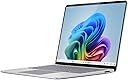
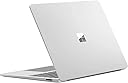



| ASIN | B0CXKYTQS2 |
| Audio Output Type | Headphones |
| Audio features | Omnisonic Speakers with Dolby Atmos |
| Automatic Backup Software Included | 13.8" Touchscreen |
| Battery Average Life Standby | 22 hours |
| Battery Cell Type | Lithium Ion |
| Battery Life | 20 hours |
| Best Sellers Rank | #1,019 in Computers & Accessories ( See Top 100 in Computers & Accessories ) #96 in Traditional Laptop Computers |
| Biometric Security Feature | Face Recognition |
| Bluetooth Version | 5.4 |
| Brand | Microsoft |
| Built-In Media | 39W PSU, Laptop, QSG, Safety & Warranty documents |
| CPU L3 Cache | 42 MB |
| CPU Model | Snapdragon X Plus |
| CPU Model Generation | X Plus |
| CPU Model Number | X1P-64-100 |
| CPU Model Speed Maximum | 3.4 GHz |
| Cache Memory Installed Size | 42 MB |
| Camera Description | Front |
| Cellular Technology | 5G |
| Chipset Type | Qualcomm |
| Color | Platinum |
| Compatible Devices | USB devices, Wi-Fi enabled devices, Bluetooth enabled devices |
| Connectivity Technology | Bluetooth, Wi-Fi |
| Control Method | Touch |
| Customer Reviews | 4.2 out of 5 stars 143 Reviews |
| Display Resolution Maximum | 2304x1536 pixels |
| Display Technology | LCD |
| Display Type | PixelSense |
| Form Factor | Clamshell |
| Global Trade Identification Number | 00196388277469 |
| Graphics Coprocessor | Qualcomm Adreno Graphics |
| Graphics Description | Integrated |
| Graphics Ram Type | DDR5 SDRAM |
| Hard Disk Description | SSD |
| Hard Disk Interface | Solid State |
| Hard Disk Size | 256 GB |
| Hard-Drive Size | 256 GB |
| Hardware Interface | USB |
| Human-Interface Input | Touchscreen |
| Item Dimensions L x W x Thickness | 11.85"L x 8.67"W x 0.69"Th |
| Item Weight | 3 pounds |
| Keyboard Description | Built-In Chiclet-Style Keyboard with Backlight |
| Keyboard Layout | QWERTY |
| Lithium-Battery Energy Content | 54.12 watt-hours |
| Manufacturer | Microsoft |
| Maximum Display Brightness | 600 nit |
| Memory Speed | 1250 MHz |
| Microphone Form Factor | Built-In |
| Model Name | Surface Laptop |
| Model Number | ZGJ-00001 |
| Model Year | 2024 |
| Native Resolution | 2304 x 1536 |
| Notebook Pointing Device Description | Touchpad |
| Number of Ports | 3 |
| Operating System | Windows 11 Home |
| Other Special Features of the Product | Lightweight, Thin, Touchscreen |
| Power Device | 39W Surface power supply |
| Processor Brand | Qualcomm |
| Processor Count | 1 |
| Processor Series | Snapdragon X Plus |
| RAM Memory Installed | 16 GB |
| RAM Memory Slot Total Count | 1 |
| RAM Memory Technology | LPDDR5X |
| RAM Type | DDR5 SDRAM |
| Ram Memory Maximum Size | 16 GB |
| Resolution | 2304 x 1536 |
| Screen Finish | Glossy |
| Screen Size | 13.8 inches |
| Speaker Description | Built-In Speaker |
| Specific Uses For Product | Business |
| Total Usb Ports | 3 |
| Touch Screen Type | In-Cell/On-Cell |
| UPC | 196388277469 |
| Unit Count | 1 Count |
| Video Output | DisplayPort |
| Video Processor | Qualcomm |
| Voltage | 26 volts |
| Warranty Description | 1 year manufacturer |
| Wi-Fi Generation | Wi-Fi 7 |
| Wireless Compability | 802.11.be, Bluetooth |
| Wireless Technology | Bluetooth, Wi-Fi |
J**9
Ideal for travel with super long battery-life
While I have a current model MacBook, I have always preferred the Windows operating system and the Surface Laptop implements it wonderfully. It has a perfect dimensions with a screen aspect ratio of 3:2 - just as wide as most 13.5 inch [the Surface has a 13.8 inch screen] laptops but with a taller screen. I find that this ratio hits the sweet spot. The case is solid magnesium-aluminum alloy with no flex. The keyboard is also very solid with a really good feel on pressing the keys. This unit has the new Windows AI key but it just replaces a redundant key so that skin keyboard covers for older Surface Laptops will fit this one as well. As with all recent Surface Laptops, the case design is the most elegant of any laptop that I have had. The slots for air ventilation and sound from the internal speakers are hidden. There are no laptops with as clean a case as this one. The new Snapdragon X Plus processor is ultra-fast and power-efficient. It can now be left on indefinitely like Apple iPads or MacBooks, with little lost of battery charge. I just let it go to sleep and when I return to work on it, it uses the Windows Hello IR camera for instant back-to-work. It continues to use the Microsoft magnetic charging system that I like since it is designed to detach from the computer when the cable is pulled. I notice that some will complain about proprietary charging connectors but they overlook the fact that this Surface Laptop can be also charged with any USB charger using its USB-C port.
J**A
This is a fantastic laptop, IF you understand what you're signing up for.
Before making your purchase, consider what you're getting into. Most computers use an x86-64 CPU (a Complex Instruction Set Computer). However, this device uses ARM architecture (a Reduced Instruction Set Computer), not x86. Unlike macOS, which brute-forced compatibility by compelling developers to support ARM on their platform, Windows has not made such a choice but instead intends to support both ecosystems. Developers must now choose to create native ARM versions of their software for compatibility. Some have even blocked ARM support, as evidenced by reports of certain online exam programs restricting ARM-based Windows machines. My primary motivation for purchasing this laptop was its battery life, which is excellent depending on how you use it. My job primarily runs off web applications, so I have no issues there. While performance isn’t top-tier—hence why I rely on my desktop—it’s still snappy enough for everyday tasks. However, those involved in heavy development might find it underwhelming. I get an average of 10 hours of real usage, which is absolutely stellar for me. I never worry about running out of battery. However, screen brightness impacts battery life. My 10-hour estimate assumes a 60% setting since the display is quite bright. Turning it down doesn’t make it difficult to read. The screen size is ideal for me. Previously, I used a 13-inch device but found my workplace-issued 16-inch model too bulky for travel despite its larger display. The Surface Laptop 7 is very portable. The touchscreen seems more like a novelty. While scrolling is occasionally handy, the lack of foldability or 180-degree opening makes its utility limited. Still, it doesn’t detract from the overall experience. If gaming is your priority, consider a used desktop for affordability or a Steam Deck for portability. Reflecting on my own experience, I deeply regret not saving up for a proper desktop after high school. Gaming on a laptop simply doesn’t compare. Not to mention the gaming compatibility issues that will arise as most games that support ARM are mobile games and they're trash. The price of this laptop is fantastic (When it is on sale.) I bought a used one for $600, I would still be completely happy paying the just under $800 currently. A base model with 256GB of storage is a bit of a crime, however. I'm fairly technically inclined and have my own homelab so I just have a vpn network drive that I use for large files.
J**.
Exceeded ALL Expectations!
This laptop is by far the best I have owned, even better than my Macbook Air M3. The Snapdragon Plus processor is very fast and delivers amazing battery life. I love that it wakes from sleep almost instantly! Very similar to a Macbook Air in terms of how it feels and looks from the outside, but the slight wedge shape is much more comfortable to type on. Also, not having the notch in the screen is a huge benefit as it is less distracting in my opinion. So far, all programs have worked flawlessly, including being able to use an external optical drive (something that I could not get to work on Mac). The screen is very bright and the 120hz refresh rate makes things smooth as butter. The haptic trackpad is very precise and scrolling is comfortable. Had no issues connecting this to an external Dell dock and just having it work without issues. Even though I don't use the touchscreen very often, it is a great benefit when you are using this on a cramped airplane tray table or sitting in bed. Having a traditional USB-A port makes it convenient when on the go and not having to bring a dongle or purchase new USB-C cables for everything. The only downside about ultra -thin laptops in general is that they can be more delicate than ones built to be abused. Additional care is needed when setting it down or making sure nothing drops on the lid since the screen bezels are extremely thin and there is not much room for error when it comes to a fall off the couch or getting squished in a laptop bag.
S**S
Do Not Recommend
I've had this laptop for about 2 months now and it can no longer start up. I'm not exactly sure what is failing but im thinking something with the ssd is faulty. I'd steer clear of this laptop. I've had and used many different pcs and never experienced something like this, especially this quick. Customer service is also poor and difficult to deal with. I have been instructed to check my warranty with the surface app to submit a claim. The surface app on my laptop, that is dead. Hopefully this gets fixed but I'm very disappointed.
P**R
Mac PC
My sister - "This is basically a Mac for the PC world. So far I have had a few glitches which scares me since it's brand new. I will say it's not easily compatible with stuff so you'll need to download some drives (ex: my older Canon printer doesn't work with it). You will also need to make sure your apps are using ARM/exe versions. Also, I wish it worked with smart pens but that's just me. I know it's not meant to. Aesthetically it's really clean looking just like a Mac"
J**E
Great laptop!
I have had this laptop a couple of days now and so far, I'm pleased. This was a luxury purchase in the sense that this is the most expensive laptop I have ever bought and in deciding to do it, I did a lot of research. And I would recommend that to anyone thinking of purchasing the Surface laptop. Some of the biggest complaints I saw were regarding the Snapdragon processor and that a lot of programs didn't work with ARM. I do some photoediting and use GIMP with no issue, as well as doing some writing, but since that's on Word on a Microsoft laptop, I didn't expect issues with their own products anyway. Outside of that, I installed VLC, which has an ARM compatible download. There are a few other programs I haven't decided if I'm going to install here or keep only on my old laptop, but those also have ARM compatible downloads. The point is if you have never heard of ARM and don't know if the programs you use are ARM compatible, do your research before spending the money. The laptop is very responsive, although the start-up is a little slower than I'm used to compared to my last laptop, which I had made RAM upgrades to (32 GB there compared to 16GB on the Surface laptop). The display is bright and the touchscreen works very well. I have been on an off othe laptop all day since 6 AM and 7 hours later, I still have 80% battery. I also splurged and bought the Arc Mouse and the pairing was quick and simple. Overall, I am very happy with this purchase.
C**S
The best built student/business/ light content creation machine
Using the 13-inch X-Plus - 16GB Content creators: Kdenlive and CapCut video editors are operational and make efficient use of the GPU. GIMP also runs smoothly—just be sure to download it directly from the official website instead of the MS Store for optimal performance. The fan activates at a whisper-quiet decibel level and there's no noticeable heat on the keyboard. Upgrading to 32GB of RAM is highly recommended, as the CPU remains unfazed by demanding tasks. This thin and lightweight Windows laptop not only feels incredibly well-built but also offers an excellent user experience. For those who always stay plugged in, there is a BIOS setting to cap the maximum charge at 49%, which helps preserve battery life. Cons: The glossy screen glare can be slightly annoying, especially in direct sunlight.
D**O
Good but came in bad condition
The laptop itself is good and id really get it all over again as I havent faced any problems with it so far and it's been a whole smooth ride. HOWEVER... my laptop came with a bent frame and a chipped screen of which I don't know if it was the shipping people that didn't handle it with care or what and im only keeping it because I dont know how to ship it back for a replacement and I have exams in a week so I cant give it back but id definitely appreciate a new one or a screen and frame replacement as this one doesn't close and it makes a weird cracking sound everytime i try to close it
R**H
Love this product and well packaged
Awesome product and was selling cheaper than in store during boxing week. Love that it was really nicely packaged and protected and given its a high value product they call you to get a code before leaving which is much appreciated. Great experience purchasing and unboxing! Love this laptop. Personally I love windows and can never get used to using a Mac despite having an iPhone, I love my excel shortcuts and having a touch screen so this was best choice at a reasonable price.
D**D
Grand
Beautiful computer
M**.
Overheats and Noisy Under Light Usage
The device heats up extremely fast and gets uncomfortably hot. Even with just two Excel files and Chrome open at the same time, it starts making a loud noise. This level of noise and overheating shouldn’t happen with such a light workload. Very disappointing performance.
Trustpilot
2 weeks ago
1 week ago