


Desertcart purchases this item on your behalf and handles shipping, customs, and support to Austria.
🔥 Upgrade your cooling game with the graphite pad that lasts and performs!
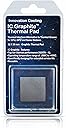
The Innovation Cooling Graphite Thermal Pad (30x30mm) is a high-performance, reusable thermal interface solution boasting 35W/m-K conductivity. Its dry, liquid-free composition prevents pump-out and bake-out, ensuring long-term durability. With an impressive operating temperature range from -200°C to 400°C, it’s ideal for CPUs and GPUs, especially modern Ryzen processors with offset dies. This pad eliminates messy thermal paste application, offering consistent cooling performance across multiple builds and simplifying hardware swaps.


| ASIN | B07CKVW18G |
| Best Sellers Rank | #63 in Thermal Pads |
| Brand | Innovation Cooling |
| Brand Name | Innovation Cooling |
| Cooler Heatsink Compatibility | CPU and GPU |
| Customer Reviews | 4.5 out of 5 stars 3,226 Reviews |
| Manufacturer | Innovation Cooling |
| Model | IC Graphite Thermal Pad 30 |
| Mounting Type | Chassis Mount |
| Number of Items | 1 |
| Number of Packs | 1 |
| Part Number | IC-001 |
| UPC | 760875812015 |
| Warranty Description | 2-Year Warranty |
W**A
Very specific use case scenario only, but it works really really well!
The thermal conductivity of these graphite pads aren't impressive when it comes to z-axis heat transfer (from the heat source to the heat sink), but they are extremely impressive when it comes to the x/y-axis heat transfer. I'm using this pad on a Ryzen 9 5950X and Noctua NH-D15 chromax.black heat sink and temps are identical to Arctic Silver 5 (20°C ambient, 32°C idle, 65°C load). I've been building PCs for over 20 years, thermal paste application is second nature to me. These pads have truly changed the game, at least in my eyes. The main benefit is for the newer Ryzen CPUs that have the CCX dies offset and not centered to the IHS. Most heat sinks are slightly concave and focus mounting pressure on the center of your CPU IHS. You can tell by putting your heat sink on a flat surface and see if it spins freely. These pads help transfer the heat from the sides of the IHS to the heat sink better than paste would. Stating the obvious here, these pads are reusable and require no cleaning after using them. They make testing heat sinks (and AIOs) so much easier since there is no thermal paste to clean up afterwards. They are safe to use on the IHS as well as the bare die if you want to use it on a GPU. I won't say it's perfect... because it's not. These pads have a specific use case scenario. While they do have a good thermal conductivity, that rating goes down the higher the temps get. As such, this pad will NOT perform as good as thermal paste if you're constantly running +85°C temps, making it a terrible choice if you are overclocking. I personally only use the PBO settings on my AMD CPUs and it handles the heat load just fine. I bought this from my local Microcenter because I was sick of wasting thermal paste when swapping between CPUs (troubleshooting). When I saw how great the temps were, I bought the two-pack from Amazon to make the swap on other machines too. Great stuff, I just wish I bought into it sooner.
M**A
Best overall thermal solution
This is easily the best thermal transfer solution I have used, and if I could afford to purchase a dozen, they would sit in my PC toolbox. I have had it installed on my Ryzen 5700g and this thermal pad has outlasted all my thermal pastes, and its performance has remained consistent even under load. I wish I could use this for all my go-to thermal solutions, especially because the quality of my Arctic Cooling MX6 degrades heavily after a year to where it becomes hard and putty-like. I would trust this on even my high-performance thermal applications. The 30mm was able to fit perfectly over my Ryzen 5700g without modification. I just prep my heatsink and CPU/GPU surface, lay it evenly, and I don't have to worry about any messes should I need to readjust for any reason. It is surprisingly resilient and didn't seem to tear after placing the heatsink.
W**E
DO IT!
CPU: Ryzen 9 3900XT Cooler: NZXT X63 Kraken I at first tried with the stock thermal paste that came on the AIO (I went through 2 different coolers by this point because of the issues I was having with temps, found out now, it wasn't the cooler!!)... so I was not happy with the temps... I switched to using Mastergel Maker (not a cheap paste) and was not happy with the results I was getting. Temperatures were fluctuating oddly, I thought maybe something was wrong with my CPU, or bad mount, cooler sucked? (this happened both with stock paste and Mastergel Maker and can say it did make a LITTLE bit of a difference, not by much)... so I did some testing and tried different methods of applying the thermal paste and different mounting pressures... was almost running out of the paste, so I ordered this thermal pad. I have now had this thermal pad (40mm X 40mm) on for 2 days. I have done some testing... shared a picture, the max temp is after a Cinebench R20 benchmark.. 57.6c!!!! What??? Roughly around 32c at "idle" with multiple programs running in the background including.... Steam, a couple Google Chrome windows open (including this one currently while typing and another with a YouTube video running), Discord, ROG GPU Tweak II, NZXT CAM, Open Hardware Monitor, and on 3 different monitors at once, all programs with hardware acceleration off (so not using GPU to render said programs) I have also seen lower, around 27c with all programs closed, could go lower I'm sure of it with the fans on my radiator turned up, just no reason to. I am happy with 32c with all of these programs running. I am sure if I turned on hardware acceleration, it would be even lower temps because it would move the grunt of the load over to the GPU. (Yes I know even with hardware acceleration off, it still uses SOME GPU, but is mostly software rendered, which is using the CPU) Lol... okay this is way to long... long story short. DO IT. Don't listen to the haters, this is a legit review. These results are real. I was so worried about my new PC build until now. I thought I was doing something wrong. This thermal pad is amazing. Also, have not tested with 2 yet... might still do that... but have no reason to honestly! I am VERY satisfied with the results. Oh and also, I ordered on the 23rd, got it on the 26th. That is pretty fast. I also ordered late at night, so maybe it could have got here quicker? I saw some of the reviews with messed up thermal pads. I can say, mine arrived perfectly fine. No damage at all. I ordered the 2-pack 40mm X 40mm... MAKE SURE YOU GET THE SIZE FOR YOUR CPU!! Ryzen 3000 series NEEDS 40mm X 40mm. It does hang over a little 1mm-2mm maybe? (VERY LITTLE and you could trim it if you are going to be a perfectionist, I usually am, but I didn't trim it) the 30x30 will be too small... and yes it does slide around on you, but be patient and just make sure it stays in place. Do check, because it could short something out. With my motherboard, I'm really not worried about it as there aren't really any components near the socket, and it stayed in place for me pretty easily, the pad became a little concave, so I flipped it so the curvature was pointing up, as if it is hugging the CPU. Anyways, just wanted to leave a legit review with true experience. Totally worth it. Very satisfied. Okay, I'm done. Good luck fellow gamers and creators!! This is what you were looking for, I promise. OH, and yes I am overclocking, obviously from the screen shot.
C**Y
Skeptical at first, but I think I love it
Just got done installing the pad and running some quick heat runs. This does do a great job of taking the guess work out of how much goop to apply; You just set it on the CPU and move right along with the HS/F install. On a s1150 i5, there is no trimming needed with the 30x30. There is a slight amount of overhang but not enough to spend time trimming it off. For just this easy install, it made me smile at step one. In all, the HS/F swap out took 13min from shutdown to firing the PC back up. I can't give a factual set of data since I also changed the heatsink/fan, but I'm assuming there's no burning in the interface since it's graphite. The swap was from a Thermalright Macho Rev. B to a Noctua NH-U12S which is much smaller all around, possibly a better cooler, and used both IC Diamond and Grizzly on the TR Macho. Temps are exactly the same as the prior setup right from the get-go. Ran Prime95 In-place FFT's and it ran the i5-4690K up to 64C from 40C idle in 26.6C (80F) ambient (CPU at 3.9Ghz, 1V, fan at 900RPM, averaging all 4 physical cores). All useless info with all the changes, but seeing it's exactly the same results as the one-use pastes and a physically smaller HS/F, right after the install; I'm impressed. I'm back with you Innovative cooling! Anyone that has hung out in Overclocking sections of forums knows of IC Diamond and may have been part of a sample kit sent to you to try, which is a good move since trying something is the best way to let a consumer actually see the results. It's just too bad there's really no way to send out samples of these pads the same way because I really think people will be impressed right away...even current Innovative Cooling users of their pastes (the paste takes the laser etching off the lids). I'm not sure this is a great item for Delidding, but it could be...I don't know. Delidding a $360-$425 i7 is always scary to me no matter how many times it turns out great, so I won't be doing that again just to try this pad out for that use just yet. I think there's enough material for a couple applications though with a 30x30 pad. I'd love to give a 5-star review because I'm impressed now, but perfection is very rare and I simply didn't do a 1:1 comparison with any solid baseline in a control environment. I also have no idea how it's reusable. Does it remain on the CPU or on the HS/F base...or partially both and it's kinda ripped to shreds? No idea. I'd like to think, since it's graphite that it's still just a pad that comes right off and you must move it to the new build...but dang that sounds too awesome to be true! We'll see. But for now, treat this 4-star like a 5-star until otherwise noted. It's just too easy and it works.
K**!
INCREDIBLE! USE THIS IN PLACE OF THERMAL PAST FOR OC YOUR GPU'S!!!!
INCREDIBLE! Some notes, there's no tackiness so it will require just a very tiny dab of thermal paste either on a corner or the center to keep it in place for assembly. Unless you're not going to move the part with the actual GPU that has this thermal pad will be placed on it otherwise it will slide around. It does not dry out like regular thermal paste does from over heating where it falls apart like dried clay. So being that it does not have any moisture and is made of graphite it will not bleed or squeeze out and will keep its shape and integrity. Hence, the reason you can use it over and over. All you gamers/miners who do their own yearly GPU tear downs do to extreme heat readings will only need to be concerned about it the pads and not the actual processing unit because these graphite thermal pads can be used over and over which again, pays for itself over and over. Or, if you're working on an Nvidia card that the manufacturer used paste on the memory chips instead of pads you can order that type of special paste from Amazon as well. Plus, that paste replacement is the best way to redo the card. People tend to get a lot of HotSpots using pads in place of the original paste on the memory chips (again my opinion) then having to open it up again and again. Anyway, as I mentioned this Graphite thermal pad work great but are for the actual processing unit on your video card or CPU. Pads or paste on the other parts. Buy the 2 pack it's cheaper. Best of all, you need never have to worry if you put too little or too much normal thermal paste on the CPU/GPU. Best "paste" solution for overclocking temps (my opinion). I'm not paid to say this (I wish I was). Just that I've used it and seen the results and therefor I believe in it and don't mind typing a little extra if it helps anyone..
D**D
Simple application. Works as well as any paste
I don't particularly know much about thermal paste and its effects on the CPU that much but I can definitely tell you that I ran a lot of tests yesterday and have been getting consistently better temps and performance with this IC graphite. I had some old Arctic Silver MX-4 lying around that I replaced my CPU with. Upon doing so (my mobo has everything set to auto so it automatically adjusts the clock speed and voltages...definitely not something most OC users would do but I just wanted to see what they'd do base on the temps) my i7-4790k ended up having core clocks of 4.1 GHz and idling in the 50s. I tried changing the OC clock speeds to 4.4 GHz and upping the voltage and it got way hot. I ended up buying new thermal paste for this because I thought this thermal paste was too old. Same issues here. Upon trying out the IC graphite, my core speed was automatically set to 4.4 GHz and idling at 50s-60s. Thought this was pretty good and performance on Cinebench was way better than with the thermal paste I bought and the old Arctic. Maybe some better paste would perform better but this was such a simple application and way less headache that I'd go for this every single time. I might lower the clock speed/voltage given that I don't necessarily need it to be that fast and since it's summer time it's getting kinda hot but I'll update on idle temps and everything if I do end up doing that. Overall, simple application. One gripe I might have with it is that it doesn't stay on the CPU and slides. I've seen some videos of people putting thermal paste on four corners to allow this to stick or even licking it! I didn't do either, was just careful with my install and applied it with mobo facing up instead of sideways.
D**O
Perfect For My Needs
Built a system for my Mother using my prior systems parts and don't want to worry about thermal paste drying or thermal pumping out. This appears to be a permanent solution and testing has verified that it performs much more than adequate.. 4960x (yes....old) lapped to near mirror polished Thermalright Peerless Assasin 120 (how can something be this cheap AND this good?) EVGA RTX 2070 XC Ultra Gaming - Because Mom loves killing zombies! Uhh..no. CPU has no iGPU 32GB RAM, ASUS MB, Fractal Design Pop Air case Anyway....installation is super easy once you put tiny dabs of thermal compound on the processor corners to hold this pad in place. Without the thermal compound - it moves, period - tried 3 times and it just wouldn't stay in place no matter how careful I was. Being as this pad is the same size as the heat spreader of the CPU - had to be perfect - so...TC on the corners - done. All fans set on manual with minimum duty cycles in BIOS. Idle temperature average is 26C for all cores with a low temp of 24C - so very consistent and even. Now, when I hammer it - prime95 AND MSI Kombustor at the same time - I get CPU temps maxing at 74C - no thermal throttling, CPU at full speed at all times. Not bad at all for a marginal airflow case. Is it as cold as kryonaut extreme - no. Runs about 3-6C hotter under load - but that was also in a case that had more airflow....sooooo...? Will I have to repaste it in a year or two? NO!!! I don't see why this won't last essentially forever. This likely isn't for extreme overclockers looking for the last degree. For me though - building a system that will work without issue and I won't have to fix it (I live 1000 miles away) it's ideal.
J**E
New favorite thermal conductor
Works like paste but no mess and reusable
K**N
Great buy
Very great buy. The best purchase i ever made so far. Works very similar to thermal paste. Managed to bring down my CPU temp 20 degrees celsius when gaming.
O**S
Thermal place alternative that really works !
The graphite thermal cooling strip works and does lower measured CPU temperatures. It is as good as all the positive reviews online and superior to thermal paste. It should be a standard part of all PCs instead of paste I reckon.
M**O
100% Calidad y buena resolucion a mi problema
este producto realmente funciona y demuestra lo que promete en su calidad y eficiensia, al uso que se necesite para el equipo en el que desea instalar, resolvio mi problema de enfriamiento de mi ps4 al 100% lo recomiendo totalmente.
U**R
Works better than thermal paste
Amazing thermal pad. Works better than thermal paste... 100% recommended
L**O
Ottimo ma non sostituisce benissimo la pasta termica...
Oggetto sicuramente innovativo e adatto a chi vuole cambiare spesso il processore del suo PC (infatti è riutilizzabile). Devo dire che fa il suo lavoro in maniera eccellente, anche se non è efficace come la pasta termica. Considerato il costo e la riusabilità, l'oggetto vale sicuramente la pena di provarlo. La mia perplessità nasce dal fatto che la pasta termica, essendo molle e non rigida, riesce ad eliminare eventuali micro bolle d'aria che si creano (anche solo per una leggera imperfezione del dissipatore e della protezione della CPU o GPU da raffreddare) rendendo la dissipazione più sicura. Per il resto, le temperature sono ottime e il prodotto svolge bene la sua mansione. Arrivato con Prime in ritardo (Amazon sta usando corrieri proprietari non affidabili) ma comunque senza problemi. Consigliatissimo.
Trustpilot
4 days ago
3 weeks ago