Buy anything from 5,000+ international stores. One checkout price. No surprise fees. Join 2M+ shoppers on Desertcart.
Desertcart purchases this item on your behalf and handles shipping, customs, and support to Austria.
🚀 Elevate your workspace with Samsung’s ViewFinity S6 — where precision meets effortless style.
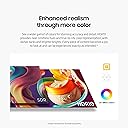
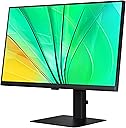
The Samsung 24" ViewFinity S6 (S60D) is a professional-grade QHD monitor featuring a 2560x1440 resolution and 100Hz refresh rate for smooth, detailed visuals. Equipped with HDR10 for vibrant color accuracy and multiple connectivity options including HDMI, DisplayPort, and USB ports, it supports seamless multitasking. Its tool-free Easy Setup Stand and ergonomic height, tilt, and pivot adjustments ensure a customizable, comfortable workspace. TÜV-certified Intelligent Eye Care technology reduces eye strain, making it ideal for long hours of creative and managerial work.


| ASIN | B0D4ZL4RV2 |
| Adaptive Sync | FreeSync |
| Additional Features | Adjustable Stand, Flicker-Free, High Dynamic Range, Pivot Adjustment, USB Hub |
| Aspect Ratio | 16:9 |
| Best Sellers Rank | #19,969 in Electronics ( See Top 100 in Electronics ) #542 in Computer Monitors |
| Brand | Samsung |
| Brightness | 350 Candela |
| Built-In Media | DP Cable, HDMI Cable, Power Cable, USB Cable |
| Color | Black |
| Compatible Devices | Desktop, Laptop |
| Connectivity Technology | DisplayPort, HDMI, USB |
| Contrast Ratio | 1,000:0 |
| Customer Reviews | 3.8 out of 5 stars 11 Reviews |
| Display Resolution Maximum | 2560 x 1440 Pixels |
| Display Technology | LCD |
| Display Type | LED |
| Hardware Connectivity | DisplayPort, HDMI |
| Has Color Screen | Yes |
| Image Contrast Ratio | 1,000:0 |
| Item Dimensions D x W x H | 8.66"D x 21.29"W x 21.1"H |
| Item Weight | 11.9 Pounds |
| Manufacturer | Samsung |
| Model Name | S60D Series |
| Model Number | LS24D606EANXZA |
| Mounting Type | Wall Mount |
| Native Resolution | 2560x1440 |
| Number of Component Outputs | 2 |
| Picture Quality Enhancement Technology | HDR |
| Refresh Rate | 100 Hz |
| Resolution | QHD Wide 1440p |
| Response Time | 5 Milliseconds |
| Screen Finish | Flat |
| Screen Size | 24 Inches |
| Screen Surface Description | Flat |
| Series Number | 60 |
| Shape | Rectangular |
| Specific Uses For Product | Business, Desktop, Photo Video Editing |
| Total Number of HDMI Ports | 1 |
| Total USB 3.0 Ports | 3 |
| Total Usb Ports | 3 |
| UPC | 887276835815 |
| Viewing Angle | 178 Degrees |
| Voltage | 110 Volts |
| Warranty Description | 3 Year Manufacturer, Dedicated B2B call center, Extended warranties available |
| Warranty Type | 3 Years Manufacturer Warranty |
M**E
Highly versatile, beautiful image
I don’t understand the poor reviews. I matched this monitor to a 34” Samsung UW monitor, replacing a 27” LG that had limited resolution. AI recommended this monitor as a match, I guess AI AIn’t so dumb. This monitor automatically set the resolution and other settings to match my 34” Samsung. There are endless options to fine tune and tweak the image. I purchased the HDMI only version which confused and concerned me a bit since I thought it would provide limited inputs and options, but trust me, except for daisy chaining and charging the laptop - which I found I didn’t need since I’m connected to a thunderbolt 4 docking station- I gave up nothing and saved quite a few coins without giving anything up. I was able to use the display port input on both monitors. This provided amazing image quality and the monitor is very responsive. I’m impressed!!
A**T
works perfectly for macOS
A**R
Nopt really compatible with Windows 11
I got this to replace another samsung monitor, which worked fine, but was just too small. OOB, the resolution has an inch of black on each side of the image. After a lot of work, I figured out that I just won't be able to change the resolution directly. The drop-down for that is grayed out. All I can do is select various refresh rates and see what the resulting resolutions happen to be. But that isn't even consistent--for some reason I am now stuck with 1260x1024, which isn't even the right shape, even when using the same refresh rate that gave me a reasonable resolution five minutes ago. This is horrible and unusable--I'm going to have to return it unless it fixes itself magically, but I prefer not to rely on magic. I definitely suggest buying something else. P.S. The very limited instructions that were included for setup are terrible--Ikea can write assembly instructions without words and still be clear, but Samsung apparently cannot.
D**N
No support from Panasonic for firmware defects
I got the version that has DisplayPort and HDMI. It's a great-looking, sharptastic monitor, but something serious is a bit off: 1. When I registered the product on Panasonic's website, it came up as not having any warranty or support, even though clearly the serial number was accepted added to my account. And trying to find firmware updates (for the issues #2 below) brought up nothing. Both confirmed with Panasonic Support (which I had to contact outside of the product support page). 2. I was experience sleep-related issues with one of my computers, where before another monitor worked fine: (2a) Via DisplayPort, the laptop would wake up the video output and believe that it's connected via DisplayPort, and send windows to the monitor accordingly -- but the monitor would stay asleep, and even if manually woken up by power button, would timeout again and go back to sleep. Not every time, but within ~5 sleep cycles (and thereafter since) unless/until the monitor is turned off and back on, which is a hassle to do 3 times a workday. (2b) Via HDMI, while the laptop is sleeping the video output, the monitor would "wake up" every few minutes to then say that it has no HDMI video and return back to sleep. Again, and again, and again... Like I said earlier, I tried but couldn't find firmware (neither upgrade not even *current* firmware) from Panasonic's website. Switching laptop docks didn't change anything. Changing every Windows setting under the sun didn't change anything. Even tried a DisplayPort-to-HDMI cable, as well as going through a KVM switch. I finally decided to give up on this monitor, just 1 day past the return window closed. Panasonic Support, for their part, say they're willing to replace under warranty, except I don't want the same model.
N**.
Terrible darkening around the edges.
Monitor Vignetting. I did not know this was a thing until this monitor. Around the edges roughly 2 inches from the side bezels it gets very dark. To a point where it is not usable. I returned the same day i recieved it. And also for a 1440 P monitor it didn't look that great compared to other 1080 P monitors i have. Save the money go with a 1080P monitor.
Trustpilot
3 weeks ago
2 weeks ago