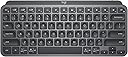
⌨️ Elevate your workspace with the minimalist keyboard that works as hard as you do.
The Logitech MX Keys Mini is a compact, wireless illuminated keyboard designed for professionals who demand precision and portability. Featuring smart backlighting, multi-device Bluetooth connectivity for up to three devices, and a rechargeable USB-C battery lasting up to 10 days, it supports macOS, Windows, Linux, iOS, and Android. Crafted with sustainable materials and certified carbon neutral, it also includes smart keys for dictation, emoji access, and mic mute/unmute, making it a powerhouse for modern multitasking and creative workflows.


| ASIN | B098JPSVKY |
| Additional Features | Backlit |
| Antenna Location | Business, Education, Everyday Use |
| Best Sellers Rank | #36,700 in Computers ( See Top 100 in Computers ) #891 in Computer Keyboards |
| Brand | Logitech |
| Built-In Media | USB Cable |
| Button Quantity | 34 |
| Color | Graphite |
| Compatible Amazon Tablet Models | Amazon Fire HD 10 11th Generation |
| Compatible Devices | PC, Laptop, Smartphone |
| Compatible Operating System Family | Windows |
| Compatible Tablet Computer Models | AAUB P30 |
| Compatible devices | PC, Laptop, Smartphone |
| Connectivity Technology | USB-C |
| Connectivity technology | USB-C |
| Customer Reviews | 4.5 out of 5 stars 2,868 Reviews |
| Enclosure Material | Plastic |
| Hand Orientation | Ambidextrous |
| Is Electric | Yes |
| Item Dimensions L x W x H | 21L x 21W x 132H millimeters |
| Item Weight | 1.5 Pounds |
| Keyboard Backlighting Color Support | Single Color |
| Keyboard Description | Membrane |
| Keyboard Layout | QWERTY |
| Keyboard description | Membrane |
| Language | Spanish |
| Manufacturer | Logitech |
| Mechanical Keyboard Switch Model | Membrane |
| Mfr Part Number | 920-010388 |
| Model Name | MX Keys Mini |
| Model Number | 920-010388 |
| Number of Items | 1 |
| Number of Keys | 104 |
| Power Source | Battery Powered |
| Recommended uses for product | Business, Education, Everyday Use |
| Special features | Backlit |
| Style Name | Minimalist |
| Switch Type | Membrane |
| Theme | computing, keyboards |
| UPC | 097855169570 |
| Unit Count | 1 Count |
M**C
Premium Keyboard That’s Worth Every Penny!
I’ve gone through so many keyboards, trying to find the perfect one. Cheap ones, mid-range ones—you name it. Every time, there was always something off. The keys felt mushy, the build was flimsy, or the typing experience just wasn’t satisfying. Then, I got the Logitech MX Keys Mini—and wow. This is by far the best keyboard I’ve ever used. The keys are smooth, responsive, and feel premium with every press. The build quality is solid, and the compact design is perfect for any setup. And the backlit? Absolutely amazing. The moment I bring my fingers close to the keyboard, the light automatically turns on—it feels so smart and effortless! Plus, the connection to my Mac is super smooth with no lag or issues. Yes, it’s a bit pricey. But trust me—when choosing a keyboard, don’t go cheap. Pay more, get a premium one like this, and you’ll never look back. Absolutely worth it!
G**Z
Perfecto para el día a día
Este teclado es uno de mis favoritos. Previamente habia comprado la version en blanco en español pero para programar me gusta más el layout en inglés y como vi en las reviews que venia en ingles (aunque en la publicación diga lo contratio). El teclado es bastante cómodo, por el formato compacto se adapta muy bien a espacios reducidos e incluso es bastante portable. Las teclas se sienten muy bien al tacto, escribir es una experiencia bastante agradable. Al ser la version Business trae el receptor logibolt lo cual ayuda bastante si cuentas con otros dispositivos Logitech.
A**R
Great keyboard for my purpose
A couple years ago I wrote a scathing review about the decline of Logitech products quality. I was having problems with the mice, the buttons where acting up, and I needed a mouse (NOW) that worked so I went to the local brick & mortar store and bought the same mouse, which had the same problems. I ended up getting hundred dollar mouse made for CAD professionals. Since then I got a Logitech mechanical keyboard, with the cherry keys, great product and I love it. I've also purchased a couple Logitech mice lately and had no problems with them. This keyboard is much nicer than what I expected, I love the solid feel of it, it is very heavy for its size. I wanted this one for the ability to switch between three different computers. I have one Windows 10 machine and two Linux ones in a corner of my man cave. I've purchased two HDMI KVM switches recently, and both where DOA, not working at all right out of the box, and from different manufacturers. My monitor has three inputs, so all I really needed was a single keyboard and mouse for all three. The Logitech MX mouse is still on the way. The set up was a bit problematic. The Windows machine set up very easy, but after a restart the keyboard was no longer paired. I had to drag out my old one to log into Windows, not so handy since Windows re-starts itself constantly. Luckily, there was a firmware update for this keyboard that fixed the problem. You can get the update through the Logitech software that can be downloaded from their website. On one Linux machine I am currently running Linux Mint. Mint came with the blueman software preinstalled, I had to make several attempts to get the pairing to stick, partly because I've only used blueman a couple of times in the past to pair BT headphones to my old laptop. You must mark the keyboard as trusted to get a connection that lasts. I had a situation where it was connecting and disconnecting constantly until I did that. Works fine now, and it pairs itself after a restart. On the third computer I am running Debian 12, and I have not been able to get the keyboard paired at all. This computer is actually part of my stereo system. It is connected to my amps by way of a DAC, but I can control it from a phone or tablet, or from a web GUI on a different computer. It would be nice if this would work on Debian, but it's not the end of the world. I almost docked this product a star because the product info is not completely accurate. On the product page it says:"Compatibility: Compatible with Logi Bolt USB Receiver (not included) . Logi Bolt wireless products will not pair with other Logitech USB receivers". OK, you don't need the Bolt USB Receiver to use this, I ordered them because it says this. The keyboard works with any Bluetooth receiver, I'm using one made by TP Link and another Knvo. The Bolt receivers are not here yet, they will be along in a couple days with the new MX mouse, even though they where part of the same order as this keyboard. When the Bolt receivers get here I will probably use them, because I had to rob the BT dongles off of my other computers to get this working right away. The limited instructions that came with the keyboard just said to pair it with Bluetooth, it does not even mention the Bolt receiver.
K**N
Excelente calidad, pero OJO: Distribución en Inglés (Sin "Ñ")
El teclado es físicamente impecable: compacto, resistente y con un tacto de teclas muy similar al de una MacBook, lo cual lo hace comodísimo para escribir rápido. Es ideal para llevar en la mochila a la oficina o de viaje. Punto importante: La descripción dice que es en español, pero confirmo que viene en inglés (no tiene la tecla Ñ física). Si ya estás acostumbrado a escribir sin ver las teclas o usas la configuración de EE.UU. Internacional, no tendrás problema, pero es importante tenerlo en cuenta antes de comprar.
M**S
Excelente teclado, es distribución en INGLÉS!
Excelente, producto, ya andaba buscando el de ISO en inglés, así que este es SOLO con distribución en inglés. Por todo lo demás es un producto totalmente recomendable :)
Trustpilot
3 weeks ago
1 week ago