Desertcart purchases this item on your behalf and handles shipping, customs, and support to Austria.
๐ฎ Elevate your stream game with the ultimate macro powerhouse!
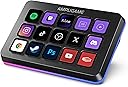
The FIFINE AmpliGame Stream Controller D6 features 15 customizable LCD macro keys with touchscreen control, 9 RGB lighting modes, and broad compatibility with streaming platforms like OBS, Twitch, and YouTube. Designed for Mac and PC users, it enhances productivity and stream quality by consolidating complex commands into a sleek, programmable keypad ideal for gaming, content creation, and multitasking.


| ASIN | B0D9JFT7JS |
| Additional Features | 15 Customizable LCD Macro Keys, Compatible with PC/Laptop, Programmable, RGB Lighting, Work for gaming, office, streaming |
| Best Sellers Rank | #479 in Video Games ( See Top 100 in Video Games ) #48 in PC Gaming Keyboards |
| Brand | AmpliGame |
| Brand Name | AmpliGame |
| Color | Black |
| Compatible Devices | Laptop, PC |
| Connectivity Technology | USB |
| Connector Type | USB-A to USB-C, USB-C to USB-C |
| Control Method | Touch |
| Control Type | Touch and Push Button Controller |
| Customer Reviews | 4.5 out of 5 stars 767 Reviews |
| Hardware Interface | USB |
| Hardware Platform | PC |
| Human Interface Input | Keypad |
| Included Components | Stream Controller*1, USB Cable, User Manual |
| Instrument | Multiple instruments/MIDI-compatible |
| Instrument Key | Any |
| Item Weight | 7.52 ounces |
| Keyboard Description | Ergonomic |
| Manufacturer | AMPLIGAME |
| Manufacturer Part Number | ALQ2415D6 |
| Model Name | D6 Black |
| Model Number | D6 |
| Number of Items | 1 |
| Number of Keys | 15 |
| Platform | Windows |
| Product Style | Modern |
| Special Feature | 15 Customizable LCD Macro Keys, Compatible with PC/Laptop, Programmable, RGB Lighting, Work for gaming, office, streaming Special Feature 15 Customizable LCD Macro Keys, Compatible with PC/Laptop, Programmable, RGB Lighting, Work for gaming, office, streaming See more |
| Supported Software | OBS/Discord/Games/Editing Software |
| UPC | 850058839370 |
| Unit Count | 15 Count |
R**O
Excellent Stream Controller for Gaming & Content Creation
Iโve been using this stream controller for my gaming and PC setup, and itโs been great. The buttons are responsive, the display is bright and easy to customize, and setting up shortcuts for apps and macros is simple. It helps speed up my workflow while streaming, editing, and everyday use. The build quality feels solid, and everything works smoothly. Definitely recommend it if you want an affordable stream controller with plenty of features.
A**S
Reliable and well worth the price.
I have been loving this. I originally got it to have a few extra buttons for playing Star citizens because you never have enough extra for that game. Launching programs, being able to set macros extremely easy and using them in games, such a simple quality of life improvement has been a game changer, (pun intended). The tactile feel of pushing the button, having to push the button just enough that you're not going to have any accidental button pushes, It's been great. The build quality is good, it's heavy enough that it doesn't slide around on my desk, and being able to choose icons for my buttons has made looking at a glance to remember the macro I'm hitting awesome! With the ability to add a next and previous screen buttons you can add layouts for different games, applications, or just an extra screen for more macros. The only con I can give, and to me personally, and it's not a big one, is sometimes the buttons can have just a little wobble due to how much travel distance there is on a button push, but again for me it's worth it to not have accidental button pushes, and once I learned to push the button straight down instead of being in too much of a hurry I don't notice. I don't normally take the time to leave a lot of reviews, but this has made more than a difference than I expected it to and well worth the price.
F**S
I wish I got one sooner!
Iโve been using the FIFINE D6 Stream Controller for my gaming and content creation setup, and it has quickly become one of the most useful pieces of gear on my desk. The 15 programmable buttons make it incredibly easy to launch apps, switch scenes, control audio, and automate tasks with a single press. Setup was straightforward, and customizing the buttons was much easier than I expected. Everything feels responsive, and the screen icons are bright and easy to recognize. Itโs helped streamline my workflow whether Iโm recording videos, streaming, or just using my PC day to day. If youโre looking for an affordable stream controller that offers a lot of functionality without breaking the bank, I can definitely recommend the D6.
M**S
Great hardware once configured - Linux / OpenDeck fix included
Really happy with the performance and functionality of the FIFINE AmpliGame D6. Keypresses are responsive, and it handles my daily workflows without issues. I can launch and close any application I need, and Home Assistant integration works great for triggering local entity routines. OBS Studio (via Flatpak) works great with it as well. Quick note for closing Flatpak apps cleanly without getting error prompts: driving a simple wmctrl command via script handles closing gracefully. For Linux / OpenDeck Users (Fix for Rev 2 / PID 0060): Out of the box on Linux, the OpenDeck plugin might not communicate with the controller if your unit reports as Product ID 0060 (3142:0060 / HOTSPOTEKUSB). Here is how to get it working: 1. udev rule: Add a rule in /etc/udev/rules.d/99-fifine-d6.rules so you don't need root access for the HID nodes: SUBSYSTEM=="hidraw", ATTRS{idVendor}=="3142", ATTRS{idProduct}=="0060", MODE="0666", GROUP="plugdev" KERNEL=="hidraw*", ATTRS{idVendor}=="3142", ATTRS{idProduct}=="0060", MODE="0666", GROUP="plugdev" Reload with: sudo udevadm control --reload-rules && sudo udevadm trigger 2. Flatpak access: If running OpenDeck in Flatpak, give it device access: flatpak override --user --device=all me.amankhanna.opendeck 3. Rebuild the plugin binary: The pre-packaged opendeck-ampgd6-linux binary from the github plugin only checks for PID 0007. Clone rafaelbiasi/opendeck-ampgd6 from GitHub (the source already includes AMPGD6REV2 / 0x0060), run cargo build --release, kill OpenDeck, and swap the newly compiled binary into ~/.var/app/me.amankhanna.opendeck/config/opendeck/plugins/st.lynx.plugins.opendeck-ampgd6.sdPlugin/opendeck-ampgd6-linux. It took a bit of command line troubleshooting to get everything tied together on Linux, but once set up, it has been solid. Worth every penny.
M**U
Solid & a decent value, but definitely a budget product
The FiFine D6 is a budget streamdeck that does the job okay enough but doesn't particularly impress. It's a very convenient though in my opinion non-essential tool for streamers or people who use hotkeys a lot who want a visual macro interface to do things like manage apps, system monitoring, and streaming software like OBS. While the D6 has decent software which lets you do many things, it directly competes with the flagship that Elgato makes. It has larger buttons but unfortunately suffers from inconsistent tactile feedback and some mushy key presses (I think I got a unit with a defect). Personally while I think the D6 is a solid value and does its job well enough, I think you could have a more reliable experience with the Elgato Stream Deck series, even if it requires a higher investment.
B**R
Game-Changer for Streaming and Productivity!
Iโve only had the FIFINE AmpliGame Gaming Controller (D6 White) for a few days, but I can already say itโs made a big impact on my setup. The design is super clean the white finish with RGB lighting looks great on my desk, and the build feels solid and high quality right out of the box. The 15 shortcut keys are really easy to set up and have been a huge help for my streaming workflow. In OBS, Iโve already programmed buttons for scene switches, muting, and triggering transitions, and it works flawlessly. Even in just a short time using it, I can tell how much smoother it makes my streams. What surprised me is how useful it is outside of streaming, too. Iโve been using it for quick actions like volume control, launching apps, and media playback, and it saves me from constantly reaching for my keyboard and mouse. The RGB backlighting is a nice touch as well it makes the keys easy to see in low light and adds personality to the setup. Even though Iโve only been using it a few days, I can already tell this controller is going to become a permanent part of my workflow. If youโre a streamer, content creator, or just want to simplify daily tasks, this is a fantastic tool. Highly recommend!
C**C
it makes everyday tasks super simple
One thing I really like about the AmpliGame Stream Controller is how simple it makes everyday tasks. Having my most-used shortcuts and controls available with a single button press has made my workflow much smoother and more efficient. It's also surprisingly well-built for the price. Between the customization options, ease of use, and overall functionality, I think it's an absolute steal for anyone looking to upgrade their setup without spending a fortune.
L**S
Good item for a great price
This is pretty cool. It's very similar to a couple of my Stream Decks but I wanted something a little smaller and brighter for my laptop area so I went with the white one. The interface is almost identical and is extremely simple. I mainly use it on my Mac to launch macros that I've created in Keyboard Maestro so almost all the buttons are configured with the HotKey action. I had some trouble with these buttons triggering macros that were created using F1-F12 but I just remapped the macros in Keyboard Maestro to trigger off of different key combinations and it worked fine. I figure this is a Mac thing -- or maybe it's just the complexity of my setup which uses Karabiner-Elements, Better Touch Tool, and Keyboard Maestro. I probably could have figured it out but it wasn't worth my time to do that. Yet. I have no opinion on the LED. I figure some folks really like that. The actual keys are bright and feel good. I'd recommend this to anyone who is looking for a less expensive button array that's similar to Elgato's Stream Deck which is itself an awesome product.
R**S
ูุงุฆุน
ู ู ุชุงุฒ
S**Y
Very handy tool
A great tool, makes it very easy to go from app to app
W**I
Good
Good choice withe price
B**N
Muy util, game changer
Es un cambio de dia y noche, muy util y muy bonito, recomendadisimo, muchos atajos y conjuntos de cosas que puedes ahcer con un solo boton
M**W
nice
the deck really helped me in the shortcuts and the quality is good for the price it deserves 5 stars every day
Trustpilot
5 days ago
3 days ago