Desertcart purchases this item on your behalf and handles shipping, customs, and support to Austria.
⌨️ Elevate your workspace, empower your day.
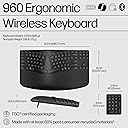
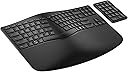
The HP 960 Ergonomic Wireless Keyboard combines advanced ergonomic design with customizable productivity features. It offers 20 programmable keys, a separate numeric keypad, and multi-device Bluetooth connectivity with Swift Pair and HP Unifying Dongle options. Designed to reduce wrist strain by up to 60%, it supports up to 24 months of battery life and is made with 50% post-consumer recycled materials, making it a sustainable choice for professionals seeking comfort, efficiency, and eco-conscious tech.


| ASIN | B0D1QBQMWV |
| Antenna Location | Business |
| Best Sellers Rank | #12,207 in Computers & Accessories ( See Top 100 in Computers & Accessories ) #155 in Keyboards |
| Box Contents | Wireless keyboard; USB dongle; 2 x AA batteries; Quick start guide; Warranty card; Wireless numpad; 2 x CR2032 batteries |
| Brand | HP |
| Brand Name | HP |
| Button Quantity | 20 |
| Colour | Black |
| Compatible Devices | Laptop |
| Connectivity Technology | Bluetooth |
| Country of Origin | China |
| Customer Reviews | 4.0 out of 5 stars 157 Reviews |
| Enclosure Material | Plastic |
| Hand Orientation | Ambidextrous |
| Importer Contact Information | HP India Sales Pvt. Ltd. |
| Item Dimensions L x W x H | 9.2L x 15.7W x 1.5H Centimeters |
| Item Type Name | HP 960 Wireless Keyboard |
| Item Weight Unit of Measure | 2.04 Pounds |
| Keyboard Description | Wireless |
| Keyboard Layout | QWERTY |
| Language | English |
| Manufacturer | HP Inc., HP India Sales Pvt. Ltd. |
| Manufacturer Contact Information | HP India Sales Pvt. Ltd. |
| Manufacturer Part Number | 7E755AA#ABA |
| Model Name | HP 960 Ergonomic Wireless Keyboard |
| Model Number | 7E755AA#ABA |
| Number of Keys | 104 |
| Number of Sections | 2 |
| Packer Contact Information | HP India Sales Pvt. Ltd. |
| Power Source | Battery Powered |
| Product Features | Ergonomic |
| Recommended Uses For Product | Business |
| Special Feature | Ergonomic |
| Style Name | Modern |
| Switch Type | Linear |
| Theme | HP |
| UPC | 197192177433 |
| Warranty Description | 3 Year Warranty |
A**R
Excellent for Touch typing
Excellent comfort while touch typing, matching natural position of hand. Wrist at rest. Minimal movement of fingers. Tactile feedback good. Keypress depth adequate. No shaking of keys. Power saving sleep mode happens silently without affecting work. Tiny problem - 'B' is positioned at left side. Used to type 'B' with right hand. Adjusted after some days. Similar problem with '6' also. If you want to raise farther edge of keyboard to see the keys more clearly to look and type, no built in legs for that. Optional negative tilt (legs to raise closer edge) supported, helpful if your elbows are above the level of keyboard. These legs can stay folded if your seat is low.
V**N
The best ergonomic keyboard you can buy
Best keyboard after 25 years of keyboards. I have used the Microsoft sculp and Logitech ergonomic whatever keyboards. Microsoft was actually good, except for horrible connectivity quality and overall slowness. Logitech's layout had something I could not get used to even after using it for 2 years. The software is not stable. For some reason my fingers were hurting after long typing sessions. Could be key travel or the dynamics curve if key presses. This one, has none of the issues and all the pros and even some. The layout is pretty much perfect. Key presses honestly feel like a low profile mechanical keyboard ones. The sound is not quite but very satisfactory. All keys are sturdy. You know if you pressed or released a key. Honestly, even if it breaks tomorrow, I would buy another one right away.
R**Y
Best replacement for Microsoft Sculpt Keyboard
Best replacement I could find for the Microsoft Sculpt Keyboard. I like the Sculpt a bit better, but this has the same hand position. One thing to watch out for is if you like having the wrist rest raised, you have to pull out all 3 tabs underneath. It wasn't clear to me other than the middle tab, and the keyboard would have been wobbly. The outer 2 tabs looked just like rubber pads to me at first. It is nice though that the tilt mechanism is built in, as opposed to the Sculpts separate magnetic attachment. Some other things are better than the Sculpt: Keys are marked for both Mac and Windows, and the default works correctly on the Mac without remapping. It also has an Fn modifier key vs the switch on the Sculpt to get the dual function out of the function keys. One other thing to watch for ... to get the bluetooth paired the instructions say to hold down the corresponding bluetooth key for 2 seconds, and this did not work. In frustration at one point, I hit the bluetooth key twice quickly, and it paired! The dongle also works, so you have 2 different bluetooth connections and the dongle so you can attach to multiple computers. The keyboard feels solid, and the key action is nice as well, if just slightly more clackity than the Sculpt. Also, the Command, Alt, Windows, Ctrl keys are smaller than on the Sculpt, so it takes just a bit getting used to.
K**.
Great replacement for Microsoft Sculpt
I've used the Microsoft Sculpt for 5 years. When I wanted to replace it, I was disappointed to learn it had been discontinued. The HP 960 is an excellent replacement. It's slightly smaller than the Sculpt but pretty close in design. It has the added benefit of an on/off switch for both the keyboard and the numeric keypad, which was missing from the Sculpt. I'm really happy so far.
C**R
Fantastic replacement for MS Sculpt
Great replacement for MS Sculpt. I actually like this one better. I set up the blue tooth so I could use my mouse with the dongle. That took a bit to set up. Then I accidentally turned off the blue tooth pairing, searching for the print screen button, which this keyboard does not have for some reason. Hitting the Windows shift S buttons remedies this. The letters are big, keyboard clicks are great, similar to sculpt. Fit is great. Wrist rest is a bit larger than the sculpt, so getting used to that, but it is OK. I'm a CPA. Heavy use of keyboard and keypad. Working about 100 hours a week right now!! Keypad is great as well. I LOVE the more raised key bumps on the F and J keys. That is a big upgrade for me. Overall a huge thumbs up foe HP. The price was great. Happy to have found this keyboard combo. It does NOT come with a mouse!! But able to use my old sculpt mouse with it. The sculpt wrist rest was constantly dirty. The surface of this one seems a bit more durable, resistant to oily hand cream, etc. Time will tell how it holds up. I had worn half the letters off my Sculpt in 1.5 years, to give an idea of how much I type. Heavy Heavy user!!! Good luck! Highly recommend this one. Good job, HP!!
T**Y
Overall similar to Microsoft sculpt
I purchased this to replace my Microsoft sculpt keyboard. This is probably the closest keyboard from a mainstream brand that’s available other than that incase version that happens to be sold out constantly. I will say some of the keys are not exactly in the same place, which is annoying. The keys tend to be a lot bigger than the Microsoft version so it does take some adapting to. I purchase an open box keyboard because I couldn’t conjure paying full price. I received all the accessories and batteries. the keyboard it self looks brand new. Overall although it’s not an exact replica of the Microsoft sculpt, I think it’s a good keyboard that isn’t too high and has enough for support while not overdoing it. I use it on a MAC so there are some differences to those using it on an HP. Overall I’d recommend it to someone looking for a decent keyboard.
Trustpilot
2 months ago
1 day ago