Desertcart purchases this item on your behalf and handles shipping, customs, and support to Austria.
📝 Elevate your note game—where AI meets paper-perfect precision!
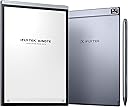
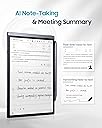
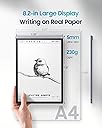
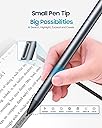
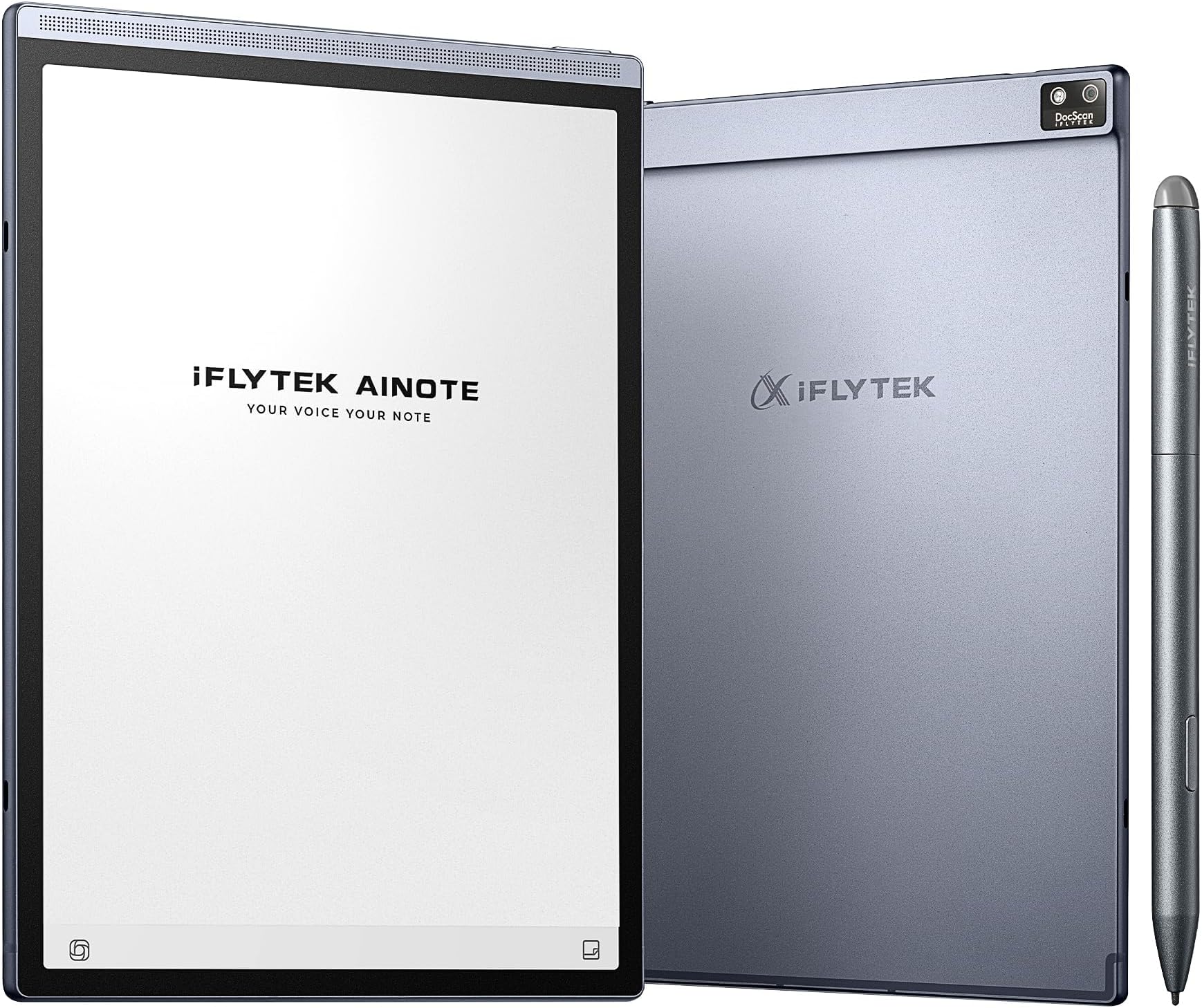
The iFLYTEK AINOTE Air 2 is a cutting-edge 8.2-inch E Ink digital notebook designed for professionals and students who demand precision and productivity. Featuring 4096 pressure levels for a natural writing feel, it supports real-time voice-to-text transcription in 17 languages and handwriting conversion in 83 languages. With AI-powered meeting summaries, schedule management, and a battery life lasting up to 5 weeks, this sleek tablet combines smart functionality with eye-friendly reading, making it the ultimate tool for meetings, study, and global collaboration.


| ASIN | B0DLKSR2P4 |
| Age Range Description | Adult |
| Aspect Ratio | 16:10 |
| Battery Average Life | 5 weeks |
| Battery Capacity | 2600 Milliamp Hours |
| Battery Cell Type | Lithium Ion |
| Best Sellers Rank | #11,053 in Electronics ( See Top 100 in Electronics ) #233 in Computer Tablets |
| Brand | iflytek |
| Built-In Media | Stylus Pen, paper tablet |
| Cellular Technology | 4G |
| Color | Gray |
| Compatible Devices | Stylus, Keyboard, Kindle, Kobo, Google Play devices |
| Connectivity Technology | Bluetooth, Wi-Fi |
| Customer Reviews | 4.0 out of 5 stars 196 Reviews |
| Display Resolution Maximum | 1440×1920 Pixels |
| Display Type | E Ink |
| Generation | 2nd Generation |
| Graphics Coprocessor | Adreno 610 |
| Graphics Description | Integrated |
| Hardware Interface | USB Type C |
| Human-Interface Input | OCR |
| Item Dimensions L x W x Thickness | 7.6"L x 5.4"W x 0.25"Th |
| Item Weight | 0.51 Pounds |
| Lithium-Battery Energy Content | 2600 Milliampere Hour (mAh) |
| Manufacturer | iFLYTEK |
| Maximum Display Brightness | 0.03 Nit |
| Memory Storage Capacity | 32 GB |
| Mfr Part Number | AINOTE Air 2 Bundle |
| Model Name | Air 2 |
| Model Number | Air |
| Model Year | 2024 |
| Native Resolution | 1440 x 1920 pixels |
| Operating System | Android |
| Other Special Features of the Product | Cellular Connectivity, Stereo Speakers, Stylus Support, Supports USB OTG |
| Processor Brand | Rockchip |
| Processor Description | Snapdragon 600 Series |
| Processor Speed | 1.8 GHz |
| RAM Memory Installed | 4 GB |
| Screen Size | 8.2 Inches |
| Set Name | AINOTE Air 2 Bundle |
| Size | AINOTE Air 2 Bundle |
| Specific Uses For Product | Note-taking, Transcription, Scheduling, Professional Use, Educational Use, Portable Use |
| Style Name | Modern, Professional |
| Unit Count | 1.0 Count |
| Video Processor | ARM |
| Warranty Description | 1 Year Manufacturer |
| Wireless Compability | 802.11n |
| Wireless Technology | Bluetooth, Wi-Fi |
C**Y
Exactly What I Needed: A Productivity-Boosting E-Ink Tablet
This has been an amazing purchase experience. I finally got my hands on the e-ink tablet I truly needed. I usually use my iPad for work, but the abundance of features often distracts me with constant notifications and pop-ups, making it hard to stay focused. This is exactly why I was looking for an e-ink tablet. The following features have provided me with an outstanding user experience: • Recording: This is a feature that really stands out for me. It’s awesome to be able to record audio during meetings and have it automatically convert to text. But the best part is that you can still take handwritten notes while the recording is happening! This is perfect for when I’m brainstorming or jotting down quick ideas while listening to the conversation. I never miss a beat, and I can easily go back and check the full transcript afterward. • Meeting Summaries: One of my favorite things about this tablet is how it helps me stay organized after a meeting. Once the meeting’s done, it can generate a full summary of the conversation, which is super helpful for catching anything I might’ve missed. This feature makes it easy to share key points with teammates and stay on top of action items. • Handwriting: Honestly, this is the best handwriting experience I’ve had. It really feels like I’m writing on paper. The pressure sensitivity is just right, and the tactile feedback is so satisfying. It’s way more comfortable than writing on an iPad, and I can write for hours without my hand getting tired. If you’re someone who prefers the feel of pen and paper, you’ll absolutely love this. • Handwriting to Text Conversion: I was pleasantly surprised by how well it recognizes both English and Spanish handwriting. I’ve used both languages, and the recognition is spot-on. The text conversion is smooth and accurate, making it super convenient for note-taking, especially for multilingual work • Reading Experience: The reading experience on this device is excellent. The screen has built-in backlighting, so I can read in any lighting condition, and the text is sharp and clear. It’s easy on the eyes, which is something I really appreciate when I’m reading for long periods. The display is very detailed, and overall, it’s just a pleasant experience whether I’m reading a book or reviewing documents. In conclusion, this e-ink tablet has really exceeded my expectations. It's not just a great tool for reading, but it’s also a productivity powerhouse. The combination of handwriting, recording, and meeting summaries makes it perfect for anyone who needs to stay organized. Highly recommend it to anyone looking to boost their productivity while enjoying a truly paper-like writing experience!
K**R
A Smart and Comfortable Notetaking Companion for My Daily Workflow
I have been using this notetaking tablet both at home and in the office and it has quickly become one of my most reliable tools. I like how natural it feels to jot down ideas because it makes my notes look clean and organized without any effort. The voice-to-text feature has been especially helpful during long meetings when I want to stay focused without typing. I enjoy how easily it keeps up with my mixed work environment since I move from my home desk to the office every day. The ability to switch between handwritten notes and clean text helps me stay on top of deadlines and tasks. I also appreciate how smoothly it manages my daily schedule because it keeps everything in one place. Reading on the screen feels comfortable and I find myself reviewing documents longer without strain. It has become part of my morning routine to outline my tasks for the day before heading to work. I like that it handles my notes from brainstorming sessions at home just as well as more formal meetings at the office. The slim and light design makes it simple to move around with and I never feel weighed down carrying it. I have noticed that it keeps me more organized because I am no longer juggling scattered notebooks. It has made my workday feel more streamlined and less stressful. I enjoy how responsive the writing feels when I sketch quick diagrams or highlight key points from discussions. The cloud sync has been a lifesaver when I switch locations and need access to all my notes immediately. Overall this device has enhanced both my productivity and my comfort no matter where I am working.
N**1
Incredible Potential Ruined by Unstable Firmware and Google Lockouts
This device is a complete disappointment and should not be sold as a standard Android 11 tablet. The iFLYTEK AINOTE2 is so locked down, it borders on fraud. It fails to meet even the basic Android functionality expectations, which are not clear in the listing. Here's what you're not told until it's too late: ❌ No volume buttons — seriously. No screenshot combo possible. ❌ No Developer Mode access — “Build Number” is hidden or removed. ❌ Not Play Protect Certified — blocks Gmail, Drive, Docs, even Play Store. ❌ ADB shell is blocked — can't run system commands or extract device info. ❌ ADB push fails — even file transfer to /sdcard/ is locked out. ❌ Sideloading is limited — many APKs silently fail or crash. ❌ Screenshot apps don’t work — “Screenshot Easy” won't install. ❌ File transfer mode missing — can’t drag files from PC to tablet. Even after installing the “Google Complete App,” I received this error: “This device isn't Play Protect Certified. Contact the manufacturer to request a certified device.” That’s precisely what I plan to do—because this tablet appears to be one of three things: - A demo or developer unit - A region-locked export model - Or a deliberately crippled education/government edition Whatever it is, it has no business being sold to the public on Amazon, and this is particularly true given its primary marketing as Android 11 with productivity features. If you're looking for a real writing tablet, digital notepad, or Workspace companion, do not waste your time or money on this. Get a Google-certified device like a BOOX Note Air 3, Lenovo Tab P11, or any Pixel/Chromebook that works. This tablet is going back. This is a follow-up to my original review -- Since I resolved the "NON-Google Play Protect Certification issue." However, I am now confronted with an issue relating to the device's firmware that is proving to need a replacement product (Device). 2nd Review: I wanted to love this device. I really did. The iFlytek AINOTE tablet has standout features: excellent voice-to-text transcription, an elegant E-Ink display, and a very useful camera + flashlight combo for document scanning. But after spending countless hours troubleshooting, I’m left with a sleek, promising device that refuses to function as advertised. The core issue? Google Play Store is broken. It either won’t open at all or displays the dreaded “Something went wrong. Try again.” message. And even worse: Google Play Protect certification cannot be verified, which cripples app compatibility and security. Even more alarming: the system hid core permissions after a firmware rollback—meaning I could no longer manage app access, system behavior, or reinstall critical components. I've done everything: • Factory resets • Reinstalls of Google services • Server toggles • Cold reboots • Clean networking setups Nothing resolves the core flaws. This points directly to a firmware-level defect or a system update designed to block or override Google's services. Until iFlytek can prove it has stable, Google-certified firmware, I cannot recommend this device for anything beyond a digital notepad. And even then—you'll always be watching over your shoulder waiting for it to self-sabotage. A replacement may fix it, but the experience has already cost me more time than any “smart” device should. Use caution. Or better yet—use something else.
T**T
My Thoughts of iFLYTEK AINOTE Air 2
I've been using the AINOTE Air 2 for a while now, and honestly, this device surprised me in a good way. It's not pretending to be a full Android tablet — and that's actually why it works for me. It's a writing-first E-Ink notebook, and in that category, it performs extremely well. Here's the stuff that actually matters for daily use: ***Writing Experience (the main reason I bought it) The writing feel is shockingly smooth for an E-Ink device. The pen has almost no lag — yes, the E-Ink delay is still there (you can't avoid that on any brand), but the latency is minimal enough that I barely notice it once I get going. The surface texture is also nice, not that slippery glass feeling. ***Display & Form Factor Super lightweight, clean design, and easy to carry around. The screen contrast is good — not BOOX-level high contrast, but definitely comfortable for long writing or reading sessions. Doesn't strain the eyes at all. ***Battery Life Battery life is kind of insane. I'm used to charging tablets daily; this thing just keeps going for days. I can take notes, doodle, draft stuff, go to class, whatever — still not dead. ***Useful Features That Surprised Me *Syncing notes actually works *Handwriting recognition is pretty accurate *Templates and notebooks feel intuitive *No distractions — honestly a huge plus But let me be real about the downsides (because nothing is perfect) ***These are not deal-breakers for me, but worth knowing: *Screen sometimes looks slightly washed out depending on lighting *App interface could use some polishing *Not a full Android tablet (don't expect Google Play everything) *You won't get the flexibility of BOOX — but that's not the point of this device Still, for what it claims to be — a lightweight E-Ink writing pad — it succeeds. ***Bottom Line If you want distraction-free writing, long battery life, and a smooth pen experience, AINOTE Air 2 is honestly a solid choice. Not perfect, but far better than I expected, and way more fun to use than staring at an iPad all day. Definitely staying with me. Solid 5 stars from my side.
Y**G
Wonderful paper tablet!
This is my second time using a paper tablet. The first one I tried was the Kindle Scribe, which I bought mainly for reading on a larger screen. After using it, I discovered that handwriting was actually more fun. The tactile feel of writing was great, and it was so convenient—writing sparked more ideas for me. Then I came across the AINOTE paper tablet. I didn't expect much, honestly, since I’d never heard of the brand, but I decided to give it a shot. After using it for a while, I’m happy to say it’s totally changed the way I work. This thing is amazing. I have to mention, though, that paper tablets might not be for everyone, but it’s definitely worth giving it a try. • First off, the design is gorgeous. I was honestly surprised. I’m usually skeptical about unknown brands, but the moment I took this out of the box, I was in love. It’s been a long time since I’ve seen such high-quality craftsmanship in an electronic device. The size is just right too—perfect for carrying around every day. • Now, let's talk about one feature I’m obsessed with: the audio recording. It can record conversations during work discussions and turn everything into text, which a lot of devices can do. But what sets AINOTE apart is that you can take handwritten notes while it’s recording! This is a game-changer. I can write down my thoughts during meetings while still capturing everything everyone else says. I can focus on my part without worrying about missing something, and then I can share the notes with colleagues afterward. Seriously, I love this feature. • There's also a scheduling feature that’s been super helpful for keeping track of my to-dos. The only downside is that it doesn’t save my handwritten content yet, but I hope they’ll add that in a future update. • As for reading, the experience is great. The resource library isn’t huge, but I think most content is available for free. I checked out the supported formats, and it handles most book formats just fine. I’ve been importing a lot of PDFs, and I can annotate them while reading—there are lots of customization options too. Overall, AINOTE is a fantastic device. It has a simple design, excellent build quality, and it’s perfect for people who need to record and organize a lot of information. It really helps with productivity, and I highly recommend it.
W**R
Works well but small
Works as described but small
P**D
Note taking Eink that’s all
It is an android device and I can only sync with Google Calendar. My work outlook cannot be added because of the company restrictions. It also doesn’t transcribe without internet which many of my meeting sites do not. In a way it is a note taking device that’s all. Handwriting is not easily converted to text because it cannot read the writing. It is slow and response time is long. It is small enough to fit inside my handbag which is the only pro. Value for money is a NO and I am keeping it only because I already have a lot of handwritten notes on it. So I am giving it 2.5 out of 5 stars.
M**Y
AINOTE AIR 2: The Perfect Companion for Efficient Work and a Relaxed Life!
Since I started using the AINOTE AIR 2, my work efficiency has significantly improved, and my life has become much easier! I'm still learning how to make the most of all its features, but in just a few weeks, it's already been incredibly beneficial. Here are some of my honest thoughts about it: Design: The packaging is exquisite, and it's clear that a lot of thought went into the design. It’s perfect for gifting. When I first received it, I was impressed by how high-end and minimalist it looks. It's compact, lightweight, and easy to carry around, with a very premium feel, making it suitable for various occasions. System: The interface design is simple and intuitive. It's very user-friendly, and the detailed guides make it easy to get started without any learning curve. Voice-to-Text: This is one of the standout features of the AINOTE AIR 2! As someone who has at least five meetings a week, I used to manually take notes, which was time-consuming and often led to missed points. Since I started using this tablet, it accurately records every meeting and automatically converts them into text to generate meeting minutes. It saves so much time and is incredibly efficient. I remember once being worried about the recording quality in a large conference room due to the distance, but the device had no issues at all. The voice recognition was incredibly accurate. The voice-to-text technology from iFlytek is really impressive! Another feature that surprised me is the ease with which I can search for notes, making it super convenient to find any keyword—it's a lifesaver! Writing Experience: Before purchasing, I was a bit concerned about the writing experience since I had used the Remarkable tablet before, which had a very smooth writing feel. But to my surprise, the writing experience on the AINOTE AIR 2 is just as good, with almost no delay and a very comfortable feel. It exceeded my expectations and was a pleasant surprise. GPT Feature: It also comes with a large AI model, which is incredibly useful! I saw official news saying it might be free to use in the future, and I’m really looking forward to it. For someone like me who often needs to quickly search for information and process text, this is a game-changer. Battery Life: I use it for at least two hours a day, and it lasts a whole week on a single charge, which is very satisfying. Summary: Overall, the AINOTE AIR 2 has far exceeded my expectations. Its features and user experience are excellent. I’ve already recommended it to my family and friends, and three of them have already purchased it. Everyone is excited about the device, and I’m looking forward to sharing more usage tips with them. I will continue to update my experience in the future.
Trustpilot
5 days ago
3 weeks ago