Desertcart purchases this item on your behalf and handles shipping, customs, and support to Austria.
🌿 Water smarter, not harder — your lawn’s new best friend!
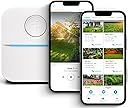
The Rachio 3 Smart Sprinkler Controller revolutionizes lawn care with app-based control and patented Weather Intelligence that automatically adjusts watering based on hyper-local weather conditions. Compatible with 8-zone systems and major smart home platforms like Alexa and Google Home, it offers fast DIY installation and customizable schedules to save water and money while keeping your yard thriving year-round.


| ASIN | B07CZ864Y9 |
| Best Sellers Rank | #697 in Patio, Lawn & Garden ( See Top 100 in Patio, Lawn & Garden ) #1 in Automatic Irrigation Controllers |
| Brand | Rachio |
| Brand Name | Rachio |
| Color | White |
| Customer Reviews | 4.5 out of 5 stars 8,404 Reviews |
| Display Type | LED |
| Global Trade Identification Number | 00680140538863 |
| Included Components | Controller, power supply, quick start guide, screws and drywall anchors |
| Item Dimensions L x W x H | 9.1"L x 1.4"W x 5.6"H |
| Item Type Name | Sprinkler Controller, Works With Alexa |
| Item Weight | 16 ounces |
| Manufacturer | Rachio |
| Material | Plastic |
| Material Type | Plastic |
| Model | 8ZULW-C |
| Number of Items | 1 |
| Operating Temperature | 4 °F |
| Part Number | 8ZULW-C |
| Product Dimensions | 9.1"L x 1.4"W x 5.6"H |
| UPC | 850028614594 680140538863 |
| Unit Count | 1 Count |
| Voltage | 120 volts |
| Warranty Description | 2 Year Limited Warranty. Not for use outside the United States and Canada. Unauthorized use outside of these countries will void all warranties. |
A**S
Vital part of a smarthome setup
Where do I start? If you have a smart home integration setup -get this. If you want to save water - get this. If you want frustration free irrigation - get this. If you want a rebate - get this. So take $99.00 off from the price if you live in Central Texas because there's a rebate by LCRA, that's right just for purchasing and installing this product you get a $99 check from LCRA. Nothing to send in, just go to their website and fill out a form. This sprinkler system uses super accurate weather forecasts to determine rain hold days. You can set it up to be dynamic based on soil conditions or program a static schedule. You can start your sprinklers from your phone - from another state if you want. Tracks water usage, schedules, rain hold days and you can add other people from your household to your account so they can control it also. If you are like most people out there, your rain sensor doesn't work anyway. Ever run to the controller when it's raining to shut the sprinklers off? I have, I don't anymore, this thing is smart enough to activate rain hold based on the forecast. The forecast could be wrong you say.... well this is not your average forecast. The weather is provided from a network of 300,000 weather stations and other sources to provide hyper-local weather forecasts. It's never wrong. Installation: takes about 10 mins 5 mins to remove the old one 5 mins to install this one. It will take you another 10 mins to setup zones where you tell the application what type of irrigation, vegetation and soil composition you have. You can actually take pictures of your actual zones to put into the app. (see pic above). You can set it to notify you when zones start and stop, or tell it to leave you alone and just do it's thing. I have it integrated with Home Assist - An open source home automation server that ties my Alexa, smart-things, cameras, nest, august locks, network devices and now my lawn sprinkler system together. You can even tell Alexa - "water backyard" and presto - your sprinklers start running. The wiring is so easy a caveman could do it - M=Master pump, +/- 24volt power and one wire for each zone. I even used the screws that were in my old control panel. If you're on the fence about this purchase, pull the trigger. It will save you time, money and frustration over time and pay for itself. I can not speak to the durability of the product, however since you never actually touch the controller to operate, I suspect that it will last a long time. I would recommend this product 100% without reservation and they make an 8 and 16 zone version. I am reviewing the 8 zone version, however the 16 has all the same features. No jinky setups, everything was straight forward and easy, the software (phone app) is really intuitive and makes it easy to schedule and manually water. It will take care of the lawn for you. Set it, and forget it. No more running to shut off the sprinklers in the rain, no more brown grass because you forgot to set the schedule to run.
J**N
Excellent product, but not for everyone
I debated for a long time before purchasing this product due to the mix of very strong reviews — both positive and negative. After using this unit for about 2 weeks, and experiencing a lot of weather in the North TX area, I’m writing to speak to both sides and offer my observations in hopes that it will help others who find themselves in the same dilemma that I did. First, let me say that this is an awesome product. Having worked in technology, and specifically software engineering and product development for 15-20 years, I truly appreciate the simplicity of the product. The entire setup process — from opening the box to having water running in our yard — lasted maybe 10-15 minutes max, and it was only that high because I spent about 5 minutes creating a label on our label maker to “mark” the zones on the outside of the unit. Some might call this overkill… my wife calls it particular… but nevertheless. Everything from the design, to engineering, to the magnetic cover, the software in the app (we use iOS)… it was simple and the experience was like opening an Apple product and having it “just work”. Second, let me speak to the setup options, since I think this is where most folks that write negative reviews get hung up. There are basically two paths to choose from, and there doesn’t really seem to be a middle ground. One path is to basically set it up as a “dumb controller” — meaning, think of what your parents probably had 20-30 years ago in their garage. You set a schedule, it is fixed, and it basically runs on certain days and times that you set. If this is your preference, then save your money and buy a different controller. There are way cheaper options on the market, and this product is going to be overkill for a schedule that simple. The other option, which is why I suspect most of you are probably interested or reading this in the first place, is what this system is really designed to do. You can set it up as a “smart controller” — meaning, you set a base schedule, along with some data points specific to your location, and these are fed into an algorithm, along with real-time weather information from your area, and it basically adjusts “on demand”. For example, if it rained more than a certain amount (you can set the threshold), or if rain is even expected in your area in the next 24 hours, it will skip a cycle. Or if it detects winds (again, you can set a threshold), it might adjust the time. Same thing for temperature below freezing, soil moisture, etc. There are a lot of options and you can customize which ones per zone… for example, one of our zones is a dedicated drip hose, so the wind alert doesn’t really matter but the soil moisture does. The neat thing is you can set multiple “schedules” and target different settings for each. The only thing to be aware of, is one of the settings is “time of day”… so if you have multiple schedules for the same day, and they are both set to “finish before sunrise”, for example, you might run into weird situations. We get around this by alternating days (or you can set a “fixed” time of day for one). Just a heads up for anyone running more complex schedules across zones. The “smart controller” setup (as I call it) is a little more work up front, and if you do it wrong, I can totally see how it will mess up your yard. However, it’s not all that difficult, and once it’s setup as intended, it’s totally worth the money. Based on our water usage, and the unpredictability of weather in the North TX area, I think this unit will pay for itself in a matter of a couple months. In the past 14 days alone, it has already saved us from running 4 different cycles for who knows how many hundreds of gallons each time. Again, this means that you actually have to do some work up front to make sure it is setup correctly. It does require a little bit of knowledge of your soil type and the ability not to over-estimate slopes. For example, just because your yard is graded (to get water away from your house) does not mean that the slope is “extreme”. All of the factors go into the algorithm… so if you get it wrong, that is not Rachio’s fault, even though it sounds like that is where most of the negative reviews stem from. It’s just like anything else with data… garbage in = garbage out. If you put good data in, then the results can be remarkable. The only downside, if there was one, is I could not get this to work with our existing rain sensor or HomeKit. The rain sensor threw false positives, and once I figured that out (thanks to Rachio alerting us "why" the system did not run), I just unplugged it and it's one less thing to have to worry about. For HomeKit, with a background in software engineering, I’ve looked into this technically and this appears to be an issue with Apple’s integration rather than Rachio. Practically, all this means is I cannot say “Hey Siri, turn on our sprinklers for 10 minutes". Would that be impressive to show off? Absolutely. But with the intelligence already built into Rachio's software, there’s a good chance I’ll never need to do anything manually ever again. In summary… this is an excellent product, but it is not for everyone. I do wish there was a review like this a few weeks back so I did not have to spend time second guessing myself before we purchased this product. All in all, this is a solid product, and I would highly recommend it… as long as you have some time to set it up correctly. I hope this helps! Justin
J**.
The best smart irrigation control available; basic Homekit control is a bonus
This is easy. The Rachio is simply the best Smart Irrigation Controller available. The recently added Homekit functionality is a nice addition, but you'll still want to use the Rachio app to get full-access to the incredible number of options for your irrigation needs. There's so many features here, it's hard to know where to start. Perhaps most important, while this controller has a myriad of options, its quite easy to setup and use. Among the features we really liked: setup is super easy. In our case, it was just a swap of the various zone control lines from our old controller to the new, download the Rachio App, and our iphone basically did the rest. It connects via Wifi (not bluetooth), and we had plenty of signal strength in our garage where the controller was located. The Rachio app will ask you some basic questions about each zone (soil and vegetation type, slope, etc) and then recommend watering intervals. Rachio adjusts watering based on weather and season, and its been working great for us for over half a year. We actually installed a home weather station, mainly to feed data to the Rachio 3. This is easier than it sounds. Most weather stations upload data to wunderground, and the Rachio 3 can talk with any wunderground station and use that for micro-weather-forecasting at your location. It's all auto-magic! The Rachio app will show all wunderground stations in your area; in our case, our home-based station was right there, easily selected. Another great feature is the ability to name zones and add a picture for each right into the app. Super easy. Micro-local weather forecasting is fantastic. Rachio uses rainfall, wind, and temperature data to adjust schedules. I'd guesttimate our water bills have decreased 20% thanks to this data, while our plants, lawn, and landscaping have never looked better. As for recently added Homekit control, you get very basic status and manual control via the Apple Home app. Homekit setup was simple: use the Rachio app to get your unique Homekit ID, and then enter this as a new device inside the Home app. Once you do this, the irrigation controller appears, and your zones (with your preassigned names) show up under this irrigation "tile" with a toggle switch for each zone. You can set a manual watering time for each zone, and manually turn them on/off via homekit. You'll still use the Rachio app for all your smart-watering schedules with Homekit as a backup for manual activation and to monitor status of the controller. The ability to include irrigation control in some automations may have some unique uses, and is the one added-feature that Homekit integration brings. For example, a motion sensor on/near the lawn could be used as a Homekit trigger to turn on sprinklers for a short period as a deterrent to cats (or trespassers). We haven't done this yet, but it's tempting... Highly recommended, a no-brainer 5-stars. Rachio features and ease-of-setup are class-leading, weather control is first rate, and homekit monitoring/control is a bonus.
H**A
I can’t figure how I lived 26 years without this…
I can’t believe I didn’t do this years ago. I’ve suffered through those confusing programmable controllers for DECADES. You know the ones, where you have to turn the dial to set the time, turn it again to set the start time. Then duration, then day(s). Then writing the zones on the wall. And having to walk back and forth to the garage to turn the system on and off while doing maintenance. Gah! This Rachio WiFi controller was up and running in 20 minutes. It easily connected to my WiFi extender in the garage. The wiring was simple and well labeled. The directions even come with a template for the wall screw holes. The app is simple. Create a zone, give it an obvious name, repeat for other zones. You can even take a picture of the zone locations. Before setting up the schedule I tried something simple: turn on and run for 10 min. Boom. Water. Happiness. Then I set up the schedules. We have weather coming in next week, and I’ll get a look at how the weather auto-pause features work. I didn’t bother with the front panel controller. The app control is what I wanted out of this.
P**R
REALLY MUST Use a Dedicated 2.4Ghz Wireless Network
Updated (again) Review: ALL GOOD! Solid, never dropping, WiFi Connection at last! What's the trick? I spent some more time looking into the issue of the controller constantly dropping the WiFi connection. On the Rachio web site, I noted that it said to NOT use a shared 2.4/5Ghz connection. But, that's the default (and, I think, only choice) that my Comcast/Xfinity router offers. So... I used one of my travel routers to setup a dedicated 2.4Ghz access point for IoT devices such as the Rachio. And, guess what? Since connecting to this dedicated 2.4Ghz network I haven't had a single disconnect in MONTHS. That's the secret to great connections with the Rachio: USE A DEDICATED 2.4Ghz network (SSID) -- If your only or default router from your cable company can't provide a separate 2.5Ghz network, buy a simple dedicated 2.4Ghz router (they cost as little as $20 here on Amazon as of Dec 2024). TP-Link has one. You don't need a lot of speed. AND, from a security perspective, you could use this for ALL your IoT devices to separate them from your home computers. Updated Review after having the device installed for a month or so: I'm conflicted. I love the product when it's working. But, every week or so, it seems to disconnect from my home WiFi network. The controller appears "stuck" with two light bars (white) which doesn't SEEM to be a documented failure code. When connected, the connection is absolutely solid. And powering the Rachio controller off and then on again seems to immediately fix the problem. The controller's networking firmware doesn't seem to be very resilient, and it doesn't seem to understand how to properly retry connections. Frustrating. When it's good, it's really good. I like it. But these disconnects are making me nuts. --------- Original Review: SUPER simple installation, replacing a 20 year old RainBird controller with 3 active zones and a rain sensor. Literally: Pull wires out of RainBird, remove RainBird from the wall, screw Rachio 3 onto the wall, insert wires into Rachio. 5 minutes. Download Rachio app. Add the just-installed controller. Define zones (there's a super-cool zone test feature in the app that's part of the zone add procedure), including taking pics of the zones. 10 minutes. Creating schedules... Maybe 15 minutes? Trying to decide what I wanted, and what the smart features meant and actually did, is what took the time. The device is super easy to install, it connected to my WiFi easily. The app is extremely well designed, with lots of suggestions and options... but also very easily enables you "do your own thing" (start the schedule at 6AM, run zone 1 for 30 minutes, then zone 2 for 15 minutes, then zone 3 for 10 minutes or whatever). I've only been using this a couple of days, but so far... VERY pleased. Definitely recommended.
J**C
Fantastic for many reasons
Absolutely fantastic system. Easy to program and make adjustments via an app on your phone. This works great if you are away from your home and wish to make a change in schedule, duration, etc. What I also love, and any one who does their own sprinkler system repairs will love, is that you can turn your system on and off while being at the site of the repair versus having to have some one else manage the on/off or risk losing a lot more water while you run to see the leak and then run back to turn off the system. Also easy to install and operate.
P**.
Thankful to have an app that just works! Simple installation & set up.
I just installed this controller so I can’t speak to the long term use. I can say nothing has been easier for this 65+ woman to install, connect to WiFi, and set up. Simple and straightforward. If you can use a screwdriver and push wires into a hole, download an app and make an account, you’re good to go. A drill will make things a little easier, but might not be necessary depending on what surface you’re mounting the controller onto. If you’re not comfortable using an app and prefer a manual controller, this might not be for you. I replaced my ESP ME3 controller from the big brand with this Rachio because I simply couldn’t tolerate the other brand’s constantly malfunctioning app. The Rachio was simple to install: download the Rachio app and create your account, *take clear pictures of your existing wiring on your old controller, remove your old controller, use the provided template to drill pilot holes for (3) screws and screw the Rachio to the wall. Insert your wires into the Rachio (they plug in, no twisting or screwdriver needed) making sure to have the right wires in the right holes, and plug the controller in. With your WiFi password handy, in the app tap ‘add a device’ and connect it to your WiFi. That’s it. Run each zone to be sure you have the correct wires in the correct slots. (**Just a tip that may help, but isn’t necessary: If you happen to have a WiFi mesh system (I have a Deco) and/or have a “Guest” network or similar, you may want to put the Rachio on a 2.4 Ghz channel, which I did even though it claims to be able to switch as needed between 2.4 and 5 Ghz with no problems. It was simple enough for me just to put it on the 2.4 Ghz, so I did just to avoid any potential connectivity issues in that regard. I think maybe some of the connectivity complaints may stem from the 2.4 Ghz vs 5 Ghz, but I’m not sure.) If you aren’t that tech savvy, just simply connect to your WiFi and pay no mind to what I just said. As far as setting times and zones and weather, etc., I only have 3 zones, and i haven’t used the weather feature that decides when it will or won’t water the lawn, so I can’t speak to any of that. I just set the days and times I want it to run the sprinklers, so my set up is pretty basic. Overall, a simple set up all around and sufficient for my needs. If I encounter any issues, I’ll definitely update as needed.
Q**N
These require major advanced adjustment or your plants will die.
I have two of these. They work well. But be prepared to lose plants and grass at first. You will save water but your plants will die. The default settings are a fraction of the water needed for California. You will need to go into advanced settings and adjust everything to get enough water delivered.
U**1
Simple and efficient sprinkler controller
Very easy to use, a lot of modofications available, really good device. The only problem if you don't have US socket, but you can solve it using another adaptor.
"**"
Sold in UAE with US power supply
Unusable device in UAE based on our power standards. Avoid!!
B**H
Everything I was hoping for
It's only been two weeks but I will give you my first impression and it's a good one. The reason I was looking for a new controller was my old Rainbird always had issues with connecting to my wifi. It was ok feature wise but felt it was falling short. This new Rachio was super easy to install. I loved that fact the bottom of the control was left open so you don't have to pull wires through any holes. Face is held on with magnets, another nice feature. Connecting wise, Are you kidding me! I blinked and I missed it. I thought for sure I did something wrong as it should not be this easy but no! I was wrong and it was connected and it really was that fast! The rest of the set up was just as easy. I'm a guy, who has time for instructions, not me!!!! And you truly do not need them. It walks you through everything step by step. I found everything easy to understand and to navigate through. It has some great features in my opinion zone wise. Asks about your area you live, asks what kind of watering you are doing (Grass, bushes etc) what type of irrigation heads you are using. What slope the area is on. It then gives you the option to name the zone and add a picture. All this is to optimise your watering. So cool! Timer wise, again super easy. I asked to end my watering cycles at sunrise and it figured out the start times. Because you entered all the information about the zone it automatically calculates how long each zone waters for. Keeping in mind you have full control over all of these settings if you wish. It watches your local forecast and it has only watered once so far. Its early spring here and it has been cloudy and sometimes raining. It is pausing my schedule automatically for me. Such A nice feature. I was a little hesitant on giving it full control but since you can easily go into the app and monitor your past watering cycles I feel comfortable knowing I can monitor it and see what is going on. Another very cool feature. It's not the cheapest unit on the market but due to all the features, the care free operation it's worth every penny. For anyone that has never used an App based watering system its pretty cool. My cell phone notified me someone was in my yard (Security camera system). When I looked someone was walking their HUGE wolf dog and it decided it didn't want to go any farther and layed down on my lawn. She was pulling and pulling. No way she was moving him. So I decided to help her out..... I opened up my Rachio app and flicked the zone on. Wanna see how fast a Wolf dog can move!!!! She literally said out loud laughing. THANK YOU WHOEVER YOU ARE !!!!! LOL!
L**.
Exelente proveedor
Muy buen servicio, entrega muy rápido, buen precio
T**D
Easy install Australia transform included.
Great unit, easy to set up and works well. For those in Australia, if you buy from the AU Amazon site the package includes 240v Australian transformer which is nice.
Trustpilot
1 month ago
3 weeks ago