


โจ๏ธ Elevate your control game with the H20 Mini โ where sleek meets smart!
The Dupad story H20 Mini Wireless Keyboard combines a full-size touchpad with a compact, ergonomic QWERTY layout, featuring a rechargeable 300mAh battery, 3-level RGB backlighting, and a 10-meter wireless range. Its smart auto-rotate touchpad and built-in IR learning remote make it a versatile tool for Android TV, Windows PC, Raspberry Pi, and more, delivering seamless plug-and-play convenience for professionals on the go.


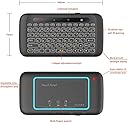


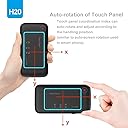
| ASIN | B07C2V97T1 |
| Additional Features | Backlit, Rechargeable |
| Antenna Location | Office |
| Best Sellers Rank | #1,508 in Computer Keyboard & Mouse Combos #3,535 in Computer Keyboards |
| Brand | Dupad story |
| Built-In Media | USB Cable |
| Color | H20 3 in 1 Keyboard |
| Compatible Devices | Laptop, PC, Projector, Smart TV, Smartphone |
| Compatible Operating System Family | Linux, MacOS, Windows |
| Connectivity Technology | 2.4GHz wireless, USB-A |
| Customer Reviews | 3.9 out of 5 stars 557 Reviews |
| Enclosure Material | Polycarbonate |
| Generation | 3rd Generation |
| Hand Orientation | Ambidextrous |
| Item Dimensions L x W x H | 4.92"L x 6.3"W x 0.63"H |
| Item Weight | 3.36 ounces |
| Keyboard Backlighting Color Support | RGB |
| Keyboard Description | Ergonomic |
| Keyboard Layout | QWERTY |
| Manufacturer | Dupad story |
| Mfr Part Number | 8541649328 |
| Model Name | H20 |
| Model Number | 8541649328 |
| Number of Batteries Required | 1 |
| Number of Items | 1 |
| Number of Keys | 104 |
| Number of Packs | 1 |
| Number of Sections | 1 |
| Power Source | Battery Powered |
| Recommended Uses For Product | Office |
| Series Number | 8541649328 |
| Special Feature | Backlit, Rechargeable |
| Style Name | Contemporary |
| Switch Type | Membrane |
| Theme | Keyboard |
| UPC | 650985808513 |
| Unit Count | 1 Count |
| Water Resistance Level | Not Water Resistant |
M**T
Perfect HTPC keyboard/touchpad
My bedroom TV is also the monitor for my HTPC and I was sick of having a keyboard in bed lol. This device is AMAZING. Size of a cell phone/remote control. Buttons are clicky, though the device is light it doesn't feel cheap. Sensors work great for flipping it to the keyboard side (like how your phone auto rotates from portrait -> landscape). LED backlight is great, colors and brightness are adjustable or you can turn it off. Maybe the best part is it's rechargeable via micro usb so there's no batteries and the charger isn't propietary so if the charger breaks you don't need a whole new device. The touchpad works well, that's what I use most. Gestures work great, up to 4 finger gestures work on it. This is exactly what I was looking for couldn't recommend it enough. If there was a nicer $100 version of this I would buy it. I can't speak to battery life yet after just a few days use (still on my first charge) but with the micro usb that doesn't concern me, charging will be easy.
E**N
Great remote for media computer. I've been using it for years!
I love this little device. I use it with a media computer hooked up to a TV. I found wireless keyboards and mice cumbersome, but this little thing revolutionized using my computer as a media station. I bought it in 2021, and I use it almost every day and only have to charge it every couple of weeks. I will admit that some of the reviewers who say the touchpad is fiddly for selecting things are right, but it is possible and you can get the hang of it. I've more than gotten my money out of this little thing. Very happy I bought it, and I highly recommend it. Recommendations for use: don't leave it on. Memorize where the power switch is and thumb it on to use it, and then thumb it off. Not only will the charge last longer that way, but you'll avoid unwanted selections. It's highly vulnerable to vibrations. Familiarize yourself with the finger tap combinations, and avoid resting all of your fingers on it because that changes the color. Don't use it when it's plugged in to charge. Charging seems to distort the signal and you can get some really weird responses. I usually unplug it to make a selection (start a video or something) and then turn it off and plug it in until I need it again. But I only have to do this when it starts blinking red indicating low battery while I'm actively using it. Usually, I just randomly pick a night and put it on the charger when I go to bed. It has an amazingly long battery life if you keep it off rather than letting it sleep when not in use. Cons: click and drag is nearly impossible. It can be done but usually takes a lot of trial and error to get the double tap just right to select something to drag. It is very vulnerable to vibrations. Leave it in sleep on the couch next to you and it will randomly stop your video when you shift on the couch. Just turn it off when you're not actively using it. Some of the keyboard combinations are a little weird, and if you have poor eyesight, even the lighted keys can be difficult to read. Finding punctuation is the hardest. Don't expect to do a ton of complicated typing with this. It's a remote keypad not a keyboard. Direct line of sight is necessary. If you have other electronic devices in use, don't put them between the remote and it's dongle. Pros: long lasting battery, good range, durable and dependable. I've been using it for years and have no real major complaints.
B**Y
I love these keyboards, super convenient and work on almost anything.
I use em with my laptop on the TV and my Nvidia Shield. Power key is a little inconveniently placed, but otherwise great chicklet keyboard. Track pad is the best I've used on a remote. It has a gyro and knows which side you are using and disables the other side. It also knows its track pad orientation, so you can scroll in landscape or portrait. I probably only charge em 2 or 3 times a year. They have a physical power switch which is nice but they also go to sleep. While I wish these would get an update to include Bluetooth and usbc charging, I've tried a bunch of other keyboards, remotes and air mouses and this is what I keep falling back on. Perfect companion to the Nvidia remote.
A**Z
Lasted 2 years, not bad.
Not a bad little device. Just threw away after 2 years and 2 months of everyday use. Stopped connecting to USB dongle. Attempted various methods to get it to work including opening it and resitting its ribbon cable. Would not buy again. Did work for what I needed.
W**L
JUNK
o stars. Piece of crap stopped communicating with the usb in less than 2 months.
N**Y
Easy set up. Working out of the box in seconds.
The best $22.99 investment I have ever made. I use it for my home theater. It works like a charm on my Intel NUC mini computer. A lighted screen? I could not believe the product description, but lo and behold, I can see the keys in the dark: what a convenience! I have not had it long enough to evaluate how long it lasts on a usb charge. I am turning it off after every use to get the longest life possible. A trackpad on the back! Wonders never cease. I love it.
C**H
Gyroscope is wonderfull
Great multimedia keyboard trackpad. Thereโs is actually a gyroscope in this thing! So if you flip it around to use either modes, it will disable the other. Another smart feature of the gyroscope is the trackpad will operate in either direction, it will always be up as long the top is facing up. The usb mini b port is less than ideal, would like to see it get updated to usb c.
6**6
USB only
It does jotnhaveb2.4 and Bluetooth which sucks. Had to return
P**E
Excellent
I own a fair number of BT and RF remotes and this one has by far the best keyboard. It feels great and responsive and the backlighting really works. It is very light and compact. The only difficulty is with clicking and dragging with the buttonless trackpad. Overall it works really well. I just wish it had a BT version as well.
H**R
Good product
Great prodect, it works better than expected.
K**L
IR function unclear, overall great
Purchased H20 model, works as intended Instructions are terribly worded but clear enough to get it working I canโt figure out how the IR works, was able to learn the power button and press that button but I canโt figure out any other buttons, even simple volume control USB dongle plugs in to my Sony Bravia 3 TV and works, it is compatible Just wish the IR instructions were more helpful
P**E
Great idea but needs revision
Great little device but the power button is right next to back space nn it turns off the PC not the keyboard so i ended up shutting down my PC while in the middle of something. Also the gyro is a bit finicky I had to flip it over a few times n back to get it to work comfortably . Great design, poor layout Also very hard to drag n drop Can't hold ctrl on keyboard side while using touchpad
O**U
Great if you don't want to 'waste' space on a touchpad.
The touchpad is on the back, it works, but I never use it. As a living room keyboard, it's excellent. The small footprint is a big plus for me. Connection is solid great selection of keys, very little missing from a fullsized kb. Backlighting is fine, battery life and charge time are reasonable, dropped it from armrest a few times and it survived the fall, nothing to complain about really. Would recommend.
Trustpilot
1 day ago
2 months ago