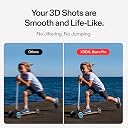
👓 Step into the future—where your apps, games, and memories live in 3D!
The XREAL Beam Pro is a cutting-edge AR glasses device powered by Android 14, featuring a full HD 1080p display, dual 50MP 3D cameras, and WiFi 6 connectivity. It supports all Google Play Store apps, enabling millions of 2D apps to be experienced in immersive 3D space. Designed for seamless streaming and cloud gaming, it offers a 90Hz refresh rate for smooth visuals and supports popular platforms like Xbox Game Pass and Steam Link. Lightweight and portable, it’s the ultimate spatial computing companion for movies, TV, gaming, and capturing life’s moments in 3D.


| ASIN | B0D66WNX85 |
| Battery Power | 2500 |
| Best Sellers Rank | #897,860 in Electronics ( See Top 100 in Electronics ) #528 in Mobile Virtual Reality (VR) Headsets |
| Box Contents | USB Cable |
| Brand Name | XREAL |
| Cellular Technology | 5G |
| Colour | White |
| Communication Feature | Bluetooth, Cellular, Wi-Fi |
| Connectivity Technology | Wi-Fi |
| Customer Reviews | 3.9 out of 5 stars 137 Reviews |
| Display Type | FHD 1080p |
| GPS | False |
| GPS Geotagging Functionality | False |
| Global Trade Identification Number | 06976143801207 |
| Human Interface Input | Touchscreen |
| Importer Contact Information | Patelcraft Solutions Private Limited, Jaipur Office: Address: Devi Nagar, Jaipur – 302019, Email: [email protected], Phone: +91-7416733071 | Bangalore Office: Address: SP Road, Bangalore – 560002, Email: [email protected], Phone: +91-8317437625 || For bulk orders and support, please contact us via the details above. |
| Item Dimensions | 16.3 x 7.6 x 1 Centimeters |
| Item Type Name | XREAL Beam Pro |
| Item Weight Unit of Measure | 390 Grams |
| Manufacturer | XREAL, Xreal : Patelcraft Solutions Private Ltd : Email Id : [email protected] |
| Manufacturer Contact Information | Xreal : Patelcraft Solutions Private Ltd : Email Id : [email protected] |
| Memory Storage Capacity | 128 GB |
| Model Name | XREAL Beam Pro |
| Model Number | X4000 |
| Operating System | Android 14 |
| Packer Contact Information | Xreal : Patelcraft Solutions Private Limited, Jaipur Office: Address: Devi Nagar, Jaipur – 302019, Email: [email protected], Phone: +91-7416733071 | Bangalore Office: Address: SP Road, Bangalore – 560002, Email: [email protected], Phone: +91-8317437625 || For bulk orders and support, please contact us via the details above. |
| Product Features | Camera |
| Resolution | 1920 x 1080 |
| Screen Size Unit of Measure | 12.5 Centimetres |
| Sim Card Size | Nano |
| Special Feature | Camera |
| Supported Application | Google Play Store |
| Unit Count | 1 Count |
| Warranty Description | 1 Year Warranty |
| Water Resistance Level | Not Water Resistant |
| Wearable Computer Type | Smart Glasses |
| Wireless Communication Standard | 802.11ax |
| Wireless Compability | 802.11ax |
| Wireless Provider | Total Wireless |
P**G
Really good accessory for the Air 2 Pro
I have been using the Air 2 Pro glasses for a little under a month now. They’ve been really good for flights and other commutes when I want a bigger screen. I’ve also used them with my work laptop as a second display when remotely working. After some more time with them, I realized that just using my phone with them had a few limitations. I couldn’t run my own streaming apps without the phone screen continuously turned on. The glasses also took up my phone’s only USB port. This meant that the glasses really ate at my phone’s battery, even in flight mode. So when I heard about the Beam Pro, I decided to make the purchase. They’re more closely integrated with the glasses, and you can use any app with the NebulaOS, which is more like a launcher specifically made for the glasses. They basically fixed my only complaint with the Air 2 Pro (which is really a complaint with my phone, not the actual glasses). There doesn’t seem to be any latency associated with the glasses, which is great. I’ve done a few things with them so far, namely PS5 remote play, local gaming (emulation), and video streaming (Plex and Max). The picture quality using NebulaOS is about the same as using my phone, which is to say, very vivid and visible. I connected a PS5 controller for remote play and gaming, and the Beam Pro handled it all very well. There’s a button to toggle between smooth follow (screen follows your eyes), and fixed position (screen floating in space). Smooth follow has some added stabilization, which makes using the glasses way more comfortable than just plugging in your phone, which if you move around too much, might get dizzy. This has been a BLESSING honestly. I also tried using the Beam Pro with my laptop, setting up virtual monitors via Parsec and SpaceDesk. The Beam Pro can run multiple windows, so I was able to set up two floating monitors within the glasses. I turned on fixed position and enlarged the Beam Pro windows, so the elements were way easier to see than just plugging the glasses in. The product runs Android, so it’s really versatile. It’s a new product and the team seems to be pretty responsive on Reddit, so I’m looking forward to some other creative use cases.
V**N
Bad quality product
Bad quality product. Screen was pixel damaged already for new product from the box from the very beginning.
T**R
Amazing camera
Great device. Camera is awesome, so many features.
C**.
Great Spatial computing device with some pitfalls
When I unboxed the product my first observation was there was no charger. The battery was completely dead. You need a dedicated at least 27 Watt wall charger. Xreal customer support said you need a PD or GaN charger of at least 27 Watts. Don't bother connecting it to a laptop even though the USB-C port powers the smartglasses it needs more amperage. I purchased a 30 Watt GaN charger and it then charger must faster. The start screen is a setup and warns you not to proceed if thed battery id below 20% so I charged it to 100%. Installation was rather lengthy not like most smartphones. When you connect your Xreal smartglasses the Xreal Beam Pro requests a 2.65 GB Nebula OS update. Then it asks for update of the Glasses app another ~800 MB and then updates the firmware in the smartglasses. I noticed it added on another menu called Real3D which wasn't there before. This basic menu enables viewing any content in 3D even if its not native 3D. I had already used my smartglasses with my gaming Laptop so was familiar with the menu ecosystem. However the Xreal Beam Pro offers a different ecosystem altogether by converting the glasses into a spatial computer very similar in some respects to the Apple Vision Pro. The Nebula OS has its own dedicated interface and uses a virtual mouse pad on the Xreal Beam Pro to navigate the menu system as well as a virtual pointer that looks like a laser beam that uses the motion sensors in the Xreal Beam Pro to get the users pointing direction. Its very similar to the hand controller in Virtual Reality headsets. You can also type on the keyboard on the Xreal Beam Pro just like a normal smartphone. After installation it guides you through a tutorial to make you familiar with the interface. You will see. Icons through the smartglasses and you can swipe left or right to see more which represent some common applications like you Photos, Calculator and YouTube to name few. However I ran into a major problem when launching the YouTube app from inside Nebula OS. I received push notifications to install a PDF viewer, an office application. I updated YouTube Music and YouTube using those onscreen buttons and then had persistent Tiktok ads that kept blocking the screen even appearing above the lock screen. I am not certain how this malware got onto the device but it clearly appears to be those push notifications inside the Nebula OS interface. In frustration I eventually factory reset the Xreal Beam Pro via the System menu and redid the entire installation. However this time I ignored on screen prompts inside Nebula OS but rather updated YouTube from inside the Playstore app which got rid of those Tiktok ads. Now that these headaches are out the way let me describe some of the experience. Xreal has put quite a lot of functionality into the Xreal Beam Pro so you will discover new things as you use the device with any Xreal smartglasses. Let's look at the device hardware. The Beam Pro has two 50 MP cameras so you can take true stereoscopic 3D photos and videos. They can be viewed under the photos app in Nebula OS and have a 3D icon on each thumbnail so you can toggle 3D on or off. Some content allows you to pinch and zoom and move the screen further away or closer to you. Another nice menu when inside the photos app basically gives you a 360 degree interface with all you photos and videos its just like a Virtual Reality headset so you can look around in full 360 and see thumbnails placed over a large sphere. Unfortunately I wasn't able to view 360 degree camera images like on my VR headset. If you use the Maps app and open a 360 image it only appears in a 2D window which you drag with the laser pointer. If you click inside Nebula OS just below the digital clock it brings up a useful interface where you can adjust the brightness and even set the transparency so you can see the menu overlayed over your environment. If you swipe up it shows you all the apps you have open. Unfortunately I couldn't figure out how to close those cards. You can highlight a card and bring an app into focus which provides another menu bar at the bottom. But clicking the X button doesn't close the app and remove it from memory. Another think I noticed is you can have two giant windows open simultaneously placed side by side eg the Photos app and YouTube. You can change what app appears in each window. I am not certain how many windows you can have open but that feature is what spatial computing is like. One last item I need mention is you can also just cast the view of the Xreal Beam Pro screen by enabling Default Air casting in the Glasses app. Then the Smartglasses acts as a screen similar to when you connect to a laptop.
A**R
I don't see the point...
I'm sorry, but I just don't see the point...if you have an Android phone, and especially if you own a newer model, Samsung Dex works way better than this. This device just complicates everything, and is not intuitive at all.
Trustpilot
3 days ago
1 week ago