Desertcart purchases this item on your behalf and handles shipping, customs, and support to Austria.
🖥️ Keep your cursor moving, your status active, and your productivity unstoppable!
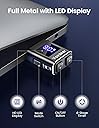
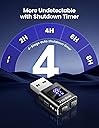
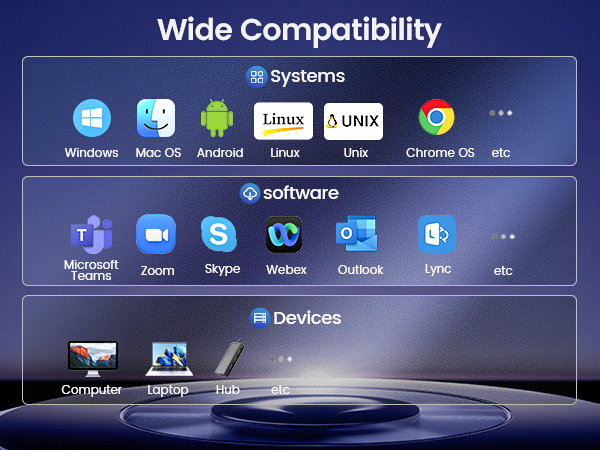
The VAYDEER USB Mouse Jiggler Mover is a compact, driver-free device designed to simulate mouse movement via USB-A or USB-C ports. Featuring an LED timer with auto shut-off, dual cursor movement modes, and memory function, it supports Windows, macOS, and Linux systems. Its durable aluminium alloy build and plug-and-play simplicity make it an essential tool for professionals seeking to maintain active status during remote work or presentations.


| ASIN | B0D8S8W3NL |
| Antenna Location | Gaming, Office, Operating multiple computers, PPT, Work from home |
| Are Batteries Included? | No |
| Are Batteries Required | No |
| Best Sellers Rank | 1,593 in Computers & Accessories ( See Top 100 in Computers & Accessories ) 73 in Mice |
| Brand | VAYDEER |
| Brand Name | VAYDEER |
| Button Quantity | 3 |
| Colour | Black |
| Compatible Devices | Desktop Computer, Laptop |
| Connectivity technology | USB-A , USB-C via Included Adapter |
| Country of Origin | China |
| Customer Reviews | 4.7 out of 5 stars 1,525 Reviews |
| Enclosure Material | Aluminium Alloy |
| Hand Orientation | Ambidextrous |
| Included Components | USB Mouse Jiggler, USB-C to USB-A Adapter |
| Item Dimensions L x W | 38L x 22W millimetres |
| Item Weight | 5 Grams |
| Manufacturer | VAYDEER |
| Manufacturer Part Number | FM9041 |
| Minimum Required Operating System Version | Linux Mint 1, Mac OS 10.12 Sierra, Windows 7 |
| Model Number | FM9041 |
| Movement Detection | Optical |
| Movement detection technology | Optical |
| Network Connectivity Technology | USB-A, USB-C via Included Adapter |
| Number of buttons | 3 |
| Operating System | Mac OS, Windows, Linux, Android |
| Power Source | USB Powered |
| Product Features | Dual Movement Modes, LED Display, Memory Function, Timer Function, USB-C Adapter Included |
| Range | 10 meters |
| Special feature | Dual Movement Modes, LED Display, Memory Function, Timer Function, USB-C Adapter Included |
| Style Name | Modern |
| UPC | 769044079396 |
| Unit Count | 1.0 count |
J**Y
Jiggle all the way
The best device
N**Y
good product
fast connection, cheap but quality easy to set up and use
M**L
My productivity has never looked so good
Fantastic little gadget. Plugged it in, and my computer now believes I’m the most relentlessly dedicated employee in Britain. Apparently I never stop working, never make a coffee, never stare blankly out of the window contemplating life choices. Setup took seconds. It’s undetectable, reliable, and doesn’t install any software. My mouse gently wanders about like it’s looking for the meaning of life while I “review strategic priorities.” Would recommend to anyone whose PC has an unhealthy obsession with locking in 30 seconds. Disclaimer for my manager: this review is purely fictional. If you’re reading this, I was definitely at my desk the entire time.
E**E
Jiggled
Was a bit sceptical as it was so cheap but it works, you can set it for 2, 4 or 6 hours. It's great
J**T
Good Product
It's really good but there is a one drawback it won't work 24/7 . it's only work for this 8 hours then you need to reset again. Also doesn't work for Service Now porstal
R**2
Value for money
Works a treat
M**T
comes with USB C adapter
does exactly what it should, plus its comes with USB C matching adapter, which I didn't notice in the description, I nearly bought another one to get the USB C connectivity, but glad I stuck to this one.....definately the best choice.
A**A
continual working never taking a break
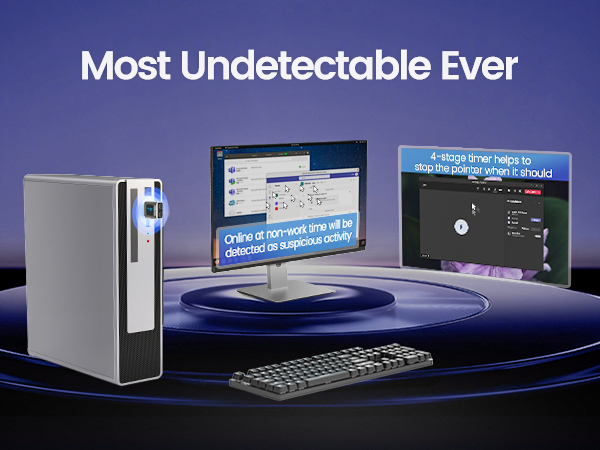
amazing! so good it almost wants you to have more than one on the same computer! when coming out of a lock screen on a computer there is a log saying u had to re-enter your password so admins can see when and how many times u were inactive. this gadget is exactly what u need to make your computer stay alive and not go on the the lock screen. total magic.
D**E
Einfach zu benutzen
Tut, was er soll; sowohl bei Windows als auch iOS.
G**Z
Práctica y comodo
Es una joya para cuando estás desconectado por largo tiempo de la computadora el teams no aparece ausente
S**O
Excellent
Works great
P**S
Cómo preparar lentejas sin que te despidan.
Como teletrabajador a tiempo completo y cocinero a tiempo parcial, mi vida era un drama constante: ¿Mover el ratón para no caer en "inactivo" o mover la cuchara para que las lentejas no se peguen? Era un dilema existencial. Pero entonces, llegó esta maravilla de la ingeniería. Este movedor de ratón no es solo un dispositivo; es un salvavidas profesional y gastronómico. Desde que lo tengo, mis compañeros creen que estoy profundamente concentrado en una hoja de cálculo vital, cuando en realidad, estoy: Sofriendo la cebolla y el pimiento. Echando el pimentón de la Vera (el secreto, que no falte). Cortando el chorizo para que suelte su jugo mágico. ¡Y lo más importante! Dándole su punto de sal a esas lentejas que me miran con ojos de "estoy lista". El aparato es silencioso, discreto y tan eficiente que dudo que mi jefe se mueva tanto en toda la jornada. A veces lo miro y pienso: "Qué bien trabajas, amigo. ¿Quieres un plato de las lentejas que nos has ayudado a hacer?" Pros: Libertad absoluta: Ahora puedo hacer la colada, ver un documental o, ya sabes, ¡cocinar! Indetectable: Es como si mi ratón tuviera vida propia y una adicción a los micro-movimientos circulares. Paz Mental: Cero ansiedad por el temido pop-up de "Su sesión va a caducar". Resultados Gourmet: Lentejas al dente y un rendimiento laboral aparentemente impecable. Contras: Deberían incluir una suscripción a una app de recetas. Mi perro lo mira con envidia, creo que sospecha que es un colega suyo que ha ascendido. Conclusión: Si tu vida se divide entre la reunión de las 11:00 y la necesidad imperiosa de tener un plato de cuchara caliente, no lo dudes. Cómpralo. Tus lentejas y tu carrera te lo agradecerán.
J**.
Definitely worth it, saves time and peace of mind
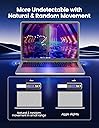
Easy to use, plug in computer usb port and choose your settings and go about your day without worrying about computer logging out after few minutes. There are two movements to choose from the side switch, zig-zag(mouse moves quicker) or micro-movement(barely notice the move). I use micro, so you can work and click without clicking on wrong files,etc as the mouse moves. I also choose the 8hr timer, set it and forget it for the day. Only been using it couple weeks, so far so good, not sure how long it will last, hopefully years to come. Also saves desk space vs the actual motorized mouse mover, you may forget to turn on and put the mouse on as you leave your desk for something. Overall very happy I got it.
Trustpilot
2 weeks ago
3 days ago