Desertcart purchases this item on your behalf and handles shipping, customs, and support to Austria.
🚀 Elevate your Mac mini M4 game with power, speed, and style!
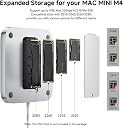
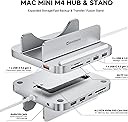
The Minisopuru MINI218B PRO is a premium 8-in-1 vertical dock designed exclusively for the 2024 Mac mini M4 and M4 Pro. Featuring an all-aluminum build, it supports up to 8TB M.2 NVMe SSD storage with blazing 10Gbps USB C/A ports, an integrated SD/TF card reader, and multiple USB connections. Its innovative vertical design enhances heat dissipation and Wi-Fi performance while providing easy access to ports and the power button. Perfect for professionals seeking sleek, efficient expansion and seamless integration.


| ASIN | B0DTHG5Q98 |
| Best Sellers Rank | #944 in USB Hubs |
| Brand | minisopuru |
| Color | 8 IN 1 Silver |
| Compatible Devices | 2024 Mac mini M4, Mac mini M4 PRO,MAC MINI M5 |
| Customer Reviews | 4.5 out of 5 stars 242 Reviews |
| Hardware Interface | MicroSD, USB 2.0, USB 3.0, USB Type C |
| Item Dimensions L x W x H | 5.1"L x 4.7"W x 2.3"H |
| Manufacturer | minisopuru |
| Number of Ports | 8 |
| Product Dimensions | 5.1"L x 4.7"W x 2.3"H |
| Total USB Ports | 4 |
| Total Usb Ports | 4 |
| Warranty Description | 2 YEAR |
A**N
Minisopuru Side-mount Dock Practical, functional, versatile accessory under $100 USD
TLDR/ I Recommend: It’s a Functional and Versatile Accessory for the 2024 Apple Mac Mini A few months ago, after doing a lot of research I settled on a 2024 Mac Mini. Plenty of Amazon and YouTube reviews steered me towards a side-mounted docking station instead of a horizontally oriented pedestal style bases. I chose the Minisopuru iExpandMate MINI218B PRO for the following reasons: - Improved WiFi and Bluetooth antenna position. - Internal SSD - Better ventilation - Additional ports - Price WiFI/Bluetooth: Several Mac Mini users observed improved WiFi and Bluetooth connectivity just by placing the unit on its side and fully exposing the bottom plate where antennas are located. This makes perfect sense from an RF (radio frequency) perspective, and a few reviewers reported some horizontally mounted docks severely interfere or even block reception. SSD: While there are other more expensive options out there that support faster a SSD, but I prefer to use high speed Acasis external enclosures which I can move between devices. In this dock, I’m using a WD_Black SN770 1 TB NVMe for a Time Machine backup, and the 10Gbps speed is perfectly fine for that. Ventilation: With the Mac Mini oriented on its side it’s easier for natural ventilation to occur, allowing hot air to rise through the top vents and cool air to be drawn in from the bottom vents. From a practical standpoint, however, Apple silicon devices run much cooler than Intel and AMD based devices, so excess heat hasn’t been a big problem for most of my work. Even if the fan kicks on, there’s nothing to restrict air flow (e.g., desk surface or docking base). Additional Ports: I hadn’t really considered the additional ports for my particular use case, After all the Mac Mini has more than enough, or so I thought. I realized the 10 Gbps USB-A port worked perfectly for an external 2-bay 3.5” SATA Sabrent hard disk enclosure that hosts 3 TB of spindle storage, perfect for long-term storage. I still have a handful of older USB-A devices which will also benefit from the additional ports, such dongles, webcams, etc. Price: With a ~$80 price tag after promotional and coupon discounts, this makes the Minisopuru iExpandMate MINI218B PRO a practical, functional, and versatile accessory for the new 2024 Apple Mac Mini. Overall, this is a good and affordable accessory to compliment the new 2024 Mac Mini form factor.
K**N
Great Doc for the M4
The Minisopuru MINI218B provided the extra ports I needed. It is stylish, looks like it came with the M4 and it frees up desktop space. It provides 2 USB-A 2.0 slots, 2 USB-C 3.2 gen2 slot, 1 SD 3.0 slot and a SSD slot and a 3.5mm Headphone jack. I used the SSD slot to install a 2 Tb drive I use when processing photographs. It is easy to install the SSD and easy to setup. The MINI218B provides all the connectivity needed.
G**R
Works really well, extra ports are practically mandatory
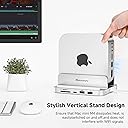
The M4 Mac mini is a great little machine, but it is sadly lacking in ports. This base adds some USBs and another HDMI port - critical if you're a dual monitor user. The vertical mounting is perfect for keeping it cool and making the power button accessible. Perhaps as important is it integrates with the mini perfectly, making it seem like a single unit, rather than a computer with a docking dongle.
M**.
Pretty easy to install SSD
This little guy is okay. I connect with an ethernet cable, so I'm not seeing any wi-fi drop off. The extra SSD was easy to install, although it takes a moment to show up in finder. You need to be careful on how you position this in the cradle or you will lose access to all the connection ports. I do like that it helps open up some addition USB ports and works pretty well with a camera card.
C**S
Good product
Works great
L**O
I can have extra connection ports
Very convenient
D**R
Great for Mac Mini
Got it a few months ago and it is perfect
J**E
How many ports do you need
Not enough C ports for me personally but well constructed and easy to use
F**R
Mac mini 2018 縦置きスタンド兼用ドッキングステーションとしても秀逸!
まだ購入予定 Mac mini 2024 の種類を決めかねているので現在手持ちの Mac mini 2018 (i5)を縦置きして使ってみました。 【まず、縦置きにした場合内部温度大丈夫なのかの検証】 Apple TVで映画、Amazon prime Video で映画、Safari 上 YouTube Video でライブ映像を同時垂れ流し 開始から30分ほどでCPU/GPU温度を確認しました(ユーティリティ Sensei を使用) 底面通気口設置面が開放されたためか、確実に温度は下がっているようです。 ただ、内部埃掃除は頻度上げてやる必要あるのかも。 【内蔵・外付けドライブ動作】 内蔵 m2 スロットに Samsung SSD980 (PCIe 3.0x4) USB-C ダウンストリームポートに外付け SSD WDSN570 (PCIe 3.0x4) どちらも 1000MBps 読み書きできており、全く問題なし。 ただ不思議なのが、Mac mini 本体とは USB3.1 Gen 2 (10Gbps)での接続のため 種々ポートに機器同時接続すると帯域食われて SSD 動作も遅くなると思うのですが 本製品の HDMI ポートからモニターに繋ぎ FHD 60Hzで使いながら SSD 動作確認しても 全く遅くならないのです。これは一体、Full HD 程度では帯域の食われ微々たるもの という事なのか? いずれにしてもありがたい事です。 micro SD も SDXC 64GB exFAT で 100MBps で読み取れ、不満はありません。 【その他のポート】 Audio 3.5mmジャックは コンボ対応のようで、マイク搭載ステレオイアホン繋ぐと モノラルマイク入力とステレオイヤホン出力が同時に認識されます。 これはありがたいですね、Mac mini 搭載の 3.5mmジャックはイヤホン出力のみ、なので テレビ会議とかに非常にありがたい所。 【改善希望点】 内蔵 m2 SSD 動作に不満ないのですが、やはりアクセスランプが欲しいと思います。 --------- 最新 Mac mini 2024(M 4/M4pro) は勿論、発熱大きい Intel Mac mini の縦置きスタンド兼用 ドッキングステーションとしてもお勧めの本製品です。
D**L
Bon produit
Bon produit, les ports fonctionnent bien.Utilisé avec NVME de 2G pour Macmini M4.
J**G
Solid and capable, makes turning mac on and off easy!
Seems like a very solid piece of kit addition. 2 SD card slots, very useful that the mac sits on its side, so makes turning on and off easy. And the right amount of ports –––– Having a weird issue where if the mac goes to sleep, sometimes the keyboard does not work, so cannot type in my password. Tried unplugging the keyboard, this does not work, so have to reboot, which is a pain. Not sure who's to blame here though... Mac or the housing unit.
M**N
La mejor compra para la Mac Mini.
Muy práctico y funcional... Ya que realmente si hacen falta más conectores. Me encanta que fija muy bien la Mac Mini y mejora el acceso al botón de encendido / apagado. La conexión a la tarjeta de memoria quedó genial.
け**6
Mac Mini M4/M4 Pro(2024年モデル)に対応する8-in-1のUSB拡張ハブ兼スタンドで、Mac Miniのポート不足を一挙に解消する製品です。
Mac Mini M4/M4 Pro(2024年モデル)に特化した 8-in-1 の USBハブです。 Mac Mini M4/M4 Pro サイズなので、実物を見ると、意外とコンパクトと感じるんじゃないかと思います。 Mac Mini のシンプルな外観がちょっとゴテゴテとするのがイマイチなんですが、便利さには代えられない! そんな感じの製品です。 機能的には、8-in-1の USB拡張ハブで、USB-Cドックって感じ。 Mac Miniはコンパクトで高性能なデスクトップPCとして人気がありますが、外部ポートの種類が限定的な点がやや不便と感じることも多いです。本製品は、その弱点を補い、さらにSSDエンクロージャーを内蔵することでストレージ拡張も同時に実現できる優れものとなっています。 以下では実際に使ってみて感じた、本製品の特長や使い勝手を整理してみました。 【製品の特徴的な仕様】 1.ドック&スタンド一体型: Mac Mini本体を載せる形で使え、作業スペースを有効活用 Mac Miniのデザインに合わせた一体感: シルバー基調のシンプルな見た目で違和感なく設置可能 まさにジャストサイズですし、Mac Miniが触れる土台の部分はシリコンでクッションにもなっており、傷が付かないように配慮されています。こういうところが専用品の良いところだと思います。 2.M.2 NVMe SSDエンクロージャー搭載: 最大容量・高速なNVMe SSDを内蔵可能 底面にスロットがあり、SSDの発熱を机の上と本体の合金で効率的に排熱するようになっています。 3.8-in-1 充実のポート類 1) 10Gbps対応 USB-C 2) 10Gbps対応の USB-A 3) USB2.0 USB-Aポート 4) USB2.0 USB-Aポート 5) SDスロット 6) MicroSDスロット 7) 3.5mm オーディオ端子 8) M2 PCIe NVNe SSDクロージャー 4.パッシブ放熱構造: SSDを搭載しても熱がこもりにくく、安定動作が期待できる
Trustpilot
2 days ago
2 weeks ago