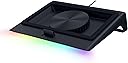
Razer ノートパソコン冷却パッド
Product ID: 725189353
Details
- ブランドRazer(レイザー)
- 商品の寸法39.6長さ x 29.2幅
- 商品の重量2.61 キログラム
- 材質プラスチック
- 色ブラック
🌀140mm brushless fan, up to 3000 RPM
🔋Smart fan speed adjusts from idle to full load
🔌3-port USB Type-A hub for expanded connectivity
Desertcart purchases this item on your behalf and handles shipping, customs, and support to Austria.
❄️ Stay Cool, Game Hard, and Own the Heat!
The Razer Laptop Cooling Pad features a 140mm brushless fan spinning up to 3000 RPM within an airtight pressure chamber, dynamically adjusting fan speed from idle to full load to drastically reduce CPU and GPU temperatures. Compatible with laptops from 14" to 18" via three magnetic frames, it also offers customizable fan curves and Razer Chroma RGB lighting through Synapse. With a built-in 3-port USB Type-A hub and programmable multifunction buttons, it enhances connectivity and control, backed by a 2-year warranty for confident ownership.

| ASIN | B0DJDWWHTV |
| Amazon 売れ筋ランキング | パソコン・周辺機器 - 118,378位 ( パソコン・周辺機器の売れ筋ランキングを見る ) ノートパソコン用冷却パッド - 176位 |
| EUスペアパーツの入手可能期間 | 2 年 |
| UPC | 840272914793 |
| おすすめ度 | 4.3 5つ星のうち4.3 (660) var |
| カラー | ブラック |
| ファンの数 | 1 |
| メーカー名 | Razer |
| メーカー型番 | RC21-02300100-R3UC |
| ユニット数 | 1.0 個 |
| 付属品総数 | 1 |
| 冷却方法 | 空気 |
| 同梱商品 | ユーザーマニュアル (日本語ではない場合があります)。 |
| 品目寸法(L x W x H) | 39.6長さ x 29.2幅 x 11.4高さ cm |
| 商品のハイライト | 気密圧力室、14インチ~18インチのほとんどのノートパソコンやMacBookに対応。プリセット&カスタムファンカーブ、3ポートUSBタイプA、Chroma RGB。 |
| 商品の重量 | 2.61 キログラム |
| 商品外装素材 | プラスチック |
| 型番 | RC21-02300100-R3UC |
L**L
Recommended for 18 inch laptop
Terbaikk !!!
J**N
Nice Cooling Pad
its effectively cooling my G14 laptop.... good to have this cooling pad..
G**A
The Best That I've Tried (& There's Been a Lot)!
I have an interesting set up, and needed something powerful, but also on the smaller side so it wouldn't stick out an awful lot. I tried probably 10 other laptop coolers before finally arriving to this Razer model, and it's the ONE. Obviously, it has a sleek design with none of the weird, unsightly little wheels or knobs a lot of models have. The buttons for this are tucked cleanly on the right side (there are three). It also doesn't stick out a lot, so my laptop/desktop set up is a lot cleaner looking. There's only the one set level of height, but it's not a problem for me since my laptop is hooked to my monitor. I think it's at a height that's comfortable for most people though. I used this pad as a hub of sorts to keep cables tidy before I swapped a Thunderbolt dock, and it worked great. Since the ports are in the back, cables are kept cleanly out of sight. I don't have a Razer laptop (I'd love one though!), but the additional magnetic tip in screens made it possible for this to fit perfectly for my Asus Tuf f15. While my laptop does have an awesome internal fan system, I'll still hit framerate drops and bad lagging about 40 minutes into heavy gaming (like for Oblivion Remastered or Crimson Desert) just due to the extreme heat well into the 200s. This pad though, keeps everything cooler by FAR, sometimes cutting my temps in near half. The screenshot shown is right after a heavy, multi hour gaming session. It might not seem like much to some, but after me worrying I'd toast my GPU (not to mention being super salty about such short gaming times) this is insane. Yes, it's loud, but honestly, I've never had a fan system that wasn't loud when it actually works. It's well worth being able to play games on my older laptop! You can download the app and use it even if you don't have a Razer laptop, you just won't have all of the features. You'll be able to modify the fan speeds/arcs and also the lighting, which for being just a small strip, has some pretty cool modes. I personally LOVE this Razer cooling pad. It makes me want more Razer products, since this is so thoughtfully made. This has made what used to be a depressing time gaming into hours of fun.
A**R
Razer laptop cooler pad
Very happy with this product, works very well with my Asus Scar 18 2024 RTX 4080. Really like the fact it has the smart intelligent cooling via usb cable and external power supply. Though on the balanced mode in Synapse 4 I found I had to adjust the curve otherwise it seemed to hunt up and down. To the other reviewer that said it bricked itself after the firmware update which caused it to not read the cpu/gpu temperatures well this happened to me too, the firmware was successfully installed but I had uninstall Synapse 4 and reinstall, reboot and working good as new. Almost bought the Llano V12 and while it gets good reviews the quality looks questionable, the IETS GT600 looks better quality than Llano V12 but the GT600 is close in price to the Razer pad. Again Razer brings great quality and advanced smart cooling to table which as being in the electrical engineering field for many years was a huge plus for me. Noise in quite mode is quite as the name suggests, balance gets louder and performance is louder when temps increase. My Asus Scar 18 2024 fits very well on biggest pad and gets about 95% of the bottom intake. RGB light is good too, lots of adjustments in Synapse 4, probably about 20 different options, wave, rainbow, strolling, etc. While at the price point you pay for what you get, the advanced features compared to the competition makes it worth it for me especially when I spent $3500cdn on a higher end gaming laptop. The Razer product is fairly new and sold out during Christmas 2024 both on Razer and Amazon, glad I got mine. Don’t mind the fixed angle as typing on my keypad feels natural. As for the temperatures can watch it drop fairly quickly which is obviously important. Definitely A+ rating.
C**L
As expdcted
Didn’t get Australian plug with this.
J**M
El mejor
El mayor inconveniente que tiene es el precio, aunque después de validar sus características se observa que está basado en la funcionalidad que ofrece, todo es configurable a través de su software razer synapse, se pueden crear curvas personalizadas (por temperatura o RPM) y asignárselas a juegos según se requiera el nivel de enfriamiento. Se puede modificar el RGB, incluso se le puede agregar otra funcionalidad diferente a los botones de RGB y RPM de la base, respecto al apagado se sincroniza con la laptop y cuando esta se apaga el ventilador entra en reposo, lo mismo en el encendido, el ventilador toma la última configuración de RPM para funcionar. La construcción es de muy buena calidad e incluye 3 marcos magnéticos para usar según las dimensiones de la laptop, el cable de alimentación para consumo de 36w (muy buen consumo de energía) Respecto al funcionamiento, el ventilador tiene un mínimo de 500 RPM y puede llegar hasta los 3200 RPM, lo cual ofrece un buen nivel de enfriamiento, aunque también a mayores revoluciones incrementa el ruido generado (haciendo pruebas el nivel aceptable de ruido es con 1700 RMP, en adelante se recomienda usar audífonos). A nivel personal observo que favorece más al lado derecho de la laptop manteniendo una temperatura no mayor a los 70 grados en la gráfica usándola al 100% en juegos de alto rendimiento y al procesador en ocasiones no le ha llegado a impactar. Otro de los factores que se debe considerar es el uso de los marcos herméticos para poder concentrar el mayor posible aire fresco, con el marco liso el aire se escapa y la laptop no recupera el aire suficiente para enfriar. finalmente, el hub de 3 puerto UBS es muy bueno y mínimo cubre el puerto USB de la laptop que se estaría ocupando. Si bien puede tener algunos detalles a mi consideración y al momento es la mejor base que se puede llegar a adquirir, las configuraciones que se pueden realizar, la potencia y el mantener mi laptop en las condiciones adecuadas de funcionamiento es lo que le otorgar valor a la base.
Trustpilot
1 day ago
2 months ago