
Desertcart purchases this item on your behalf and handles shipping, customs, and support to Austria.
🖤 Elevate your digital reading & note-taking game with BOOX Go Color 7 Gen II — where color meets clarity!
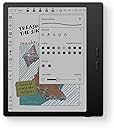
The BOOX Tablet Go Color 7 Gen II is a sleek, lightweight 7-inch E Ink tablet featuring a 1680x1264 resolution Kaleido 3 color display, powered by an octa-core CPU and 4GB RAM running Android 13. It supports active stylus input with 4096 pressure levels (stylus not included), offers adjustable warm/cold front lighting, and versatile connectivity options including Wi-Fi, Bluetooth 5.1, USB-C OTG, and microSD expansion. Designed for professionals who demand eye-friendly reading, note-taking, and sketching on the go, it balances color E Ink technology’s unique visual experience with robust performance and storage.
| ASIN | B0F58ZHCX2 |
| Active Surface Area | 7 inches |
| Additional Features | E INK |
| Best Sellers Rank | #9,311 in Electronics ( See Top 100 in Electronics ) #224 in Computer Tablets |
| Brand | BOOX |
| Built-In Media | Device |
| Color | Black |
| Compatible Devices | Stylus Pen |
| Connectivity Technology | Wi-Fi |
| Customer Reviews | 4.0 out of 5 stars 389 Reviews |
| Display Type | E Ink |
| Item Dimensions L x W | 6.14"L x 5.39"W |
| Item Weight | 0.39 kg |
| Manufacturer | BOOX |
| Mfr Part Number | Go Color 7 Gen II |
| Model Name | BOOX Go Color 7、CLP209291 |
| Model Number | BOOX Go Color 7、CLP209291 |
| Native Resolution | 300 dpi in Black 150 dpi in Color |
| Number of Items | 1 |
| Operating System | Android |
| Pressure Sensitivity | 4096 levels |
| Screen Size | 7 inches |
| Software Update Supported to Date | unknown |
| Special Feature | E INK |
| Specific Uses For Product | Reading, Drawing, Note-taking |
| Unit Count | 1 Count |
| Warranty Description | 1-Year non-hardware warranty |
C**N
Probably my favorite product that I own
Incredible surpassed all my expectations. I can use any book reading app You're not tied up with Amazon. It's 3x faster than a Kindle. You can send your pdf from school and annotate them. You can browse the web. It's ridiculously customizable. It has settings that you would never think of Like customizable buttons, the screen rotates You can have the screen in any direction you want. It also has customizable screen, tapping options where, depending on where you tap on the screen, it will do something specific. I really like the back of the device. It has a grip material. It's light, portable the battery lasts a long time, especially if in the settings you set up auto turn off after 1hr of beeing not used to 4hr i really like the screen It looks like paper. It has warm light options, white light or no light. I really like the color version for annotation reasons. Again, since it's a e reader, the colors are not very sharp but for what I wanted It works really well
J**K
Amazing device, but definitely not for everyone.
I've been using this "tablet" for a while and I love it, but I was looking for an e-reader that happens to run Android, and that may put me in the minority. So, what is this not good for? Technically, by name, this is a tablet, but I wouldn't call it that. You are not going to watch movies or YouTube videos on this. You can browse the web in a pinch, but a lot of content will seem very unusual because of the screen's refresh rate. Most of your apps will not work very well, also because of the screen type. You will not be playing anything but the most basic games, again because of the screen, and because the SoC is very lower power in order to get better battery life. So, what IS it good for? Reading!!! It comes with its own book store/app, but you can also install Kindle, Goole Play Books, Libby, news apps, whatever you want to read. The colors are a bit muted, so if you're a fan of visual novels, you might be unimpressed, but it works just fine for that otherwise. The screen is pretty good. Not quite as good of detail as my last Kindle, but the backlight has more configuration. It's nice and light, and I really like the page flip buttons. Technically, they're volume buttons, but they can be configured to flip pages in apps I use. The battery life has been great for me. I charge it about once a week, but I could probably wait 2-3 weeks. It makes use of pretty aggressive power saving features to enable that battery life while running Android. Expect to wait close to a minute for it to start up when you want to use it.
N**.
Sooo much potential!!!
CONS: App for easily moving books between local devices not available rn. BATTERY LIFE ** Not water proof, I knew this before buying -- I was going to overlook because of other features. For this price, should be included. PROS: Nice Color Ink Stylus support Android/Google Play Access EXPANDABLE memory Great reader Great PDF reading experience. Some things are clunky but okay. My BIGGEST complaint for a device with this price tag is the battery life. It should also be WATER PROOF. I was willing to overlook the lack of water proofing to get out of the Kindle trap. Battery, battery, battery. Come on man, there's got to be a better way! I doubt I'll keep it due to this one thing. My older Kindle OASIS still holding a great charge and IS water proof, so I can take it by the pool side and go to the beach with it. I don't like taking physical copies of books around water, water proof e-readers are a way better choice. One of the best things about this device, great PDF reading experience. By far the best. Has sooooooooo much potential because it has access to the Play Store. It also has EXPANDABLE memory. Huge plus! Has many things to offer. However, battery life is king. I really wanted this to work. 😓😭 Updated: Removed 2 stars I wanted to like this so much. It glitches super bad using the Kindle app. Freezes, can't use buttons to page turn. I still have a large library of Kindle books. ................. Updated adding 3 Stars: After using this device for a while I'm revising my review and adding three stars. Outside of Kindle app being very glitchy on this device the native book reader that comes on it is awesome for everything but you need it for. My biggest complain about the native e-reader is that it does not show your progress within the book and percentages. I'm still really bummed that the BOOX Assistant app for Android is not updated, so.Inam not able to easily push books to my BOOX Onyx nor sync reading between devices. For the price point they should work a little bit harder on this functionality. My son-in-law has an e-reader that fits into his pocket, that easily pushes books between devices. The bottom line is it takes a little while to get used to. There's a few small things about it you can complain about. But it is a solid gateway out of the Kindle Amazon paradigm! You can read your own books, you own. Expand the memory to hold as many books as your hearts desire. You can also set up a media server locally and sync your device to it for MORE SPACE. I still beg for a water proof option. For summer reading I'll have to resort to my Kindle 😞
J**S
Very Disappointed — Screen Cracked by Itself, No Warranty Support
I bought the Boox Go Color 7 (Gen 2) and really liked it at first — lightweight, nice screen, and perfect for reading and note-taking. But after just a few monthes of careful use (always kept in the case), the screen suddenly stopped displaying properly. There was no drop, no pressure, and no visible crack, yet the display was clearly damaged. I contacted customer service, but they said it was a “physical damage” issue not covered by warranty and quoted about $165 for repair. That’s extremely frustrating considering how fragile the screen seems to be. I’ve handled e-readers for years and never experienced this kind of problem. It’s disappointing that such an expensive device can fail on its own and customer support offers no real help. Definitely think twice before buying — the screen durability and warranty policy are not what you’d expect for the price.
M**I
Best E-Reader Out There? maybe…
I was looking for a new device to try to streamline my ereader(s) into one but still have both a color option and a note taking/stylus writing option. I needed e-ink, so a iPad was out. This device absolutely does what I needed, and more. I needed to be able to access ebooks from both my Kindle account, Nook, Libby, Hoopla, and be able to easily import long form AO3 fics. The BooxGo Color far exceeds my expectations. I have full access and functionality for my Kindle library, including my KU subscription, and because the device has a built in browser the process of accessing then downloading fics from The Archive is SEAMLESS. It also has speakers so I can do my DuoLingo and listen to audiobooks through Audible/Chirp/The Library. (Or use headphones) It’s the perfect size, I was able to find a cover for it pretty easily (although I wish we had more options). The only slightly negative is that it didn’t already come with a stylus, and after sleep the startup takes a few beats. The setup was pretty straight forward and after a few weeks I’ve decided I love it so much I sold the other two ereaders this device was replacing.
A**R
Great e-reader!!
The Boox Go Color 7 is a great product! I previously used a kindle paper white, but now I think I prefer the Boox. There is a learning curve to figuring out how to operate the Boox, but once you get the hang of it, it is easy. I love that I can download books straight from Libby and Kindle Unlimited. You can also use Boox drop to send epub files over Bluetooth! Weight and screen wise, the Boox is lighter and easier to hold. There is a grip to the back of it, and the buttons make it easy to turn the page. The screen quality is great, and I love that you can see the colors in the books. There is some ghosting to the screen, so this is something to consider if you do not like that. The battery life is great as well! Overall, I love the usability of the Boox Go color, and I would recommend this product.
S**A
Battery life disappointing
Battery life is bad. With wifi on, bluetooth off and brightness set to 15 I see the battery going from 55% to 35% over 1 hour. Unfortunately will probably return even though I do like everything else. Like the software and being able to have access to the playtime. Very lightweight and the buttons are helpful for page turn. The case that comes with bundle is also nice and didn't add too much weight to it. Not sure if the problem is this specific device that just has a bad battery or if they're all like this. Update after another week of use: The battery life does improve significantly if the screen brightness is turn off. But the issue when theres limited natural light it gets hard to read. The screen itself is already darker than normal black and white e-reader devices. It seems like the black and white version of this is much better for reading if the color feature is not something you NEED to have.
R**T
Swiss Army Knife of ereaders
I'm an engineer with experience in user experience design. This product has an unacceptable lack of polish and fitness for use, I liken it to the Heath Kit of e-readers. Learning how to use it is exactly like learning another language. Icons, terminology, menu locations are non-intuitive and require decoding. In several days of set-up activity, I've found that even AI assistants can't provide clear guidance. I want to put cycles into reading, not weeding through their user interface idiosyncrasies. An example: Having both a Nook and Kindle, I looked for a device that had physical buttons to control page turns. This Go 7 has buttons, but after much research, I found that the people at Boox set this e-READer product up such that the buttons control audio volume, not page turns -- and there is nothing a user can do about it. They prioritized audio over turning pages using those buttons that occupy so much real estate on the device. On an ereader. The attractiveness of this and other Boox devices is that it offers the most flexibility, circumventing ecosystem lock-in by competing brands. Before I decided to quit this device, I had Libby, Kindle and Nook apps more or less working, which in theory provides a one-device-experience to address my reading needs. The result of this otherwise laudable approach is endless quirks and complexity that dilutes the reading experience by imposing need to manage the device and its many non-intuitive settings. This device is trying to be the Swiss Army Knife and the flexibility it offers combined with the poor documentation on their site makes that flexibility it's biggest weakness IMHO. The display and battery performance did not impress me, given the fact that I needed a brighter setting, given my farsightedness. I wanted this device to work, but finally, I'm going to look for something that follows the "less is more" philosophy. I need the buttons and tweaking to get out of the way of the reading experience.
D**H
Jack of all product
Well you won't usually find this product being advertised much in India. But it is a good alternative to your all day Android needs except for heavy tasks. If you are too much into web browsing and reading and don't want to strain your eyes then this is perfect solution... A blend of Android aswell as ereader... Only issue is you won't find its case easily. Also you can use it if you find your kids addicted to mobiles and don't want to strain their eyes.
I**S
Duración de la batería
Excelente producto. Lo mejor de todo es su compatibilidad con Play Store de Android. Los colores de ven muy parecidos al papel periódico.
し**う
とても便利になった。
仕事柄、月間スケジュールを書き、日ごとにミーティング内容をメモしたりすることが多く、スケジュール帳を持ち歩いていました。 さらに、講習・研修、個人的な勉強の内容をノートにまとめたりなどして、ルーズリーフ・バインダー・手帳・資料など紙媒体のものを持ち歩くことで、鞄が重くなり持ち手が千切れることもありました。それに困っていたところ、電子ノートを持ち歩くことにしました。色々調べた結果、BOOX Go Calor7が自分に向いていると感じ購入しました。 半年以上使ってみての感想ですが、 書き味は紙と同じようにさらさら書けるのでとても良い。書くときは、ページを拡大(自分は300%くらいで拡大)してキレイに書ける形で使っています。 ページをスクロールする時は、5秒ほど画面のタイムラグが生じるが、気にしてイライラするほどではない。 年間スケジュールなどのノートテンプレートをダウンロードすることで、マンスリー・ウォークリー・ワンデーページをまとめて管理したり書き込んだりできるようになって、しかも電子ノートだけを持ち歩けばいいので快適さが増した。 配られた資料などをスキャナーでPDF化したりすることで、電子ノートに入れて見返したり書き込んだりでき便利。 iPadと違い、動画などの余計なものが入っていない見づらい(見れないわけではない)ので、ついつい動画やサイトを見て時間が溶けたということもなく、書くことに集中できる。 ノートに特化したとても使いやすい物でした! これからも使い続けていくと思います。
J**R
Open system reading.
Love this device. It took a little while to get it set up to my liking. I love the page turn buttons, can have all the library apps (libby, cloudlibrary, hoopla) plus the other reading apps (kindle, kobo). I don't have to sideload epubs as I can download directly onto device from the device internet. It is very lightweight & easy to read in all light settings. Only downside is battery. Battery last 2-3 full days of non stop use or 2 week with occassional use. its not a deal breaker for me as I charge other devices (watch, phone) daily. I have read many more books than normal owning this device. Highly recommend.
C**E
Muito bug
Muito lento Buga o tempo todo, e não consegue carregar as coisas
Trustpilot
3 weeks ago
2 weeks ago