Desertcart purchases this item on your behalf and handles shipping, customs, and support to Austria.
🔒 Stay ahead of threats with smart, weatherproof security that never sleeps.
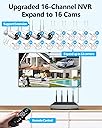
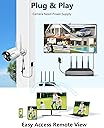
The OOSSXX 3MP Wireless WiFi Outdoor Security Camera System features dual antennas for 55% improved wireless range, AI-powered human detection to minimize false alarms, and IP67 waterproof metal cameras for all-weather durability. It supports up to 16 cameras with 1TB pre-installed storage for 30 days of continuous video and audio recording. The free Honestview app enables remote monitoring without monthly fees, making it a comprehensive, reliable security solution for modern homes and businesses.


| ASIN | B0796R2LCG |
| Antenna Location | IP67 Dustproof, Indoor, Outdoor, Pet Monitor, Wireless Security Camera System |
| Best Sellers Rank | #209 in Surveillance DVR Kits |
| Brand | OOSSXX |
| Built-In Media | 16-Channel 8.0MP Wireless NVR Pre-install 1TB Hard Drive x 1, Antenna for Camera x 8, DC12V1A 10FT Cable Power Supply for Camera x 4, DC12V2A Power Supply for NVR x 1, IP67 AI Human Detection Wireless Camera x 4 |
| Camera Description | Real IP67 Waterproof |
| Color | IP67 Waterproof |
| Compatible Devices | Cameras, Laptops, Personal Computers, Smartphones, TV |
| Connectivity Technology | Wired, Wireless 2.4G |
| Customer Reviews | 4.2 out of 5 stars 1,716 Reviews |
| Focal Length Description | 130° Ultra Wide-Angle Lens |
| Frame Rate | 15fps |
| Hardware Interface | HDMI, USB, VGA |
| Item Dimensions | 11.42 x 21.65 x 16.14 inches |
| Item Highlight | Built-in Audio, Dual Antennas Stronger Signal, AI Human Detection, IP67 Waterproof, Free APP No Month Fee |
| Item Weight | 8.5 pounds |
| Lens Type | Fixed |
| Manufacturer | OOSSXX |
| Manufacturer Warranty Description | US Location Manufacturer warranty for 1 year from date of purchase |
| Memory Storage Capacity | 1 TB |
| Mfr Part Number | OSX-3MWL0402 |
| Model Number | OSX-30042T |
| Night Vision | Night Vision |
| Night Vision Range | 65 feet |
| Number of Channels | 16 |
| Number of Items | 1 |
| Number of Packs | 1 |
| Operating System | Linux |
| Other Special Features of the Product | Dual Antenna Enhance, Human Detection, IP67 Waterproof, One-Way Audio, Video & Audio Storage |
| Power Source | Corded Electric |
| Recording Mode | Event, Schedule |
| Set Name | 4Cams |
| Signal Format | Digital |
| Special Feature | Dual Antenna Enhance, Human Detection, IP67 Waterproof, One-Way Audio, Video & Audio Storage |
| Total Usb Ports | 2 |
| Unit Count | 1 Count |
| Video Capture Resolution | 1536p , 3.0MP (2048×1536) |
| Video Input | RJ45, Wireless IP Camera |
| Viewing Angle | 75 degrees |
C**K
Easy install and great customer service
This camera set was an easy install and works. Great, great pictures. Customer service was super when I had an issue with one camera and they're customer support is also awesome. So if you have a problem with your camera like this customer service. will take care of you
H**.
Great Camera System. You must take the time to fit it to your particular home or location
This is a long review but worth the read if planning on purchasing an OOSSXX WIFI based camera system. The initial setup and function test of the camera system took maybe 15 to 20 mins at the most and everything worked great right out of the box. Before purchase I read all the reviews and came to one strong conclusion that the system is good quality but the people installing it did not quite understand how WIFI works. It seems many just don’t understand how critical it is to place the NVR in the optimum place that fits your particular home. It literally took me almost a week to play around and find the proper place. This NVR system is 1080P so yeah it needs a good signal connection to the camera to maintain the data rates for that high-quality image. What I have found is that if you don’t have a minimum of 3 of the 4 signal bars then your connection will not be good enough to prevent the camera to drop off on and off briefly during the day. First step is to place, tie wrap or tape the cameras in the place you would like them to be after doing the initial system setup and test to make sure they are working properly. Make sure to connect them with a bunch of long extension cords so you can move them as necessary for better signal later. Once your cameras are all placed the system is powered up you need to find the best location for your NVR. A couple of hints to finding the proper location. In the software go to System Setup -> Network Setup -> WIFI Setup. Here is where it will make or break your happiness with the system. If you look off to the right side you will see the signal for all your installed cameras. If it is not above 35 on any camera that camera will have issues. It will function and record between 30 and 35 but you will see brief 1 to 2 second drop-offs that are worse at night when night vision is on. So here is how to find the best location for the NVR. I have a WIFI extender for my house WIFI that I plugged the NVR ethernet cable into as I bounced around the house outlet to outlet with a spare monitor and power strip to look for the best spot. As you go spot to spot in your house click on the Adaptive channel button on the bottom of the WIFI page refresh the cameras to check signal and click Apply once you discover the best channel for that location. You would be amazed just by changing the channel it increased the number by +5 or so in the exact same location. Actually, for the final location and the channel with the highest strength in my home one of my cameras would not connect at all. I went to the camera and changed the antenna position just a bit and just like that it came back to life with good signal. In your case you may have one or two cameras that are low while the others are high. Try moving the camera location a bit or try the repeater setup to connect them to a camera with a stronger signal and see if it helps. If still no good contact tech support and/or purchase an oossxx repeater to boost them up a bit and check out YouTube videos that can help you get it setup. For my particular case I did not need a separate repeater but used the built-in repeater function in the system and it worked perfect. I also did not need the NVR constantly attach to a TV or monitor so the NVR ended up on a table in a room. I use the app and remote access for my needs and when I need access to the system, I drag over the spare monitor make my changes and then put it away again. I am very happy with the system and the image quality both day and night. Scrolling through the playback of images is simple. I originally purchased a 4-camera setup and have ordered two additional cameras to complete my needs. Once they are all up and running I will setup the alerts. With all this said there are a few areas OOSSXX could improve on. The mouse cable is ridiculously short and the include 10ft antenna did nothing to improve signal as I was setting up my system. It actually made it worse. These little things are not enough to discourage your purchase but wish list things for improvements for the next revisions. Like any piece of tech equipment, it is easy to blame the equipment. If I had left the NVR in the first place, I put it I would not have been happy at all but with a little patience and setup on my part to match the particular setup of my home I became very pleased and would definitely recommend purchase.
A**N
Fantastic security system
This 3MP wireless outdoor security camera system is fantastic. I've had it for nearly two years now and plan to buy one or two more cmeras for it. It is very easy to set up and image quality is excellant. For me, this is a 5-star-plus system. And most importantly, customer support is excellent.
A**R
No subscription, no cloud fees. Highly recommend.
Great system, no monthly fees Installed in under 30 minutes — the NVR detected all cameras automatically. The dual antennas make a real difference: signal is stable even at distance, with noticeably smoother video than my old setup. Image quality is sharp day and night, the 130° wide angle covers a lot of ground, and the AI human detection cuts out almost all false alerts from animals or passing cars. Cameras are solid metal with IP67 waterproofing — held up fine through heavy rain. Two-way audio works well too. Amazon Just keep in mind: each camera needs a power cable, so this isn't truly wireless. Minor inconvenience, but totally worth it for the reliability. Amazon No subscription, no cloud fees. Highly recommend.
S**.
Update: 08/02/2024 Total trash.... Great Wireless Security System - Update 12/01/2023
Update 08/02/2024 Just a little over a year since purchase and the system is going to the trash. The cameras starting failing one by one within a week of each other. All cameras are dead. I'm done with this system. update 12/01/2023 While communication with the vendor leaves a bit to be desired they do however stand by their product. They send me a new camera that arrived yesterday. So the system is still working great and the new camera works as designed. Update: 11/26/2023 The positive review below was done about a week after installing and using the system in June of this year. However, within five months one of the cameras stopped working. I contacted their customer service and it's been over a week now and no help. They responded with request for "home address and telephone number" and I have not heard from them since I provided them with the info. Now this system suppose to have 2 year warranty. I this is how they handle the warranty support I would stay away from any product offering from this company. I originally gave them 5 star and now I dropped them to 1 star. I will provide further updates as appropriate. I've had this system for a week and it works great. I love the app alerts for motion detection. It's a short video of the incidents. In addition, it comes with 2 terabyte hard drive where you can playback any particular instance. Picture clarity is awesome. Customer service is excellent and usually respond within 24 hours. If you have Gmail than it's possible that email alert messages from this system may not work for you because Gmail has blocked access to application it deem as a potential security risk. Although the company claims that they can make gmail work. I don't care to receive emails. The app alerts on my phone are plenty fine for me. The price is right and when you register the product you get an additional 1 year warranty. 2 year warranty in total. Based on my personal experience this is a great deal.
B**.
Overall a nice system for the $$
First off let me start by saying my previous experience with security systems was with a fully wired system which I must say worked very well but was a PITA to install. Lots of cables to run, holes to drill etc. Based on this I decided to give a WiFi system a try for the install in my new home. I purchased the 8 channel system with 4 cameras, with an additional PTZ camera. I opened the box, quick read through the directions, powered up the cameras laying on my floor, connected the NVR to my TV (supplied HDMI cord, nice touch), and turned it on. They system when through it's startup and then showed no video, I was disheartened for about 30 seconds, then the camera's showed up on the screen. I was impressed with the ease of the system at this point. Keep in mind I also bought one extra PTZ camera which I haven't received yet, we'll see how that goes when I get it. So now to determine how far away from the NVR I could place the cameras. I read some reviews stating the signal strength required for the system to work properly. So I put a camera a few rooms away and powered it up and nothing. "IPC disconnected". Hmmmmm. I decided to power off the system and low and behold the video came back, but the signal strength had degraded quite a bit. All my cameras are going to be installed outside with the DVR in my office connected to a 1080P television. Looks like this might be an issue. So to test I took a camera to the furthest distance (maybe 70 feet) and plugged it in and restarted the NVR. I couldn't get it to connect. Thinking what now I decided to connect the camera to my network at it's remote location with a network cable. When I did this it immediately popped up on the screen showing video. So, I've decided to run network lines to the distant cameras when I install them outside. Now to the power requirement. As my cameras are going to be installed in the soffits of my home I have purchased a DC power supply panel and cable to run 12VDC to each of the cameras independently so I don't have to wire 120VAC to plug the power adapters in. Overall I would say I was impressed with the ease of the system connecting to the cameras. I have yet to go in to the system settings to set up the motion detection for recording, but it all looks very similar to the previous system I installed at my last home. I did walk through getting the system to be accessible from a remote computer as well as my cell phones. Note 9's. The only issue I ran into here was with the AT&T router (Uverse) required me to set up port forwarding. Once I did that it all worked fine.
J**C
Motion Detection is Worthless
First of all, as other reviewers have stated, the installation and setup of this system is very straightforward. The cameras connected automatically right after power up. After that initial setup though, the rest of the operation is disappointing. My biggest disappointment is with the video motion detection feature. I've tried various settings of motion sensitivity and motion area (e.g. parts of the visual frame to be sensed) settings and have not found a setup that either doesn't false alarm regularly or doesn't pick up motion at all. With a sensitive setting that does detect my motion within 20 feet of the camera, I get dozens of false alarms per day on the iP Pro3 app. When I pull up the video from those alarm instances I don't see any activity in the video playback whatsoever. The system also indicates motion false alarms whenever the camera switches between daylight and IR mode (e.g. at sunrise and sunset times). Because this system provides so many false alarm indications, the concept of providing a motion detection alarm event is useless. For the purpose of just checking in on the home while I'm away, this system works just fine. The iP Pro3 app provides a fine way to pull up my home camera views on my smartphone or tablet. I just wish the system could have been more useful as a security alert system.
J**T
Beautiful view
This is an excellent product in many features. first of all it is very easy to install. It has very good sharp pictures, it is wireless and additional cameras can be added to it. This system is much better than the one I replaced.
E**Z
Equipo facil de instalar, con todos los complementos incluidos.
Buen equipo, es el segundo de esta marca que adquiero, Satisfecho con el producto.
V**O
Excelente
Súper fácil de instalar, súper fácil de conectar, se ven bastante bien, me gustaron me parece un precio Justo, si o si necesitas un monitor para conectarlas!! Pero todo va bien hasta hoy!! Sin duda son una excelente alternativa para seguridad sencilla pero funciona
G**E
Hace meses adquiri este sistema de seguridad y no me ha fallado.
Su insta lacion no fue dificil. Produce imagenes muy claras a color que me permite ver varios puntos de mi propiedad. Se enfoca a la presencia de personas y sus actividades. Buena inversion.
A**O
Difícil configurar
No es adecuado pasa monitorear una casa, las cámaras tienen que estar en la misma ubicación para poderlas conectar, las paredes afectan la conexión.
H**.
Ningún problema para la configuración de las cámaras, se conectan sin ningún problema.
Buena respuesta del proveedor, pero no hay forma de recuperar contraseña para usuario admin
Trustpilot
2 months ago
1 month ago