Desertcart purchases this item on your behalf and handles shipping, customs, and support to Austria.
๐ Elevate your workspace with the smartest USB-C hub on the market!
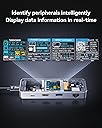
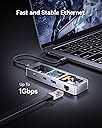
The DOCKCASE Explorer Edition Visual Smart USB-C Hub is a premium 6-in-1 docking solution designed for professionals who demand speed, style, and smart functionality. Featuring 4K@60Hz HDMI output, 1Gbps Ethernet, dual USB-A and USB-C ports with 5Gbps data transfer, and 100W power delivery, it supports seamless connectivity and fast charging for MacBook Air/Pro, XPS, and more. Its aluminum alloy body with advanced heat dissipation and a unique D-key control panel for display and mode customization make it a standout choice for multitasking millennials seeking both performance and flair.


| ASIN | B0C61HV3FP |
| Amazon ๅฃฒใ็ญใฉใณใญใณใฐ | ใใฝใณใณใปๅจ่พบๆฉๅจ - 179,217ไฝ ( ใใฝใณใณใปๅจ่พบๆฉๅจใฎๅฃฒใ็ญใฉใณใญใณใฐใ่ฆใ ) USBใใ - 2,263ไฝ |
| OS1 | Windows 10, Windows 7, macOS 10.13 High Sierra |
| USBใใผใใฎ็ทๆฐ | 3 |
| USBใใผใๆฐ | 3 |
| ใใใใๅบฆ | 5ใคๆใฎใใก4.4 122 ใฌใใฅใผ |
| ใซใฉใผ | ใทใซใใผ |
| ใใผใฟ่ปข้้ๅบฆ | 5 ใฎใฌใใใๆฏ็ง |
| ใใผใใฆใงใขใคใณใฟใผใใงใคใน | HDMI, ใคใผใตใใใ |
| ใใใฏๆฐ | 1 |
| ใใฉใณใ | DOCKCASE |
| ใใฉใณใๅ | DOCKCASE |
| ใใผใใฎๆฐ | 6 |
| ใกใผใซใผๅ | TMD Touch |
| ไบๆใใใคใน | ใฉใใใใใใใฝใณใณ |
| ไปๅฑๅ็ทๆฐ | 1 |
| ๅ็ฎๅฏธๆณ๏ผL x W x H๏ผ | 16้ทใ x 126ๅน x 38้ซใ mm |
| ๅๅใฎ่ฟฝๅ ่ชฌๆ1 | ใในในใซใผใใฃใผใธ, ใใฉใฐใขใณใใใฌใค, ้ซ้ใใผใฟ่ปข้, ้ซ้ๅ ้ป |
| ๅๅๅค่ฃ ็ด ๆ | ใขใซใใใฆใ |
| ๅ็ช | Plata-usa |
| ๅฏพๅฟใใใคใน | ใฉใใใใใใใฝใณใณ |
| ็นๅพด | ใในในใซใผใใฃใผใธ, ใใฉใฐใขใณใใใฌใค, ้ซ้ใใผใฟ่ปข้, ้ซ้ๅ ้ป |
| ่ฒ | ใทใซใใผ |
A**N
it is important to use the correct cable
I was frustrated that with 100w PD charger only have 65w power for charging my laptop. turns out is my usb c cable did not support the PD 3.1. with the new cable, this thing works perfect.
A**D
The most versatile USB-C hub I've seen
During Amazon Prime Day I managed to get the Dockcase Explorer Edition M.2 SSD Enclosure and liked the aesthetics and design enough that I started to look at Dockcase's other products. Their M.2 Enclosure meets and exceeds my expectations as I work in IT and sometimes need to swap between drives, and it is helpful to know its SMART stats especially when troubleshooting potentially failing drives. The fact that it worked out of the box with most of my hardware and supports the faster connection speeds I was looking for (10gbps connectivity over USB 3.1 Gen2) I have found uses for it on my MacBook Pro, Steam Deck and in my work life! Boiling my review down into something simple: Pros: Small design that fits in the same footprint as their M.2 Enclosure. Lightweight and durable metal housing with a really cool techy design. Versatile ports (2 USB-A, 1 USB-C all at 5gbps, 1 HDMI and a PD-in port that supports up to 100W) The onboard display that no one else on the market has. Cons: It's flashy, and its gimmick might make people envious. Slightly stiff USB ports. Out of the box, the network port did not immediately get an IP until I power cycled the device. I've been using an older no-name USB-C Adapter for my MBP and recently the networking port stopped working on it and I was weighing several options, but the utility of Dockcase's product really won me over. Being able to see the connectivity speed for the various USB ports, what display modes are being set, how much power is being supplied directly, and what network speed was negotiated at a glance without diving into the network settings are invaluable when I am trying to quickly help customers while I am at work. It is smaller than the hub that I am replacing by a sizable amount and the versatility as far as USB-C power delivery goes makes this a much better option as I was never able to use my older hub with my MBP's charger. This one handled it automatically for all three of my test cases: MBP @60W, Steam Deck @45W, and Nintendo Switch @12W. It supported the Switch out of the box and even has a mode in the menus to tailor the experience for it. The connectivity speeds are about as expected. The USB 3 ports all run up to 5gbps, but don't expect to pull that continuously from all 3 ports as the port back to the computer will usually run at 5gbps itself unless you have something like a MacBook that supports 10gbps or higher on its USB-C ports. I did not have any issues getting 3440x1440 out of it, and it worked flawlessly with my Elgato Capture at 1080p card which is what I usually use for my Nintendo Switch. Durability appears to be fine. I've had their M.2 enclosure for a week or so now as of the writing of this review and it has been fine coming with me to work and I have not seen any issues with the coating getting scratched off or the glass scuffing even with some metal-to-metal contact with my MBP. This product is constructed nearly identically, and so I imagine it will fare similarly. It certainly feels premium when you hold it in your hand. The only problem of note that I had initially, and that was that the networking port did not come up when plugging it in the first time. After the first time, and every time since, it has worked. If it doesn't work the first time for you, I definitely recommend just replugging the USB-C lead to your device and/or the RJ45. It may have been the fact that the first time I tried on the Switch it was on low-battery mode so you may have a different experience. Outside of that the product has worked great so far!
A**R
Almost perfect, and very useful.
First off, this is the first USB network interface I've tried that can actually deliver gigabit throughput. It wins a lot of points with me for that alone. It's a really good dock in just about every other way, too. Everything works exactly as you'd expect and the built-in display has been very helpful in diagnosing weird device problems relating to video, USB, and power delivery. It's small enough to easily fit in my bag and feels very well-built. The only thing I wish it had is a second HDMI output, but I knew when I bought it that it only had the one. It isn't a dealbreaker for my use case, but it would make the price of this dock easier to swallow.
W**U
Simply excellent
This is the 2nd dockcase hub I own. I purchased the first one about two years ago. It performed really well with my 14'' M1 Pro Macbook pro and I never had an issue. The only gripe I have is that it doesn't come with a USB type c port for my high-speed ssd. Also, I sometimes need a LAN port for a stable internet connection which is missing in the previous model. So when I saw this new model, I placed the order immediately. After I received it, the new model really lives up to my expectation. The LAN port is solid, providing a faster and more stable connection in comparison to wifi. The transfer rate on the type-c port is also fast. And to my surprise, the hub could power one 2TB ssd, one 4TB hard drive, and 4k HDMI simultaneously without any issues, which really exceeded my expectation. In general, I'd say this should be the go-to for anyone who needs a hub with a LAN port and USB type-c port.
B**N
Very good
I took a chance on this USB C Hub because I have purchased Dockcase products in the past and they've all been good quality. This is no exception. The hub includes a 1 foot USB C to USB C 10Gbps/100W cable, and comes nicely packaged to ensure it does not break in shipment. If you have other Dockcase products, this will fit in nicely, as it has the same general design and form factors as other ones. The clear cover is nice, and covers the port labels for easy reading without having to turn the device. It also has a 1.44", 128x128 16-bit high color LCD, showing you what devices are connected, the transfer rates of the USB-A and USB-C devices plugged in, the max transmission rate of the network when an ethernet cable is plugged in, and HDMI monitor brand, size, current and max resolutions. It also shows the power being drawn, which is a nice little feature that allows you to diagnose issues easily. According to the instruction manual, the display also will show the internal temperature if it is higher than 39 degrees Celsius. The display is bright enough to read in the daytime, but not too bright at night, although I wish it was OLED. The viewing angles for the display are OK, but not great. The ports include a 100W (20V 4A) power delivery (USB C) input, two USB-A 5Gbps ports, one HDI 2.0b port, one Gigabit Ethernet port, and one USB-C 5Gbps port with power delivery. All the ports feel secure, so cables won't come out unless you want them to. That's something that often goes unnoticed, but it's a major inconvenience when a cable falls out. Overall, I am really liking this hub so far. It's more expensive than others, but the display really does make problems way easier to diagnose, and it's a really nice looking and feeling device. The frame and heatsink are metal, which is obviously superior to plastic in terms of durability, but also in heat dissipation. The only thing I wish Dockcase had changed was an OLED display instead of the LCD they currently use, but it's not really a huge issue for me.
Trustpilot
2 months ago
1 month ago