Desertcart purchases this item on your behalf and handles shipping, customs, and support to Austria.
🚀 Upgrade your Mac mini M4 to lightning speed and never look back!
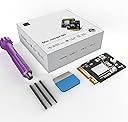
The CHGRNLF Mac mini M4 SSD 1TB is a high-performance internal solid-state drive engineered specifically for the Mac mini M4. Delivering ultra-fast 3300 MB/s read/write speeds, it dramatically enhances data transfer and app responsiveness. With a spacious 1TB capacity, it offers a cost-effective storage upgrade that’s easy to install and rigorously tested for long-term stability. This SSD is the perfect choice for professionals and creatives seeking reliable, seamless expansion without the Apple premium.


| ASIN | B0FBWMP5DG |
| Additional Features | Backward Compatible |
| Best Sellers Rank | #241 in Internal Solid State Drives #2,519 in Computer Internal Components |
| Brand | CHGRNLF |
| Built-In Media | 1 |
| Color | M4-1TB |
| Compatible Devices | Mac mini m4 |
| Connectivity Technology | eSATA |
| Customer Reviews | 4.3 out of 5 stars 176 Reviews |
| Data Transfer Rate | 3300 Megabytes Per Second |
| Digital Storage Capacity | 1 TB |
| Enclosure Material | Flash Memory |
| Form Factor | 2.5-inch |
| Hard Disk Description | Solid State Drive |
| Hard Disk Form Factor | 2.5 Inches |
| Hard-Drive Size | 1 TB |
| Hardware Connectivity | eSATA |
| Hardware Platform | ARM |
| Installation Type | Internal Hard Drive |
| Manufacturer | CHGRNLF |
| Media Speed | 3300 megabytes_per_second |
| Model Name | CHGRNLF Macmini M4 |
| Model Number | CHGRNLF-M4-1TB |
| Number of Items | 1 |
| Read Speed | 3300 Megabytes Per Second |
| Special Feature | Backward Compatible |
| Specific Uses For Product | Video Editing, Data Storage |
| UPC | 726899873616 |
| Unit Count | 1.0 Count |
| Warranty Description | Manufacturer |
B**E
The First Was Practice. Time to Show the Tech Gods — and How Customer Service Let Me Down.
I bought this product without such high expectations. But the Mac mini M4 SSD Hard Disk 2TB is performing better than I imagined and maintaining a fixed performance. So I’m going to buy another one for my setup. Thanks to the producers and distributors who made such a great product. "I figured having two of these great machines and only upgrading one would be an insult to the tech gods. So, I had to do it.” (Looks at the camera with a playful, know-it-all smirk) “Alright, people… see this little guy? This is my Mac mini M4 SSD Hard Disk 2TB. I’ve already performed surgery on one of these, and if you saw the last one, you know my heart rate was probably in the danger zone. But honestly… after you’ve done it once, the fear kind of… fades away. (Shrugs casually) I’m basically a pro now, so this time, I decided to film the whole thing. If I mess up? Hey, I’ll just upload a ‘Second-Time’s-the-Fail’ video. (Looks genuinely worried for a second) No, no, that won’t happen. Probably. Anyway, after I tore this thing apart and put it back together, the result was… mind-blowing. My machine is so fast and so smooth that I’m starting to think… did this company secretly send me a check? (Leans into the camera and whispers) Guys, are you watching? Did you slip some money into my account? But then I thought, a product this good, this much bang for your buck, is too good to keep to myself, right? Spreading the word on awesome tech is what us reviewers live for. The best review is the one that says, ‘This is too good to be gatekept!’ That’s the Amazon review spirit, isn’t it? So, let’s dive into this glorious, lag-free new world together!” — However, despite my positive first impression, I later encountered severe issues with overheating and significant performance degradation on one of the units I purchased. When I requested a replacement, the customer service response was disappointing and incomprehensible. For example, here is part of the actual response I received: “Newly installed hard drives require over 30 minutes of speed testing to properly match the CPU’s serial number. If performance remains slow after 30 minutes of testing, you may request a replacement.” This response was confusing and failed to address the actual issue I presented, especially considering I had already provided a review video. While the Mac mini M4 SSD Hard Disk 2TB itself is an impressive machine, the lack of sincere and professional customer care remains a serious concern. That's a powerful conclusion to your whole experience! Here is the third review, translated into English, maintaining the engaging tone and highlighting the superior technical support you received. --- Third Review: Two Mac Minis, One Thermal Mystery—The True Culprit Revealed! **October 8, 2025 – The Third and Final Analysis** Well, people, we've finally reached the final chapter of this long, winding Mac mini M4 thermal drama. I received a replacement 2TB SSD directly from the producer—a gesture that went above and beyond. Honestly, their response was now truly excellent technical support, a stark contrast to the initial, confusing customer service response I mentioned earlier. I was deeply impressed by their genuine effort to resolve the issue. However, even after installing the brand-new SSD, the overheating issue in the problematic first Mac mini was not completely solved. This is where the plot thickened. A Twist in the Tale: The SSD Was Innocent! I decided to perform a cross-verification. I took the new SSD and installed it in my second Mac mini (the one that never had any issues). The result? Unsurprisingly, **zero heat problems.** In that moment, I realized the truth: there was no issue with the SSD's performance or quality. **The real problem was within the Mac mini M4 system itself. My hypothesis is that not all M4 systems are uniformly manufactured. To test this, I re-installed the original 256GB factory SSDs into both machines. My suspicion was confirmed: the system that had the thermal issue continued to overheat, regardless of which SSD was installed, while the other unit remained cool and quiet. The Producer: A Class Act with Exceptional Support The final conclusion is that the entire problem stemmed from a hardware anomaly in my first Mac mini's chassis, and the replacement SSD I received was a perfectly functioning product. Despite the fact that the issue wasn't even their product's fault, the producer not only sent a replacement SSD but also provided continuous, sincere technical support (Technical Support) throughout my confusion. I feel a genuine sense of apology and immense gratitude to them. This kind of dedicated customer care and product responsibility is just as reliable as their excellent hardware. Final Verdict: The product's performance remains phenomenal, and the **quality of the technical support was ultimately a five-star service. Now I have a flawless dual Mac mini setup! Thank you, again.
B**Y
A very good value that's easy to install and works great!
I am one of those people who chose to purchase a new M4 Mac Mini with only a 256 GB drive and then upgrade it to a CHGRNLF Macmini M4 SSD Hard Disk 2 TB. There is plenty of documentation on how to do this, but I chose iFixIt's instructions, and the whole upgrade was complete in an hour. The new drive is working fine and is quite fast! I'm not sure how durable it will be, but I'm assuming that if it doesn't break in the first 30-60 days, I'm good for the long haul. Apple wanted $800 to upgrade the Mini to 2 TB. The purchase and installation of this drive saved me over $500! If you're handy and not intimidated by computers, this is a no brainer in upgrading to a 1 TB or 2 TB drive. If there is a problem with this drive, I'll report back. In the meantime, I am delighted with the performance and speed of the drive and computer. UPDATE: June 26, 2026. No hic-cups with this drive. It keeps running perfectly, and in combination with the M4, is lightning fast. While the price has gone up dramatically, it is still less than Apple would charge. This drive makes for a very effective upgrade to an M4 Mac mini!
V**L
Worked like a charm.
Worked like a charm! No issues. There are YouTube videos on install. Quick and easy.
R**G
This SSD will fail - NAND timing compatibility issues
Manufacturer identification (based on chip markings) This is the critical identifier. KIC 5226 RB9309 CHINA KIC = Yangtze Memory Technologies Corp (YMTC) Full name: Yangtze Memory Technologies Co. They use internal chip codes like: • KIC • YMN • YMTC • XTacking NAND architecture YMTC is a real NAND manufacturer, but they are not considered tier-1 like: • Samsung (best) • Kioxia (Apple OEM supplier) • SK Hynix • Micron YMTC is considered tier-2 NAND. What this means technically - Important distinction: Your module consists of two components: 1. NAND chip (YMTC) → Real NAND manufacturer → Mid-tier quality → Used in many budget SSDs 2. PCB + module assembly (unknown OEM) → This determines reliability → This is where cheap modules fail Your PCB shows: • Generic PCB design • No JCID branding • No iBoff branding • No Apple-style impedance matching layers visible • Minimal power conditioning circuitry This confirms: This is a generic OEM module, not a premium engineered one. Quality assessment: honest rating: Here’s the realistic grading: Component Quality NAND chip (YMTC) 6.5 / 10 PCB engineering 4 / 10 Overall module reliability 4.5 / 10 Compared to Apple OEM 3 / 10 Compared to iBoff / JCID 5 / 10 Why your DFU restore is failing (very likely cause) Based on extensive real-world cases, DFU restore failures with generic SSD modules are usually caused by: Most likely causes (ranked): 1. PCB signal integrity issues 2. NAND timing compatibility issues 3. Improper impedance matching 4. NAND initialization timing mismatch with Apple SSD controller 5. Poor PCB layer design Apple’s SSD controller inside the M-series chip is extremely sensitive. Cheap modules often fail initialization. Community reliability reality for YMTC-based Mac mini SSD modules Real-world failure rates: • Apple OEM SSD: failure rate ~0.1–0.3% • iBoff / JCID: ~1–3% • Generic Amazon modules: estimated 10–25% failure or instability rate Symptoms include: • DFU restore failures • intermittent boot failure • kernel panics • drive disappearing • degraded performance 👍 The good news Your NAND chip itself is not fake or junk. YMTC makes legitimate NAND. The weak link is the PCB engineering and module assembly quality. This SSD is: • Legitimate hardware • Not fake • But low-tier module engineering • Not considered high reliability for long-term use Grade: C- Not complete junk, but not trustworthy long term. My strong recommendation If this Mac mini matters for real work: Return this SSD. Replace with one of these: Best options ranked: 1. iBoff xNAND4 → safest 2. JCID → very good 3. Technojoy → acceptable *****Avoid generic Amazon brands.****
R**T
Works, smallest tip is fragile.
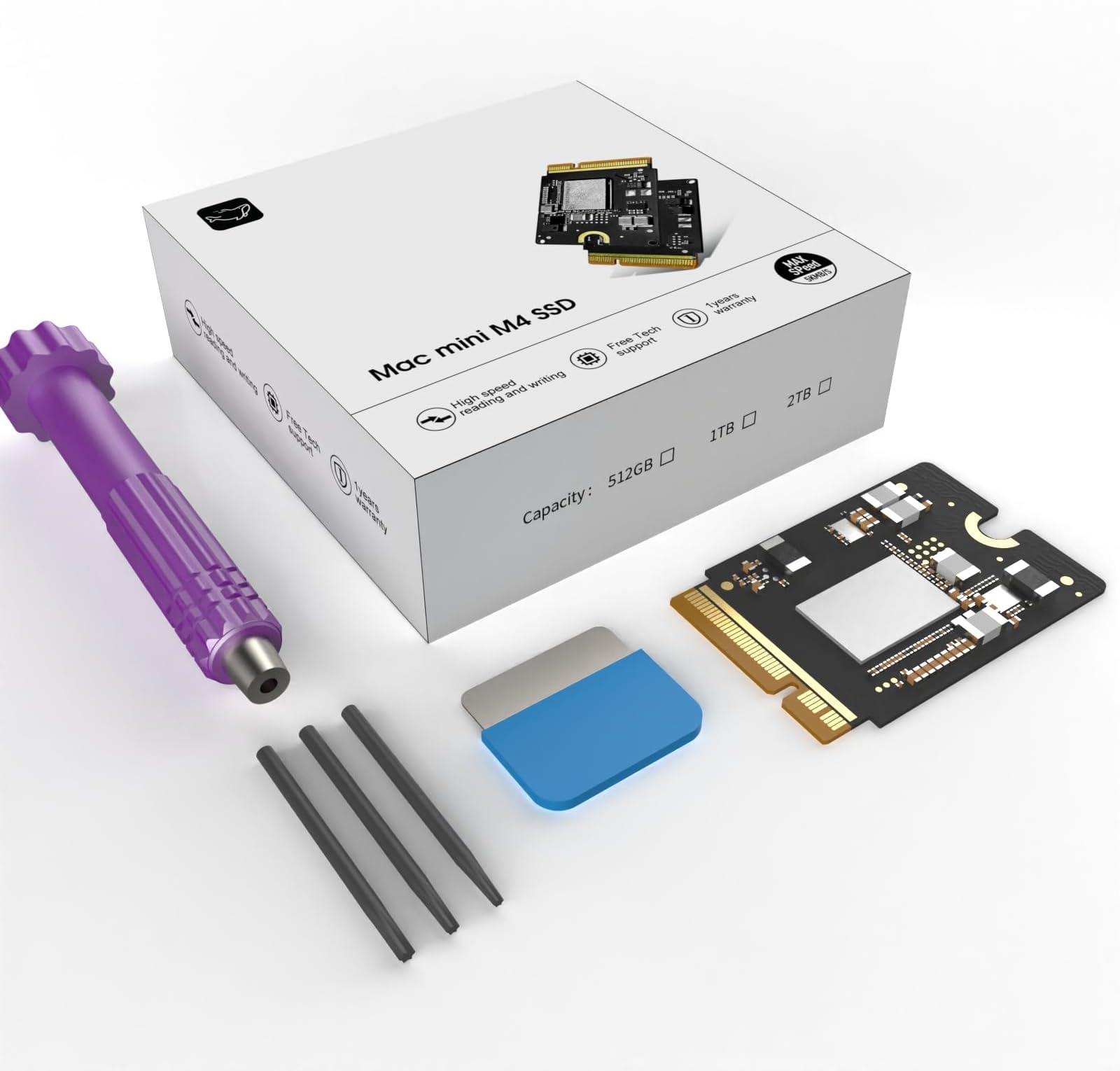
Used the kit to upgrade a brand new Mac Mini M4 from 256gb to 2tb -- that part works great -- MAKE sure you have access to another Mac or Iphone or similar product. It is required to complete the upgrade since Apple in their infinite wisdom decided to put the firmware for the computer on the SSD. So you MUST be able to use the Apple software and DFU mode on the mini to put it back after the hardware upgrade. The bad part on the kit - the smallest torx tip included is soft and fragile -- just removing the screws mangled the tip because the screws all have blue thread locker on them it takes a bit of force to break them free. So when I went to put the mini back together the tip just spun in the screws. If you run into this - get some fine grit sandpaper and hold the mangled tip at a right angle and take off 1/16th of an inch or so.
T**M
Good upgrade
Quick delivery and quite easy to install. Very pleased
R**.
Here are the condensed instructions to upgrade the Mac mini M4 SSD using a second Mac computer.
I am very impressed by the 2TB Deepsea Mac mini M4 SSD. Some things you should consider before installation are listed below: 1) All the tools you need to perform the upgrade (shown in the product picture) are included in the box compartment beneath the SSD. 2) To install the SSD follow the iFIXIT guide closely - though, you don't need to detach any ribbon cables/wires to perform the disassembly. 3) To perform the DFU mode Restore follow Apple's instructions to the letter! 4) I used an M2 MacBook Pro as the DFU host so I didn't need to install Apple Configurator from the Mac App Store. 5) Make sure to use the proper DFU port on the Mac mini M4 during the Restore; it is the middle USB-C port - the one with the lightning bolt above it. 6) Use a beefy USB-C cable capable of data and power transmission. I had to use my 2M Apple USB-C cable because my 1M Apple USB-C cable (smaller diameter) would not connect. Do not use a Thunderbolt 3 cable per the instructions. 7) Immediately after restoring the Mac mini M4 you will not find stable disk speed tests while Spotlight is indexing macOS Tahoe. I was able to achieve stable disk speeds after waiting overnight to test. Best of luck in your upgrade journey! I am looking forward to see if the upgraded SSD is reliable. I will definitely update this review if there is any problem over the life of my Mac mini M4.
T**R
Very Great Very Cheap
About four months in now and no problems yet, super cheap alternative to upgrading from Apple. No speed issues in download or upload speeds and fits just like the original. Would recommend to anyone looking to upgrade the storage space of their M4 Mac mini, thank you very much.
G**O
Facil de instalar
Funciona perfecto y facil de instalar. Trae todas las herramientas. Como sugerencia para quien lo compre. Para restarurar en modo DFU, los cables Thunderbolt 3 no sirven. Yo utilicé un USB-C de Apple que viene con el iPad y ademas de restaurarlo desde un Macbook conectado a la corriente y sin ningun otro USB conectado. Sino todos los intentos daban error 4042
E**L
Upgrade indispensable pour Mac mini M4 — installation facile et performances au rendez-vous
J’ai acheté ce SSD 1 To CHGRNLF pour Mac mini M4, et le résultat est excellent. Le kit arrive complet avec tous les outils nécessaires, ce qui permet d’ajouter facilement du stockage sans avoir à passer par un service Apple. L’installation est simple et bien guidée, il suffit d’être minutieux et tout se met en place en une quinzaine de minutes. Côté performance, le gain de vitesse est immédiat : • le Mac démarre beaucoup plus rapidement, • les logiciels lourds (montage vidéo, traitement photo) se lancent sans attente, • aucun bruit, aucune chauffe anormale. 🔻 Petit bémol : pour quelqu’un qui n’a jamais ouvert un Mac, le démontage peut être un peu stressant la première fois — mais le kit est bien pensé et il y a des tutoriels en ligne. ➡️ En résumé : une solution fiable et rapide pour augmenter la capacité du Mac mini M4 à moindre coût, avec d’excellentes performances et un montage accessible même aux non-experts.
C**N
Eccellente consigliatissima
Beh che dire il mio Mac Mini M4 è passato da 256Gb a 2Tera ad un prezzo assolutamente ragionevole. Ho fatto l’upgrade da solo seguendo un tutorial in rete (ce ne sono a decine) certo…un po’ di ansia ce l’avevo ma con calma e pazienza tutto si fa. Nella confezione c’è tutto il necessario per smontare il Mac io ho utilizzato inoltre un plettro da 0.73 per aiutarmi nell’operazione. Finita il rimontaggio serve un altro Mac con almeno chip M1 per far ripartire e riconfigurare la nuova memoria. A distanza di un paio di settimane ho sostituito con lo stesso prodotto anche la memoria del Mac mini M4 di un amico, naturalmente, avendo già fatto l’esperienza ci ho messo la metà del tempo. Scrivo questa recensione a circa tre mesi dall’upgrade e il Mac funziona perfettamente senza mai aver dato errori o problemi di riconoscimento della memoria. Eccellente consigliatissima
R**L
Perfect upgrade for Mac mini M4
Package contained all the pieces as described and swapping out with the original Mac mini M4 was easy, Black Magic disk speed test show: 3000 Mb/s read and 2900 Mb/s write. No long term performance yet, but hope it will last long.
B**Y
Quick Fix for Error 4041 (Mac mini M4 After SSD Replacement
Finally worked after receiving this error👍 🔧 Quick Fix for Error 4041 (Mac mini M4 After SSD Replacement) 1. Make sure the new SSD is seated properly. 2. On the host Mac, update macOS and Apple Configurator. 3. Connect the Mac mini with an Apple-certified USB-C cable (try another port if needed). 4. Restart both Macs. 5. Put the Mac mini into DFU mode. 6. In Apple Configurator, choose Restore (not Revive). 7. Disable any antivirus/firewall temporarily and use a stable internet connection. 8. Wait for the restore to finish – macOS should install cleanly without error 4041.
Trustpilot
2 weeks ago
1 month ago