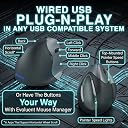
🖐️ Elevate your workflow with ergonomic precision!
The Evoluent Vertical Mouse 4 Right Hand VM4R is a wired, laser optical mouse designed to reduce wrist strain through its ergonomic vertical design. Featuring six buttons and a scroll wheel, it offers precise control and enhanced productivity for right-handed professionals, making it ideal for intensive tasks like CAD and coding.


| ASIN | B00427TAIK |
| Amazon 売れ筋ランキング | パソコン・周辺機器 - 383,995位 ( パソコン・周辺機器の売れ筋ランキングを見る ) マウス - 6,503位 |
| Amazon.co.jp での取り扱い開始日 | 2011/9/20 |
| おすすめ度 | 4.4 5つ星のうち4.4 (2,090) var |
| その他 機能 | エルゴノミックデザイン |
| カラー | ブラック |
| ブランド名 | Evoluent |
| メーカー | Evoluent |
| 付属品 | 1 package |
| 商品モデル番号 | VM4R |
| 商品重量 | 0.2 キログラム |
| 対応OS | Linux, mac os x |
| 対応機種 | パソコン |
| 接続方式 | 有線 |
| 発売年 | 2011 |
| 製品サイズ | 13.72 x 9.14 x 9.14 cm; 200 g |
| 製品型番 | VM4R |
| 電池付属 | いいえ |
| 電池使用 | いいえ |
か**ー
ボタンの数が増えて快適に
新しいPCを購入するのにあわせて購入しました. 以前の物と比較して,親指で押すボタンが増えて割り当てることが出来る機能が増えたので良いです. 以前から使用しているマウスも現役なのですが,マウスだけで操作出来る快適さを知ってしまうと古いマウスは残念な感じです. このバーティカルマウスは左右対称形状の物があります.一台のPCを複数の人が使う場合に一台のPCに左右つなげておいて使用した場合に左手の人用の設定に変えるなどの作業が必要無い所も良いです.
M**E
エルゴノミクスで有線という選択肢
慢性的な腱鞘炎で、普段から手首にあまり負担をかけないようなマウスを選んで使っています。 個人的には、MicrosoftのSculpt Ergonomic Mouseが一番しっくりきましたが、無線接続ですので、電池交換の手間や電波干渉や処理で負荷がかかった際のもっさり感などの欠点もあり、有線接続のエルゴノミクスマウスを探してこれに辿り着きました。 使ってみた結果ですが、期待通り手首の痛み、違和感はかなり緩和されました。 どうも、小指が乗せられるデザインになっているところがポイントのようで、他のこの手のマウスですと、小指が乗せられなかったり、乗るにしても中途半端だったりすると、とてもストレスに感じることが分かりました。 欠点としては、クリックするのに普通下へ押すところが横に押すような形になるため、クリックする力が横に加わり、たまにカーソルが滑ってしまうことがあるのと、マウスの手に触れる部分がツルツルしているので、掴んで持ち上げる際に滑ってしまうのところが、マイナスです。 持つ部分はラバーにしてほしいとも思いましたが、ラバーは時間と共に加水分解してベトベトしてしまうので、長く使うことを考えると、これが正解なんだろうなと思います。
山**郎
割と大き目です。
割と大きいマウスなので、人を選びます。 確かに手首は楽になります。 カスタマイズはWindowsのショートカットキー機能とファンクションキーが選択できます。 自由に任意のキーを割り振ったりすることは出来ません。 キー設定はアプリケーション(exe)毎に設定できるようですが、割り振れる機能に制限があるためあまり有用では無いです。 Windows7 64bitで使用していますが、ドライバインストール直後はマウスを操作できませんでした。 デバイス抜き差しやEvoluent Mouse Managerを開いてキーカスタマイズを変更したりしたら使えるようになってました。
翠**月
手首が楽!ただ汚れやすい
人間の手首というのはボールを横から持つような向かい合った角度が本来の角度と言われています。 そのため、自転車はスポーツタイプのいわゆるドロップハンドル、キーボードは左右分割、マウスは縦型が手首に優しいそうです。 私は仕事で一ヶ月ほど根を詰めていたところ手首が痛くなり、このままではやばいと思い買いました。 実は自腹を切ったレビューではないのですが、使用感はすごく良いです。というか、一度なれてしまうと普通のトラックパッドやマウスを使うのが苦痛に思えてきます。 僕は特にボタンを工夫して使うタイプではないので戻る進むボタンが付いてるだけでも満足です。 ホイールもスルスル動くタイプではないですがこれは好き好みがあると思います。 一つだけ気になることがあるとすれば、手垢というか汚れが付きやすいです。キーボードと比べても汚れが目立つ気がします。 あと、1万円代のモデルとして考えるとプラスチックの質感とかは相当チープです。ただ、握りやすさや動かしさに影響ある部分ではないので、背に腹は代えられないというところではあります。
N**R
It is very useful for healing wrist pain due to extended use of ...
It is very useful for healing wrist pain due to extended use of mouse.. I would recommend it to everyone using the mouse for long duration ..
T**G
Cómodo y fácil de manejar
Compré este ratón por un problema en la mano y la verdad es que me ha resultado de mucha utilidad. Tiene un manejo sencillo y te haces a él enseguida. Es cómodo y ágil y la posición de la mano es buena. Ha mejorado la posición del brazo y ha disminuido el dolor considerablemente. Estoy muy contenta con el producto.
D**4
Génial cette souris verticale
C'est ma seconde souris de ce modèle, la première commençait à manquer de précision après 4 années de service à temps plein (2011 à 2015). Soit une durée plus longue que les autres marque que j'ai eu avant. On prend vite l'habitude de ce type de souris et le double clic sert souvent. De plus, avec Win 7, Win 8 et Win 10, le clic droit est fréquent et les doigts sont bien positionnés. La lumière "bleue" peut plaire ou non, par contre, les témoins vert de réglage de précision sont intéressant pour certains logiciels (dessins notamment).
K**Y
This is quite possibly the best computer mouse money could buy
Not only is its higher angle than other vertical mice helpful in removing wrist strain, its well thought out comfort and usability make it a very productive device at that. In a few hours of usage, its fit feels natural. For those that gripe about the challenges of straining new muscles to position their pointer, they need to utilize more their fingertips and thumb, with its well sculpted cavity, for fine motion. We do that with pencils and pens (remember those inventions?) Anchoring your palm's side might save a lot of effort with small precise movements, with your wrist on a wrist rest too. And moving your arm for more coarse positioning in the "handshake" posture feels natural if not more so than flat mice. Optical, infrared sensing and 2600 DPI resolution should be high enough to satisfy many gamers, maybe not the hardcore twitch variety. But for desktop app use, sometimes dropping to 1800 and 1300 DPI (depending on screen size) with the pointer's acceleration sensitivity to the minimum (maximum threshold before accelerating) will help you improve slow speed accuracy. Browsing hyperlinks on a 2k screen is fine for me at 2600 DPI, but sometimes I need something lower for letter-precise aiming in editing text. The main buttons, including an ingenious middle button that's not forced to reside as the wheel, are considered to be a very light touch by a reviewer, but I measure left and right actuations at approximately 40 grams of force. I suppose knowing membrane switches can start down as soft as 25 gf should have taught me to take subjective anecdotes with a grain of salt. It feels as firm as many mouse buttons do. The clicky sounds are definitely pronounced. The wheel in between the left and middle button can be spun more quickly by operating it with the index and middle fingers. Tilt-to-move works like a charm and it's possible to move the mouse's body and not upset the screen blanker, thanks to an angled foot. Just follow the instructions on the insert. Although, it's not as reliable as a serious gaming mouse, which shouldn't even register 1/16000th inch of movement, for example. The highly mounted top thumb button (9 cm off the surface!) is easily struck if you're switching your hand from an unsplit keyboard on the left by touch for the first few days. So make sure it's not set to something that performs an irreversible action. It's the 'back' button by default and I have to watch out for it typing this review in a web browser. That's not an issue if you place your mouse in between split keyboard halves or in front of it. Before this review sounds like a shill, I am peeved this costs as much it does, and there are seldom sales nor used units available. And with reviews of low durability too, leaving me wondering if there are better values out there competing for Evoluent's mindshare and rank. And it costs more than many wired gaming mice which represent the pinnacle of performance, convenience and endurance, not that those should be the definitive benchmark for this market. But I'd have to conclude with so much product design executed well, we are getting what we pay for. And at least we get a gaming grade sensor that proves to be a very accurate tracker, even without a good gaming mouse pad. Hint: If you have to temporarily go left-handed, the thumb buttons can be programmed as left/right buttons and the mouse still operates comfortably, vertically and functionally.
I**E
Great investment!
In my extensive work on digital imagery and animations as hobbies as well as general computer use, my wrist and right arm were becoming quite sore as a result of using my old standard PC mouse. As a result of my research, I purchased the Evoluent Ergonomic Mouse and it was worth every cent! After a very short period tweaking the settings and getting used to the different hand and wrist positions, I was very impressed! The wrist and arm pain were gone quickly and it has stayed that way ever since. Two thumbs up!
Trustpilot
2 weeks ago
1 month ago