Buy anything from 5,000+ international stores. One checkout price. No surprise fees. Join 2M+ shoppers on Desertcart.
Desertcart purchases this item on your behalf and handles shipping, customs, and support to Austria.
❄️ Stay cool, stay ahead: The ultimate Threadripper chill master
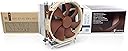
The Noctua NH-U14S TR4-SP3 is a premium-grade air cooler engineered specifically for AMD’s high-end sTRX4/TR4/SP3 CPUs like Ryzen Threadripper and Epyc. Featuring a 140mm NF-A15 fan with PWM for silent, efficient airflow of 140.2 m³/h, it combines copper heat pipes and aluminum fins for exceptional heat dissipation. With over 250 awards, ultra-quiet operation at 24.6 dB, and a tailored design that fits large CPUs and motherboards, it’s the go-to cooler for professionals demanding reliable, high-performance thermal management.


| ASIN | B074DX2SX7 |
| Air Flow Capacity | 140.2 Cubic Meters Per Hour |
| Best Sellers Rank | #469 in Computer CPU Cooling Fans |
| Brand | Noctua |
| Brand Name | Noctua |
| Compatible Devices | Desktop |
| Cooling Method | Air |
| Customer Reviews | 4.8 out of 5 stars 948 Reviews |
| Global Trade Identification Number | 09010018000108 |
| Item Dimensions L x W x H | 5.9"L x 3.1"W x 6.5"H |
| Item Type Name | CPU cooler |
| Item Weight | 1030 Grams |
| Manufacturer | Noctua |
| Material Type | Copper (base and heat-pipes), aluminium (cooling fins), soldered joints & nickel plating |
| Maximum Rotational Speed | 1500 RPM |
| Model | NH-U14S TR4-SP3 |
| Noise Level | 24.6 Decibels |
| Number of Items | 1 |
| Part Number | NH-U14S TR4-SP3 |
| Power Connector Type | 4-Pin |
| Product Dimensions | 5.9"L x 3.1"W x 6.5"H |
| UPC | 841501100109 |
| Unit Count | 1.0 Count |
| Voltage | 12 Volts |
| Warranty Description | 6 year manufacturer’s warranty |
C**E
It works great at stock speeds and perhaps a mild overclock.
Very easy to install. I didn't know until I got it that you can get one with a second fan. I'm ordering that for my computer as the Threadrippers runs even warmer than I thought it would. Make sure you have good airflow in the case! It works very well at stock speeds and maybe a mild overclock, but beyond that, unless you have a way to keep your computer room very cool, it will get warm. I tried the 3960x with a liquid cooler at first, but although it kept it below the throttling speed, it was getting quite warm. The standard water coolers just don't cover enough of the cpu to keep it cool. Putting it in was very easy. Cleared the memory on my Gigabyte Aorus Wifi Pro MB with no problem, but I only have four sticks of ram. If I had more, it would have hit the top of the sticks closest to the cpu and wouldn't fit. If you are planning on using more than four sticks, they had better be very low profile. Your MB may be different and have more spacing though. It cleared my video card which is in the first slot by at least 6 mm, although there is an adjustment to move it up to 6 mm higher up in the case if needed. Heatsink seems to be solid and very well made. It's tall, so check your clearance with the side of the case. I've got an old Cooler Master HAF 932 case and have four fans mounted on the side, and it still cleared with plenty of room. Even though it came with only one fan, it includes clips for a second one and a tube of thermal paste. It also comes with a short cable you can attach to the second fan to keep it at about 1200 RPM for quietness. I don't think the second fan will add that much extra noise as they are rather quiet fans and are 140 mm. They come with extra rubber isolation pads to keep the fan from vibrating against the cooler. All in all, a good product for a fair price, (considering what everything costs these days). Amazon shipping is also very quick, even without paying extra for faster shipping. I ordered it on a Wednesday evening, and it arrived on Friday about noon. I live near a large city, so your mileage may vary!
M**N
Capable cooler, front-to-back airflow
I really like the NH-U14S. It's very capable, but I'm not an overclocker and didn't expect it to cool beyond stock settings which are somewhere around 330W or so at the wall. That would put the CPU socket probably around 250W. I do NOT suggest the smaller version of this cooler. If you are going to air-cool a threadripper and choose Noctua, you want to get the U14S. A couple of notes on this cooler: The cooler partially blocks one DIMM slot, but its above the slot. Simply removing the fan (which takes 2 seconds) clears the slot for putting a DIMM in or taking it out, then the fan can be put back on and will be above the DIMM. This is a major plus. The cooler includes one fan, but also includes a strap for a second fan so you can boost heat extraction (and noise) by adding a second 140mm fan if you like. The fan is fairly quiet considering what its being asked to do. A lower-noise setup is possible if you use XFR2 + PPT settings to reduce the power envelope below stock. The cooler is designed for front-to-back airflow. Front-of-case fan-in, cooler pulls the air through to the back of the case, and a rear case fan to pull the air out. I recommend a front AND rear fan at a minimum, inline with the CPU socket. The cooler is fairly hefty and I do not recommend a vertical motherboard. Keep the motherboard flat if you use this cooler (and this is true for any bulky air cooler). If you need more cooling, intend to mount sideways (vertical motherboard), or need to fit the threadripper into a lower-profile case, consider a liquid cooling setup such as an Enermax. The advantage of using a liquid cooling setup is that you don't really have to worry about case airflow so much, whereas with an air-cooled setup you have to make sure that the front-to-back path is clear. The advantage of air-cooling is that it is extremely robust (no liquid to leak, no AIO pump, the fan is the only moving part). The disadvantage is that you will have non-uniform heat distribution on the motherboard. For example, the DIMMs on the exhaust side of the fan run considerably hotter than the DIMMs on the front-side, and same for the VRMs. So air-cooling is best when you aren't pushing the limits of the system, whereas liquid cooling is best if you are (or for the other reasons iterated). -Matt
J**N
Perfect Fit and Excellent Cooling for Threadripper Pro 3955WX
The Noctua NH-U14S TR4-SP3 fits the ASUS Pro WS WRX80E-SAGE SE WIFI motherboard perfectly. I’m using it with an AMD Ryzen Threadripper PRO 3955WX, and it keeps the CPU nice and cool even under heavy load (main use cases include Game Servers, TrueNAS, and ProxMox for my homelab). Installation was straightforward, the build quality is top-notch, and the fan runs smoothly without excessive noise. It’s exactly what I expect from Noctua – reliable, effective cooling with no surprises. If you have a Threadripper PRO and want a cooler that just works, this is a great choice.
T**Y
Great option when my Liquid cooler died
I have an AMD 2950x CPU and was having a great time with it. Had a well known liquid cooler that has the words "TR4 II 240" in it. It was ultra quiet and worked great. Great that is, until the pump failed at about 15 months in. It's under warranty, but, my PC was only useable for about 5 minutes at a time with no working cooler, and it left me stranded and so far they aren't being quick with my warranty ticket. So, I needed something to get me back in action and this was not only one of the more affordable options but also well-reviewed. I threw the Noctua cooler on and its been doing a fine job keeping my CPU in the ~40C range for a few hours. I haven't pushed the PC to its limits, but I think it will suffice. And, it's really not that noisy and should actually be a great cooler. Not sure what I'll do once the other one is replaced. It's tempting to just keep using this one, since it works so well. At least its an easy swap. It came with the mounts, some thermal grease, a wrench, parts for adding a 2nd fan if you wish, and everything needed to get it going. The ONLY downside I found so far was that if you leave the fan mounted in the default location, it hits my DRAM because it needs to be maybe 1/8" higher or so. So I was forced to attach the fan just slightly higher by 1/8" to 1/4" than centered on the cooler. Otherwise, it's great.
S**D
Great cooler for AMD TR4 1900x
I needed another cooler while my Enermax AIO is in route to RMA department and will hopefully get replaced. I picked this up because the reviews (outside of Amazon) said it gets the job done even though it's an air cooler. I also have other Nactua fans in this rig and my other appliances around the house. They perform really well in general. Well, they were right. I'm getting lower temps with with this air cooler than I ever did with the enermax liquid AIO. Granted, the Enermax was apparently defective (thanks for not telling me via email, Enermax) and manufacture was replacing them for anyone who opened a case (Reddit for details). That said, even when the AIO was brand new, I never reached below 32 C. With this air cooler, I'm getting 29 at idle and it is very quite. I applied some load and even then, it never went over 43 C. Ambient temp in the room is around 73 - 74 but overall, I really do see a very significant difference in cooling performance. It's only running with the fan that came with it too. This cooler can be configured in a push/pull setup to improve performance but at the moment, I don't think that's necessary. So it's very likely that even if I get a replacement AIO from enermax that I will continue to use this air cooler. It's quite, performs really well, easy to install, price is good and Nactua will throw in a spiffy case badge too. I highly recommend it if you are running AMD 1900x.
C**S
Cool, quiet, and not water!
I've never used water cooling and was unhappy when AMD recommended that for its AMD 2950x Threadripper CPU . After all, when water cooling fails (and many such reports are online), you've ruined hundreds if not thousands of dollars of computer parts. When air cooling fails, all you have to do is replace a $25 fan and you're back in business. However reviews here and elsewhere claimed that this Noctua cooler does an excellent job cooling the Threadripper series. And it does. At idle, the CPU is 27-33C (depending on ambient temperature). While I've not run a stress test like Prime95, during a half-hour compilation in which all 32 "cores" were at 100% the temperature was always under 50C. The tradeoff is the size of the cooler. It's tall enough that cases smaller than a Full Tower might not work. Also it will block the first PCI Express slot. But Noctua provides a clever system which allows you to slide it over by 6 mm to unblock this slot. In my case, I did not do this since I needed only one such slot and had five. Since my motherboard alternates x16 and x8 slots, my video card ended up in the third, rather than second, slot. I believe that alternation is common in many motherboards. The excellent fan is large enough that it will impinge on the first RAM slot as well. I was worried that moving the fan up a bit would be difficult but it wasn't. In Amazon's photos you can see the clip that holds the fan to the heatsink. (There's one on each side.) Noctua's installation instructions have you attach the heatsink to the CPU first and then attach the fan. The two clips are easy to clip and unclip from the heatsink. The cooler is remarkably quiet given its size. I've already bought a Noctua replacement fan when this inevitably fails and am now hooked on Noctua for air cooling.
R**O
It's big, but it works
The Good: * It works. Idle temps around 18-22°C, and load temps consistently below 45°C as far as I can tell. * Not loud at all (proof that bigger fan == less noise) The Bad: Hasn't failed yet :) We'll see if it outlasts my ENERMAX LIQTECH TR4, the failure of which (60°C idle!) prompted this purchase. Given that fans are easy to replace, and that's literally the only thing that can go wrong besides maybe some kind of bizarre corrosion issue, I don't expect much issue. The Ugly: * It's slightly too tall for my case (a Thermaltake one, the model number of which I can't recall). It "fits", but it bulges out the access door just a smidge. * Hangs unusually close to the top PCI-E slot, making it impractical to have a graphics card there. It's apparently possible to adjust the mounting brackets for this specific reason, but it was easier to just move the graphics card down a slot. * Fan hangs over one of my RAM slots. I'm thankfully not using it right now, but if I ever do get around to ordering a slot-filling full set, I'll probably need to either find something low-profile or install a different fan.
M**Z
AMD Threadripper 1950X Tamed!
I finally swapped my AIO water cooler for a Noctua CPU fan on my AMD Threadripper, 1950X and wow, what a difference! I was nervous about air cooling such a powerful chip, but this Noctua is a game-changer. The build quality is phenomenal, and installation was surprisingly easy. The best part? Silence! My old AIO always had a hum; this Noctua is practically inaudible, even under heavy load. Even better, my temperatures are lower or comparable to the liquid cooler, but with no pump hum or leak worries. My Threadripper system feels more stable, quieter, and happier. If you're considering air cooling for a high-end CPU like Threadripper, or just want to simplify your setup, get one of these.
D**N
Supereinfach zu montieren mit wirklich guter Anleitung
Sowas ist man gar nicht mehr gewohnt bei Computerteilen. Eine in lesbarer Grösse gedruckte und perfekt illustriert Anleitung in der der Einbau genau erklärt wird. Mir war die Wasserkühlung meines PCs kaputt gegangen und ich wollte wieder mit Luft kühlen. Und das tut es jetzt auch, und zwar leiser (!) als die Wasserkühlung war. Der Lüfter ist zwar nicht billig aber definitiv oberste Qualität. Die Laufruhe ist grossartig. Der Einbau war wirklich supereinfach und toll erklärt und alles was man braucht (inklusive Wärmeleitpaste und Imbus für die Schrauben)) ist beim Produkt dabei. Die Kühlleistung auf dem Threadripper 2950X ist Ok. Im idle ca. 41 Grad. Unter Vollast wenn alle 16 Kerne dauerhaft 100% rechnen ist die Temperatur allerdings auf 62 Grad, so dass ich mir noch den Zusatzlüfter NF-A15 dazu bestelle, der laut Rezension nochmal -5 Grad bringt. Nach ausgiebigem Gebrauch: die Laufruhe ist immer noch sensationell (wobei mein gesamter Tower auf leise getrimmt ist). Das System ist definitiv viel angenehmer als mit der vorher eingebauten Enermax Wasserkühlung (die ich leider niemandem empfehlen kann, die war nach noch nicht mal 3 Jahren defekt.) Update: gerade den Zusatzlüfter verbaut. Tipp: darauf achten in welche Richtung der Luftstrom im rechner fliessen muss und den Lüfter entsprechend der Richtung konfigurieren und einsetzen. Hatte ihn zuerst falsch rum eingesetzt weil kein Hinweis in der Anleitung dazu ist. Wenn alles richtig ist gibt es ungefähr die versprochene Kühlung um zusätzliche 5 Grad, bei mir sind es 4 Grad-- und das flüsterleise. Unter Vollast bleibt das System jetzt immer deutlich unter 60 Grad trotz Übertaktung. Im idle ist die Temperatur unter 40 Grad . Perfekt.
C**A
One of the best options for TR4 socket cpus
I did not want to deal with water cooling anymore and found the Noctua NH-U14S TR4-SP3 to be one of the best options available for TR4 sockets. One month of usage and had no troubles with my 1920x.
R**R
Was able to use my threadripper without underclocking
I live in a hot place and so far using water cooling, I had to underclock my threadripper 3960x so as not to overheat it. Not anymore. The inbuilt thermal paste is also good enough. Really silent, great product 10/10. Note: Wear a glove while mounting, the fins are sharp, I nicked my hand on it.
A**R
Silent and coool
As expected from Noctua products
A**X
Antes de comprar
Estuve revisando diferentes comparativas de aircooler y este era el que mejor enfriaba. Efectivamente, incluso con Render en Arnold las temperaturas se mantienen en los 67 C y de ahí no sube. Creo que hasta es mejor enfiramento que un water 360mm. Tiene la opción de comprar otro ventilador. Espero sirva para los nuevos threadripper 3970
Trustpilot
5 days ago
1 month ago