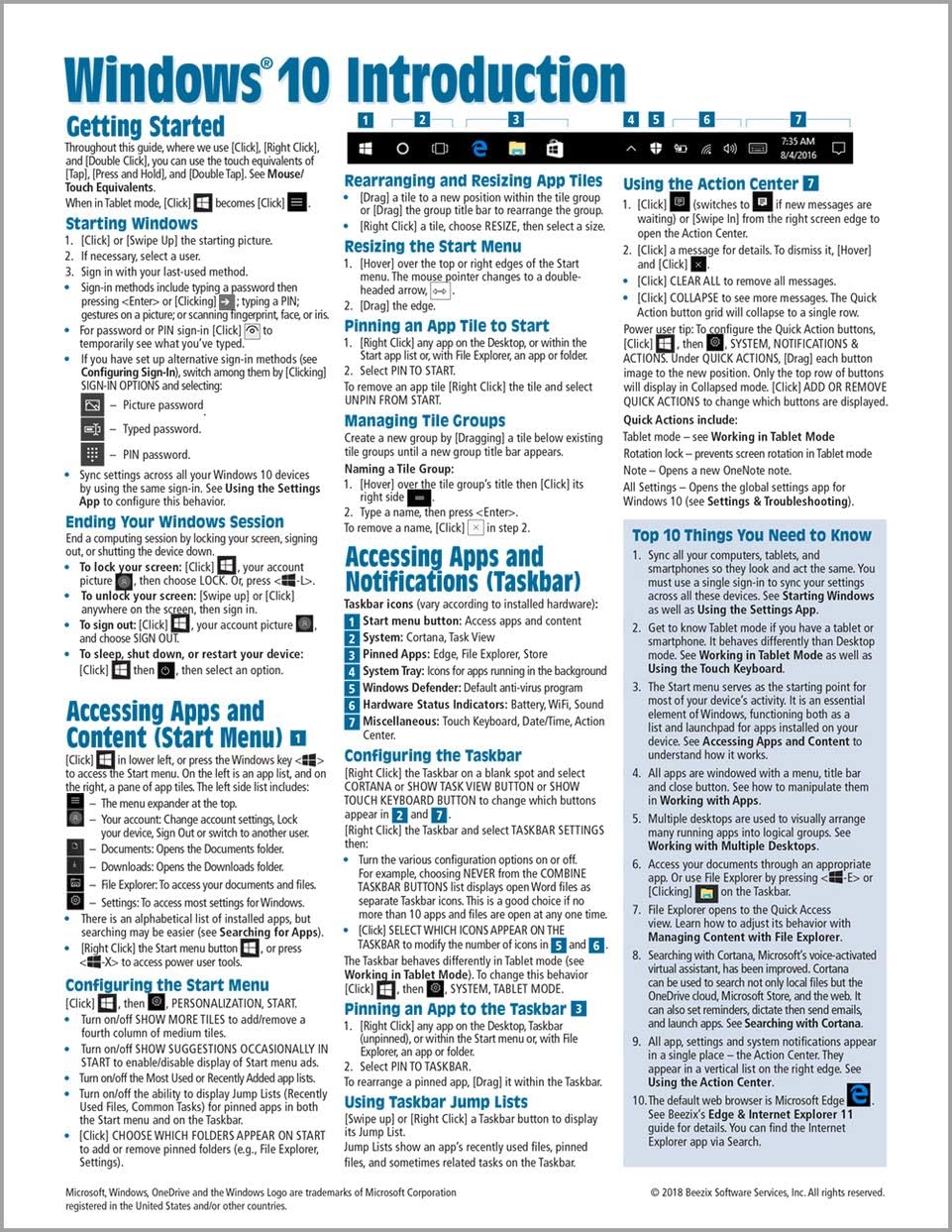
Windows 10 Introduction Quick Reference Guide (Cheat Sheet of Instructions, Tips & Shortcuts - Laminated) Updated May 2021
Product ID: 82730132
Buy anything from 5,000+ international stores. One checkout price. No surprise fees. Join 2M+ shoppers on Desertcart.
Desertcart purchases this item on your behalf and handles shipping, customs, and support to Austria.
Updated May 2021, four page laminated quick reference guide showing step-by-step instructions and shortcuts for how to use Microsoft Windows 10. Includes touch interface. This guide is suitable as a training handout, or simply an easy to use reference guide, for any type of user. The following topics are covered: Getting Started: Starting Windows; Ending your Windows session. Accessing Apps and Content (Start Menu): Configuring the Start Menu; Resizing the Start Menu; Pinning an App to Start; Rearranging and Resizing App Tiles; Managing Tile Groups. Accessing Apps and Notifications (Taskbar): Configuring the Taskbar; Pinning an App to the Taskbar; Using Taskbar Jump Lists; Using the Action Center. Working with Apps: Starting an App; Opening an App File (Document); Saving an App File; Switching Between Apps/Windows; Switch Using Task View; Snapping Multiple Apps to the Same Screen; Resizing an App; Moving an App; Maximizing an App; Restoring to Previous Size; Hiding an App; Closing an App; Close an app window from the Taskbar; Searching for Apps; Searching with Cortana; Working with Multiple Desktops. Managing Content with File Explorer: Managing Files and Folders with File Explorer; Customizing the Quick Access Toolbar; Navigating in File Explorer; Customizing the Default Quick Access View; Searching in File Explorer; Refine Your Search; Changing File Explorer's Display; Grouping and Sorting Files and Folders; Opening a Second Explorer Window; Creating a Folder; Renaming Files or Folders; Selecting Multiple Items; Selecting Items with Checkboxes; Moving and Copying Files and Folders; Using Cut, Copy & Paste for files; Deleting Files or Folders; Restoring Deleted Items; Deleting Permanently; Linking to a Document, Folder, or App; Sending Files and Folders (Zip); Unzipping (Extracting) Files; Working with Libraries. Working in Tablet Mode: Configuring Tablet Mode; Using Tablet Mode. Settings & Troubleshooting: Using the Settings App; Adding a Picture or Slide Show to Your Lock Screen; Setting Up WiFi; Using Airplane Mode; Using the Control Panel App; What to Try if an App Freezes; Getting Help. Users & Security: Changing Users; Adding User Sign-Ins; Configuring Sign-In. Also includes a "Top 10 Things You Need to Know" list, a list of Keyboard Shortcuts, and a list of Mouse/Touch Equivalents. Review: Handy Quick reference guide. - I'm new to Windows 10 coming from Windows 7 and before that XP. When you get older, you don't like change and going to Windows 10 is a big leap. The only reason I went to Windows 10 is because IE 11 will no longer work after January 2020 and you cant really use Edge with Windows 7. Long story short, I bought a big, think Windows 10 book for study later.........but sometimes you need a quick reference. This guide fits the bill for me. Review: A Quick Reference: Windows 10 - Better than having a book to flip through! Highlights the most used/ useful features. Wish i knew this format existed 2yrs ago after buying my new PC🤦♀️
| Best Sellers Rank | #1,148,123 in Books ( See Top 100 in Books ) #42 in Windows 10 Guides #75,656 in Reference (Books) |
| Customer Reviews | 4.3 out of 5 stars 1,813 Reviews |
L**S
Handy Quick reference guide.
I'm new to Windows 10 coming from Windows 7 and before that XP. When you get older, you don't like change and going to Windows 10 is a big leap. The only reason I went to Windows 10 is because IE 11 will no longer work after January 2020 and you cant really use Edge with Windows 7. Long story short, I bought a big, think Windows 10 book for study later.........but sometimes you need a quick reference. This guide fits the bill for me.
M**T
A Quick Reference: Windows 10
Better than having a book to flip through! Highlights the most used/ useful features. Wish i knew this format existed 2yrs ago after buying my new PC🤦♀️
R**U
It helped with certain projects
It was a little confusing at first but after reading it several times, I found some helpful hints.
W**.
This reference sheet is excellent - Highly recommend it !!
Nice and easy to use and it's laminated to last along time. Very useful and handy to keep by your computer for a quick reference when you need it without looking thru pages and pages of a big computer book. I highly recommend it for everyone who is serious about using their computer.
C**L
NON TECHNOLOGY GIFTED PEOPLE
I ordered this quick guide for windows 10 because I am not very good with electronic items. This guide would probably be great for someone with more knowledge of computer terminology, but I found it lacking for what I needed.
T**R
80yo parents: 5 stars
Bought Word 2016, Excel 2016, and Windows 10 quick reference guides for my 80yo parents. They are finding them very convenient to keep track of all the shortcuts and key combinations - especially since they were used to Windows XP and Office 2010.
M**S
Basic how-to for newbies
A long-time Windows 7 user, I have gotten a laptop with 10, so I needed a basic helper to at least get me exploring 10. Added to the fact both my husband I are 75 and HAD to change made it even more daunting. This is in the case, for use whenever we open the laptop.
G**N
Very helpful
Laminated so my coffee, crumbs, grease, and everything else don’t destroy the Windows Ten Reference Sheet. It’s really a great guide for Beginners. Four Stars ⭐️⭐️⭐️⭐️!!
J**C
Cole's Notes for Windows, an excellent quick guide.
If you're like most people and Microsoft 365, you probably want something faster than Windows for Dummies. Here it is. These cheat sheets are excellent - buy every one of them you need, you will not be disappointed!
H**R
very helpful
There are so many tricks and tips that remembering them all is a large order with windows 10. My brain can only absorb or remember so much. This reference guide takes the edge of all that.
B**K
Good
I did not want to change to Windows 10, I am completely satisfied with 7 but I have to change. The quick reference card is great, easy to use. Maybe a little hard to understand when you are in your 70's, but I am patient & will persevere.
T**K
Very good
Very good product good information 😃👍👍👍👍👍
C**E
Print is too small
Print is a little small-I have to use a magnifier glass
Trustpilot
4 days ago
2 weeks ago