Buy anything from 5,000+ international stores. One checkout price. No surprise fees. Join 2M+ shoppers on Desertcart.
Desertcart purchases this item on your behalf and handles shipping, customs, and support to Austria.
📺 Unlock your Pi’s full potential with live TV streaming—don’t miss a moment!
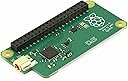
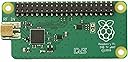
The Raspberry Pi TV HAT is a compact, lightweight DVB-T/T2 TV tuner card designed for seamless integration with Raspberry Pi devices. It connects via PCIe x1, supports Linux OS, and enables live TV streaming and recording through popular apps like Kodi and TVHeadend. Perfect for millennial tech enthusiasts seeking affordable, flexible home entertainment solutions.
| ASIN | B07JKH36VR |
| Best Sellers Rank | 25,215 in Electronics & Photo ( See Top 100 in Electronics & Photo ) 89 in Digital-Analog Converters |
| Brand | Raspberry Pi |
| Brand Name | Raspberry Pi |
| Compatible Devices | Television |
| Compatible devices | Television |
| Customer Reviews | 4.5 out of 5 stars 720 Reviews |
| Global Trade Identification Number | 00707565827195 |
| Hardware Interface | PCI Express x1 |
| Hardware interface | PCI Express x1 |
| Item Weight | 34 Grams |
| Item weight | 34 Grams |
| Manufacturer | Raspberry Pi |
| Manufacturer Part Number | RB-TVHAT |
| Model Number | 180-6177 |
| Operating System | Linux |
| Style | Modern |
| Style Name | Modern |
| UPC | 707565827195 |
B**E
Fantastic price, fantastic product
I just installed a RasPi 2 on my downstairs TV running LibreElec/Kodi and found out that this was available - so I thought I'd give it a try. I'm very impressed. Installation is not too hard, just plug the extension header into the RaspPi's header, then add the TV hat. In my case I had to remove the top of my case but that's no biggie. For me, in LibreElec all I needed to do was go to their repository, get TVheadend Server and then use a laptop to set it up. As many people will tell you, use the pihut guide, it really is the best (although on my first attempt I couldn't get many channels, so I reinstalled and tried again scanning for everything and it worked better that time!) - So top tip would be break open a cheap SD card and install a vanilla version of your OS/back up your OS before attempting set up as undoing TVheadend settings is a complete nightmare! Also note, I don't think the TVheadend server 'web' interface shows live video on Windows machines (at least, it didn't on any of mine!) Once the server was set up, I've just installed TVHeadend client on all the Kodi devices in my house and am now able to stream or record TV from wherever I am on my network. One final 'be aware' - the first device to log in to the server is in control of it (unless a pre-arranged recording is happening) so you'll only be able to watch channels on the same DVB multiplex on any additional devices (e.g. only BBC channels if you are recording BBC TV) All in all, worth the £7!
T**E
Great product - additional configuration may be needed with TvHeadend
I purchased this after it was recommended by a friend. It is easy to install and the setup of Tvheadend is relatively easy with many guides available on the Net. However I did notice that I was unable to view channels such as Court TV, Freesports and BBC 4 HD, though these are picked up by my TVs and PVRs. The mux in common with these channels is COM7. I use the Crystal Palace transmitter. Some research indicates that this is due to the internal tables used by TvHeadend not (yet) reflecting the last set of Freeview changes. I got around this by adding the COM7 mux manually to TV headend and doing a rescan. The settings I used were: Delivery system: DVB-T2, Frequency (Hz):746000000, Bandwidth:8Mhz, Constellation:QAM/256, Transmission mode:32K, Guard internval:1/128, Hierarchy:NONE, FEC high:2/3, Fec Low: NONE, PLP ID:0 Once I added this mux, I was able to access the missing COM7 channels. Regarding streaming, the only client so far that works smoothly as far as playback is the Kodi app with the TVH add-on. I'm using this with my Macbook Pro. This works brilliantly with an EPG similar to that on the typical PVR. I am using a Raspbery Pi 3. I am yet to find an IOS client that streams smoothly. Overall I am happy to award 5 stars especially given the price.
M**O
Excellent value for money!
Its Sony CXD2880 tuner chip can receive both SDTV and HDTV Freeview channels (DVB-T and DVB-T2). It works smoothly even on a Raspberry Pi Zero W when using the default HTSP and PASS profiles on Tvheadend (that are gentle on the CPU). CPU load while playing HDTV channels goes up to 20% max. If you have any HDTV playback issues at all it will be due to a low wireless network speed (between the Pi Zero and your router) so make sure that you are close to your router to achieve at least 30-40Mbps wireless connection to it. A highly recommended little device to setup a home TV server and watch TV on your tablet or phone from anywhere around the house. On Windows 10, I totally recommend using the SichboPVR TV client as it is the most complete and stable client I could find.
B**R
Great Idea in Principle
A super cool idea to get Freeview TV on a Raspberry PI. It's relatively simple to install and I went down the LibreELEC disk image route to install the functionality. I found that the connector between the riser and the main board did not always get a good electrical connection and the device was not recognised. If I lifted the board half a millimetre it became available to the software. When you have a good signal the received quality is amazing seeing the size of the unit. I ended up purchasing three of these receivers as I was not convinced I'd not broken them. A really good experiment and hardware if you want to try Kodi and TVHeadEnd. I found that the board did not work with some of my cases and in the end I had to buy a special case which had been designed for it. Overall if you have the budget I'd recommend you look at the Hauppage Freeview receivers as I had a better experience overall using the dual channel version. As an exercise to learn the software you could do worse that starting with the less than £10 TV hat.
E**F
Surprisingly good. No brainer at the £6 price.
I've been running MediaPortal backend on my Windows 7 desktop/server with a Hauppauge USB dual HD Freeview tuner and Libreelec Pi3Bs, Firesticks or tablet Kodi clients for recording/playing Freeview, for some years now and very good it has been too. However, I wanted to try for a while, just for fun, TVHeadend. 6 whole £ later, one of my Pi3Bs running Libreelec, a 64GB USB memory stick (optional), and this Amazon supplied Pi TVHat and it was up and running. It even all fits in a standard Pi3B case with a little fettling and I added a heat sink too. As a first pass I used the PiHut TVHeadend installation guide which was straightforward, from which I was able to then fine tune my configuration to suit my environment. I can't fault the picture quality or overall performance, which is surprisingly good. For £6, what's not to like!
K**R
Works perfectly
I've been playing around with TV cards plugged into PCs and Home Servers for the last 30 years, and never really had the functionality or reliability that I wanted. So my expectations for this tiny little card were, to be honest quite low! However with the back end set up, clients set up on our mobile devices and Kodi set up on the same Raspberry Pi as the TV hat (which is plugged into the TV), everything not only works but has exceeded my expectations! Not only that but by using Kodi, all the family are now happy setting up recordings, which can't be said for my dedicated PVR!
M**N
Hardware easy to plug in wrong, TVHeadend software takes some mastering.
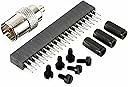
This is not a purchase for non-technical people, and even then it can be a challenge. As others have said, make absolutely sure you plug this into your PI the right way up. At first I plugged it in black header to black header on my Pi 3B+. In fact the holes in the TV Hat header go right the way through the PC,B so plug it in black header facing up and with the antenna input facing away from the USB ports on the PI. I had to add the extra black header spacer which came with it and then screw in the board spacers to stabilise it. The TVHeadend software you will probably be using comes with hopelessly out of date MUX settings so on first scan you may well find zero channels. Look up the MUX settings online from an updated source - the freeview website or wikipedia seem up to date. These have to be entered manually. After that it worked great but again do not buy if any of the above is beyond you.
R**T
White elephant
Never got it working.
E**O
Chiaramente per chi conosce il raspberry
Ho il raspberry 3 b2. La modalità di montaggio del decoder è semplicissima, si collega al GPIO. Ho adattato il case per collegare il decoder, perchè il mio chiaramente non aveva l'uscita per l'antenna. Un foro con il trapano e via il gioco è fatto. Il mio raspberry monta Libreelec come distro. Quindi ho installato TvHeadend e poi da interfaccia Web ho fatto lo scan dei canali, aggiungendo le picon (icone canali). Rispetto ai decoder usb esterni (esempio AverMedia), provati su Openelec la configurazione è automatica. Non devi installare driver con istruzioni ssh e lato Tvheadend web la configurazione è semplicissima (nelle versioni precedenti il processo era più complesso). La cosa bella è poter configurare TvHeadend nelle App Android per vedere la Tv in streaming nel cellulare. Unica nota dolente è il connettore (adattatore) Antenna alla scheda. Un po' deboluccio, appena tocchi il cavo antenna, si stacca.
J**B
Fungerar perfekt
Snabb leverans och lågt pris. Förpackningen var platt när jag fick den, men innehållet var helt. En liten varning bara är att kolla instruktionerna innan du fäster hat:en på din Raspberry Pi, jag gjorde misstaget att fästa den upp-och-ner på min Raspberry Pi Zero. Då startar inte din Raspberry Pi alls, vilket räddade mig. Annars har den fungerat felfritt. Rekommenderas!
B**K
Fantastyczny
Urządzenie działa bez zarzutu. Świetnie radzi sobie zarówno w systemie Kodi, jak i na innych dystrybucjach Linuxa.
W**Z
Nun auch DVB-T2-Empfang
... mit dieser kleinen Receiverplatine und einem RaspberryPi4B. Der kann das in Deutschland ausgestrahlte HEVC(/h.265) selber decodieren und auf zB. einen angeschlossenen HDMI-Monitor wiedergeben. Allerdings ist die Installation der Software (LibreELEC, tvheadend, PVR-Client) eher etwas für Fortgeschrittene. Hat man das aber hinbekommen funktioniert es super - vorausgesetzt man hat ausreichenden Empfangspegel.
A**E
Sa Marche Nickel !
La carte marche nickel avec tvheadend tester sur un rPi 3B ; rPi 3B+ et un rPi 4. Le signal est stable il chauffe dans des proportion reasonable (sans radiateur) Il a fonctionné en continue pendent 6h sans problème ! Me manque plue que un boîtier adapté pour le protéger. J'en ai prie 2 pour faire un serveur DVB affin que mes smart TV puisse accéder à la tnt par tuner sans forcément tirer du câble coax dans tout la maison et sans prandre du débit sur la connection Adsl vue que les image sont démodulé et injecter sur le réseaux local de la maison ! Seul souci effectivement les petite boîte en carton a l'effigie de notre framboise sont arrivé écrasé dans l'emballage Amazon pas très grave pour moi mais il existe des "collectionneurs" que sa aurai déçu.
Trustpilot
1 month ago
2 weeks ago