Buy anything from 5,000+ international stores. One checkout price. No surprise fees. Join 2M+ shoppers on Desertcart.
Desertcart purchases this item on your behalf and handles shipping, customs, and support to Austria.
🚀 Elevate Your Editing Game!
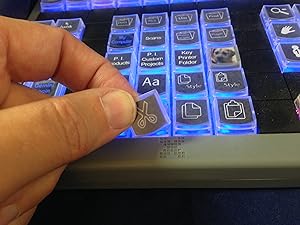
The XKeys 68 Key Programmable Keyboard with Shuttle is a versatile editing tool designed for professionals. It features 68 customizable keys, an integrated jog and shuttle for precise control, and is compatible with multiple operating systems, making it ideal for video and audio editing tasks.


| ASIN | B00I3OW4SQ |
| Antenna Location | Photo Editing |
| Best Sellers Rank | 59,133 in PC & Video Games ( See Top 100 in PC & Video Games ) 2,387 in PC Gaming Keyboards |
| Brand | X-keys |
| Brand Name | X-keys |
| Button Quantity | 68 |
| Colour | XK-68 JGS |
| Compatible Amazon Tablet Models | Amazon Fire HD 10 13th Generation |
| Compatible Devices | PC |
| Compatible Operating System Family | Windows |
| Compatible devices | PC |
| Connectivity Technology | USB |
| Connectivity technology | USB |
| Customer Reviews | 4.4 out of 5 stars 17 Reviews |
| Enclosure Material | Plastic |
| Hand Orientation | Ambidextrous |
| Item Weight | 1.63 Pounds |
| Keyboard Backlighting Color Support | Single Color |
| Keyboard Description | USB |
| Keyboard Layout | QWERTY |
| Keyboard description | USB |
| Manufacturer | P. I. Engineering |
| Manufacturer Part Number | XK-0990-UBG68-R |
| Mechanical Keyboard Switch Model | Rubber Dome |
| Minimum Required Operating System Version | Windows 10 |
| Model Number | XK-68 Jog & Shuttle |
| Number of Keys | 68 |
| Power Source | USB Powered |
| Product Features | Lighting |
| Recommended uses for product | Photo Editing |
| Special feature | Lighting |
| Style Name | Modern |
| Switch Type | Mechanical |
| UPC | 703273009908 |
| Unit Count | 1.0 count |
F**E
great kit, works brilliantly for me
i am a film editor and this piece of kit has been amazing for me. Initially a little head bending to programme but the tech staff were quick and efficient in putting me straight. It hs completely changed my workflow for the better, i no longer have aching wrists on occasion from awkward keyboard twists, as i re train myself to use it more and better i can only think it's going to get better and better. The only reason not to give 5 stars is that it's early days so can't vouch for how mell it'll stand up to heavy daily usage, otherwise can't recommend enough
J**N
The ultimate in customization
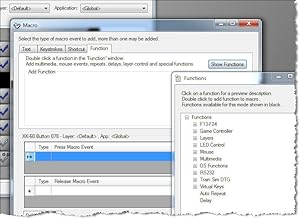
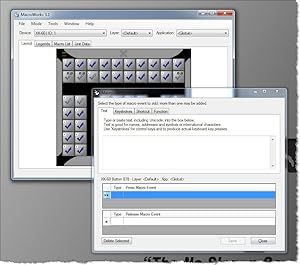
I had been wanting to add some macro keys to my Premiere editing workflow to iron out some things that bug me. I came to realize that adding an additional device to my desk would create too much travel for whatever tasks I was going to assign to it. That’s when I found the X-Keys 68. I reached out to tech support to see if it would even be usable since I remote control an editing pc for my daily work, and since it mimics keyboard commands the answer was yes. Not having used a jog shuttle before, I wasn’t sure it would be for me, but because it was made for editing I thought I should give it a shot. So, while it took almost a week to really figure out where I wanted everything to be, what commands I wanted grouped into macros and also to retrain my brain to know where most of my keys are now, this has replaced my keyboard for editing tasks. I DO like the jog shuttle because it allows my thumb to control playback which frees up my JKL fingers to always be on my old secondary buttons (mark in, mark out, and zoom timeline in and out). This brings all of my commonly used commands closer overall. There are definitely a few negatives though. While the device seems very well built, I wish it could be more modern. I’ve become very used to modern keyboard keys with their tiny travel, but the X-Keys keys feel more like industrial equipment buttons from the last century. And speaking of last century, it feels like their software was developed for Windows 3.1. Anyone with programming experience from that era will feel right at home customizing their X-Keys, but anyone else is likely to be quite confused. I was also surprised that I had to use the X-Keys in hardware mode for them to work properly on the remote machine. I thought that the software running on my local machine would be able to send the commands to the remote machine, but that didn’t end up being the case (probably more of an issue with the remote software my company uses) so I’m unable to do some of the more advanced things. That’s probably for the best because next time I go into an edit bay to work it’ll be much easier to simply plug-in my preprogrammed X-68 than to have to install software on a new machine.
D**H
Cheap addition to keyboard and performance boost, but too tedious to remember all combinations without the proper legends
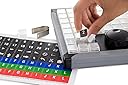
I recommend this for designer/programmers of all sorts, it is cheap and effective. I personally use it for Photoshop. The only thing that I find lacking about this product is it's tedious and un-intuitive software, which requires some familiarity with before you start programming its keys. Overall I am happy with this product as it trains your skills in deciding where to put buttons for functions of your software and that can be challenging and engaging. I would have been just as happy with a less amount of keys, because programming and remembering which keys change in which program (the macros can be software specific) would be less of a hassle, and perhaps someday I would use it for 4 different programs (having made legends that can be split into four color coded parts).
J**B
Broken after one day
This worked fine for one day. Then, it suddenly stopped responding from one moment to the next; I pressed perhaps 15 buttons in total. It is bricked now and cannot even be reprogrammed. Total failure of a device.
F**Y
Glitchy Software, Hardware Failed on Day 2
I don't write reviews very often... something has to be pretty bad to tick me off enough to write a review. I bought this to use to make a hand held controller for a CNC machine, with the shuttle wheel to be used to move the machine around on two axis. I saw the many xkey devices and it looked like a solid product, but the software is very buggy and the shuttle wheel is implemented in such a way as to make it completely useless for making the machine run smoothly. I can operate the machine just fine using arrow keys on the computers keyboard, but this xkeys device introduces delays between key signals from the shuttle wheel that causes the machine to be jumpy and slow. The left-right outer ring on the shuttle wheels sends single keystrokes both when you turn it and when it returns to the zero point. You would think it would send streams of keystrokes that increase in frequency the farther you turn the knob, but no, you get something completely useless. No matter how fast I spin the inner wheel, the rate of keystroke generation is painfully slow and you have no control over any of these unwanted delays. The software has so many bugs in it that it looks like someone wrote it in a few weekends and kicked it out the door without any QA whatsoever. For something this expensive to have that level of glitchyness is unacceptable. It amazes me that these things appear to be as popular as they are, but I guess that is because there is no competition. The concept is great, but the implementation is poor. Another sign of amateur hour is the sparse FAQ listing on their website. One of the FAQs is literally someone complaining about how bad their FAQ section is, and their reply was a bullet list of incoherent nonsense. I really wanted this to work. I was wondering why nobody is using these for jog pedents on CNC machines, now I know. You can't use their joystick version for this either because the joystick is implemented as a gaming joystick and not something that generates keystrokes. About the only thing usable is keys, so you would have to control your machine using keys only and then just tip-toe around the software glitches. Update: unit completely broke on 2nd day. Doesn't even power up when plugged in now, just flat out died. Sending it back.
J**T
ok product
Works as expected, but it is expensive.
Trustpilot
2 days ago
1 month ago